
Django admin charts
- Description:
Easily configurable charts statistics for django-admin and django-admin-tools.
- Documentation:





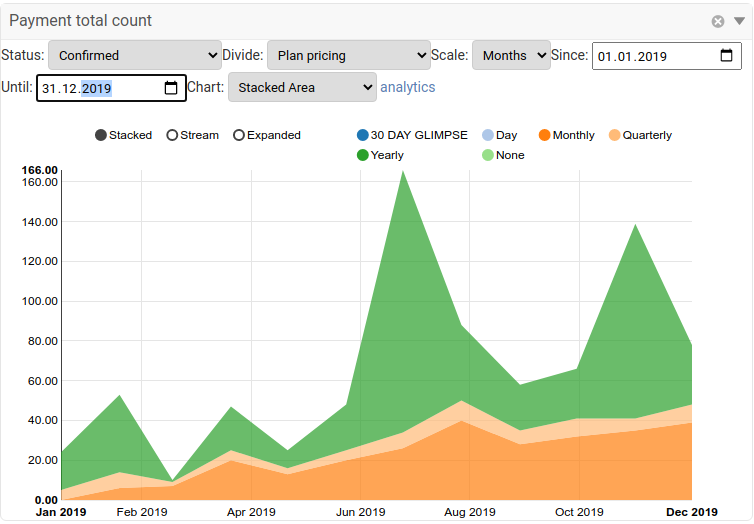
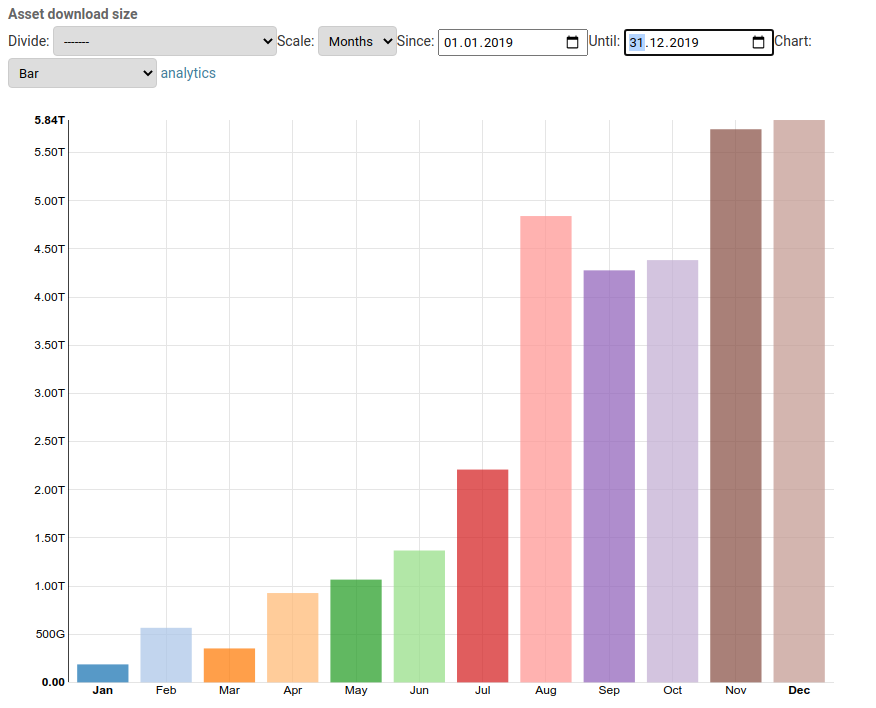
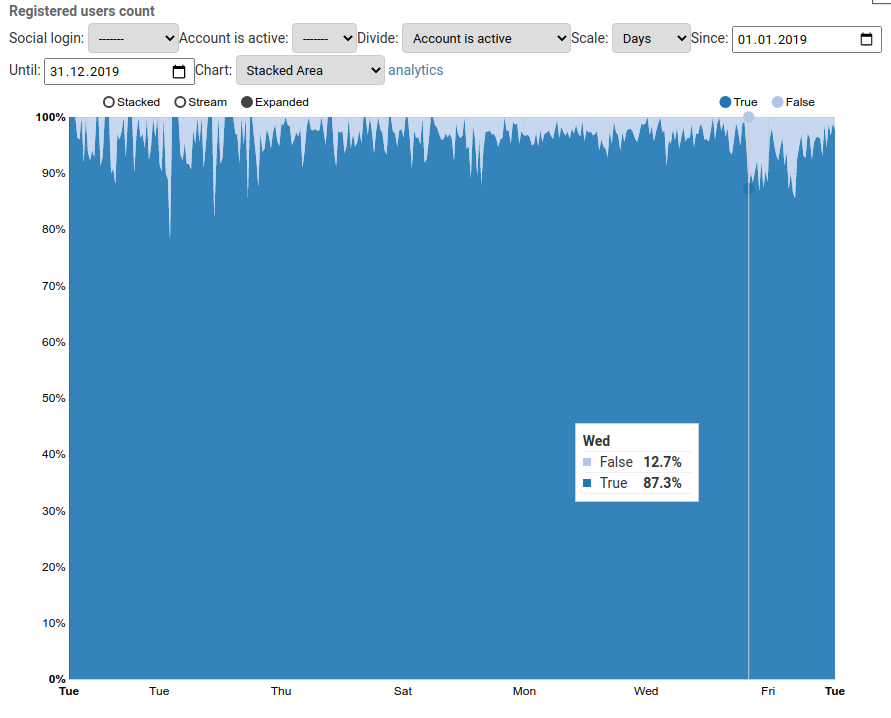
Create beautiful configurable charts from your models and display them on the django-admin index page or on django-admin-tools dashboard. The charts are based on models and criterias defined through admin interface and some chart parameters are configurable in live view.
This is application is fork of django-admin-tools-stats which has been reworked to display all charts through Ajax and made work with plain django-admin. The django-admin-tools are supported but not needed.
Requirements
Django>=2.0
Python>3.6
PostgreSQL (MySQL is experimental, other databases probably not working but PRs are welcome)
simplejson for charts based on DecimalField values
Warning
The django-admin-charts application intended usage is mainly for system admins with access to Django admin interface. The application is not intended to be used by untrusted users, as it is exposing some Django functionality to the user, especially in the chart configuration.
It has not been examined whether some malicious user with access to the charts could exploit the application to gain access to the system or data.
Installation
Install django-admin-charts with these commands:
$ pip install django-admin-charts
Basic setup for django-admin
Add admin_tools_stats (the Django admin charts application) & django_nvd3 into INSTALLED_APPS in settings.py:
INSTALLED_APPS = (
    'admin_tools_stats',  # this must be BEFORE 'admin_tools' and 'django.contrib.admin'
    'django_nvd3',
    ...
    'django.contrib.admin',
)
Register chart views in your urls.py:
from django.urls import include, path
urlpatterns = [
    path('admin_tools_stats/', include('admin_tools_stats.urls')),
]
Ensure, you have default cache set up: https://docs.djangoproject.com/en/3.2/topics/cache/#memcached
Run migrations:
$ python manage.py migrateOpen Django admin root and add your Dashboard Stats configuration:
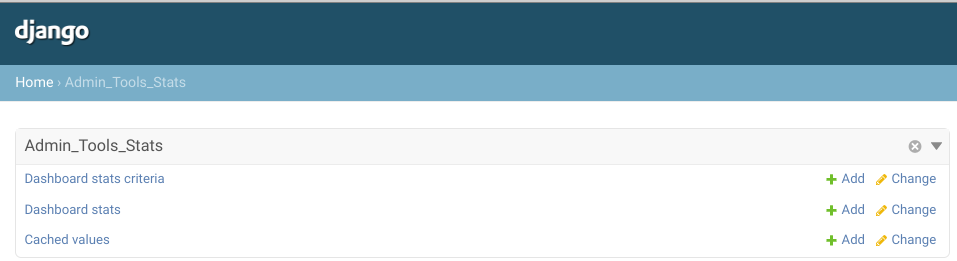
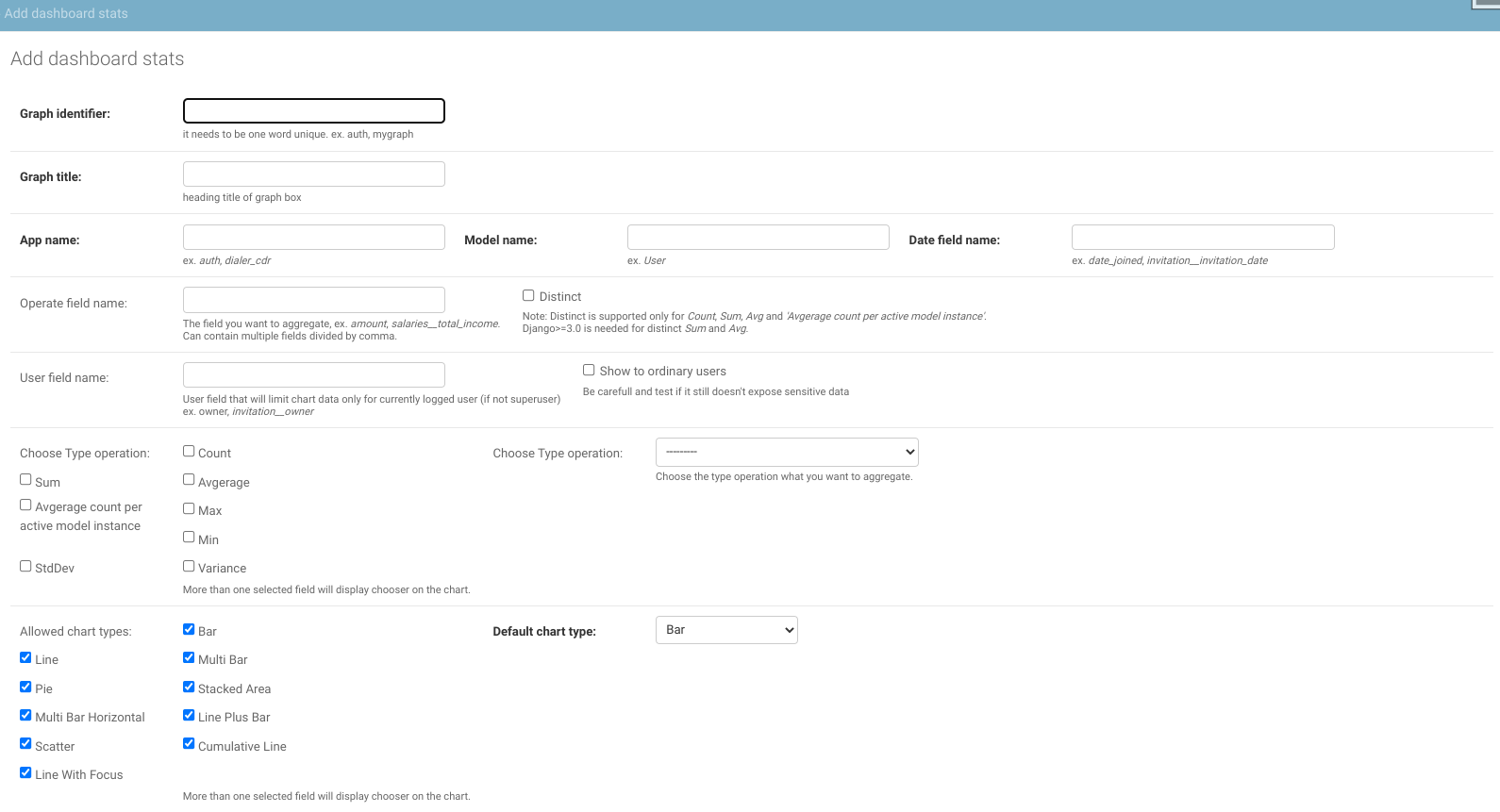
Then the charts will appear on the root of Django admin page as well as on analytics page (/admin_tools_stats/analytics/).
Configuring charts
Every chart is one Dashboard Stats row. The fields that define what gets counted:
model app name / model name - the model the chart aggregates, e.g. shop / Order
date field name - the DateField/DateTimeField the x-axis buckets by, e.g. created
operation field name - the field the operation aggregates, e.g. total_price; leave empty for plain Count of rows
type operation field name - the aggregation: Count, Sum, Avg, Median, Max, Min, StdDev, Variance or AvgCountPerInstance
graph key - unique slug identifying the chart
Example - “orders per day”: model name = Order, date field name = created, operation Count. Example - “revenue per month”: the same plus operation field name = total_price and operation Sum.
Filtering and dividing by criteria
A Dashboard Stats Criteria row describes one way to slice the model, and gets attached to a chart in the criteria inline of the Dashboard Stats admin. The same criteria can be reused by several charts. Its key field is dynamic criteria field name - a field path on the chart’s model, using ordinary ORM lookups:
status - a plain field; every distinct value becomes a choice (model field choices labels are used when defined)
author__username - a related field path works too
paid_at__isnull - an __isnull path gives a Blank/Non-blank choice pair
leave the field empty and fill criteria dynamic mapping with JSON like {"": [null, "All"], "big": [["gold", "platinum"], "Big plans"]} to define custom buckets - each key maps to [database value or list of values, label]
How the criteria behaves depends on the use as field of the attachment:
Chart filter - renders as a select in the chart’s toolbar; picking a value filters the whole chart
Multiple series - divides the chart into one stacked serie per choice (the “Divide” select)
Example - the “stack by user” scenario: a Plan model with a user foreign key and a created date field. Create a criteria with dynamic criteria field name = user__username, attach it to the chart with use as = Multiple series, and every user becomes one serie of the stacked chart.
Options on the attachment row:
count limit - keep only the N largest choices as their own series and merge the rest into one other serie; essential for high-cardinality fields like users
choices based on time range - compute the choices from rows in the displayed time range instead of all distinct values
default option - the filter value preselected when the chart loads
Big tables
For charts too slow to compute on every view, tick cache values. Values are then served from the CachedValue table and recomputed only for unfinished periods (the ⟳ toolbar button, or ⟳ all to recalculate everything visible). The recalculate_charts management command refreshes cached charts from cron.
Special configurations
Update from django-admin-tools-stats
Uninstall django-admin-tools-stats.
Follow django-admin-charts installation according to previous section. Especially pay attention to these steps: - Move admin_tools_stats in INSTALLED_APPS before admin_tools and django.contrib.admin. - Configure urls.py.
Change DashboardCharts to DashboardChart in dashboard definition (this is recomended even if dummy class is left for compatibility reasons).
Check any overridden template from admin_tools_stats or DashboardChart(s) class that might interfere with the changes.
Configure javascript libraries
By default the nvd3/d3 libraries are taken from unpkg. If you want to install those libraries on your own, you can set their path by following settings:
ADMIN_CHARTS_NVD3_JS_PATH = 'bow/nvd3/build/nv.d3.js'
ADMIN_CHARTS_NVD3_CSS_PATH = 'bow/nvd3/build/nv.d3.css'
ADMIN_CHARTS_D3_JS_PATH = 'bow/d3/d3.js'
The settings can accept either full path (with http…) or there can be static file path. Note that versions nvd3==1.8.6 and d3==3.3.13 are the only tested to be working.
Installation of javascript libraries with django-bower
Add django-bower to INSTALLED_APPS in settings.py:
INSTALLED_APPS = (
    ...
    'djangobower'
)
Add the following properties to you settings.py file:
# Specifie path to components root (you need to use absolute path)
BOWER_COMPONENTS_ROOT = os.path.join(PROJECT_ROOT, 'components')


BOWER_INSTALLED_APPS = (
    'd3#3.3.13',
    'nvd3#1.8.6',
)
Add django-bower finder to your static file finders:
STATICFILES_FINDERS = (
    ...
    'djangobower.finders.BowerFinder',
)
Run the following commands. These will download nvd3.js and its dependencies using bower and throw them in to you static folder for access by your application:
$ python manage.py bower_install
$ python manage.py collectstatic
Usage with django-admin-tools
Configure admin_tools
Add following code to dashboard.py:
from admin_tools_stats.modules import DashboardChart, get_active_graph

# append an app list module
self.children.append(modules.AppList(
    _('Dashboard Stats Settings'),
    models=('admin_tools_stats.*', ),
))

# Copy following code into your custom dashboard
# append following code after recent actions module or
# a link list module for "quick links"
if context['request'].user.has_perm('admin_tools_stats.view_dashboardstats'):
        graph_list = get_active_graph()
    else:
        graph_list = []

for i in graph_list:
    kwargs = {}
    kwargs['require_chart_jscss'] = True
    kwargs['graph_key'] = i.graph_key

    for key in context['request'].POST:
        if key.startswith('select_box_'):
            kwargs[key] = context['request'].POST[key]

    self.children.append(DashboardChart(**kwargs))
You may also need to add some includes to your template admin base, see an example on the demo project:
demoproject/demoproject/templates/admin/base_site.html
Running demo
Run following commands:
export DB_ENGINE='sqlite'
pip install -r requirements.txt
python manage.py migrate
python manage.py loaddata demoproject/fixtures/auth_user.json
python manage.py loaddata demoproject/fixtures/test_data.json
python manage.py bower install
python manage.py runserver
And log in with username admin and password admin to the localhost:8000/admin site.
Development
Dependencies
django-admin-charts is a django based application, the major requirements are:
django-jsonfield
django-nvd3
django-bower
Running tests
Test can be run with:
DB_ENGINE="postgres" coverage run ./manage.py test --keepdbContributing
If you’ve found a bug, add a feature or improve django-admin-charts and think it is useful then please consider contributing. Patches, pull requests or just suggestions are always welcome!
Source code: http://github.com/PetrDlouhy/django-admin-charts
Bug tracker: https://github.com/PetrDlouhy/django-admin-charts/issues
Debugging charts
For chart data view (/admin_tools_stats/chart_data/payments/) the URL query parameter &debug=True can be added, in order to get Django debug page or Django debug toolbar.
Documentation
Documentation is available on ‘Read the Docs’: http://readthedocs.org/docs/django-admin-charts/
License
django-admin-charts is licensed under MIT, see MIT-LICENSE.txt.
1 maintainer

Metadata
1 maintainer
Release files for django-admin-charts 1.9.0
For a detailed explanation of source distributions (sdists) and built distributions (wheels), please see the package formats documentation.
Source distribution (sdist)
| File | Size | Uploaded | Provenance | Actions |
|---|---|---|---|---|
| django_admin_charts-1.9.0.tar.gz | 495.8 kB | Without provenance | Details for django_admin_charts-1.9.0.tar.gz |
Built distribution (wheel)
| File | Interpreter | ABI | Platform | Actions Reset |
|---|---|---|---|---|
| django_admin_charts-1.9.0-py3-none-any.whl | Python 3 | none | any | Details for django_admin_charts-1.9.0-py3-none-any.whl |
Total release size: 597.3 kB
Release files / django_admin_charts-1.9.0.tar.gz
| Download URL | django_admin_charts-1.9.0.tar.gz |
|---|---|
| Size | 495.8 kB |
| Tags | Source |
|
SHA-256 checksum How to use checksums |
637228ce761cf0bcce1ff555c20b7f6a8eb9c090547289406d9011ed6d7d3286
|
|
BLAKE2b-256 checksum How to use checksums |
570c541737dc71136d46d859a5cbf70836e3f97c2e3930b231817bc90c4e81d4
|
| Upload date | |
|
Uploaded using Trusted Publishing? What is trusted publishing? |
No |
| Uploaded via |
twine/7.0.0 CPython/3.12.3
|
Release files / django_admin_charts-1.9.0-py3-none-any.whl
| Download URL | django_admin_charts-1.9.0-py3-none-any.whl |
|---|---|
| Size | 101.5 kB |
| Tags | Python 3 |
|
SHA-256 checksum How to use checksums |
a33f05db4e597c722a47ca427aad341887ebbe0a390d98fc6705e9b69d8ae5e6
|
|
BLAKE2b-256 checksum How to use checksums |
d27128be023ec99da71a10e3bed3b0d33b6ea3095d50104e386a6a3d5b582927
|
| Upload date | |
|
Uploaded using Trusted Publishing? What is trusted publishing? |
No |
| Uploaded via |
twine/7.0.0 CPython/3.12.3
|
Security for django-admin-charts 1.9.0
Provenance
Provenance describes where a file came from. On PyPI, provenance is shared via attestations, which provide a verifiable record of the build or publishing details. View details, limitations and caveats.
No provenance found
None of the files in this release were uploaded with provenance metadata.
A note on package security
PyPI is a repository for distributing packages, not a service for auditing them. While third-party security researchers and our staff do their best to detect and remove malicious packages, PyPI cannot guarantee the quality, security or suitability of any given package.
To learn more about protecting yourself from malicious actors, visit our package security documentation.














