
A Django Admin skin that can be set for the entire project or for each session.

Project description
Django admin - no more blue is a Django app that let you choose a skin for your django admin. You can let your users set their favorite theme on the session or you can choose to statically set the theme for the entire application. With a variations of fruity themes you can now set a unique appearance for your Django.
Color your environments! It’s easier not to break something into production now.
Show me how to use it
After you follow the guide bellow on getting started with django-admin-no-more-blue it should work like this:
If STATIC_THEME is False
The theme will be selected by every user and will be saved on the session

You can spot the CHANGE THEME button, don’t be shy! Click it!
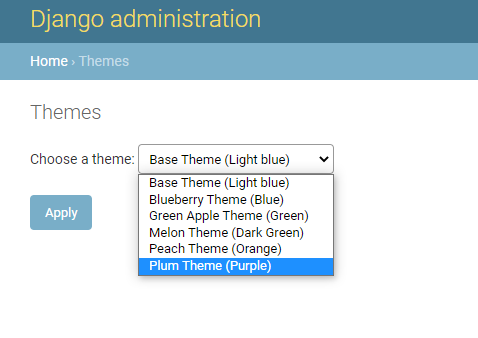
Let’s say we change the theme to PLUM.

That’s it, your theme is now purple and fine!
If STATIC_THEME is True
The select theme option will not be visible anymore and all the users will see the theme configured in settings.

As you can see, in the settings, the THEME is set to “apple”.
Quick Start
Add “no_more_blue” to your INSTALLED_APPS settings like this:
INSTALLED_APPS = [
    'no_more_blue',
    ...
]
! The order is important
In settings.py, make sure you have ‘django.template.context_processors.request’ added in the context_processors.
In settings.py, at TEMPLATES section, inside ‘OPTIONS’, at the same level with context_processors, add:
'libraries': {
            'themes': 'no_more_blue.templatetags.themes',
  }
TEMPLATES should look like this:
TEMPLATES = [
    {
        'BACKEND': 'django.template.backends.django.DjangoTemplates',
        'DIRS': [],
        'APP_DIRS': True,
        'OPTIONS': {
            'context_processors': [
                'django.template.context_processors.request',
                 ...
            ],
            'libraries': {
                'themes': 'no_more_blue.templatetags.themes',

            }
        },
    },
]
Include URLconf into your project urls.py like this:
from no_more_blue.urls import themes_urlpatterns
...

urlpatterns = [
    path('themes/', include(themes_urlpatterns)),
    ...
]
And as a final step add STATIC_THEME and THEME variables in your settings.
STATIC_THEME - True/False depending on whether you want the theme to be static and all the users will have the same theme.
THEME - if the theme is static (STATIC_THEME = True) you can set which theme you want to render. Here you should set the AKA for the theme.
- List of themes:
AKA
TITLE
COLOR
base
Base Theme
Light blue
blueberry
Blueberry Theme
Blue
apple
Green Apple Theme
Green
melon
Melon Theme
Dark Green
peach
Peach Theme
Orange
plum
Plum Theme
Light Purple
grapes
Grapes Theme
Purple
That’s it! Do not forget to use collectstatic when you are not in DEBUG mode


Download files
Download the file for your platform. If you're not sure which to choose, learn more about installing packages.
Source Distribution
File details
Details for the file django-admin-nmb-0.2.2.tar.gz.
File metadata
- Download URL: django-admin-nmb-0.2.2.tar.gz
- Upload date:
- Size: 111.9 kB
- Tags: Source
- Uploaded using Trusted Publishing? No
- Uploaded via: twine/3.3.0 pkginfo/1.7.0 requests/2.25.1 setuptools/40.8.0 requests-toolbelt/0.9.1 tqdm/4.56.0 CPython/3.7.6
File hashes
| Algorithm | Hash digest | |
|---|---|---|
| SHA256 |
4b969971936926687125758de458482e1f5e66e124f5b1b5f498f12680d9dcba
|
|
| MD5 |
822293bd11eb3f0431f266b401c47656
|
|
| BLAKE2b-256 |
873d30132890fc4fb543509b0048b9075c068befade201c99bd576498feac96b
|






