
Django-adminstat’s documentation
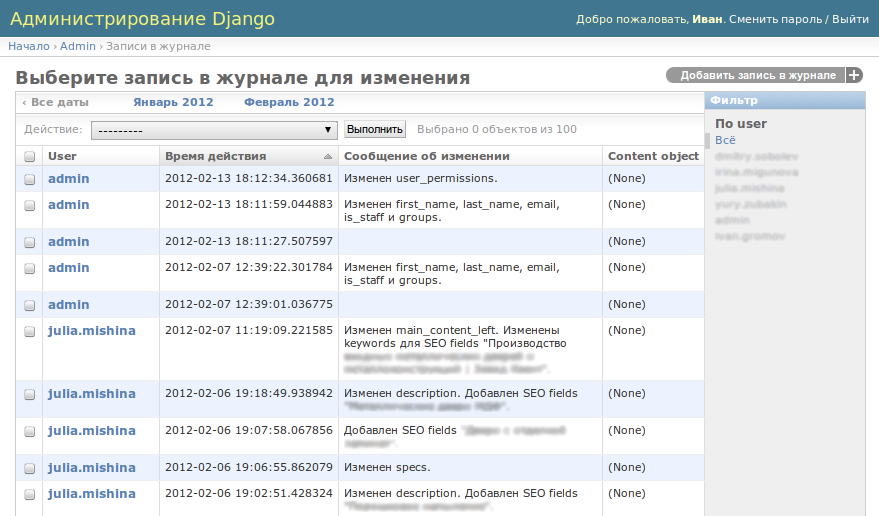
This is very simple application that provides admin class for Django’s LogEntry model.
If you want to view changes made by concrete staff user this app is for you.
Intall
Insert adminstat in your INSTALLED_APPS and grant permissions for users who can view statistics. Permissions called like admin.can_***_logentry.
Result
Look at the result in django admin page.
6 maintainers


Metadata
6 maintainers
Release files for django-adminstat 0.1.0
For a detailed explanation of source distributions (sdists) and built distributions (wheels), please see the package formats documentation.
Source distribution (sdist)
| File | Size | Uploaded | Provenance | |
|---|---|---|---|---|
| django-adminstat-0.1.0.tar.gz | 2.2 kB | Without provenance | Details |
Release files / django-adminstat-0.1.0.tar.gz
| Download URL | django-adminstat-0.1.0.tar.gz |
|---|---|
| Size | 2.2 kB |
| Tags | Source |
|
SHA-256 checksum How to use checksums |
f61bcade3f1862ec798efeef5be17d01c0aba9fdb9eb876cf506e11614e3b961
|
|
BLAKE2b-256 checksum How to use checksums |
f0eeb17bfe7cc7bf1432ed53825694027f8f31f600d0c189e5b7703ac4bd8f27
|
| Upload date | |
|
Uploaded using Trusted Publishing? What is trusted publishing? |
No |
Security for django-adminstat 0.1.0
Provenance
Provenance describes where a file came from. On PyPI, provenance is shared via attestations, which provide a verifiable record of the build or publishing details. View details, limitations and caveats.
No provenance found
None of the files in this release were uploaded with provenance metadata.
A note on package security
PyPI is a repository for distributing packages, not a service for auditing them. While third-party security researchers and our staff do their best to detect and remove malicious packages, PyPI cannot guarantee the quality, security or suitability of any given package.













