
Django-Audiofield
- Description:
Django Audio Management Tools
- Maintainer:
- Contributors:




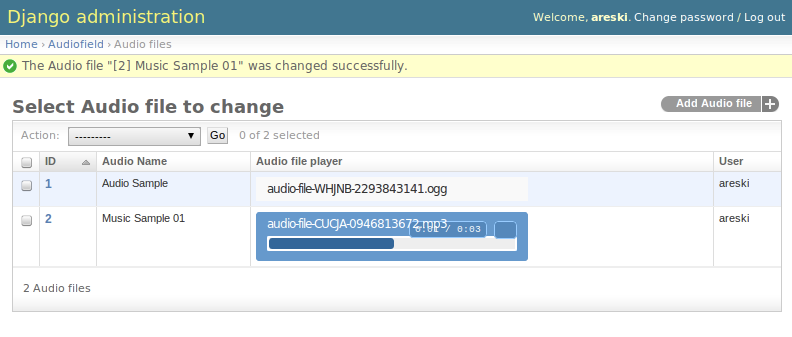
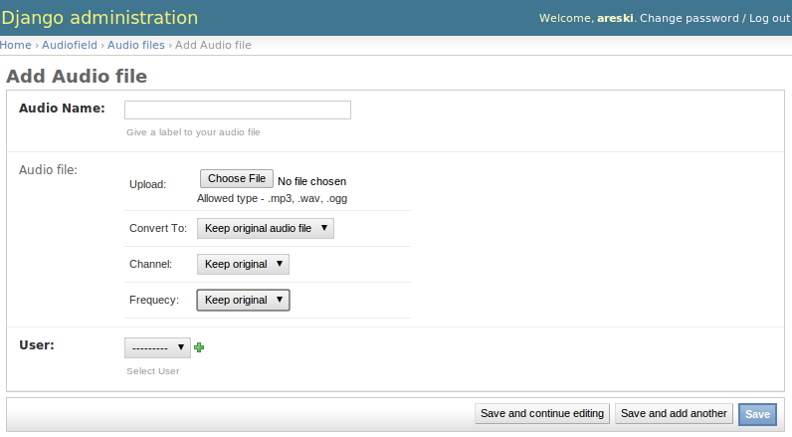
Django-Audiofield is a simple app that allows Audio files upload, management and conversion to different audio format (mp3, wav & ogg), which also makes it easy to play audio files into your Django application.
We are using the HTML5 and Flash audio player SoundManager2
Installation
Install Django-Audiofield:
python setup.py install
Dependencies
Install dependencies on Debian:
apt-get -y install libsox-fmt-mp3 libsox-fmt-all mpg321 dir2ogg ffmpeg
Note: For Debian version 7 (Wheezy) and older, replace ffmpeg with libav-tools
Install dependencies on Redhat/CentOS:
yum -y install python-setuptools libsox-fmt-mp3 libsox-fmt-all mpg321 dir2ogg
Install avconv on Redhat/CentOS:
git clone git://git.libav.org/libav.git
cd libav
sudo ./configure --disable-yasm
sudo make
sudo make install
Settings
in your settings.py file:
# Set Following variable
MEDIA_ROOT = ''
MEDIA_URL = ''

In MIDDLEWARE_CLASSES add 'audiofield.middleware.threadlocals.ThreadLocals'

In INSTALLED_APPS add 'audiofield'

# Frontend widget values
# 0-Keep original, 1-Mono, 2-Stereo
CHANNEL_TYPE_VALUE = 0

# 0-Keep original, 8000-8000Hz, 16000-16000Hz, 22050-22050Hz,
# 44100-44100Hz, 48000-48000Hz, 96000-96000Hz
FREQ_TYPE_VALUE = 8000

# 0-Keep original, 1-Convert to MP3, 2-Convert to WAV, 3-Convert to OGG
CONVERT_TYPE_VALUE = 0
Usage
Add the following lines in your models.py file:
from django.conf import settings
from audiofield.fields import AudioField
import os.path

# Add the audio field to your model
audio_file = AudioField(upload_to='your/upload/dir', blank=True,
                        ext_whitelist=(".mp3", ".wav", ".ogg"),
                        help_text=("Allowed type - .mp3, .wav, .ogg"))

# Add this method to your model
def audio_file_player(self):
    """audio player tag for admin"""
    if self.audio_file:
        file_url = settings.MEDIA_URL + str(self.audio_file)
        player_string = '<audio src="%s" controls>Your browser does not support the audio element.</audio>' % (file_url)
        return player_string

audio_file_player.allow_tags = True
audio_file_player.short_description = ('Audio file player')
Add the following lines in your admin.py:
from your_app.models import your_model_name

# add 'audio_file_player' tag to your admin view
list_display = (..., 'audio_file_player', ...)
actions = ['custom_delete_selected']

def custom_delete_selected(self, request, queryset):
    #custom delete code
    n = queryset.count()
    for i in queryset:
        if i.audio_file:
            if os.path.exists(i.audio_file.path):
                os.remove(i.audio_file.path)
        i.delete()
    self.message_user(request, ("Successfully deleted %d audio files.") % n)
custom_delete_selected.short_description = "Delete selected items"

def get_actions(self, request):
    actions = super(AudioFileAdmin, self).get_actions(request)
    del actions['delete_selected']
    return actions
Then perform following commands to create the table and collect the static files:
./manage.py syncdb
./manage.py collectstatic
Create audiofield.log file:
touch /var/log/audio-field.log
Contributing
If you’ve found a bug, implemented a feature or customized the template and think it is useful then please consider contributing. Patches, pull requests or just suggestions are welcome!
Source code: http://github.com/Star2Billing/django-audiofield
Bug tracker: https://github.com/Star2Billing/django-audiofield/issues
Documentation
Documentation is available on ‘Read the Docs’: http://django-audiofield.readthedocs.org
Credit
Django-audiofield is a Star2Billing-Sponsored Community Project, for more information visit http://www.star2billing.com or email us at info@star2billing.com
License
Django-Audiofield is licensed under MIT, see MIT-LICENSE.txt.
TODO
Use pydub (http://pydub.com) to lift the audio conversion away from django-audiofield
integrate with django-storage (http://django-storages.readthedocs.org/)
support more formats
1 maintainer

Metadata
1 maintainer
Release files for django-audiofield 0.10.1
For a detailed explanation of source distributions (sdists) and built distributions (wheels), please see the package formats documentation.
Source distribution (sdist)
| File | Size | Uploaded | Provenance | |
|---|---|---|---|---|
| django-audiofield-0.10.1.tar.gz | 185.2 kB | Without provenance | Details |
Release files / django-audiofield-0.10.1.tar.gz
| Download URL | django-audiofield-0.10.1.tar.gz |
|---|---|
| Size | 185.2 kB |
| Tags | Source |
|
SHA-256 checksum How to use checksums |
10608885b60465ce6a95d2309f260fcbd1c52e12233b3a15b1056de9e14a7030
|
|
BLAKE2b-256 checksum How to use checksums |
d68fefaf9eeb932da45d964a30fb8881c244f18079a4dea74a6124a94b50399c
|
| Upload date | |
|
Uploaded using Trusted Publishing? What is trusted publishing? |
No |
| Uploaded via |
Python-urllib/2.7
|
Security for django-audiofield 0.10.1
Provenance
Provenance describes where a file came from. On PyPI, provenance is shared via attestations, which provide a verifiable record of the build or publishing details. View details, limitations and caveats.
No provenance found
None of the files in this release were uploaded with provenance metadata.
A note on package security
PyPI is a repository for distributing packages, not a service for auditing them. While third-party security researchers and our staff do their best to detect and remove malicious packages, PyPI cannot guarantee the quality, security or suitability of any given package.
To learn more about protecting yourself from malicious actors, visit our package security documentation.














