
Django Currency History
A reusable Django app that tracks currency rates.
Installation
To get the latest stable release from PyPi
pip install django-currency-historyTo get the latest commit from GitHub
pip install -e git+git://github.com/bitmazk/django-currency-history.git#egg=currency_historyTODO: Describe further installation steps (edit / remove the examples below):
Add currency_history to your INSTALLED_APPS
INSTALLED_APPS = (
    ...,
    'currency_history',
)
Before your tags/filters are available in your templates, load them by using
{% load currency_history_tags %}Don’t forget to migrate your database
./manage.py migrate currency_historyUsage
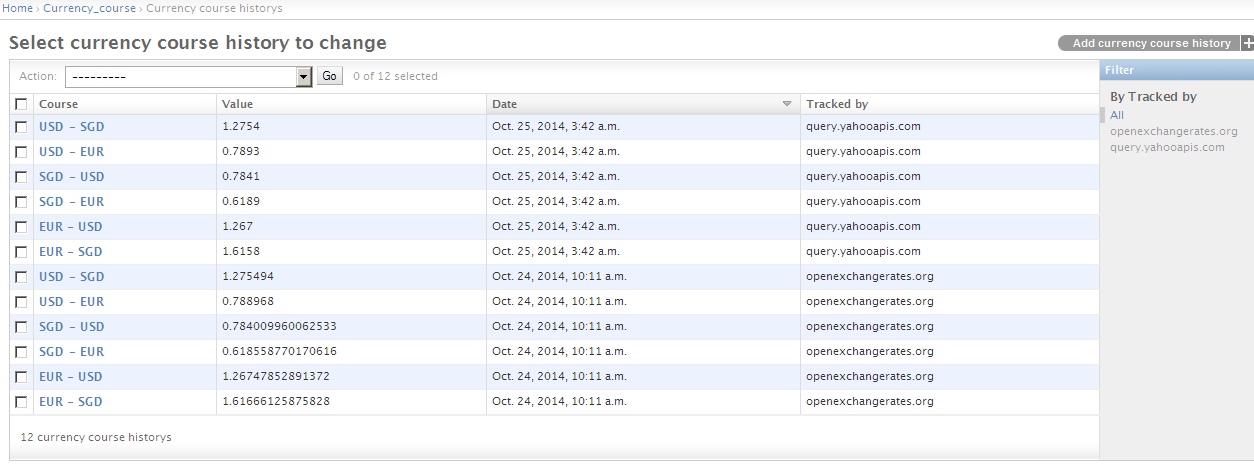
First fill the database with currencies and add your desired rates. By default you will have to track the history by yourself. Check the management commands and settings for automated trackings.
Management Commands
track_currency_rates
Run this command to let external services like fixer.io or Yahoo track currency rates.
./manage.py track_currency_rates
You might want to run it with a cron job.
Settings
CURRENCY_SERVICE
Default = None
By default no external service tracks your rate histories. The following services are available:
'fixer': https://fixer.io/
'openexchangerates': https://openexchangerates.org/
OPENEXCHANGERATES_APP_ID
Default = False
If you want to make use of the openexchangerates service, make sure to register at https://openexchangerates.org/ and provide your App ID.
CURRENCY_EMAIL_REPORT
Default = False
Enable this settings to receive an email report every time the track_currency_rates command was called.
Contribute
If you want to contribute to this project, please perform the following steps
# Fork this repository
# Clone your fork
mkvirtualenv -p python2.7 django-currency-history
make develop

git co -b feature_branch master
# Implement your feature and tests
git add . && git commit
git push -u origin feature_branch
# Send us a pull request for your feature branch1 maintainer

Metadata
1 maintainer
Release files for django-currency-history 0.2.9
For a detailed explanation of source distributions (sdists) and built distributions (wheels), please see the package formats documentation.
Source distribution (sdist)
| File | Size | Uploaded | Provenance | Actions |
|---|---|---|---|---|
| django-currency-history-0.2.9.tar.gz | 14.4 kB | Without provenance | Details for django-currency-history-0.2.9.tar.gz |
Release files / django-currency-history-0.2.9.tar.gz
| Download URL | django-currency-history-0.2.9.tar.gz |
|---|---|
| Size | 14.4 kB |
| Tags | Source |
|
SHA-256 checksum How to use checksums |
c09fbdfa560d62938135ed547b0c68edbef51adedabdf43fd0a2b2a8b2221cc2
|
|
BLAKE2b-256 checksum How to use checksums |
6a395664167f7d6043feb1dad802b73807f7ceceecc70ea833a454111b7066d6
|
| Upload date | |
|
Uploaded using Trusted Publishing? What is trusted publishing? |
No |
Security for django-currency-history 0.2.9
Provenance
Provenance describes where a file came from. On PyPI, provenance is shared via attestations, which provide a verifiable record of the build or publishing details. View details, limitations and caveats.
No provenance found
None of the files in this release were uploaded with provenance metadata.
A note on package security
PyPI is a repository for distributing packages, not a service for auditing them. While third-party security researchers and our staff do their best to detect and remove malicious packages, PyPI cannot guarantee the quality, security or suitability of any given package.
To learn more about protecting yourself from malicious actors, visit our package security documentation.














