
django-debug-toolbar-template-profiler

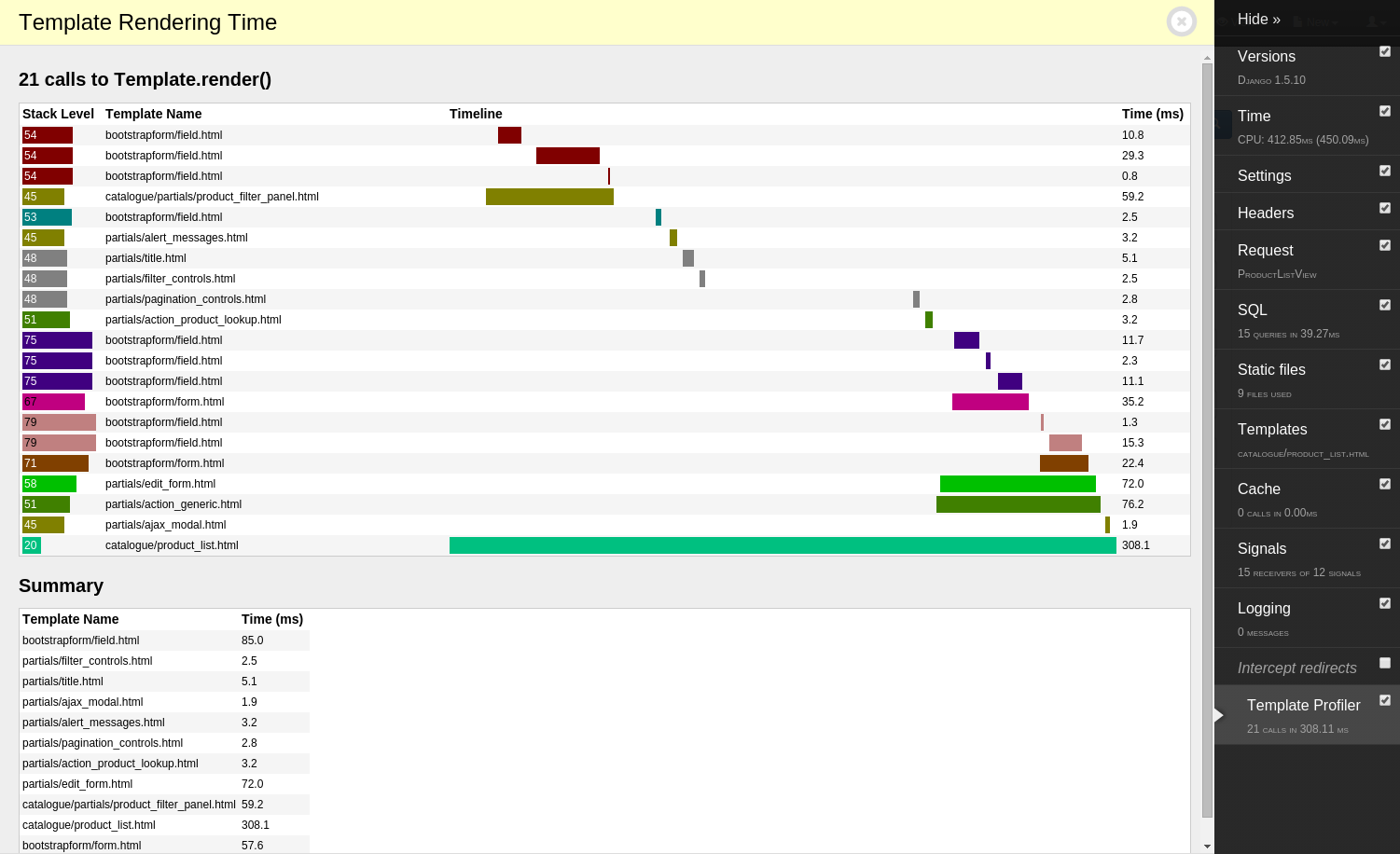
An extra panel for django-debug-toolbar that displays time spent rendering each template.
For example:
Installation
First, you’ll need to install and configure django-debug-toolbar as per its installation instructions.
Note: currently django-debug-toolbar 2.0+ is not supported.
Second, install this package:
pip install django-debug-toolbar-template-profilerThird, add it to your installed apps - order doesn’t matter but after debug_toolbar will keep it neatly grouped:
INSTALLED_APPS = [
    # ...
    "debug_toolbar",
    "template_profiler_panel",
    # ...
]
Fourth, configure django-debug-toolbar’s DEBUG_TOOLBAR_PANELS setting as per its documentation to include the panel. You’ll need to copy the default and add the panel at the end:
DEBUG_TOOLBAR_PANELS = [
    # ...
    "template_profiler_panel.panels.template.TemplateProfilerPanel",
]
After this, you should see the “Template Profiler” panel when you load the toolbar. Both Django and Jinja2 template render() calls will be measured.
2 maintainers


Metadata
2 maintainers
Release files for django-debug-toolbar-template-profiler 2.0.0
For a detailed explanation of source distributions (sdists) and built distributions (wheels), please see the package formats documentation.
Source distribution (sdist)
| File | Size | Uploaded | Provenance | Actions |
|---|---|---|---|---|
| django-debug-toolbar-template-profiler-2.0.0.tar.gz | 7.5 kB | Without provenance | Details for django-debug-toolbar-template-profiler-2.0.0.tar.gz |
Built distribution (wheel)
| File | Interpreter | ABI | Platform | Actions Reset |
|---|---|---|---|---|
| django_debug_toolbar_template_profiler-2.0.0-py2.py3-none-any.whl | Python 3, Python 2 | none | any | Details for django_debug_toolbar_template_profiler-2.0.0-py2.py3-none-any.whl |
Total release size: 16.8 kB
Release files / django-debug-toolbar-template-profiler-2.0.0.tar.gz
| Download URL | django-debug-toolbar-template-profiler-2.0.0.tar.gz |
|---|---|
| Size | 7.5 kB |
| Tags | Source |
|
SHA-256 checksum How to use checksums |
c983c9bd9fee1d0e297c52fa3551692e505eae9fc641e0d92dfc0d1b7b135a15
|
|
BLAKE2b-256 checksum How to use checksums |
54c7bf5dced4aa7df53dcebdedeb1860ce0bf5665d1e51f7f2005ba202a1dc00
|
| Upload date | |
|
Uploaded using Trusted Publishing? What is trusted publishing? |
No |
| Uploaded via |
twine/2.0.0 pkginfo/1.5.0.1 requests/2.22.0 setuptools/40.8.0 requests-toolbelt/0.9.1 tqdm/4.32.2 CPython/3.7.4
|
Release files / django_debug_toolbar_template_profiler-2.0.0-py2.py3-none-any.whl
| Download URL | django_debug_toolbar_template_profiler-2.0.0-py2.py3-none-any.whl |
|---|---|
| Size | 9.3 kB |
| Tags | Python 2 Python 3 |
|
SHA-256 checksum How to use checksums |
e18f645b05b354ce3172e43cbcea7447431b1acdaced8a2291229548185676a2
|
|
BLAKE2b-256 checksum How to use checksums |
8af57839b07d2ab8ccc7c4833e1ab89cb9bb1c179e9994d398cb27ae4f8dfae1
|
| Upload date | |
|
Uploaded using Trusted Publishing? What is trusted publishing? |
No |
| Uploaded via |
twine/2.0.0 pkginfo/1.5.0.1 requests/2.22.0 setuptools/40.8.0 requests-toolbelt/0.9.1 tqdm/4.32.2 CPython/3.7.4
|
Security for django-debug-toolbar-template-profiler 2.0.0
Provenance
Provenance describes where a file came from. On PyPI, provenance is shared via attestations, which provide a verifiable record of the build or publishing details. View details, limitations and caveats.
No provenance found
None of the files in this release were uploaded with provenance metadata.
A note on package security
PyPI is a repository for distributing packages, not a service for auditing them. While third-party security researchers and our staff do their best to detect and remove malicious packages, PyPI cannot guarantee the quality, security or suitability of any given package.
To learn more about protecting yourself from malicious actors, visit our package security documentation.














