
DOCLIB
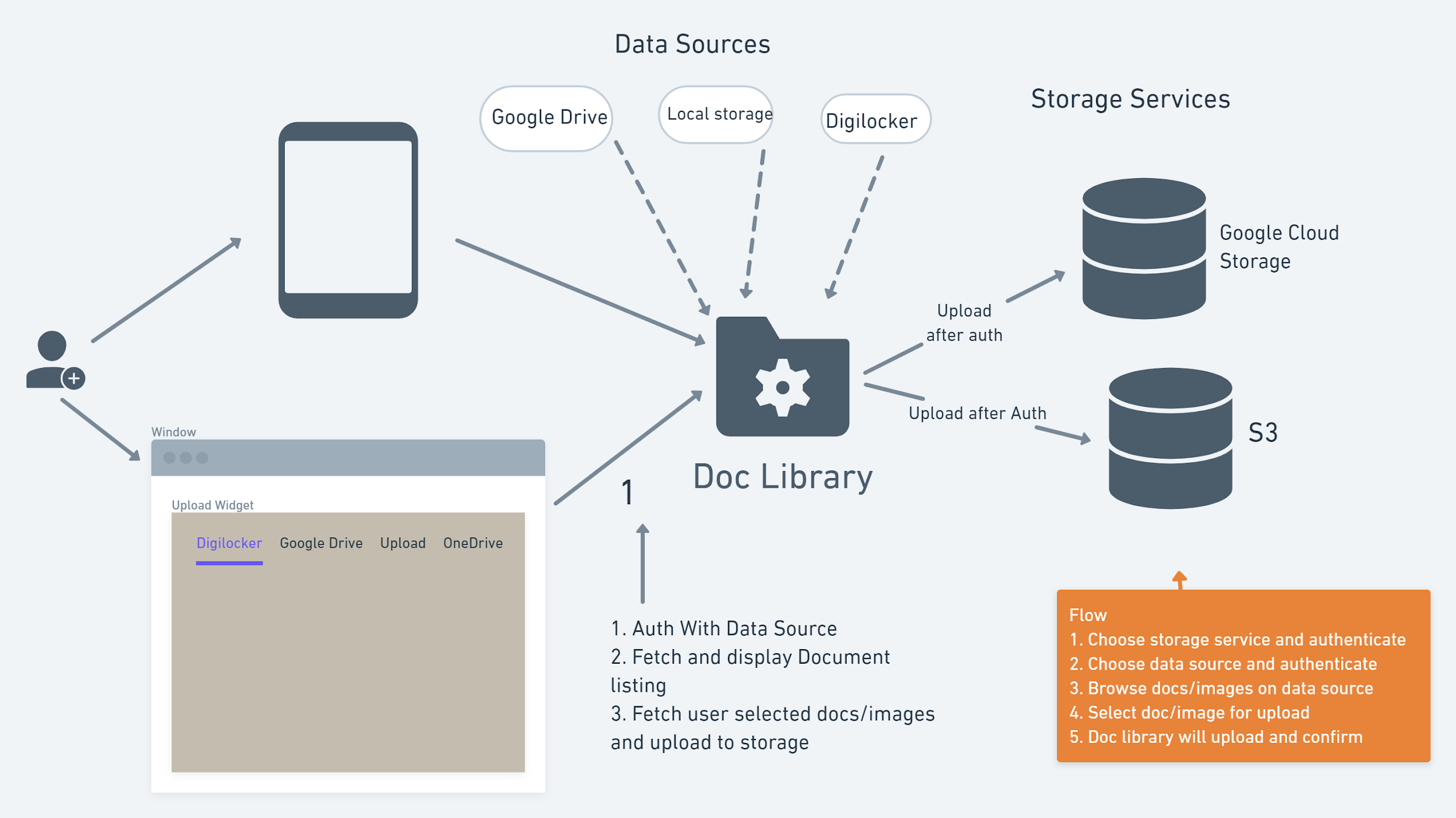
A document library that integrates with multiple data sources (like digiLocker, Google Drive, local storage etc.) and storage services (like S3 and Google Cloud Storage) and uploads data from these data sources to the chosen storage service. It can be integrated with any Django Project.
TECHNOLOGIES
- Python
- Django: Django builds better web apps with less code
- DRF: A powerful and flexible toolkit for building Rest APIs with Django
- Frontend: HTML5, Bootstrap, JS
- Architecture of the Library
CURRENT SUPPORTED SERVICES
DATA SOURCES
-
Local Storage
-
Digimocker (mock of Digilocker)
STORAGE SERVICES
QUICKSTART
Install the package
pip install django-doclib
Before running the server, make sure Directory looks like
demo_proj
├── credentials_dir
|      └── credentials_gcs.json
├── media
└── django_project_folder
    ├── settings.py
    ├── asgi.py
    ├── .env
    ├── wsgi.py
    └── urls.py
Follow the steps
-
Add
doclibandrest_frameworkto your INSTALLED_APPS setting like thisINSTALLED_APPS = [
...
'doclib',
'rest_framework',
] -
Include the doclib URLconf in your project urls.py like this
path('doclib/', include('doclib.urls')) -
Provide
MEDIA_ROOTin your project settings.py, something like thisMEDIA_ROOT = os.path.join(BASE_DIR, 'media') -
For integrating with Google Drive
-
Make a directory with name
credentials_dirat the project root level -
Put the google api client secret json file with name as
credentials_gcs.jsonincredentials_dirdirectory For getting the API and Developer keys, visit here. -
Make a
.envfile in the project folder directory (at the project settings.py level) and put the Browser API keys obtained from the Google API Console like this (don’t use quotations around strings)DEVELOPER_KEY=##################
CLIENT_ID=##################
APP_ID=##################
-
-
For setting the environment variables, follow this
-
Add these below lines in the project
settings.pyimport environ env = environ.Env() environ.Env.read_env()
-
For setting the above API Keys put these below lines in the
settings.pyDEVELOPER_KEY = env("DEVELOPER_KEY") CLIENT_ID = env("CLIENT_ID") APP_ID = env("APP_ID")
-
-
Run
python manage.py migrateto create the doclib models. -
Start the development server and visit
http://localhost:8000/doclib/to access the doclib.
2 maintainers


Metadata
2 maintainers
Release files for django-doclib 1.2.2
For a detailed explanation of source distributions (sdists) and built distributions (wheels), please see the package formats documentation.
Source distribution (sdist)
| File | Size | Uploaded | |
|---|---|---|---|
| django-doclib-1.2.2.tar.gz | 47.0 kB | Details |
Built distribution (wheel)
| File | Interpreter | ABI | Platform | Reset |
|---|---|---|---|---|
| django_doclib-1.2.2-py3-none-any.whl | Python 3 | none | any | Details |
Total release size: 98.7 kB
Release files / django-doclib-1.2.2.tar.gz
| Download URL | django-doclib-1.2.2.tar.gz |
|---|---|
| Size | 47.0 kB |
| Tags | Source |
|
SHA-256 checksum How to use checksums |
10037a16b5832dbb547b72849a3405b30a6c658da888c9e0123cb29a0aa3ce4b
|
|
BLAKE2b-256 checksum How to use checksums |
ed025ebdc0d36848883020adfba4df8749a6946e246cf323b845e44fd57fc037
|
| Upload date | |
|
Uploaded using Trusted Publishing? What is trusted publishing? |
No |
| Uploaded via |
twine/3.4.1 importlib_metadata/3.9.0 pkginfo/1.7.0 requests/2.25.1 requests-toolbelt/0.9.1 tqdm/4.59.0 CPython/3.6.9
|
Release files / django_doclib-1.2.2-py3-none-any.whl
| Download URL | django_doclib-1.2.2-py3-none-any.whl |
|---|---|
| Size | 51.7 kB |
| Tags | Python 3 |
|
SHA-256 checksum How to use checksums |
4fac6d853bc5056d3a5af527131966068ebdbeb59c991d743e6213b71f4d2834
|
|
BLAKE2b-256 checksum How to use checksums |
1628e87bbc965f753b33ba8acb922469781af61ef2986fea1a21adebdc86976f
|
| Upload date | |
|
Uploaded using Trusted Publishing? What is trusted publishing? |
No |
| Uploaded via |
twine/3.4.1 importlib_metadata/3.9.0 pkginfo/1.7.0 requests/2.25.1 requests-toolbelt/0.9.1 tqdm/4.59.0 CPython/3.6.9
|














