
This release is a pre-release and may not be stable for production use.
Eve Universe
Complete set of Eve Online Universe models in Django with on-demand loading from ESI







Contents
Overview
Most apps that use data from ESI need to store it locally for. Either to allow acceptable page load times or because they are needed in queries.
django-eveuniverse comes with all main Eve classes as Django models, including all relationships between then, ready to be used in your project. Further, all Eve models have an on-demand loading mechanism that allows you to load and store every eve objects ad-hoc.
Here is an overview of the main features:
- Complete set of Eve Universe objects as Django models like regions, types or planets.
- On-demand loading mechanism that allows retrieving Eve universe objects ad-hoc from ESI
- Management commands for preloading often used sets of data like the map or ships types
- Eve models come with additional useful features, e.g. a route finder between solar systems or image URLs for types
- Special model EveEntity for quickly resolving Eve Online IDs to names
- Optional asynchronous loading of eve models and loading of all related children. (e.g. load all types for a specific group)
Installation
Step 1 - Install app
pip install django-eveuniverse
python manage.py migrate
Step 2 - Settings
By default only the core models are automatically loaded on-demand. If you want to also include some of the additional models please add them to your settings.
Step 3 - Setup celery
This app uses celery for loading large sets of data, e.g. with the load commands. Please make sure celery is setup and working for your Django project.
Note on celery worker setup
For an efficient loading of large amounts of data from ESI we recommend a thread based setup of celery workers with at least 10 concurrent workers.
For example on our test system with 20 gevent threads the loading of the complete Eve Online map (with the command: eveuniverse_load_data map) consisting of all regions, constellation and solar systems took only about 5 minutes.
Step 4 - Finalize installation into AA
Restart your Django instance so your changes become effective.
Examples
Using the eve models in your own project is straightforward. The syntax is similar to the standard manager methods for Django modes.
Here is an example:
from eveuniverse.models import EveSolarSystem

# get the Jita solar system and load it ad-hoc if needed
jita, _ = EveSolarSystem.objects.get_or_create_esi(id=30000142)

# this will output True
print(jita.is_high_sec)

# this will output the name of it's constellation: Kimotoro
print(jita.eve_constellation.name)
API
Every eve model has an id and name property and comes with a set of basic methods:
get_or_create_esi(id=12345678): gets or creates an Eve universe object. The object is automatically fetched from ESI if it does not exist (blocking). Will always get/create parent objects.update_or_create_esi(id=12345678): updates or creates an Eve universe object by fetching it from ESI (blocking). Will always get/create parent objects.
Please see each model for a list of additional methods and properties.
Models
The following graph shows all models and how they are interrelated:
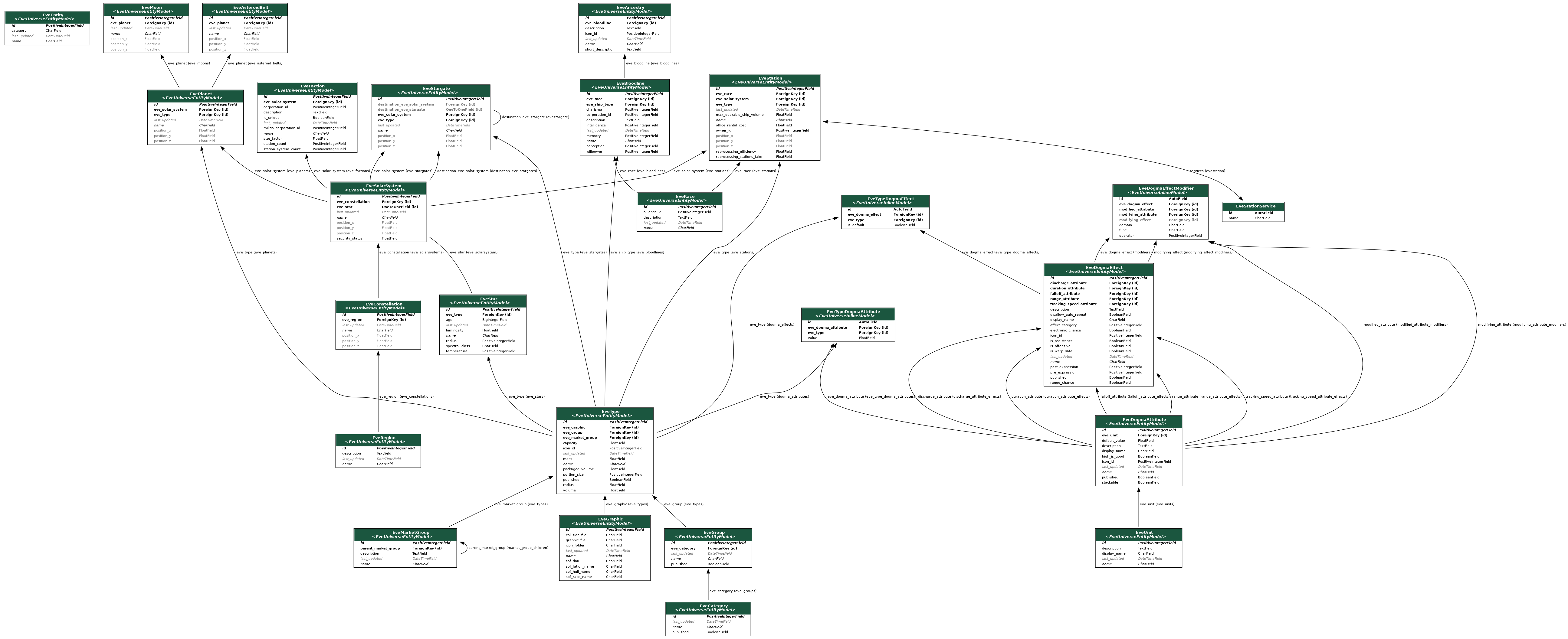
Here is a list of the main models, each representing and Eve object:
- EveAncestry
- EveAsteroidBelt
- EveBloodline
- EveCategory
- EveConstellation
- EveDogmaAttribute
- EveDogmaEffect
- EveEntity
- EveFaction
- EveGraphic
- EveGroup
- EveMarketGroup
- EveMoon
- EvePlanet
- EveRace
- EveRegion
- EveSolarSystem
- EveStar
- EveStargate
- EveStation
- EveType
- EveUnit
Settings
Here is a list of available settings for this app. They can be configured by adding them to your local Django settings file.
Most settings will enable the automatic loading of related models. Note that this will exponentially increase load times of objects, so we recommend to only enable additional models that are functionally needed. For example: if you enable Planets, all related planet object are automatically loaded when updating a solar system.
| Name | Description | Default |
|---|---|---|
EVEUNIVERSE_LOAD_ASTEROID_BELTS |
When true will automatically load astroid belts with every planet | False |
EVEUNIVERSE_LOAD_DOGMAS |
when true will automatically load dogma, e.g. with every type | False |
EVEUNIVERSE_LOAD_GRAPHICS |
when true will automatically load graphics with every type | False |
EVEUNIVERSE_LOAD_MARKET_GROUPS |
when true will automatically load market groups with every type | False |
EVEUNIVERSE_LOAD_MOONS |
when true will automatically load moons be with every planet | False |
EVEUNIVERSE_LOAD_PLANETS |
when true will automatically load planets with every solar system | False |
EVEUNIVERSE_LOAD_STARGATES |
when true will automatically load stargates with every solar system | False |
EVEUNIVERSE_LOAD_STARS |
when true will automatically load stars with every solar system | False |
EVEUNIVERSE_LOAD_STATIONS |
when true will automatically load stations be with every solar system | False |
Note that all settings are optional and the app will use the documented default settings if they are not used.
Management commands
The following management commands are available:
- eveuniverse_load_data: This command will load a complete set of data form ESI and store it locally. Useful to optimize performance or when you want to provide the user with drop-down lists. Available sets:
- map: All regions, constellations and solar systems
- ships: All ship types
- structures: All structures types
- structures_purge_all: This command will purge ALL data of your models.
1 maintainer

Release files for django-eveuniverse 0.2.0a1
For a detailed explanation of source distributions (sdists) and built distributions (wheels), please see the package formats documentation.
Source distribution (sdist)
| File | Size | Uploaded | |
|---|---|---|---|
| django-eveuniverse-0.2.0a1.tar.gz | 148.3 kB | Details |
Release files / django-eveuniverse-0.2.0a1.tar.gz
| Download URL | django-eveuniverse-0.2.0a1.tar.gz |
|---|---|
| Size | 148.3 kB |
| Tags | Source |
|
SHA-256 checksum How to use checksums |
e458ab4717645b1c6549e27a8e1e116f2bc368d8460b0c31db248f44f6ced6e9
|
|
BLAKE2b-256 checksum How to use checksums |
bfc36d5def49335bb2d2afd75e7464a408963bb28a9934e73abc70c2f9669309
|
| Upload date | |
|
Uploaded using Trusted Publishing? What is trusted publishing? |
No |
| Uploaded via |
twine/3.2.0 pkginfo/1.5.0.1 requests/2.23.0 setuptools/47.1.1 requests-toolbelt/0.9.1 tqdm/4.48.0 CPython/3.6.9
|














