
django-fluent-dashboard
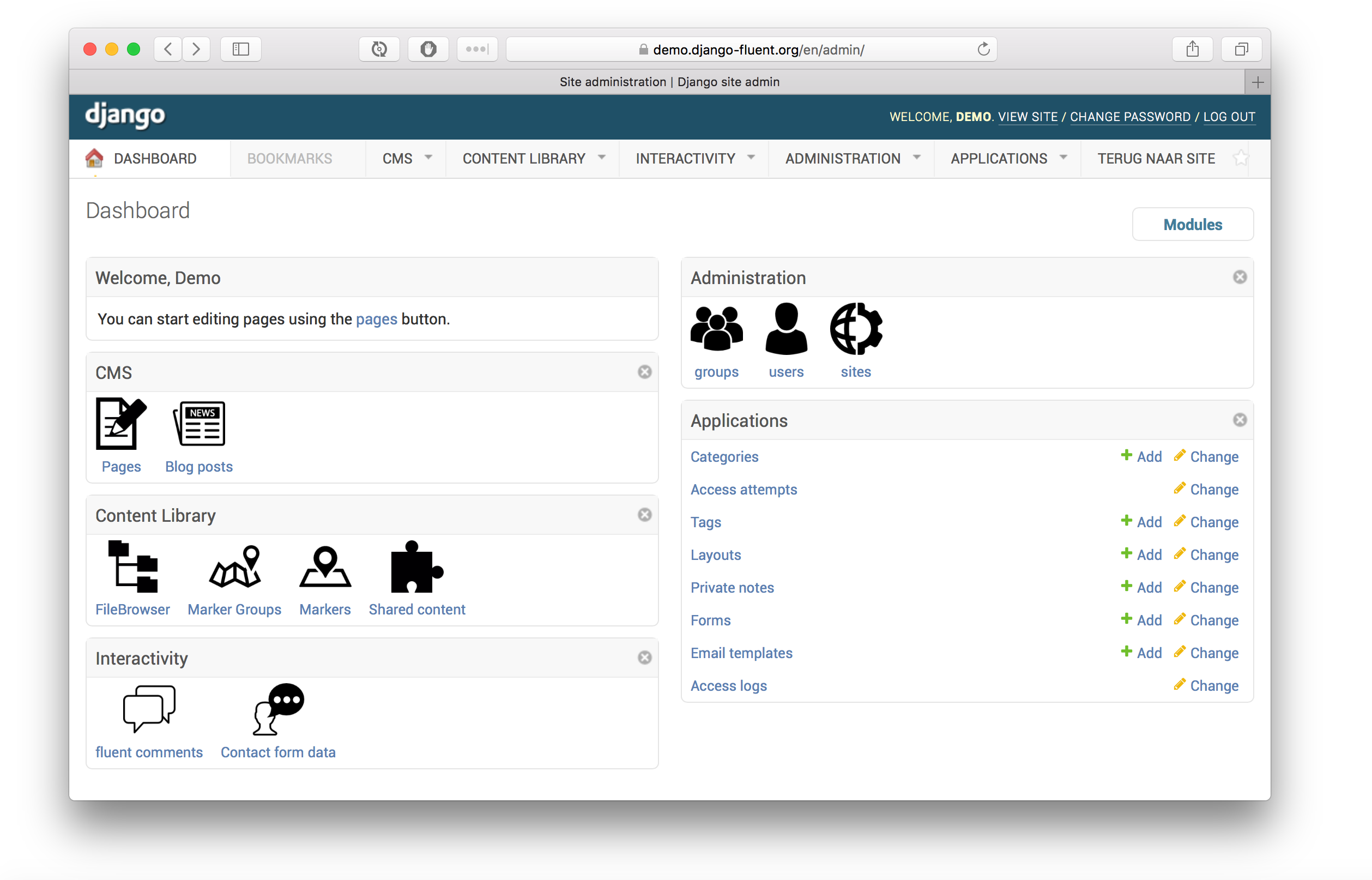
The fluent_dashboard module offers a custom admin dashboard, built on top of django-admin-tools (docs).
The django-admin-tools package provides a default mechanism to replace the standard Django admin homepage with a widget based dashboard. The fluent_dashboard module extends this, by providing additional widgets (called “modules”) such as:
a “icon list” module for the admin homepage.
a “welcome” module for the admin homepage.
a configurable module layout for the admin homepage, through settings.py.
a “return to site” link.
an optional “cache statistics” module.
Documentation can be found at: https://django-fluent-dashboard.readthedocs.io/
Screenshot
Installation
First install the module, preferably in a virtual environment. It can be installed from PyPI:
pip install django-fluent-dashboard
Or the current folder can be installed:
pip install .
Configuration
Add the following settings to settings.py:
INSTALLED_APPS += (
    'fluent_dashboard',

    # enable the admin
    'admin_tools',
    'admin_tools.theming',
    'admin_tools.menu',
    'admin_tools.dashboard',
    'django.contrib.admin',
)

ADMIN_TOOLS_INDEX_DASHBOARD = 'fluent_dashboard.dashboard.FluentIndexDashboard'
ADMIN_TOOLS_APP_INDEX_DASHBOARD = 'fluent_dashboard.dashboard.FluentAppIndexDashboard'
ADMIN_TOOLS_MENU = 'fluent_dashboard.menu.FluentMenu'

TEMPLATES = [
    {
        'BACKEND': 'django.template.backends.django.DjangoTemplates',
        'DIRS': (),
        'OPTIONS': {
            'loaders': (
                ...
                'admin_tools.template_loaders.Loader',  # Add this line!
            ),
        }
    }
]
The admin_tools.theming and admin_tools.menu applications are optional.
Add to urls.py:
urlpatterns += [
    url(r'^admintools/', include('admin_tools.urls')),
]
The database tables for admin_tools can be created afterwards:
./manage.py migrateCustomizing the dashboard
Adding extra icons
The FLUENT_DASHBOARD_APP_ICONS setting is a dictionary that allows you to define extra icons for your own modules, and overwrite default settings. For example:
FLUENT_DASHBOARD_APP_ICONS = {
    'auth/user': "user.png"
}
The icon is expected to be 48x48 pixels. The icon name is treated in 3 different formats:
Absolute URLs are passed as-is.
Icon names with a / character, are relative to the STATIC_URL.
Icon names without any path information, are relative to the current theme folder, e.g. STATIC_URL/fluent_dashboard/themename/
Organizing the application groups
The FLUENT_DASHBOARD_APP_GROUPS setting defines which applications are grouped. For example:
FLUENT_DASHBOARD_APP_GROUPS = (
    (_('CMS'), {
        'models': (
            'cms.*',
            'pages.*',
            'fiber.*',
        ),
        'module': 'CmsAppIconList',
        'collapsible': False,
    }),
    (_('Interactivity'), {
        'models': (
            'django.contrib.comments.*',
            'form_designer.*'
            'threadedcomments.*',
            'zinnia.*',
        ),
    }),
    (_('Administration'), {
        'models': (
            'django.contrib.auth.*',
            'django.contrib.sites.*',
            'google_analytics.*',
            'registration.*',
        ),
    }),
    (_('Applications'), {
        'models': ('*',),
        'module': 'AppList',
        'collapsible': True,
    }),
)
Details about these options, and additional settings are explained in the documentation.
Displaying cache status
This application features optional support for the dashboardmods package, which can display cache statistics. It can be installed using:
pip install dashboardmods
The application requires the cache backends to be configured, for example:
INSTALLED_APPS += (
    'dashboardmods',
)

# Example Memcache configuration:
CACHES = {
    'default': {
        'BACKEND': 'django.core.cache.backends.memcached.MemcachedCache',
        'KEY_PREFIX': 'mysite.production',
        'LOCATION': '127.0.0.1:11211',
        'TIMEOUT': 24*3600,
    },
}

# Optional, example Varnish configuration:
VARNISH_MANAGEMENT_ADDRS = ('127.0.0.1:6082',)
When a cache is not configured, it will simply not be displayed by the module.
Contributing
This module is designed to be generic. In case there is anything you didn’t like about it, or think it’s not flexible enough, please let us know. We’d love to improve it!
If you have any other valuable contribution, suggestion or idea, please let us know as well because we will look into it. Pull requests are welcome too. :-)
1 maintainer

Metadata
1 maintainer
Release files for django-fluent-dashboard 2.0
For a detailed explanation of source distributions (sdists) and built distributions (wheels), please see the package formats documentation.
Source distribution (sdist)
| File | Size | Uploaded | Provenance | Actions |
|---|---|---|---|---|
| django-fluent-dashboard-2.0.tar.gz | 377.4 kB | Without provenance | Details for django-fluent-dashboard-2.0.tar.gz |
Built distribution (wheel)
| File | Interpreter | ABI | Platform | Actions Reset |
|---|---|---|---|---|
| django_fluent_dashboard-2.0-py3-none-any.whl | Python 3 | none | any | Details for django_fluent_dashboard-2.0-py3-none-any.whl |
Total release size: 799.6 kB
Release files / django-fluent-dashboard-2.0.tar.gz
| Download URL | django-fluent-dashboard-2.0.tar.gz |
|---|---|
| Size | 377.4 kB |
| Tags | Source |
|
SHA-256 checksum How to use checksums |
848cbd8d7f241b89a5245071a543c5fe67b3a5b157fc4179f87abfbfd35ab0c5
|
|
BLAKE2b-256 checksum How to use checksums |
33da83b0f150bc0864902c24d9dbf88a94012456ae0b3ad169de1513874f7704
|
| Upload date | |
|
Uploaded using Trusted Publishing? What is trusted publishing? |
No |
| Uploaded via |
twine/3.4.2 importlib_metadata/4.8.1 pkginfo/1.7.1 requests/2.26.0 requests-toolbelt/0.9.1 tqdm/4.62.3 CPython/3.9.6
|
Release files / django_fluent_dashboard-2.0-py3-none-any.whl
| Download URL | django_fluent_dashboard-2.0-py3-none-any.whl |
|---|---|
| Size | 422.3 kB |
| Tags | Python 3 |
|
SHA-256 checksum How to use checksums |
4eec8827182d16a7ae53450c934824eaf6f4279ebc70f5cdc81af22d0cd89f6a
|
|
BLAKE2b-256 checksum How to use checksums |
5dcfac8d7a5e7158d2aab3d99429555612be1ff6383ab0d078b374dc9a89d3d6
|
| Upload date | |
|
Uploaded using Trusted Publishing? What is trusted publishing? |
No |
| Uploaded via |
twine/3.4.2 importlib_metadata/4.8.1 pkginfo/1.7.1 requests/2.26.0 requests-toolbelt/0.9.1 tqdm/4.62.3 CPython/3.9.6
|
Security for django-fluent-dashboard 2.0
Provenance
Provenance describes where a file came from. On PyPI, provenance is shared via attestations, which provide a verifiable record of the build or publishing details. View details, limitations and caveats.
No provenance found
None of the files in this release were uploaded with provenance metadata.
A note on package security
PyPI is a repository for distributing packages, not a service for auditing them. While third-party security researchers and our staff do their best to detect and remove malicious packages, PyPI cannot guarantee the quality, security or suitability of any given package.
To learn more about protecting yourself from malicious actors, visit our package security documentation.














