
django-inline-actions





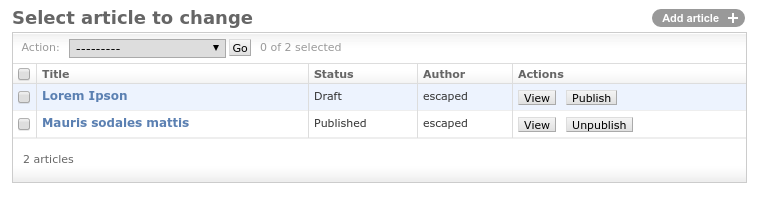
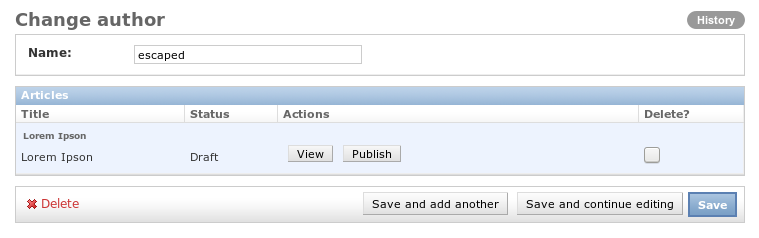
django-inline-actions adds actions to each row of the ModelAdmin or InlineModelAdmin.
Requirements
- Python 3.10 or newer
- Django 5.2 or newer (5.2 LTS, 6.0 and 6.1 are tested in CI)
Screenshot
Installation
-
Install django-inline-actions
pip install django-inline-actions
-
Add
inline_actionsto yourINSTALLED_APPS.
Integration
Add the InlineActionsModelAdminMixin to your ModelAdmin.
If you want to have actions on your inlines, add the InlineActionsMixin to your InlineModelAdmin.
Each action is implemented as a method on the ModelAdmin/InlineModelAdmin and must have the following signature.
def action_name(self, request, obj, parent_obj=None):
| Argument | Description |
|---|---|
request |
current request |
obj |
instance on which the action was triggered |
parent_obj |
instance of the parent model, only set on inlines |
and should return None to return to the current changeform or a HttpResponse.
Finally, add your method name to list of actions inline_actions defined on the corresponding ModelAdmin.
If you want to disable the actions column, you have to explicitly set inline_actions = None.
To add your actions dynamically, you can use the method get_inline_actions(self, request, obj=None) instead.
This module is bundled with two actions for viewing (inline_actions.actions.ViewAction) and deleting (inline_actions.actions.DeleteAction).
Just add these classes to your admin and you're done.
Additionally, you can add methods to generate a custom label and CSS classes per object.
If you have an inline action called action_name then you can define
def get_action_name_label(self, obj):
    return 'some string'

def get_action_name_css(self, obj):
    return 'some string'
| Argument | Description |
|---|---|
obj |
instance on which the action was triggered |
Each defined method has to return a string.
Example 1
Imagine a simple news application with the following admin.py.
from django.contrib import admin
from inline_actions.admin import InlineActionsMixin
from inline_actions.admin import InlineActionsModelAdminMixin

from .models import Article, Author


class ArticleInline(InlineActionsMixin,
                    admin.TabularInline):
    model = Article
    inline_actions = []

    def has_add_permission(self, request, obj=None):
        return False


@admin.register(Author)
class AuthorAdmin(InlineActionsModelAdminMixin,
                  admin.ModelAdmin):
    inlines = [ArticleInline]
    list_display = ('name',)


@admin.register(Article)
class ArticleAdmin(admin.ModelAdmin):
    list_display = ('title', 'status', 'author')
We now want to add two simple actions (view, unpublish) to each article within the AuthorAdmin.
The view action redirects to the changeform of the selected instance.
from django.core.urlresolvers import reverse
from django.shortcuts import redirect


class ArticleInline(InlineActionsMixin,
                    admin.TabularInline):
    # ...
    inline_actions = ['view']
    # ...

    def view(self, request, obj, parent_obj=None):
        url = reverse(
            'admin:{}_{}_change'.format(
                obj._meta.app_label,
                obj._meta.model_name,
            ),
            args=(obj.pk,)
        )
        return redirect(url)
    view.short_description = _("View")
Since unpublish depends on article.status we must use get_inline_actions to add this action dynamically.
from django.contrib import admin, messages
from django.utils.translation import gettext_lazy as _


class ArticleInline(InlineActionsMixin,
                    admin.TabularInline):
    # ...
    def get_inline_actions(self, request, obj=None):
        actions = super(ArticleInline, self).get_inline_actions(request, obj)
        if obj:
            if obj.status == Article.PUBLISHED:
                actions.append('unpublish')
        return actions

    def unpublish(self, request, obj, parent_obj=None):
        obj.status = Article.DRAFT
        obj.save()
        messages.info(request, _("Article unpublished"))
    unpublish.short_description = _("Unpublish")
Adding inline_actions to the changelist works similar. See the sample project for further details (test_proj/blog/admin.py).
Example 2
Instead of creating separate actions for publishing and unpublishing, we might prefer an action, which toggles between those two states.
toggle_publish implements the behaviour described above.
def toggle_publish(self, request, obj, parent_obj=None):
    if obj.status == Article.DRAFT:
        obj.status = Article.PUBLISHED
    else:
        obj.status = Article.DRAFT

    obj.save()

    if obj.status == Article.DRAFT:
        messages.info(request, _("Article unpublished."))
    else:
        messages.info(request, _("Article published."))
This might leave the user with an ambiguous button label as it will be called Toggle publish regardless of the internal state.
We can specify a dynamic label by adding a special method get_ACTIONNAME_label.
def get_toggle_publish_label(self, obj):
    if obj.status == Article.DRAFT:
        return 'Publish'
    return 'Unpublish'
So assuming an object in a row has DRAFT status, then the button label will be Toggle publish and Toggle unpublish otherwise.
We can go even fancier when we create a method that will add css classes for each object depending on a status like:
def get_toggle_publish_css(self, obj):
    if obj.status == Article.DRAFT:
        return 'btn-red'
    return 'btn-green'
You can make it more eye-candy by using btn-green that makes your button green and btn-red that makes your button red.
Or you can use those classes to add some javascript logic (i.e. confirmation box).
Similarly, a get_ACTIONNAME_attr method can add extra html attributes to the button, i.e. to open the action in a new browser tab:
def get_view_attr(self, obj):
    return {'formtarget': '_blank'}
Dict values are html-escaped. A plain string is used as-is (trusted, like the label and css hooks above), as is a static attribute_properties on the action function itself:
def get_view_attr(self, obj):
    return 'formtarget="_blank"'
Tip on confirmation alerts
When performing a certain critical action or ones which may not be easily reversible it's good to have a confirmation prompt before submitting the action form. To achieve this, one way would be to override templates/admin/change_list.html with the following.
{% extends "admin/change_list.html" %}

{% block extrahead %}
    {{ block.super }}
    <script>
        (function() {
            document.addEventListener("DOMContentLoaded", function(event) {
                let inline_actions = document.querySelectorAll(".inline_actions input");
                for (var i=0; i < inline_actions.length; i++) {
                    inline_actions[i].addEventListener("click", function(e) {
                        if(!confirm("Do you really want to " + e.target.value + "?")) {
                            e.preventDefault();
                        }
                    });
                }
            });
        })();
    </script>
{% endblock %}
If a staff user has clicked any inline action accidentally, they can safely click no in the confirmation prompt & the inline action form would not be submitted.
Permissions and audit trail
Actions are executed on behalf of the current admin user, so check the
permissions you rely on and raise PermissionDenied when they are missing.
from django.contrib import messages
from django.core.exceptions import PermissionDenied
from django.utils.translation import gettext_lazy as _


class ArticleInline(InlineActionsMixin,
                    admin.TabularInline):
    # ...
    def unpublish(self, request, obj, parent_obj=None):
        if not self.has_change_permission(request, obj):
            raise PermissionDenied
        obj.status = Article.DRAFT
        obj.save()
        messages.info(request, _("Article unpublished"))
    unpublish.short_description = _("Unpublish")
Actions on the changelist are methods of your ModelAdmin, so you can also
add them to the object's admin history with
self.log_change(request, obj, _("Article unpublished")).
Inline actions are methods of the InlineModelAdmin, which has no
log_change; use LogEntry.objects.log_actions(...) if you need history
entries for them.
Intermediate forms
The current implementation for using intermediate forms involves some manual handling. This will be simplified in the next major release!
In order to have an intermediate form, you must add some information about the triggered action.
django-inline-actions provides a handy templatetag render_inline_action_fields,
which adds these information as hidden fields to a form.
{% extends "admin/base_site.html" %}
{% load inline_action_tags %}

{% block content %}
  <form action="" method="post">
    {% csrf_token %}
    {% render_inline_action_fields %}

    {{ form.as_p }}

    <input type="submit" name="_back" value="Cancel"/>
    <input type="submit" name="_save" value="Update"/>
  </form>
{% endblock %}
As the action does not know that an intermediate form is used, we have to include some special handling. In the case above we have to consider 3 cases:
- The form has been submitted and we want to redirect to the previous view.
- Back button has been clicked.
- Initial access to the intermediate page/form.
The corresponding action could look like
    def change_title(self, request, obj, parent_obj=None):

        # 1. has the form been submitted?
        if '_save' in request.POST:
            form = forms.ChangeTitleForm(request.POST, instance=obj)
            form.save()
            return None  # return back to list view
        # 2. has the back button been pressed?
        elif '_back' in request.POST:
            return None  # return back to list view
        # 3. simply display the form
        else:
            form = forms.ChangeTitleForm(instance=obj)

        return render(
            request,
            'change_title.html',
            context={'form': form}
        )
Example Application
You can see django-inline-actions in action using the bundled test application test_proj.
Use uv to run it.
git clone https://github.com/escaped/django-inline-actions.git
cd django-inline-actions/
uv sync
cd test_proj
uv run python manage.py migrate
uv run python manage.py createsuperuser
uv run python manage.py runserver
Open http://localhost:8000/admin/ in your browser and create an author and some articles.
How to test your actions?
There are two ways on how to write tests for your actions. We will use pytest for the following examples.
Test the action itself
Before we can call our action on the admin class itself, we have to instantiate the admin environment and pass it to the ModelAdmin together with an instance of our model.
Therefore, we implement a fixture called admin_site, which is used on each test.
import pytest
from django.contrib.admin import AdminSite
from django.test import RequestFactory

from yourapp.module.admin import MyAdmin


@pytest.fixture
def admin_site():
    return AdminSite()

@pytest.mark.django_db
def test_action_XXX(admin_site):
    """Test action XXX"""
    request = RequestFactory().get('/')
    request.user = ...  # a user with the required permissions
    obj = ...  # create an instance

    admin = MyAdmin(type(obj), admin_site)
    # `render_inline_actions` calls `get_inline_actions`, which receives the
    # current request; set it if your implementation uses it
    admin._request = request

    admin.render_inline_actions(obj)
    response = admin.action_XXX(request, obj)
    # assert the state of the application
Test the admin integration
Alternatively, you can test your actions on the real Django admin page. You will have to log in, navigate to the corresponding admin and trigger a click on the action. To simplify this process you can use django-webtest. Example can be found here.
Development
This project uses uv for packaging and managing all dependencies, ruff for linting and formatting, mypy for type checking and pytest for the test suite. pre-commit runs the linting and type checks on every commit.
Clone this repository and run
uv sync
uv run pre-commit install
to create a virtual environment containing all dependencies. Afterwards, you can run the test suite using
uv run pytest
test_proj contains an end-to-end test matrix that drives the Django admin
through django-webtest,
covering inline actions, model admin actions and intermediate action forms.
Django 4.2 LTS, 5.2 LTS and the latest release are exercised in CI via the
matrix in .github/workflows/test.yml.
This repository follows the Conventional Commits style.
1 maintainer

Metadata
1 maintainer
Release files for django-inline-actions 3.0.0
For a detailed explanation of source distributions (sdists) and built distributions (wheels), please see the package formats documentation.
Source distribution (sdist)
| File | Size | Uploaded | Provenance | Actions |
|---|---|---|---|---|
| django_inline_actions-3.0.0.tar.gz | 660.5 kB | Without provenance | Details for django_inline_actions-3.0.0.tar.gz |
Built distribution (wheel)
| File | Interpreter | ABI | Platform | Actions Reset |
|---|---|---|---|---|
| django_inline_actions-3.0.0-py3-none-any.whl | Python 3 | none | any | Details for django_inline_actions-3.0.0-py3-none-any.whl |
Total release size: 673.3 kB
Release files / django_inline_actions-3.0.0.tar.gz
| Download URL | django_inline_actions-3.0.0.tar.gz |
|---|---|
| Size | 660.5 kB |
| Tags | Source |
|
SHA-256 checksum How to use checksums |
a6848e7640c60d46d4afadeb18a131fb5ca73303c5b3fe6bac6fa99af0a1e4fb
|
|
BLAKE2b-256 checksum How to use checksums |
eb92a66b753969b10985e91a8b5b9d08c75a7312fda4fa18a13e716789edacce
|
| Upload date | |
|
Uploaded using Trusted Publishing? What is trusted publishing? |
No |
| Uploaded via |
twine/7.0.0 CPython/3.13.14
|
Release files / django_inline_actions-3.0.0-py3-none-any.whl
| Download URL | django_inline_actions-3.0.0-py3-none-any.whl |
|---|---|
| Size | 12.8 kB |
| Tags | Python 3 |
|
SHA-256 checksum How to use checksums |
77e030f7049cec7461873f4f09e5515bb196a7d4f094934eb39b70f8ac494ce2
|
|
BLAKE2b-256 checksum How to use checksums |
beeb5d568121466528453afd3d59eba3a49be67b698d70a3012aabce375e80f4
|
| Upload date | |
|
Uploaded using Trusted Publishing? What is trusted publishing? |
No |
| Uploaded via |
twine/7.0.0 CPython/3.13.14
|
Security for django-inline-actions 3.0.0
Provenance
Provenance describes where a file came from. On PyPI, provenance is shared via attestations, which provide a verifiable record of the build or publishing details. View details, limitations and caveats.
No provenance found
None of the files in this release were uploaded with provenance metadata.
A note on package security
PyPI is a repository for distributing packages, not a service for auditing them. While third-party security researchers and our staff do their best to detect and remove malicious packages, PyPI cannot guarantee the quality, security or suitability of any given package.
To learn more about protecting yourself from malicious actors, visit our package security documentation.














