
django-maintenancemode-2

Current Version: 1.2
This project makes it easy to put your Django site into “maintenance mode”, or more technically, return an HTTP 503 response.
This project differs slightly from other implementations in that the maintenance mode flag is stored in your database versus settings or an environment variable. If your site is deployed to multiple servers, the centralized database-based maintenance flag makes it a snap to bring them all up or down at once.
Requirements
Pre-Requisites
You must have at least one Site entry in your database before installing django-maintenancemode-2.
Supported Python Versions
2.7, 3.x
Supported Django Versions
3.x use the latest version
2.x < 3, please use version 1.1.11
< 2, please use version 1.1.9
Installation
pip install django-maintenancemode-2
– or –
Download django-maintenancemode-2 from source
*optional: Enable a virtualenv
Run python setup.py install or add maintenancemode to your PYTHONPATH
Settings and Required Values
Ensure the Sites Framework is enabled, and you have at least one entry in the Sites table.
Add maintenancemode.middleware.MaintenanceModeMiddleware to your MIDDLEWARE_CLASSES
Add maintenancemode to your INSTALLED_APPS
Run python manage.py migrate to create the maintenancemode tables.
Run your project to automatically add the maintenancemode database records.
Add a 503.html template to the root of your templates directory, or optionally add a MAINTENANCE_503_TEMPLATE path to your 503.html file’s location in settings.
maintenancemode will ignore any patterns beginning with the default Django Admin url: ^admin so you can turn it off. If you use a custom url for admin, you may override the ignored admin patterns by adding the MAINTENANCE_ADMIN_IGNORED_URLS list in settings. Example: ['^my-custom-admin', '^my-other-custom-admin']
You can also block staff users, who by default are ignored by maintenance mode, by setting MAINTENANCE_BLOCK_STAFF to True
Usage
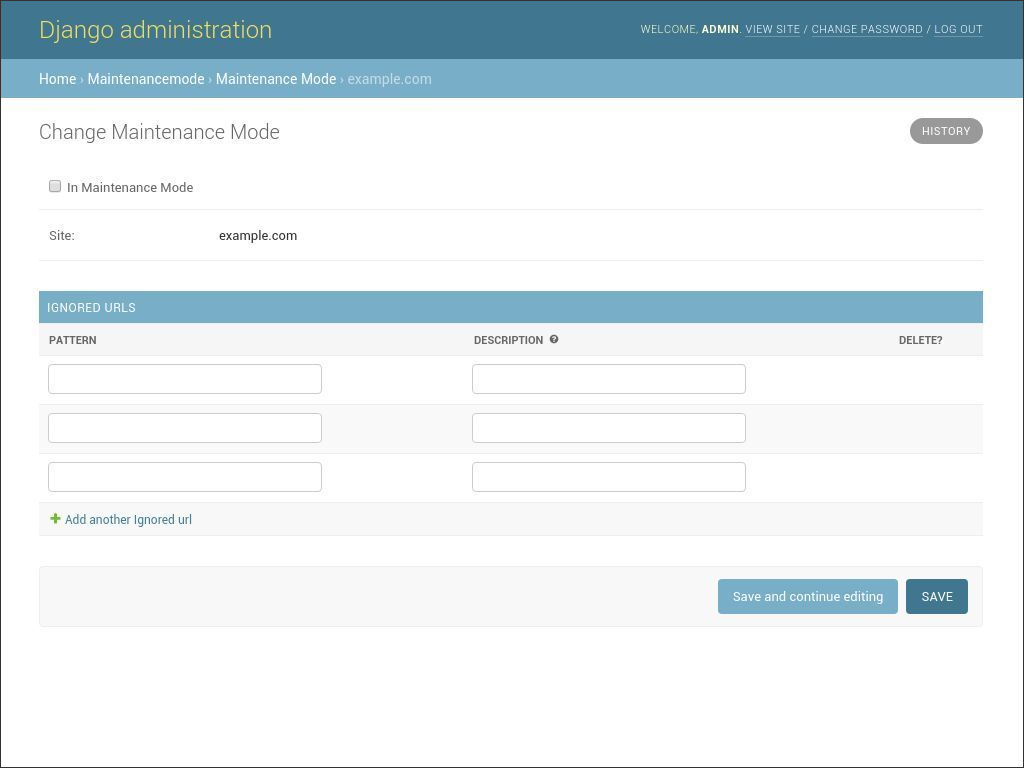
Image of django-maintenancemode-2
Turning Maintenance Mode On
To put a site into “Maintenance Mode”, check the “In Maintenance Mode” checkbox and save in Django Admin under the “Maintenancemode” section. The next time you visit the public side of the site, it will return a 503 if:
You are not logged in as a superuser or staff user
You are not viewing a URL in the ignored patterns list
Your REMOTE_ADDR does not appear in the INTERNAL_IPS setting
Or you can alternatively use the setmaintenance management command:
# sets maintenance on for the current settings.SITE_ID
./manage.py setmaintenance on

# sets maintenance on for sites 2 and 3
./manage.py setmaintenance on 2 3
which can be useful for fabric deployment scripts etc.
Turning Maintenance Mode Off
Log in, un-check the “In Maintenance Mode” checkbox and save.
Or you can alternatively use the setmaintenance management command:
# sets maintenance off for the current settings.SITE_ID
$ ./manage.py setmaintenance off

# sets maintenance off for sites 2 and 3
$ ./manage.py setmaintenance off 2 3
Testing and Sample Application
A “testproject” application is included, which also contains unit and functional tests you can run via python manage.py test from the testproject directory.
You will need to run manage.py migrate to create the test project database.
There are only two views in the testproject: - / - /ignored-page
To see maintenancemode in action, log into Django admin, and set the maintenance mode to true. Log out, then visit the home page, and instead, you’ll be greeted with the maintenance page.
To have maintenancemode ignore the “ignored-page” view, simply add it’s url pattern to the Ignored URLs as:
^ignored-page/$
Now you should be able to visit the ignored-page view regardless of the maintenancemode status. This is useful for contact or help pages you still want people to be able to access while you’re working on other parts of the site.
Database migrations
./manage.py migrate should add the necessary tables.
1 maintainer

Metadata
1 maintainer
Release files for django-maintenancemode-2 1.2
For a detailed explanation of source distributions (sdists) and built distributions (wheels), please see the package formats documentation.
Source distribution (sdist)
| File | Size | Uploaded | |
|---|---|---|---|
| django-maintenancemode-2-1.2.tar.gz | 18.7 kB | Details |
Built distribution (wheel)
| File | Interpreter | ABI | Platform | Reset |
|---|---|---|---|---|
| django_maintenancemode_2-1.2-py3-none-any.whl | Python 3 | none | any | Details |
Total release size: 41.1 kB
Release files / django-maintenancemode-2-1.2.tar.gz
| Download URL | django-maintenancemode-2-1.2.tar.gz |
|---|---|
| Size | 18.7 kB |
| Tags | Source |
|
SHA-256 checksum How to use checksums |
2b4d079672f9d459c55341426e09fa309b52915a877d086b883832a8b4dd20bd
|
|
BLAKE2b-256 checksum How to use checksums |
232e0889472f8c66824d16382dea302979d0770885140316a3d14098dcfa1e4a
|
| Upload date | |
|
Uploaded using Trusted Publishing? What is trusted publishing? |
No |
| Uploaded via |
twine/3.1.1 pkginfo/1.5.0.1 requests/2.22.0 setuptools/42.0.2 requests-toolbelt/0.9.1 tqdm/4.41.0 CPython/3.6.5
|
Release files / django_maintenancemode_2-1.2-py3-none-any.whl
| Download URL | django_maintenancemode_2-1.2-py3-none-any.whl |
|---|---|
| Size | 22.5 kB |
| Tags | Python 3 |
|
SHA-256 checksum How to use checksums |
02bf2277ff03551b0390076490e12676b2055c5dec7c432ac89df8b6eb63188e
|
|
BLAKE2b-256 checksum How to use checksums |
a93fee9d3847dd7b11e3e61a871092ad2d23371ba3afe89651721a8e152b7150
|
| Upload date | |
|
Uploaded using Trusted Publishing? What is trusted publishing? |
No |
| Uploaded via |
twine/3.1.1 pkginfo/1.5.0.1 requests/2.22.0 setuptools/42.0.2 requests-toolbelt/0.9.1 tqdm/4.41.0 CPython/3.6.5
|














