

Resizing and cropping images via Nginx, as well as caching the result
pip install django-nginx-image

Features:
High-performance resize and crop via Nginx
Transparent caching an images
Template tag thumbnail for building correct URL for Nginx
The Django command for convert unsupported images formats (example, BMP) to JPG
For more details see:
http://github.com/adw0rd/django-nginx-image - the GitHub repository
http://pypi.python.org/pypi/django-nginx-image - the PyPI page
http://adw0rd.com/2012/django-nginx-image/ - article about this package on Russian
http://adw0rd.com/2012/django-nginx-image/en/ - article about this package on English
Settings:
Add to settings.py:
INSTALLED_APPS = (
    'nginx_image',
)
Now, add two sections called server:
The cache server www.example.org, which will connect to the second server and receive changed image and save the result to the cache.
The image server image.example.org, which can to resize and to crop a images.
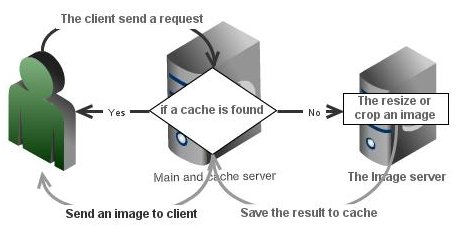
A sample of configuration file for your project:
http {

    proxy_cache_path <STORAGE_ROOT>/nginx/cache levels=1:2 keys_zone=<CACHE_NAME>:10m max_size=1G;

    server {
        listen 80;
        server_name www.example.org;

        location ~* ^/(resize|crop)/ {
            proxy_pass http://image.example.org$request_uri;
            proxy_cache <CACHE_NAME>;
            proxy_cache_key "$host$document_uri";
            proxy_cache_valid 200 1d;
            proxy_cache_valid any 1m;
            proxy_cache_use_stale error timeout invalid_header updating;
        }
    }

    server {
        listen 80;
        server_name image.example.org;

        location ~* ^/resize/([\d\-]+)/([\d\-]+)/(.+)$ {
            alias <STORAGE_ROOT>/$3;
            image_filter resize $1 $2;
            image_filter_buffer 2M;
            error_page 415 = /empty;
        }

        location ~* ^/crop/([\d\-]+)/([\d\-]+)/(.+)$ {
            alias <STORAGE_ROOT>/$3;
            image_filter crop $1 $2;
            image_filter_buffer 2M;
            error_page 415 = /empty;
        }

        location = /empty {
            empty_gif;
        }
    }
}
Where, STORAGE_ROOT is the path to directory with web-assests. For example I have in my settings.py:
STORAGE_ROOT = "/storage/kinsburg_tv"
MEDIA_ROOT = os.path.join(STORAGE_ROOT, "media")
STATIC_ROOT = os.path.join(STORAGE_ROOT, "static")
And “CACHE_NAME” is the arbitrarily name, example: “my_project_cache”.
Usage:
In the templates can be used as follows:
{% load nginx_image %}

Proportionally resize a image, based on the width and the height:
    {% thumbnail user.profile.avatar 130 130 %}

Proportionally resize a image, based on the width:
    {% thumbnail user.profile.avatar 130 '-' %}
    {% thumbnail user.profile.avatar 130 0 %}
    {% thumbnail user.profile.avatar 130 %}

Proportionally resize a image, based on the height:
    {% thumbnail user.profile.avatar '-' 130 %}
    {% thumbnail user.profile.avatar 0 130 %}

Crop a image:
    {% thumbnail user.profile.avatar 130 130 crop=1 %}
    {% thumbnail user.profile.avatar 130 0 crop=1 %}
    {% thumbnail user.profile.avatar 0 130 crop=1 %}
Convert:
Unfortunaly, ngx_http_image_filter_module only supports JPEG, GIF and PNG, so you have to convert BMP to JPG:
./manage.py nginx_image_converter -i /storage/project/media -o /storage/project/newmedia
Available options:
-i SOURCE, --source=SOURCE
                    Source directory with pictures
-o DESTINATION, --destination=DESTINATION
                    Destination directory for save the pictures
-q QUALITY, --quality=QUALITY
                    Percentage of quality for images in JPG
-e, --change-extension
                    Change extension to "jpg"
1 maintainer

Metadata
1 maintainer
Release files for django-nginx-image 0.3.2
For a detailed explanation of source distributions (sdists) and built distributions (wheels), please see the package formats documentation.
Source distribution (sdist)
| File | Size | Uploaded | |
|---|---|---|---|
| django-nginx-image-0.3.2.tar.gz | 4.5 kB | Details |
Release files / django-nginx-image-0.3.2.tar.gz
| Download URL | django-nginx-image-0.3.2.tar.gz |
|---|---|
| Size | 4.5 kB |
| Tags | Source |
|
SHA-256 checksum How to use checksums |
3bd10922176effaa28eff666a459add9b3a7355e390748411580f2d43c271908
|
|
BLAKE2b-256 checksum How to use checksums |
4eba22f745b1469888b554520e298bbcb8128ce646b92f5e3c38873810289937
|
| Upload date | |
|
Uploaded using Trusted Publishing? What is trusted publishing? |
No |














