
Django Search Input Field
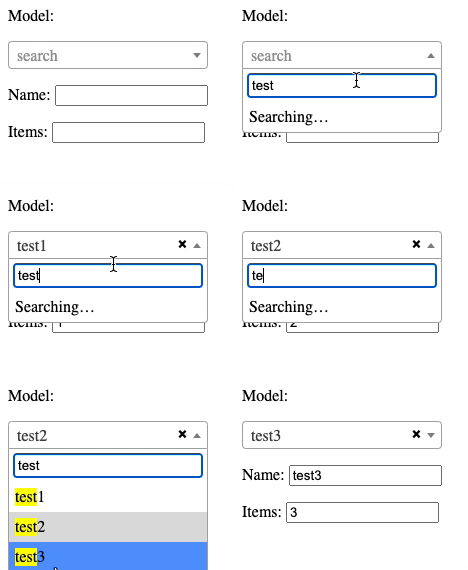
The Django Search Input Field package simplifies the process of integrating Ajax searchable input fields into Django forms. This package provides flexibility for searching model fields or any custom data, enhancing the user experience and improving search functionality within your Django applications.
Installation
You can install the package via pip:
pip install django-search-input-field
Once installed, add the app to your INSTALLED_APPS in your Django settings:
INSTALLED_APPS = [
    ...
    "django_search_input_field"
]
Finally, include the package's URLs in your project's URL configuration:
urlpatterns = [
    path('django_search_input_field/', include('django_search_input_field.urls')),
]
Usage
Field Types
SelectSearchCharField
The SelectSearchCharField is used to perform a search on a specified field and return the field value.
Example Usage:
from django import forms
from django_search_input_field.field import SelectSearchCharField
from Main.models import Customers
from rest_framework.permissions import AllowAny

class CustomerSearchFieldForm(forms.Form):
    name = SelectSearchCharField(field="name", model=Customers, permissions=AllowAny)
SearchModelField
The SearchModelField is used to search based on a specified field but returns the entire model object, using the field for searching.
Example Usage:
from django import forms
from django_search_input_field.field import SearchModelField
from Main.models import Customers
from rest_framework.permissions import AllowAny

class CustomerSearchFieldForm(forms.Form):
    name = SearchModelField(model=Customers, search_field="name", permissions=AllowAny)
Related Form and CharRelatedField
The related form is used to fill related fields automatically when a SearchModelField is selected.
Example Usage:
from django_search_input_field.field import CharRelatedField, SearchModelField
from django_search_input_field.form import RelatedFillForm

from Main.models import Customers
from rest_framework.permissions import AllowAny

class CustomerSearchFieldWithRelatedForm(RelatedFillForm):
    name = SearchModelField(model=Customers, search_field="name", permissions=AllowAny)
    email = CharRelatedField(related_field="name", related_search_input="email")
Advanced Usage
The package provides the flexibility to customize the search behavior by creating custom providers. you can provide the provider name to the field using query_function_name parameter.
Custom Providers
You can create custom providers to tailor the search behavior according to your specific requirements.
Here's an example of creating a custom provider:
from django_search_input_field.providers import SearchModelProvider

class CustomModelProvider(SearchModelProvider):
    model = YourModel
    query_function_name = 'custom_search_function'
    auto_register = False

    def get_queryset(self):
        # Implement your custom queryset logic here
        return YourModel.objects.all()

    def get_filtered_queryset(self, function_filters, search_key):
        # Implement your custom filtered queryset logic here
        return YourModel.objects.filter(**function_filters)

    def get_filtered_options(self, function_filters, search_key):
        options = self.get_filtered_queryset(function_filters, search_key)
        return [ModelOption(option, serializer=None, object_str=lambda obj: str(obj)) for option in options]
Using Custom Providers
After creating a custom provider, you can use it in your form or field:
from django import forms
from django_search_input_field.field import SearchModelField
from .providers import CustomModelProvider

class YourForm(forms.Form):
    custom_field = SearchModelField(
        model=None,
        search_field="your_field",
        permissions=YourCustomPermissionsClass,
        query_function_name=CustomModelProvider.query_function_name,
        min_search_length=1,
    )
1 maintainer

Release files for django-search-input-field 0.1.15
For a detailed explanation of source distributions (sdists) and built distributions (wheels), please see the package formats documentation.
Source distribution (sdist)
| File | Size | Uploaded | |
|---|---|---|---|
| django-search-input-field-0.1.15.tar.gz | 11.1 kB | Details |
Release files / django-search-input-field-0.1.15.tar.gz
| Download URL | django-search-input-field-0.1.15.tar.gz |
|---|---|
| Size | 11.1 kB |
| Tags | Source |
|
SHA-256 checksum How to use checksums |
71d3e12516c2982318e6bf269df4c55e81db1a10c0dac466068fe4418f6283a0
|
|
BLAKE2b-256 checksum How to use checksums |
aebae509178a7332b8bbf740f186ab0bc578d72d13becf09f454e651fac66bc2
|
| Upload date | |
|
Uploaded using Trusted Publishing? What is trusted publishing? |
No |
| Uploaded via |
twine/5.1.1 CPython/3.10.13
|














