
django-server-timing


Django middleware that exposed collected metrics into HTTP Server Timing header.
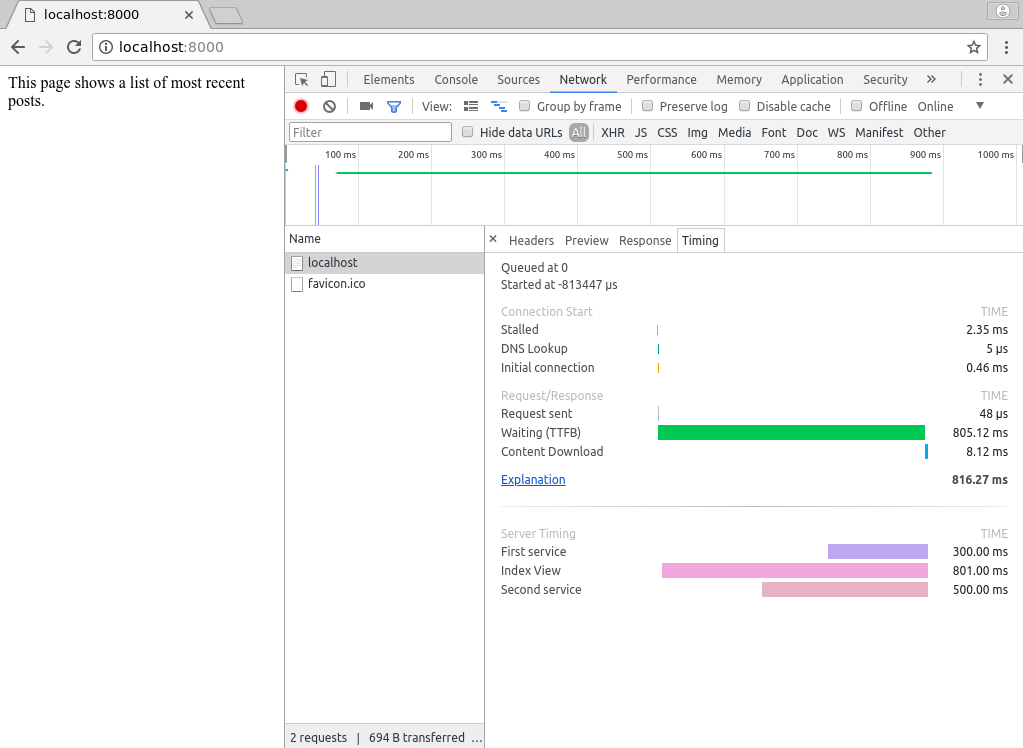
This headers is used by browser to display several metrics into the Timing tab of the Network interface.
Right now, this header is not supported properlly by all browser
It doesn't effect unsupported browser.
This middleware will send the entire header value since not all browsers supports sending it via HTTP Trailer.
Install
It works on Python >= 3.10 and Django >= 4.2
Install easily via pip or uv
pip install django-server-timing
# or with uv
uv add django-server-timing

# For SQL timing with django-silk integration
pip install django-server-timing[silk]
# or with uv
uv add django-server-timing[silk]
And configure MIDDLEWARES
MIDDLEWARE += ['server_timing.middleware.ServerTiming']
Usage
import time

from django.http import HttpResponse

from server_timing.middleware import TimedService, timed, timed_wrapper


@timed_wrapper('index', 'Index View')
def index(request):
    home_service = TimedService('first', 'First service')
    home_service.start()

    time.sleep(0.3)

    home_service.end()

    with timed('second', 'Second service'):
        time.sleep(0.5)

    return HttpResponse('This page shows a list of most recent posts.')
1 maintainer

Metadata
1 maintainer
Release files for django-server-timing 0.2.0
For a detailed explanation of source distributions (sdists) and built distributions (wheels), please see the package formats documentation.
Source distribution (sdist)
| File | Size | Uploaded | |
|---|---|---|---|
| django_server_timing-0.2.0.tar.gz | 141.9 kB | Details |
Built distribution (wheel)
| File | Interpreter | ABI | Platform | Reset |
|---|---|---|---|---|
| django_server_timing-0.2.0-py3-none-any.whl | Python 3 | none | any | Details |
Total release size: 170.8 kB
Release files / django_server_timing-0.2.0.tar.gz
| Download URL | django_server_timing-0.2.0.tar.gz |
|---|---|
| Size | 141.9 kB |
| Tags | Source |
|
SHA-256 checksum How to use checksums |
5ee804ce900b9ba5808d256ca861fe3d3dd52944f6c7caa41d55a08ec95eaa09
|
|
BLAKE2b-256 checksum How to use checksums |
226ad8679530d3418132ce46faac254c00910a521239519f8c2720f55db39e85
|
| Upload date | |
|
Uploaded using Trusted Publishing? What is trusted publishing? |
Yes |
| Uploaded via |
twine/6.1.0 CPython/3.12.9
|
Provenance
Provenance describes where a file came from. On PyPI, provenance is shared via attestations, which provide a verifiable record of the build or publishing details. View details, limitations and caveats.


PyPI Publish Attestation
PyPI verified that this artifact, at this checksum, originated from the publisher listed below.
Signed by GitHub Actions, verified by PyPI on Jul 2, 2025.
Transparency logRelease files / django_server_timing-0.2.0-py3-none-any.whl
| Download URL | django_server_timing-0.2.0-py3-none-any.whl |
|---|---|
| Size | 28.9 kB |
| Tags | Python 3 |
|
SHA-256 checksum How to use checksums |
fa0182bf175ad15f23daaa9c0caf7c4114e6089fb17ab5ba1c0001984654c14c
|
|
BLAKE2b-256 checksum How to use checksums |
b2d331f5dab8d4d1486a00c7586d0d8eb327ae4a366e1e199d5f907c71773556
|
| Upload date | |
|
Uploaded using Trusted Publishing? What is trusted publishing? |
Yes |
| Uploaded via |
twine/6.1.0 CPython/3.12.9
|
Provenance
Provenance describes where a file came from. On PyPI, provenance is shared via attestations, which provide a verifiable record of the build or publishing details. View details, limitations and caveats.
PyPI Publish Attestation
PyPI verified that this artifact, at this checksum, originated from the publisher listed below.
Signed by GitHub Actions, verified by PyPI on Jul 2, 2025.
Transparency log













