




Its a spicy meatball for serving up fresh hot entity-relationship diagrams straight from your django models.
Adding spaghetti to your project
Install some spaghetti:
pip install django-spaghetti-and-meatballsAdd "django_spaghetti" to your INSTALLED_APPS setting like this:
INSTALLED_APPS = [
    ...
    'django_spaghetti',
]
Configure your sauce
django-spaghetti-and-meatballs takes a few options set in the SPAGHETTI_SAUCE variable from your projects settings.py file that make it extra spicy:
SPAGHETTI_SAUCE = {
    'apps': ['auth', 'polls'],
    'show_fields': False,
    'exclude': {'auth': ['user']},
}
In the above dictionary, the following settings are used:
apps is a list of apps you want to show in the graph. If its not in here it won’t be seen.
show_fields is a boolean that states if the field names should be shown in the graph or just in the however over. For small graphs, you can set this to True to show fields as well, but as you get more models it gets messier.
exclude is a dictionary where each key is an app_label and the items for that key are model names to hide in the graph.
If its not working as expected make sure your app labels and model names are all lower case.
Serve your plate in your urls file
Once you’ve configured your sauce, make sure you serve up a plate of spaghetti in your urls.py like so:
urlpatterns += patterns('',
    url(r'^plate/', include('django_spaghetti.urls')),
)
A sample platter
Below is an example image showing the connections between models from the django-reversion and django-notifications apps and Django’s built-in auth models.
Colored edges illustrate foreign key relations, with arrows pointing from the defining model to the related model, while gray edges illustrate many-to-many relations. Different colors signify the different Django apps, and when relations link between apps the edges are colored with a gradient.
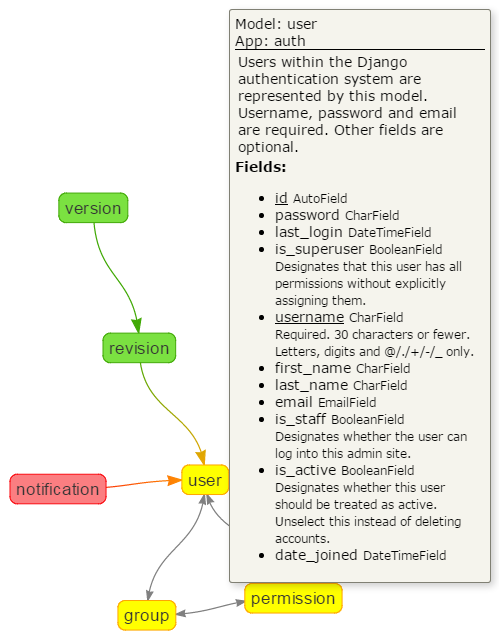
Hovering over a model, gives a pop-up that lists the following information:
model name
app label
The models docstring
A list of every field, with its field type and its help text (if defined). Unique fields have their name underlined.
This was build with the sauce:
SPAGHETTI_SAUCE = {
    'apps': ['auth', 'notifications', 'reversion'],
    'show_fields': False,
}
A complex live-demo
To see a complex example, where django-spaghetti-and-meatballs really shines, checkout the live version built for the Aristotle Metadata Registry
Testing and developing
I like keeping my development environments isolated in docker. You can too. If you want to install poetry locally, you can skip this bit.
Build a container with Pythong and Poetry installed - docker build . -t spaghetti
Run a container for developing docker run -v “$(realpath .)”:/site -w /site -p 8000:8000 -it –rm spaghetti bash
Install the dependencies - poetry install
Open a poetry shell - poetry shell
Run the server - django-admin runserver 0.0.0.0:8000
If you navigate to 127.0.0.1:8000 should should see the demo app.
1 maintainer

Metadata
1 maintainer
Release files for django-spaghetti-and-meatballs 0.4.2
For a detailed explanation of source distributions (sdists) and built distributions (wheels), please see the package formats documentation.
Source distribution (sdist)
| File | Size | Uploaded | |
|---|---|---|---|
| django-spaghetti-and-meatballs-0.4.2.tar.gz | 12.2 kB | Details |
Built distribution (wheel)
| File | Interpreter | ABI | Platform | Reset |
|---|---|---|---|---|
| django_spaghetti_and_meatballs-0.4.2-py3-none-any.whl | Python 3 | none | any | Details |
Total release size: 26.1 kB
Release files / django-spaghetti-and-meatballs-0.4.2.tar.gz
| Download URL | django-spaghetti-and-meatballs-0.4.2.tar.gz |
|---|---|
| Size | 12.2 kB |
| Tags | Source |
|
SHA-256 checksum How to use checksums |
ad1341aa2de9bd989d1f242455980b94ba289836b5a9b67015d1b11fcb33932e
|
|
BLAKE2b-256 checksum How to use checksums |
451fc1fc11aa877748a1477595572b0b1b686ca86cee470f169f53e2c30672d2
|
| Upload date | |
|
Uploaded using Trusted Publishing? What is trusted publishing? |
No |
| Uploaded via |
poetry/1.1.4 CPython/3.8.3 Linux/4.19.104-microsoft-standard
|
Release files / django_spaghetti_and_meatballs-0.4.2-py3-none-any.whl
| Download URL | django_spaghetti_and_meatballs-0.4.2-py3-none-any.whl |
|---|---|
| Size | 13.9 kB |
| Tags | Python 3 |
|
SHA-256 checksum How to use checksums |
daebe5a4000f70b0a538106df27e34ab46d1303e1ee50257d6546aa2ef5330ba
|
|
BLAKE2b-256 checksum How to use checksums |
69d5d5553dcfbb0610ee82f9efd6625a1b524a9abdd2f3803c5c568b95448fae
|
| Upload date | |
|
Uploaded using Trusted Publishing? What is trusted publishing? |
No |
| Uploaded via |
poetry/1.1.4 CPython/3.8.3 Linux/4.19.104-microsoft-standard
|














