
django-split-json-widget
===
[](https://travis-ci.org/abbasovalex/django-SplitJSONWidget-form)
A widget that renders JSON data as separate editable inputs.
## Installation
```pip install django-split-json-widget```
or
```pip install git+https://github.com/abbasovalex/django-SplitJSONWidget-form.git```
### Example №1
#### forms.py
```python
# -*- coding: utf-8 -*-
from django import forms
from splitjson.widgets import SplitJSONWidget
class testForm(forms.Form):
attrs = {'class': 'special', 'size': '40'}
data = forms.CharField(widget=SplitJSONWidget(attrs=attrs, debug=True))
```
#### views.py
```python
# -*- coding: utf-8 -*-
from django.shortcuts import render_to_response
from django.template import RequestContext
from forms import testForm
def test_dict(request):
json = {'a': 1,
'b': 2,
'c': 3,
'd': 4}
form = testForm(request.POST or None, initial={'data': json})
if form.is_valid():
# validate and save
pass
template = 'test_template.html'
context = RequestContext(request, {'form': form})
return render_to_response(template, context)
```
#### test_template.py
```html
<!doctype html>
<html>
<head></head>
<body>
Errors:
{% for field, error in form.errors.items %}
<ul>
<li>{{ error }}</li>
</ul>
{% empty %}
no errors
{% endfor %}
<hr/>
List of:
<form action="" method="post">
{% csrf_token %}
{{ form.as_p}}
<input type="submit" value="Submit" />
</form>
</body>
</html>
```
#### Result (with debug mode enabled)
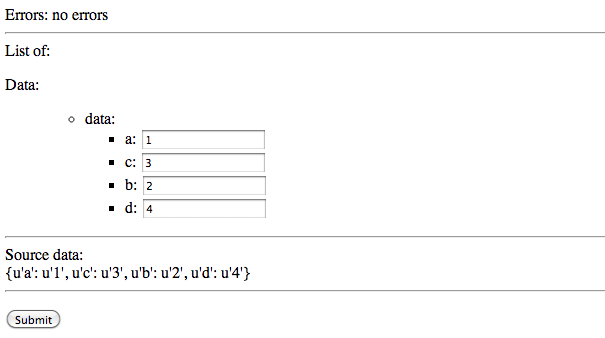
### Example №2
#### forms.py
```python
# -*- coding: utf-8 -*-
from django import forms
from splitjson.widgets import SplitJSONWidget
class testForm(forms.Form):
attrs = {'class': 'special', 'size': '40'}
data = forms.CharField(widget=SplitJSONWidget(attrs=attrs, debug=True))
```
#### views.py
```python
# -*- coding: utf-8 -*-
from django.shortcuts import render_to_response
from django.template import RequestContext
from forms import testForm
def test_nested_dict(request):
json = {'a': {'aa': 1},
'b': [2, 2, {'q': 'qq',
'w': 'ww',
'z': [1, 2, 3, 4, {'five': 'number',
'six': 'number'}, 7]}],
'c': 3,
'd': {'e':'ee', 'f':'ff'},
'listA': [99, 98, 97, {'text': 'string'}],
'ListA': [{'name': 'A', 'value': 'No'},
{'name': 'B', 'value': 'No'},
{'name': 'C', 'value': 'Yes'}]}
form = testForm(request.POST or None, initial={'data': json})
if form.is_valid():
# validate and save
pass
template = 'test_template.html'
context = RequestContext(request, {'form': form})
return render_to_response(template, context)
```
#### test_template.py
```html
<!doctype html>
<html>
<head></head>
<body>
Errors:
{% for field, error in form.errors.items %}
<ul>
<li>{{ error }}</li>
</ul>
{% empty %}
no errors
{% endfor %}
<hr/>
List of:
<form action="" method="post">
{% csrf_token %}
{{ form.as_p}}
<input type="submit" value="Submit" />
</form>
</body>
</html>
```
#### Result (debug mode is enabled)
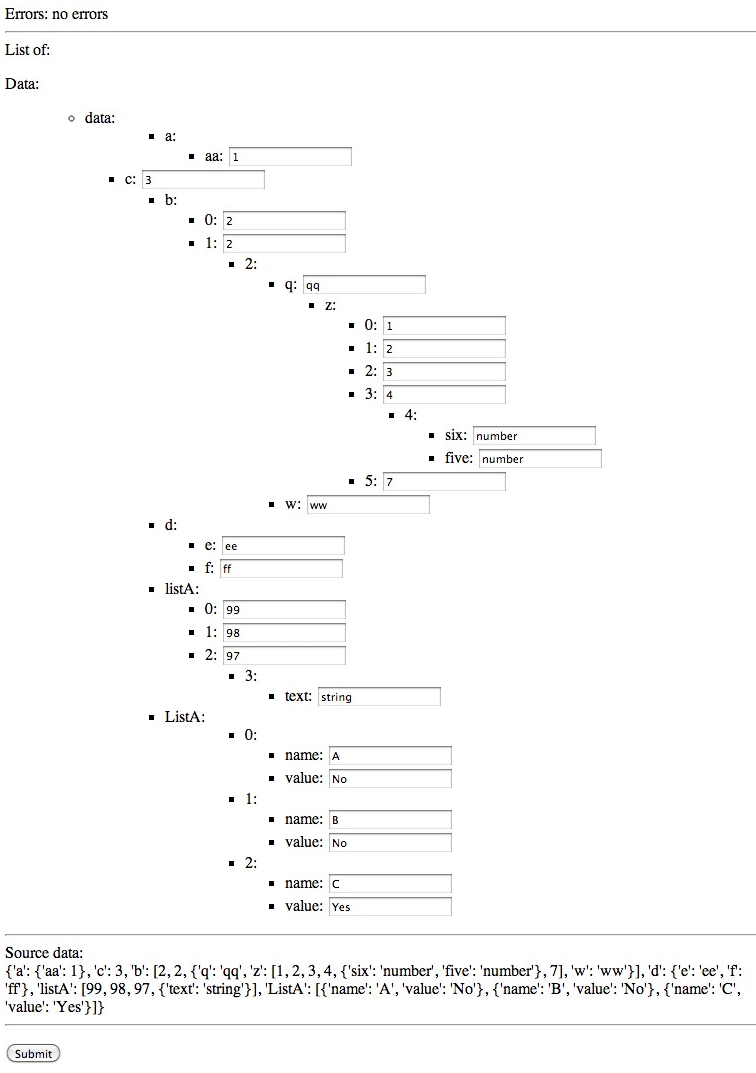
### Example №3
#### forms.py
```python
# -*- coding: utf-8 -*-
from django import forms
from splitjson.widgets import SplitJSONWidget
class testForm(forms.Form):
attrs = {'class': 'special', 'size': '40'}
data = forms.CharField(widget=SplitJSONWidget(attrs=attrs, debug=True))
```
#### views.py
```python
# -*- coding: utf-8 -*-
from django.shortcuts import render_to_response
from django.template import RequestContext
from forms import testForm
def test_list(request):
json = ['a', 'b', 'c']
form = testForm(request.POST or None, initial={'data': json})
if form.is_valid():
# validate and save
pass
template = 'test_template.html'
context = RequestContext(request, {'form': form})
return render_to_response(template, context)
```
#### test_template.py
```html
<!doctype html>
<html>
<head></head>
<body>
Errors:
{% for field, error in form.errors.items %}
<ul>
<li>{{ error }}</li>
</ul>
{% empty %}
no errors
{% endfor %}
<hr/>
List of:
<form action="" method="post">
{% csrf_token %}
{{ form.as_p}}
<input type="submit" value="Submit" />
</form>
</body>
</html>
```
#### Result (debug mode is enabled)
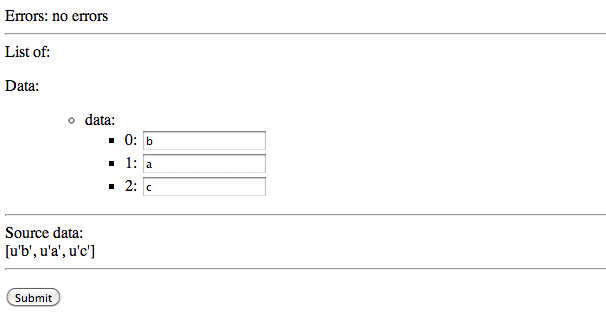
### Example №4
#### forms.py
```python
# -*- coding: utf-8 -*-
from django import forms
from splitjson.widgets import SplitJSONWidget
class testForm(forms.Form):
attrs = {'class': 'special', 'size': '40'}
data = forms.CharField(widget=SplitJSONWidget(attrs=attrs, debug=True))
```
#### views.py
```python
# -*- coding: utf-8 -*-
from django.shortcuts import render_to_response
from django.template import RequestContext
from forms import testForm
def test_nested_list(request):
json = [['a', 'b', [1, 2, 3]], {'c': 'best'}, 'd']
form = testForm(request.POST or None, initial={'data': json})
if form.is_valid():
# validate and save
pass
template = 'test_template.html'
context = RequestContext(request, {'form': form})
return render_to_response(template, context)
```
#### test_template.py
```html
<!doctype html>
<html>
<head></head>
<body>
Errors:
{% for field, error in form.errors.items %}
<ul>
<li>{{ error }}</li>
</ul>
{% empty %}
no errors
{% endfor %}
<hr/>
List of:
<form action="" method="post">
{% csrf_token %}
{{ form.as_p}}
<input type="submit" value="Submit" />
</form>
</body>
</html>
```
#### Result (debug mode is enabled)
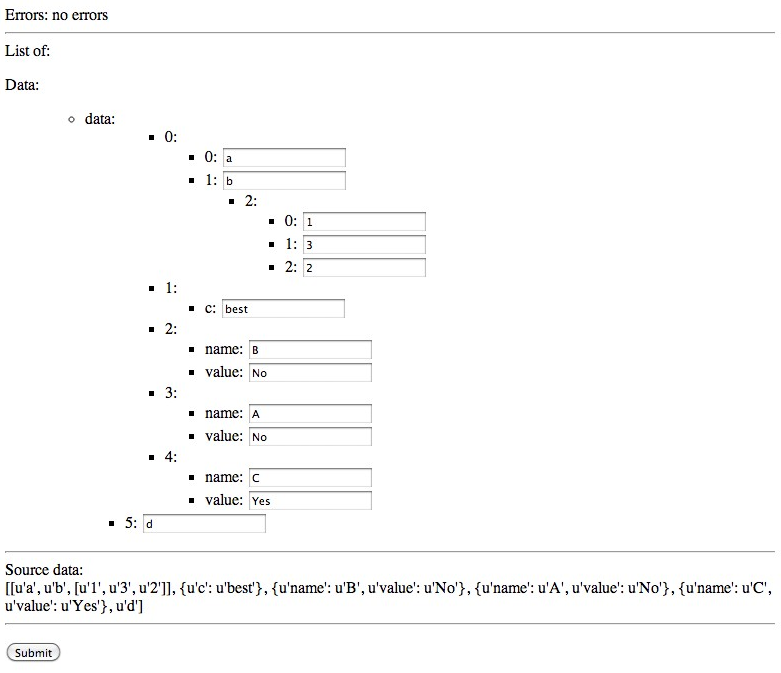
## Known issues
See https://github.com/abbasovalex/django-SplitJSONWidget-form/issues?labels=bug&page=1&state=open
[](https://bitdeli.com/free "Bitdeli Badge")
===
[](https://travis-ci.org/abbasovalex/django-SplitJSONWidget-form)
A widget that renders JSON data as separate editable inputs.
## Installation
```pip install django-split-json-widget```
or
```pip install git+https://github.com/abbasovalex/django-SplitJSONWidget-form.git```
### Example №1
#### forms.py
```python
# -*- coding: utf-8 -*-
from django import forms
from splitjson.widgets import SplitJSONWidget
class testForm(forms.Form):
attrs = {'class': 'special', 'size': '40'}
data = forms.CharField(widget=SplitJSONWidget(attrs=attrs, debug=True))
```
#### views.py
```python
# -*- coding: utf-8 -*-
from django.shortcuts import render_to_response
from django.template import RequestContext
from forms import testForm
def test_dict(request):
json = {'a': 1,
'b': 2,
'c': 3,
'd': 4}
form = testForm(request.POST or None, initial={'data': json})
if form.is_valid():
# validate and save
pass
template = 'test_template.html'
context = RequestContext(request, {'form': form})
return render_to_response(template, context)
```
#### test_template.py
```html
<!doctype html>
<html>
<head></head>
<body>
Errors:
{% for field, error in form.errors.items %}
<ul>
<li>{{ error }}</li>
</ul>
{% empty %}
no errors
{% endfor %}
<hr/>
List of:
<form action="" method="post">
{% csrf_token %}
{{ form.as_p}}
<input type="submit" value="Submit" />
</form>
</body>
</html>
```
#### Result (with debug mode enabled)

### Example №2
#### forms.py
```python
# -*- coding: utf-8 -*-
from django import forms
from splitjson.widgets import SplitJSONWidget
class testForm(forms.Form):
attrs = {'class': 'special', 'size': '40'}
data = forms.CharField(widget=SplitJSONWidget(attrs=attrs, debug=True))
```
#### views.py
```python
# -*- coding: utf-8 -*-
from django.shortcuts import render_to_response
from django.template import RequestContext
from forms import testForm
def test_nested_dict(request):
json = {'a': {'aa': 1},
'b': [2, 2, {'q': 'qq',
'w': 'ww',
'z': [1, 2, 3, 4, {'five': 'number',
'six': 'number'}, 7]}],
'c': 3,
'd': {'e':'ee', 'f':'ff'},
'listA': [99, 98, 97, {'text': 'string'}],
'ListA': [{'name': 'A', 'value': 'No'},
{'name': 'B', 'value': 'No'},
{'name': 'C', 'value': 'Yes'}]}
form = testForm(request.POST or None, initial={'data': json})
if form.is_valid():
# validate and save
pass
template = 'test_template.html'
context = RequestContext(request, {'form': form})
return render_to_response(template, context)
```
#### test_template.py
```html
<!doctype html>
<html>
<head></head>
<body>
Errors:
{% for field, error in form.errors.items %}
<ul>
<li>{{ error }}</li>
</ul>
{% empty %}
no errors
{% endfor %}
<hr/>
List of:
<form action="" method="post">
{% csrf_token %}
{{ form.as_p}}
<input type="submit" value="Submit" />
</form>
</body>
</html>
```
#### Result (debug mode is enabled)

### Example №3
#### forms.py
```python
# -*- coding: utf-8 -*-
from django import forms
from splitjson.widgets import SplitJSONWidget
class testForm(forms.Form):
attrs = {'class': 'special', 'size': '40'}
data = forms.CharField(widget=SplitJSONWidget(attrs=attrs, debug=True))
```
#### views.py
```python
# -*- coding: utf-8 -*-
from django.shortcuts import render_to_response
from django.template import RequestContext
from forms import testForm
def test_list(request):
json = ['a', 'b', 'c']
form = testForm(request.POST or None, initial={'data': json})
if form.is_valid():
# validate and save
pass
template = 'test_template.html'
context = RequestContext(request, {'form': form})
return render_to_response(template, context)
```
#### test_template.py
```html
<!doctype html>
<html>
<head></head>
<body>
Errors:
{% for field, error in form.errors.items %}
<ul>
<li>{{ error }}</li>
</ul>
{% empty %}
no errors
{% endfor %}
<hr/>
List of:
<form action="" method="post">
{% csrf_token %}
{{ form.as_p}}
<input type="submit" value="Submit" />
</form>
</body>
</html>
```
#### Result (debug mode is enabled)

### Example №4
#### forms.py
```python
# -*- coding: utf-8 -*-
from django import forms
from splitjson.widgets import SplitJSONWidget
class testForm(forms.Form):
attrs = {'class': 'special', 'size': '40'}
data = forms.CharField(widget=SplitJSONWidget(attrs=attrs, debug=True))
```
#### views.py
```python
# -*- coding: utf-8 -*-
from django.shortcuts import render_to_response
from django.template import RequestContext
from forms import testForm
def test_nested_list(request):
json = [['a', 'b', [1, 2, 3]], {'c': 'best'}, 'd']
form = testForm(request.POST or None, initial={'data': json})
if form.is_valid():
# validate and save
pass
template = 'test_template.html'
context = RequestContext(request, {'form': form})
return render_to_response(template, context)
```
#### test_template.py
```html
<!doctype html>
<html>
<head></head>
<body>
Errors:
{% for field, error in form.errors.items %}
<ul>
<li>{{ error }}</li>
</ul>
{% empty %}
no errors
{% endfor %}
<hr/>
List of:
<form action="" method="post">
{% csrf_token %}
{{ form.as_p}}
<input type="submit" value="Submit" />
</form>
</body>
</html>
```
#### Result (debug mode is enabled)

## Known issues
See https://github.com/abbasovalex/django-SplitJSONWidget-form/issues?labels=bug&page=1&state=open
[](https://bitdeli.com/free "Bitdeli Badge")
2 maintainers


Metadata
2 maintainers
Release files for django-split-json-widget 1.16
For a detailed explanation of source distributions (sdists) and built distributions (wheels), please see the package formats documentation.
Source distribution (sdist)
| File | Size | Uploaded | |
|---|---|---|---|
| django-split-json-widget-1.16.tar.gz | 5.9 kB | Details |
Release files / django-split-json-widget-1.16.tar.gz
| Download URL | django-split-json-widget-1.16.tar.gz |
|---|---|
| Size | 5.9 kB |
| Tags | Source |
|
SHA-256 checksum How to use checksums |
e6f9f7b0fdddcb8ba5ba457ca45ffd64b3381a9fa6cd98c46c9a543f3ee9cc9b
|
|
BLAKE2b-256 checksum How to use checksums |
1a43a624427c6a90daf634919e6acb65bbcb8b3f98f87eeed87d1ee3bf9be268
|
| Upload date | |
|
Uploaded using Trusted Publishing? What is trusted publishing? |
No |














