
Django Tasks Manager
A super simple Django & Celery integration - This library is actively supported by AppSeed.
Features:
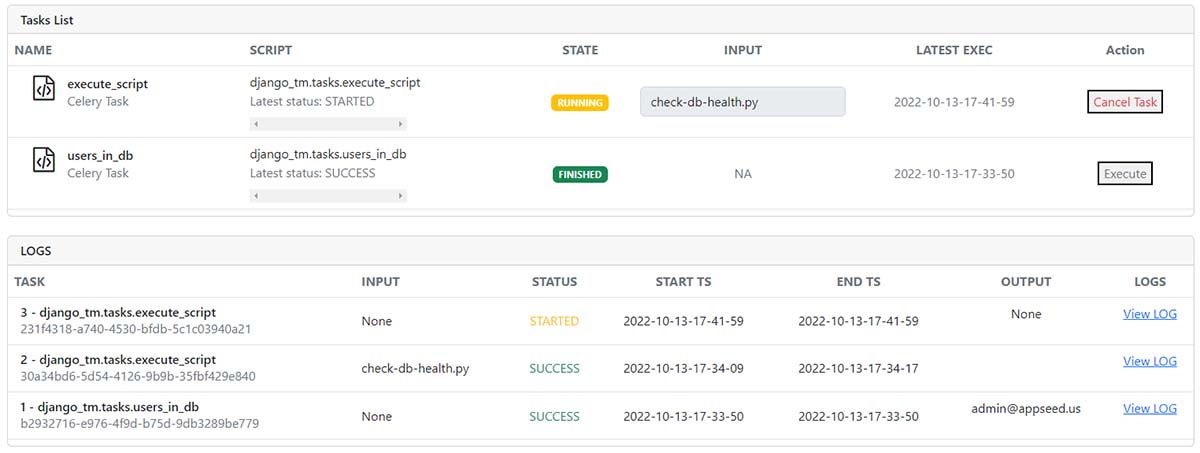
- Create/Revoke
Celery Tasks View LOGS& OutputMinimal Configuration- Available TASKS (provided as starting samples)
users_in_db()- List all registered usersexecute_script()- let users execute the scripts defined inCELERY_SCRIPTS_DIR(CFG parameter)- check-db-health.py (sample)
How to use it
Install the package via
PIP
$ pip install django-tasks-manager
// OR
$ pip install git+https://github.com/app-generator/django-tasks-manager.git
Include the new routing
# core/urls.py

from django.urls import path, include     # <-- UPDATE: Add 'include' HELPER

urlpatterns = [
    ...

    path("", include("django_tm.urls")),  # <-- New Routes

    ...
]
Create Scrips & LOGS directories - The Recomended place is in the root of the project:
$ mkdir celery_scripts # Used in Settings -> CELERY_SCRIPTS_DIR
$ mkdir celery_logs    # Used in Settings -> CELERY_SCRIPTS_DIR
- Make sure the user that executes the app has write permission.
- Copy the sample scripts in the scripts directory.
- All scripts will be available in the UI, ready to be executed by the manager.
Update Configuration Add
osobject import
import os # <-- NEW
Update Configuration: Include the new APPS
INSTALLED_APPS = [
    ...
    'django_tm',              # Django Tasks Manager   # <-- NEW
    'django_celery_results',  # Django Celery Results  # <-- NEW
]
Update Configuration: Include the new templates
TEMPLATE_DIR_TASKS = os.path.join(BASE_DIR, "django_tm/templates")     # <-- NEW

TEMPLATES = [
    {
        'BACKEND': 'django.template.backends.django.DjangoTemplates',
        'DIRS': [TEMPLATE_DIR_TASKS],                                  # <-- Updated
        'APP_DIRS': True,
    },
]
Update Configuration: New CELERY_ Section
#############################################################
# Celery configurations
# https://docs.celeryq.dev/en/stable/django/first-steps-with-django.html

# !!!
# BASE_DIR points to the ROOT of the project
# Note: make sure you have 'os' object imported
# !!!

# !!!
# BASE_DIR = os.path.dirname(os.path.dirname(__file__))
# !!!

# Working Directories required write permission
CELERY_SCRIPTS_DIR        = os.path.join(BASE_DIR, "celery_scripts" )
CELERY_LOGS_DIR           = os.path.join(BASE_DIR, "celery_logs"    )

CELERY_BROKER_URL         = os.environ.get("CELERY_BROKER", "redis://localhost:6379")
CELERY_RESULT_BACKEND     = os.environ.get("CELERY_BROKER", "redis://localhost:6379")

CELERY_TASK_TRACK_STARTED = True
CELERY_TASK_TIME_LIMIT    = 30 * 60
CELERY_CACHE_BACKEND      = "django-cache"
CELERY_RESULT_BACKEND     = "django-db"
CELERY_RESULT_EXTENDED    = True
CELERY_RESULT_EXPIRES     = 60*60*24*30 # Results expire after 1 month
CELERY_ACCEPT_CONTENT     = ["json"]
CELERY_TASK_SERIALIZER    = 'json'
CELERY_RESULT_SERIALIZER  = 'json'

#############################################################
#############################################################
Start the App
$ # Set up the database
$ python manage.py makemigrations
$ python manage.py migrate
$
$ # Create the superuser
$ python manage.py createsuperuser
$
$ # Start the application (development mode)
$ python manage.py runserver # default port 8000
- Authenticate as
superuser - Access the
Taskspage:http://127.0.0.1:8000/tasks
Start the Celery Manager (another terminal) & Update Environment
Export DJANGO_SETTINGS_MODULE using the value provided in manage.py
$ export DJANGO_SETTINGS_MODULE=cfg.settings
The value used export should be taken from manage.py:
def main():

    """Run administrative tasks."""
    os.environ.setdefault("DJANGO_SETTINGS_MODULE", "cfg.settings")  # <-- VALUE to be exported

    try:
        from django.core.management import execute_from_command_line
    except ImportError as exc:
        ...
Note: Redis server is expected on port 6379 (default). In case Redis runs on other PORT, please update the configuration: CELERY_BROKER_URL and CELERY_RESULT_BACKEND.
$ celery --app=django_tm.celery.app worker --loglevel=info
Screens
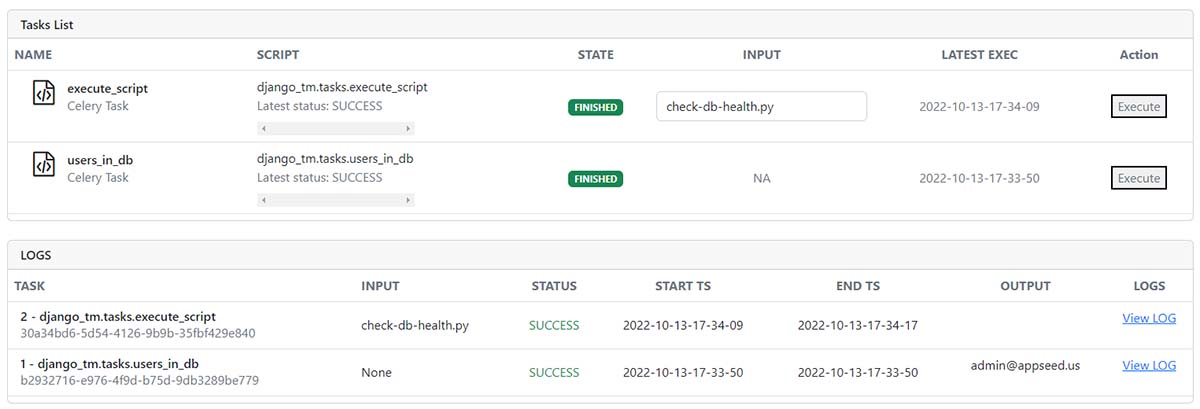
View all tasks
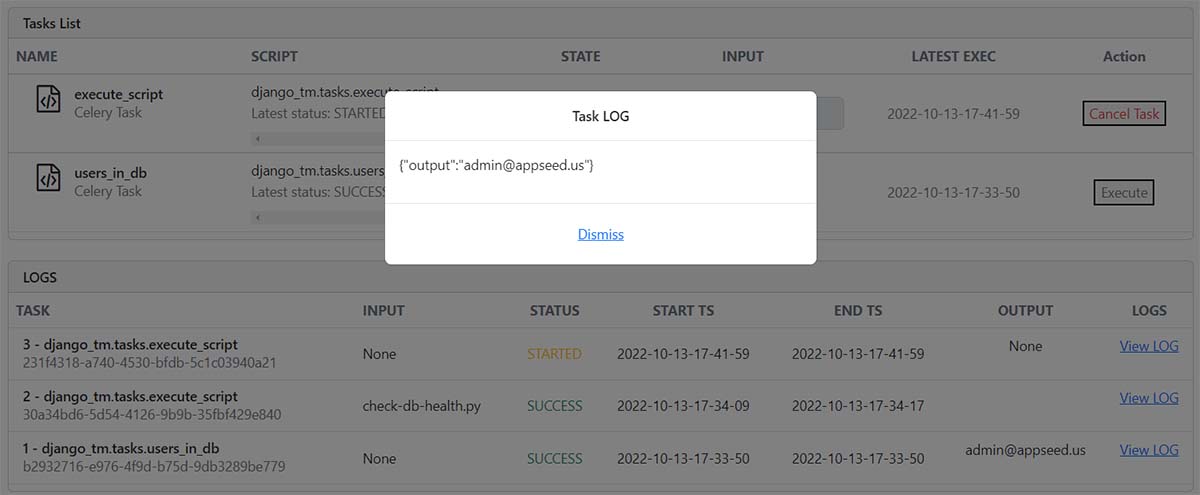
View Task LOG
Links & Resources
- Free Support via Email and Discord
- Django Tasks Manager -
free samplethat explains:Project Creation(minimal files added)Install& GenerateDjangoCore- Install
Django-TM(this package) Update ConfigurationStart the app- Use the
Tasks Manager
Django Tasks Manager - Open-source library provided by AppSeed
1 maintainer

Metadata
1 maintainer
Release files for django-tasks-manager 1.0.1
For a detailed explanation of source distributions (sdists) and built distributions (wheels), please see the package formats documentation.
Source distribution (sdist)
| File | Size | Uploaded | |
|---|---|---|---|
| django-tasks-manager-1.0.1.tar.gz | 13.0 kB | Details |
Release files / django-tasks-manager-1.0.1.tar.gz
| Download URL | django-tasks-manager-1.0.1.tar.gz |
|---|---|
| Size | 13.0 kB |
| Tags | Source |
|
SHA-256 checksum How to use checksums |
aded173cb1968591d5d23a7c7ad0f306041328760ddc39312ab5d1b3f8674dff
|
|
BLAKE2b-256 checksum How to use checksums |
a4ee444a5bcf6f6e2472ad8cb055168250992db4ee62ba9cc4aa0b5a95298822
|
| Upload date | |
|
Uploaded using Trusted Publishing? What is trusted publishing? |
No |
| Uploaded via |
twine/4.0.1 CPython/3.10.4
|














