
django-templated-email-md





Features
- Markdown Templates: Write email templates using Markdown syntax for cleaner and more readable templates.
- Automatic Conversion: Automatically converts Markdown to HTML and generates a plain text version of emails.
- CSS Inlining: Inlines CSS styles for better email client compatibility using Premailer.
- Seamless Integration: Works as an extension of
django-templated-email, allowing for easy integration into existing projects. - Template Inheritance: Supports Django template inheritance and template tags in your Markdown templates.
Installation
You can install django-templated-email-md via pip from PyPI:
pip install django-templated-email-md
Requirements
- Python 3.11+
- Django 4.2+
- django-templated-email 3.0+
Add to INSTALLED_APPS
Add templated_email_md to your INSTALLED_APPS in settings.py:
INSTALLED_APPS = [
    # ...
    'templated_email_md',
    # ...
]
Configuration
Assuming you have already installed and configured django-templated-email, update your Django settings as follows:
# settings.py

# Configure the templated email backend
TEMPLATED_EMAIL_BACKEND = 'templated_email_md.backend.MarkdownTemplateBackend'

# Optional: Specify the base HTML template for wrapping your content. See the Usage guide for details.
TEMPLATED_EMAIL_BASE_HTML_TEMPLATE = 'templated_email/markdown_base.html'

# Set the directory where your email templates are stored
TEMPLATED_EMAIL_TEMPLATE_DIR = 'templated_email/'  # Ensure there's a trailing slash

# Define the file extension for your Markdown templates
TEMPLATED_EMAIL_FILE_EXTENSION = 'md'

# Optional: Specify Markdown extensions if needed
TEMPLATED_EMAIL_MARKDOWN_EXTENSIONS = [
    'markdown.extensions.extra',
    'markdown.extensions.meta',
    'markdown.extensions.tables',
]

# Optional: Base URL for resolving relative URLs in CSS/images
TEMPLATED_EMAIL_BASE_URL = 'https://example.com'

# Optional: Customize plain text generation
TEMPLATED_EMAIL_HTML2TEXT_SETTINGS = {
    'ignore_emphasis': True,
    'body_width': 0,
}

# Optional: Fail silently on errors (default: False)
TEMPLATED_EMAIL_FAIL_SILENTLY = False
For a complete list of available settings, see the settings documentation.
Usage
Creating Markdown Templates
Place your Markdown email templates in the templated_email/ directory within your project's templates directory. For example, create a file templated_email/welcome.md:
{% block subject %}Test Email{% endblock %}
{% block preheader %}Thanks for signing up!{% endblock %}
{% block content %}
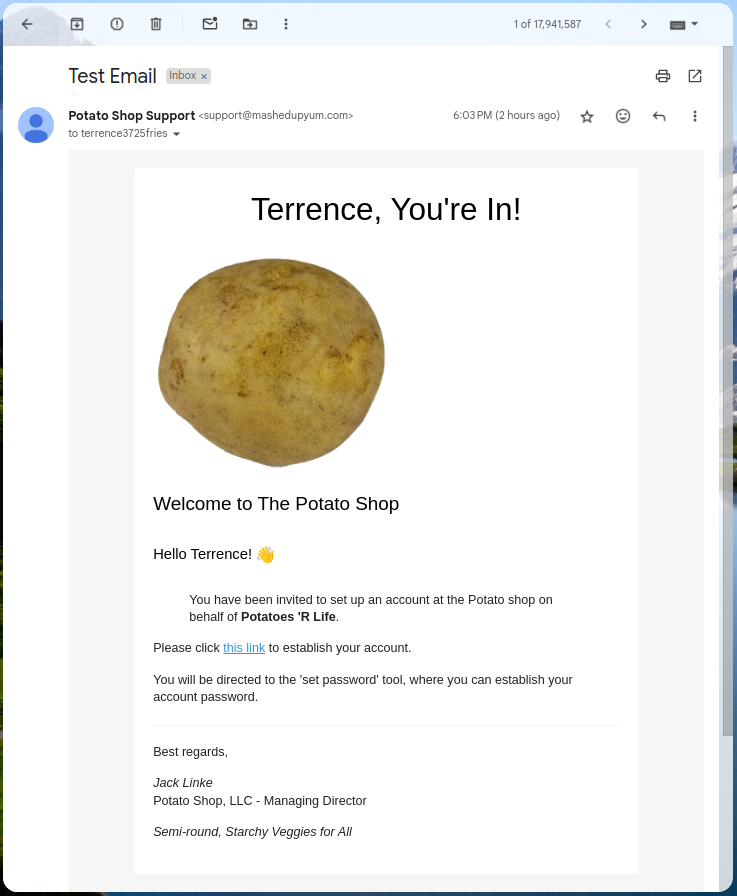
# {{ user.first_name }}, you're in!

## Welcome to The Potato Shop
### Hello {{ user.first_name }}! 👋
> You have been invited to set up an account at the Potato shop on behalf of **{{ inviter.name }}**.
Please click [this link]({% url 'invitations:accept-invite' key=invitation.key %}) to establish your account.
{% blocktranslate %}You will be directed to the 'set password' tool, where you can establish your account password.{% endblocktranslate %}
---
Best regards,
*Jack Linke*
Potato Shop, LLC - Managing Director
*Semi-round, Starchy Veggies for All*
{% endblock %}
Sending Emails
Use the send_templated_mail function to send emails using your Markdown templates, just as you would with the base django-templated-email package:
from templated_email import send_templated_mail

send_templated_mail(
    template_name='welcome',
    from_email='Potato Shop Support <support@mashedupyum.com>',
    recipient_list=['terrence3725fries@wannamashitup.com'],
    context={
        'user': request.user,
        'inviter': inviter,
    },
)
You can also pass a base_url parameter for resolving relative URLs in CSS and images:
send_templated_mail(
    template_name='welcome',
    from_email='support@example.com',
    recipient_list=['user@example.com'],
    context={
        'user': request.user,
    },
    base_url='https://example.com',  # Optional: for CSS/image URLs
)
The Result
Inbox Preview

Email Preview
More detailed information can be found in the usage guide.
Documentation
For more detailed information, please refer to the full documentation.
Contributing
Contributions are very welcome. To learn more, see the Contributor Guide.
License
Distributed under the terms of the MIT license, django-templated-email-md is free and open source software.
Issues
If you encounter any problems, please file an issue along with a detailed description.
Credits
We are grateful to the maintainers of the following projects:
This project was generated from @OmenApps's Cookiecutter Django Package template.


Release files for django-templated-email-md 2026.5.1
For a detailed explanation of source distributions (sdists) and built distributions (wheels), please see the package formats documentation.
Source distribution (sdist)
| File | Size | Uploaded | Provenance | |
|---|---|---|---|---|
| django_templated_email_md-2026.5.1.tar.gz | 23.1 kB | Without provenance | Details |
Built distribution (wheel)
| File | Interpreter | ABI | Platform | Reset |
|---|---|---|---|---|
| django_templated_email_md-2026.5.1-py3-none-any.whl | Python 3 | none | any | Details |
Total release size: 49.6 kB
Release files / django_templated_email_md-2026.5.1.tar.gz
| Download URL | django_templated_email_md-2026.5.1.tar.gz |
|---|---|
| Size | 23.1 kB |
| Tags | Source |
|
SHA-256 checksum How to use checksums |
eea6e9d33caad3abd632154531c7fcd8bb40f2e5c0eb45786cbd65d2d99363b9
|
|
BLAKE2b-256 checksum How to use checksums |
955e8b4f4e84dd6fdd4f70ef347e9182b30654d44b9c015ac27c062a4802a085
|
| Upload date | |
|
Uploaded using Trusted Publishing? What is trusted publishing? |
No |
| Uploaded via |
uv/0.11.3 {"installer":{"name":"uv","version":"0.11.3","subcommand":["publish"]},"python":null,"implementation":{"name":null,"version":null},"distro":{"name":"Ubuntu","version":"24.04","id":"noble","libc":null},"system":{"name":null,"release":null},"cpu":null,"openssl_version":null,"setuptools_version":null,"rustc_version":null,"ci":null}
|
Release files / django_templated_email_md-2026.5.1-py3-none-any.whl
| Download URL | django_templated_email_md-2026.5.1-py3-none-any.whl |
|---|---|
| Size | 26.5 kB |
| Tags | Python 3 |
|
SHA-256 checksum How to use checksums |
8c8dcd7c825bb07d529f0fe932739f1b9f3e685c5cd4272cb1ac334152104fae
|
|
BLAKE2b-256 checksum How to use checksums |
69f8f198986a50c1c75aba00fa0ea607402c975816383d3dc123f2efe693814b
|
| Upload date | |
|
Uploaded using Trusted Publishing? What is trusted publishing? |
No |
| Uploaded via |
uv/0.11.3 {"installer":{"name":"uv","version":"0.11.3","subcommand":["publish"]},"python":null,"implementation":{"name":null,"version":null},"distro":{"name":"Ubuntu","version":"24.04","id":"noble","libc":null},"system":{"name":null,"release":null},"cpu":null,"openssl_version":null,"setuptools_version":null,"rustc_version":null,"ci":null}
|
Security for django-templated-email-md 2026.5.1
Provenance
Provenance describes where a file came from. On PyPI, provenance is shared via attestations, which provide a verifiable record of the build or publishing details. View details, limitations and caveats.
No provenance found
None of the files in this release were uploaded with provenance metadata.
A note on package security
PyPI is a repository for distributing packages, not a service for auditing them. While third-party security researchers and our staff do their best to detect and remove malicious packages, PyPI cannot guarantee the quality, security or suitability of any given package.














