
django-dashing

Note this fork is to support Django 3, which dropped support for Python2.
NOTE: Using Python 3.9 for development as shown in pipfile, but Python 3.6 or greater should work too.
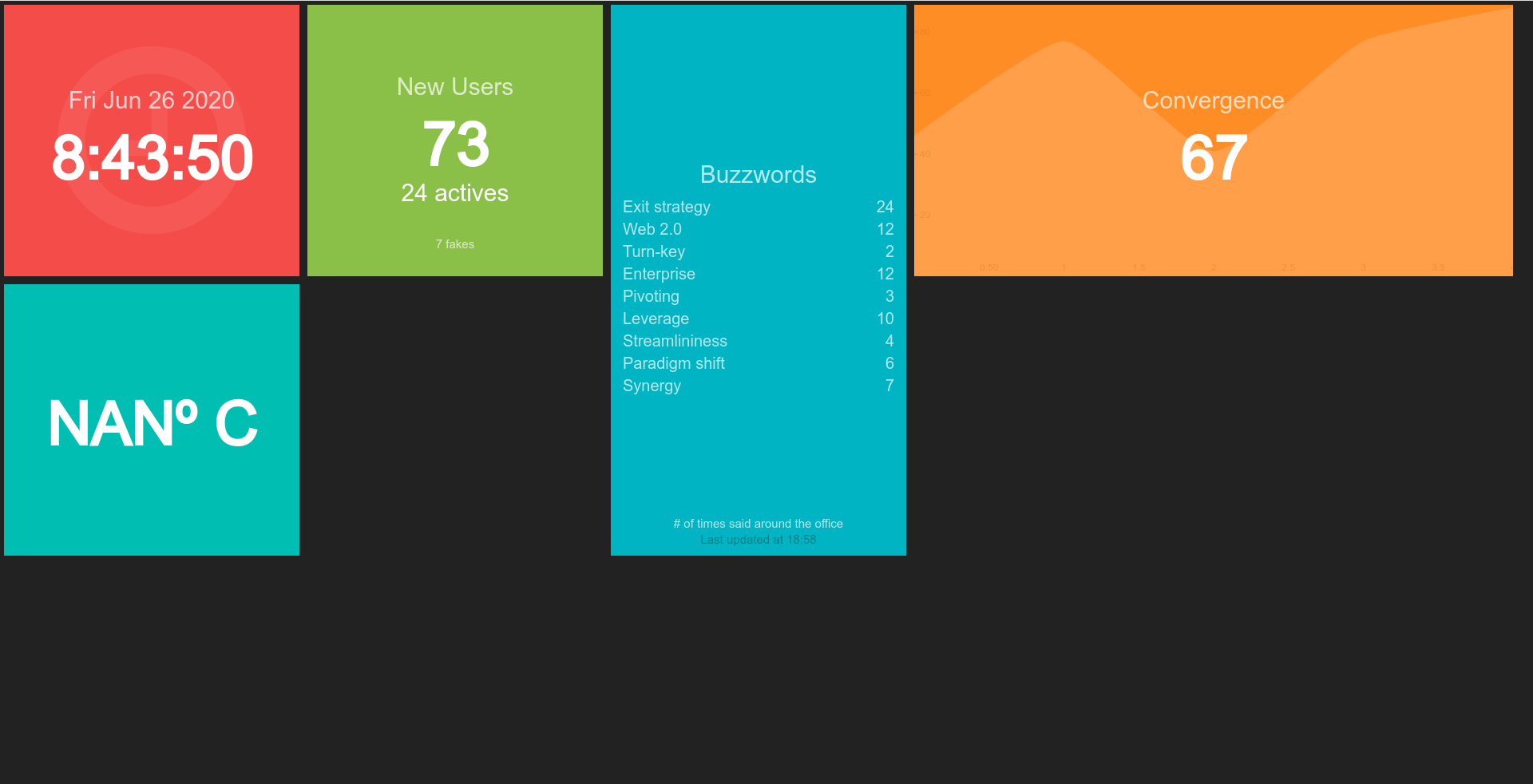
django-dashing is a customisable, modular dashboard application framework for Django to visualize interesting data about your project. Inspired in the exceptionally handsome dashboard framework Dashing
Check out a demo over here.
Prerequisites
Django 3+
Django Compressor (optional)
Key concepts
Use premade widgets, or fully create your own with css, html, and javascript.
Use the API to push data to your dashboards.
Drag & Drop interface for re-arranging your widgets.
Installation
Install latest stable version from PyPi:
$ pip install django-dashingAdd dashing to INSTALLED_APPS of the your projects.
INSTALLED_APPS = (
    ...
    'dashing',
)
Include the dashboard URLconf in your project urls.py like this:
from dashing.utils import router
...
path('dashboard/', include(router.urls)),
Start the development server and visit http://127.0.0.1:8000/dashboard/ to view the dummy dashboard.
Quick Start
To make your own dashboard and retrieves the data from django you should:
Create a django dashboard application with a widgets.py file
Create your widget extended from NumberWidget, ListWidget, GraphWidget or simply Widget (from dashing.widgets), for example see.
Register your widget in urls.py like:
from django.urls import include, path
from dashing.utils import router

from project.dashboard.widgets import CustomWidget

router.register(CustomWidget, 'custom_widget')

urlpatterns = [
    path('dashboard/', include(router.urls)),
]
Create a dashing-config.js file with a widget that retrive the data in your static directory like:
var myDashboard = new Dashboard();
myDashboard.addWidget('customWidget', 'Number', {
    getData: function () {
        var self = this;
        Dashing.utils.get('custom_widget', function(data) {
            $.extend(self.scope, data);
        });
    },
    interval: 3000
});
Also if you want to locate the config file in a different directory you can create a dashing/dashboard.html file in your TEMPLATE_DIRS and replace the config_file block to the route of your javascript config file, see the docs.
Testing
Install dependencies.
$ npm install
$ pip install -r requirements.txt
Run tests.
$ npm testLinks
1 maintainer

Metadata
1 maintainer
Release files for django3-dashing 0.5.2
For a detailed explanation of source distributions (sdists) and built distributions (wheels), please see the package formats documentation.
Source distribution (sdist)
| File | Size | Uploaded | Provenance | Actions |
|---|---|---|---|---|
| django3-dashing-0.5.2.tar.gz | 799.6 kB | Without provenance | Details for django3-dashing-0.5.2.tar.gz |
Built distribution (wheel)
| File | Interpreter | ABI | Platform | Actions Reset |
|---|---|---|---|---|
| django3_dashing-0.5.2-py3-none-any.whl | Python 3 | none | any | Details for django3_dashing-0.5.2-py3-none-any.whl |
Total release size: 1.7 MB
Release files / django3-dashing-0.5.2.tar.gz
| Download URL | django3-dashing-0.5.2.tar.gz |
|---|---|
| Size | 799.6 kB |
| Tags | Source |
|
SHA-256 checksum How to use checksums |
decc4f13a9b91c4ee0d9fe6db0546745b6a6749415a0eb81bcc0cc050ae3a6dc
|
|
BLAKE2b-256 checksum How to use checksums |
d034e7c4db52b556efbf29a9815017dd3606e57b63323c4a30f79fa7fe5b3b36
|
| Upload date | |
|
Uploaded using Trusted Publishing? What is trusted publishing? |
No |
| Uploaded via |
twine/3.4.1 importlib_metadata/4.0.1 pkginfo/1.7.0 requests/2.25.1 requests-toolbelt/0.9.1 tqdm/4.60.0 CPython/3.7.9
|
Release files / django3_dashing-0.5.2-py3-none-any.whl
| Download URL | django3_dashing-0.5.2-py3-none-any.whl |
|---|---|
| Size | 862.3 kB |
| Tags | Python 3 |
|
SHA-256 checksum How to use checksums |
4e1e13d4c280450b9de27a902093e8e9bddcd3a0a0870c715ed79d2582c93c98
|
|
BLAKE2b-256 checksum How to use checksums |
217337200a5c1bb0330864bff3e18d220f1f6ff2296b248c0e95fe5fbca93f7d
|
| Upload date | |
|
Uploaded using Trusted Publishing? What is trusted publishing? |
No |
| Uploaded via |
twine/3.4.1 importlib_metadata/4.0.1 pkginfo/1.7.0 requests/2.25.1 requests-toolbelt/0.9.1 tqdm/4.60.0 CPython/3.7.9
|
Security for django3-dashing 0.5.2
Provenance
Provenance describes where a file came from. On PyPI, provenance is shared via attestations, which provide a verifiable record of the build or publishing details. View details, limitations and caveats.
No provenance found
None of the files in this release were uploaded with provenance metadata.
A note on package security
PyPI is a repository for distributing packages, not a service for auditing them. While third-party security researchers and our staff do their best to detect and remove malicious packages, PyPI cannot guarantee the quality, security or suitability of any given package.
To learn more about protecting yourself from malicious actors, visit our package security documentation.














