

Add an Agenda to your blog that displays upcoming events!
Easy! CheapFree! Not seen on TV!
Still using djangocms-blog? Check out djangocms-blog-agenda instead!
Install
-
Install the package
python3 -m pip install djangocms-stories-agenda
-
Add it in your
INSTALLED_APPS:"djangocms_stories_agenda", "recurrence",
-
Run the migration:
python3 manage.py migrate djangocms_stories_agenda
-
Update the
djangocms-storiesurls by the ones in this module, by using this lovely setting:STORIES_URLCONF = "djangocms_stories_agenda.patched_urls"
-
Create a new blog configuration.
- Instance namespace: put what you want.
- Application title: put what you want.
- Object name: put what you want.
- [...]
- Click on Layout (Show):
- [...]
- Template prefix:
djangocms_stories_agenda.
That's very important since this application will check this value multiple times (to update the queryset, to check the templates, to add the post extension "event date" only to the Agenda app...).
- Save this config.
-

Explanations/Views/Misc
- A new
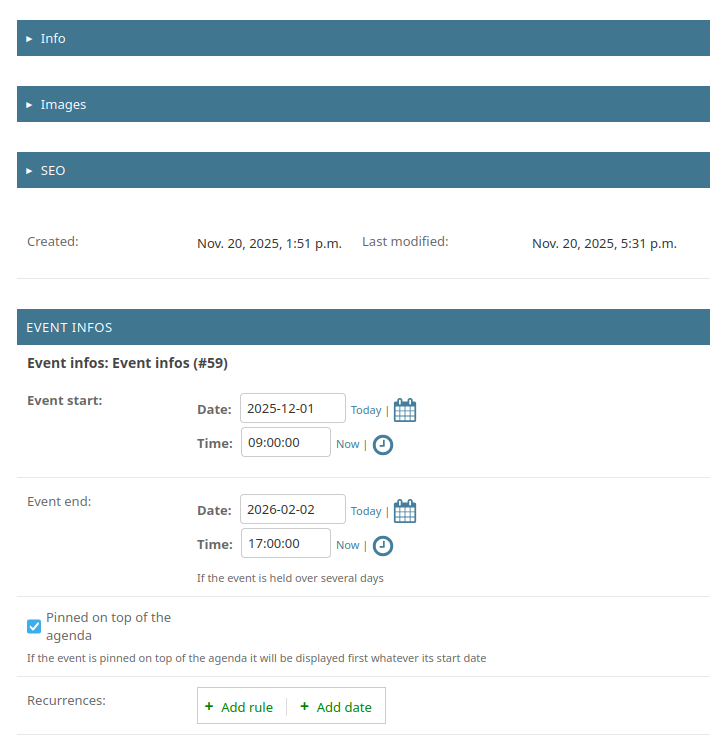
Event dateDateTime field has been added to blog posts that have the template prefix set todjangocms_stories_agenda. - A new post list view was created for the Agenda view, it includes all the posts where the
event_dateis set to a date in the future. - Another view is available at
_("/past/"), that will display each post where theevent_dateis in the past. - The templates are not in
djangocms_stories/templatesanymore, but indjangocms_stories_agenda/templates. Something's not appearing on your templates? Try to edit the file indjangocms_stories_agenda/templates/! - We removed the mention of comments & liveblog in the admin form, because we're not using this.
- We use some very special bits of code that are using some internal features of djangocms-stories (see
misc.py, andapps.py). Try the module before pushing an update.
Config
Settings
DJANGOCMS_STORIES_AGENDA_HIDE_UPCOMING_EVENTS_AFTER_CHOICES
a tuple of choices describing when AgendaUpcomingEntriesPlugin will hide events.
Default choices are:
(
    ("start", _("just after event start date")),
    ("start+1h", _("1 hour after event start date")),
    ("start+4h", _("4 hours after event start date")),
    ("start+1d", _("1 day after event start date")),
    ("start+2d", _("2 days after event start date")),
    ("start+3d", _("3 days after event start date")),
    ("start+7d", _("7 days after event start date")),
    ("end", _("just after event end date")),
)
DJANGOCMS_STORIES_AGENDA_RECURRENCE_IS_ENABLED
Wether to enable recurrence for events.
DJANGOCMS_STORIES_AGENDA_RECURRENCE_MAX_DAYS_SEARCH
Number of days (int) to limit the search of recurring events. Defaults to 365.
DJANGOCMS_STORIES_AGENDA_TEMPLATE_PREFIXES
You may need to add multiple agenda blogs with different template prefixes, in order to have different html content or styles for each agenda.
Add this list in your settings so that djangocms-stories-agenda will work (display start_date & end_date in add/update views of the articles):
DJANGOCMS_STORIES_AGENDA_TEMPLATE_PREFIXES = [
    "djangocms_stories_upcoming_calendar",
    "other_djangocms_stories_template_prefix",
    "...",
]
The default template prefix (
djangocms_stories_agenda) will still be recognized even if you had this setting, you don't need to add it in the list.
DJANGOCMS_STORIES_AGENDA_OPEN_FIELDSETS_BY_DEFAULT
If you want to open all the fieldsets in the admin instead of having to click on them. Defaults to False.
Multisite
This modules handles multisite just fine; just add BLOG_MULTISITE = True in your settings, and our module will inject the get_site function directly inside the class returned by get_user_model()! (it is done in AppConfig ready() method)
You will then need to create a new "Global Page Permission" entry with your user/group, and to select the site where the user/group will have the right to post new articles/agenda posts.
If you're curious about this function, here it is.
Recurrences
Recurring events are handled with the help of django-recurrence package. Only the first event is saved into database, and following recurring events are added into querysets just before they are displayed. Only events that will occur up to n days after the first event are displayed. You can change this delay with the setting DJANGOCMS_STORIES_AGENDA_RECURRENCE_MAX_DAYS_SEARCH.
You need to update the way you display dates on the templates in order to show the correct date from a recurring event, like this:
{% if post.occurrence %}
    {# use post.occurrence here #}
{% else %}
    {% with post_event=post.extension.first %}
        {# use post_event.event_start_date and post_event.event_end_date here #}
    {% endwith %}
{% endif %}
Tests
Run the tests using tox:
tox
Run the tests using pytest:
virtualenv .venv
source .venv/bin/activate
pip install -r requirements-test.txt
pytest
1 maintainer

Metadata
1 maintainer
Release files for djangocms-stories-agenda 0.1.10
For a detailed explanation of source distributions (sdists) and built distributions (wheels), please see the package formats documentation.
Source distribution (sdist)
| File | Size | Uploaded | |
|---|---|---|---|
| djangocms_stories_agenda-0.1.10.tar.gz | 39.7 kB | Details |
Release files / djangocms_stories_agenda-0.1.10.tar.gz
| Download URL | djangocms_stories_agenda-0.1.10.tar.gz |
|---|---|
| Size | 39.7 kB |
| Tags | Source |
|
SHA-256 checksum How to use checksums |
de0ade88e17298995256ef7f0113102edff6bd6e0087c70897ab6832392f4589
|
|
BLAKE2b-256 checksum How to use checksums |
23fafde9da46bd4a58265665a37ea67e898ce7a1e4b1239a3d37487aa422ebc9
|
| Upload date | |
|
Uploaded using Trusted Publishing? What is trusted publishing? |
No |
| Uploaded via |
twine/6.1.0 CPython/3.12.9
|














