
DL's Lex

Project description
DLex
DL‘s Lexer
DLex可以使用正规文法和正则表达式两种格式进行分析。由NFA到DFA的过程,默认对DFA进行最小化。
使用方法
正规文法
DFA画图
执行语句
python .\cli.py -g .\test\rule.txt -d
运行结果

分析代码获取token流
执行语句
python .\cli.py -g .\test\rule.txt -p -codefile .\test\codeGr
.\test\codeGr中的内容:
import A
int main(){
    string s = "helloWorld";
    return 0;
}
运行结果
row:1,col:0,value:import
row:1,col:6,value:A
row:2,col:0,value:int
row:2,col:3,value:main
row:2,col:8,value:(
row:2,col:9,value:)
row:2,col:10,value:{
row:3,col:4,value:string
row:3,col:10,value:s
row:3,col:12,value:=
row:3,col:14,value:"helloWorld"
row:3,col:27,value:;
row:4,col:4,value:return
row:4,col:10,value:0
row:4,col:12,value:;
row:5,col:0,value:}
对DFA进行持久化
执行语句
python .\cli.py -g .\test\rule.txt -pk
运行结果
获得一个名为DFAresult的pickle文件。
正则表达式
DFA画图
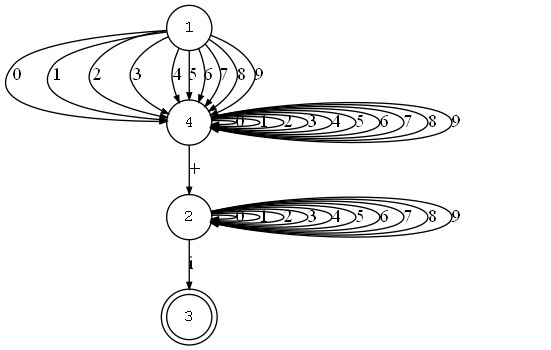
为了便于得到token的类型,对于正则表达式采用每一种模式分别生成一个DFA的办法,所以需要有选择的进行画图。
比如,查看一个类型为COMPLEX的DFA,则:
执行语句
python .\cli.py -r .\config.json -d -type 'COMPLEX'
运行结果
分析代码获取token流
执行语句
python .\cli.py -r .\config.json -p -codefile .\test\codeRe
.\test\codeRe中的内容:
import A
int main(){
    string s = "I want to say :\"helloWorld\"";
    cp = 4+8i
    se = 5E+9
    int a=10
    return 0;
}
"""sdfas
运行结果
LexerError: Lexer error on 's' line: 9 column: 8
Token(IMPORT, 'import', position=1:6)
Token(ID, 'A', position=1:8)
Token(INT, 'int', position=2:3)
Token(MAIN, 'main', position=2:8)
Token(LP, '(', position=2:9)
Token(RP, ')', position=2:10)
Token(CLP, '{', position=2:11)
Token(STRING, 'string', position=3:10)
Token(ID, 's', position=3:12)
Token(ASSIGN, '=', position=3:14)
Token(STRINGVALUE, '"I want to say :\\"helloWorld\\""', position=3:46)
Token(SEMI, ';', position=3:47)
Token(ID, 'cp', position=4:6)
Token(ASSIGN, '=', position=4:8)
Token(COMPLEX, '4+8i', position=4:13)
Token(ID, 'se', position=5:6)
Token(ASSIGN, '=', position=5:8)
Token(SCIENCE, '5E+9', position=5:13)
Token(INT, 'int', position=6:7)
Token(ID, 'a', position=6:9)
Token(ASSIGN, '=', position=6:10)
Token(INTEGER, '10', position=6:12)
Token(RETURN, 'return', position=7:10)
Token(INTEGER, '0', position=7:12)
Token(SEMI, ';', position=7:13)
Token(CRP, '}', position=8:1)
Token(STRINGVALUE, '""', position=9:2)
对DFA进行持久化
执行语句
python .\cli.py -r .\config.json -pk
运行结果
获得一个名为DFAresult的pickle文件。
Release history Release notifications | RSS feed


Download files
Download the file for your platform. If you're not sure which to choose, learn more about installing packages.
Source Distribution
DLex-DeaL-0.0.3.tar.gz
(10.5 kB
view details)
Built Distribution
Filter files by name, interpreter, ABI, and platform.
If you're not sure about the file name format, learn more about wheel file names.
Copy a direct link to the current filters
DLex_DeaL-0.0.3-py3-none-any.whl
(10.6 kB
view details)
File details
Details for the file DLex-DeaL-0.0.3.tar.gz.
File metadata
- Download URL: DLex-DeaL-0.0.3.tar.gz
- Upload date:
- Size: 10.5 kB
- Tags: Source
- Uploaded using Trusted Publishing? No
- Uploaded via: twine/3.8.0 pkginfo/1.8.2 readme-renderer/34.0 requests/2.27.1 requests-toolbelt/0.9.1 urllib3/1.26.9 tqdm/4.63.0 importlib-metadata/4.11.3 keyring/23.5.0 rfc3986/2.0.0 colorama/0.4.4 CPython/3.9.6
File hashes
| Algorithm | Hash digest | |
|---|---|---|
| SHA256 |
35a9ce00627aa83fa07cce19152ff4320719ec07c7858b09a5fb2d61547b0143
|
|
| MD5 |
2dc66fa25c6c07fe5556b7c47e14dccf
|
|
| BLAKE2b-256 |
94803d9102b066ee00f5f78b62d0b9ddcede19ac8f00e5f9ab660807762bb259
|
File details
Details for the file DLex_DeaL-0.0.3-py3-none-any.whl.
File metadata
- Download URL: DLex_DeaL-0.0.3-py3-none-any.whl
- Upload date:
- Size: 10.6 kB
- Tags: Python 3
- Uploaded using Trusted Publishing? No
- Uploaded via: twine/3.8.0 pkginfo/1.8.2 readme-renderer/34.0 requests/2.27.1 requests-toolbelt/0.9.1 urllib3/1.26.9 tqdm/4.63.0 importlib-metadata/4.11.3 keyring/23.5.0 rfc3986/2.0.0 colorama/0.4.4 CPython/3.9.6
File hashes
| Algorithm | Hash digest | |
|---|---|---|
| SHA256 |
5832f64dc108d76e2328ce69fb339f130c59d0bd3c5cf8a6386156b4f3e23cf4
|
|
| MD5 |
09a72b238010279561425526352a1603
|
|
| BLAKE2b-256 |
703bc35239910d775f9b5f7d66d276c2d123a1c6ae6e4fce1533cbc18140f2ad
|






