
doc2dash
doc2dash is an extensible Documentation Set (docset) generator that helps you to have documentation for all your favorite APIs in Dash-compatible API browsers.
An API browser is an application that runs locally on your computer and allows you to search various API docs by pressing a key combination and starting to type (I have bound it to ⌥Space bar and can’t write code without it).
The most common ones – Dash (macOS) and Zeal (Windows and Linux) – come with many docsets out of the box, but they can never offer you docsets for every package you’ll ever use. This is where doc2dash comes in: It takes your offline documentation and converts it into an indexed format that API browsers can read and search (very fast!).
Currently it supports all known intersphinx-based documentation systems like Sphinx, pydoctor, or MkDocs (with mkdocstrings). While doc2dash is a Python project, the support is not limited to Python-related formats.
It’s also extendable: you can write your own parser!
Quickstart
The fastest way to get started is installing doc2dash from our Homebrew tap:
$ brew install hynek/tap/doc2dash
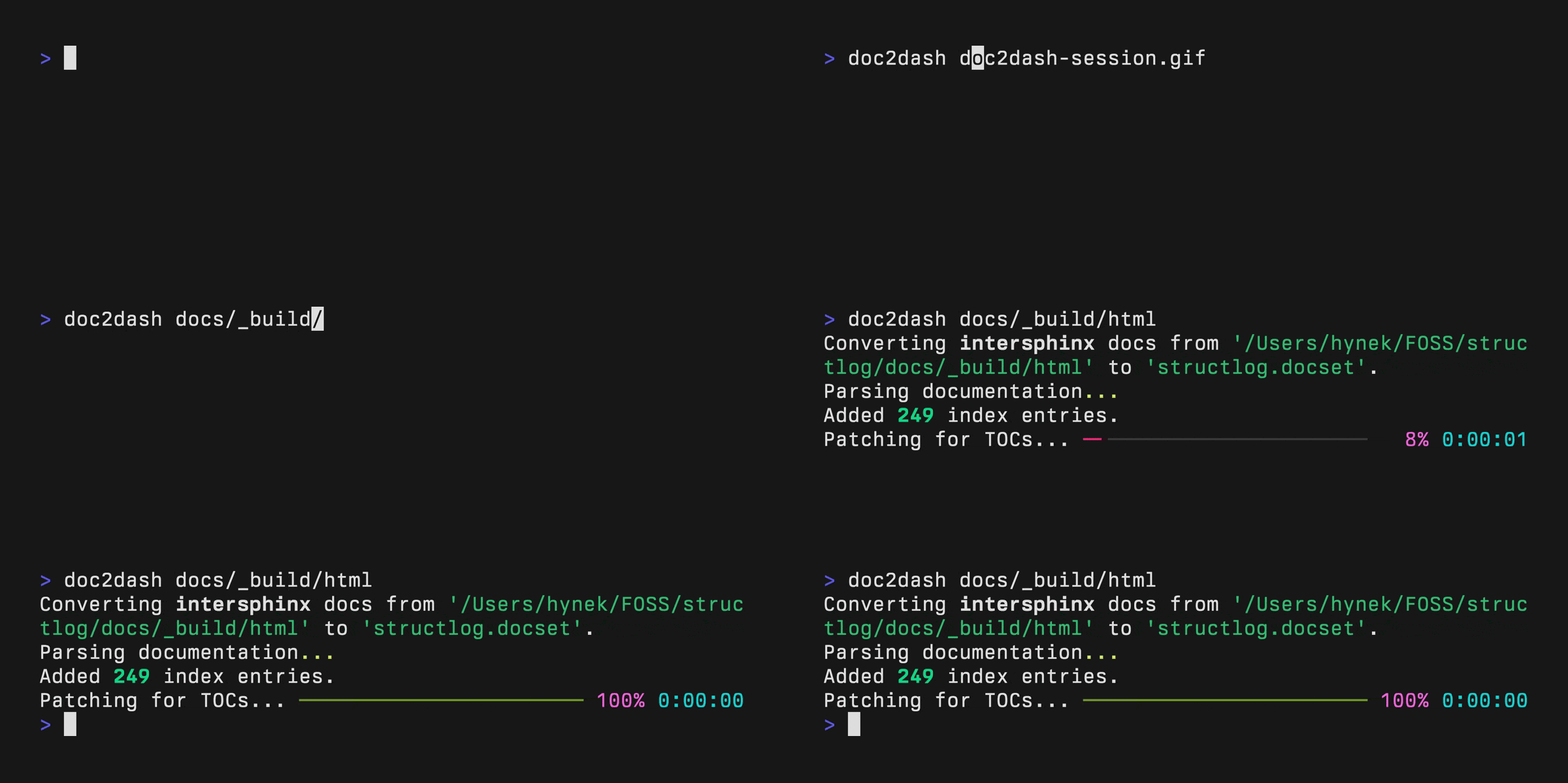
Then point doc2dash at a directory containing built intersphinx-compatible documentation:
$ doc2dash directory/to/documentation
You should see an output like in the video above and find an appropriately named docset in the current directory. That’s it – you can add it to Dash or Zeal!
doc2dash has many more features and options – make sure to check out the usage for more details. A full how-to is available too.
Credits
doc2dash is maintained by Hynek Schlawack and released under the MIT license.
The development is kindly supported by my employer Variomedia AG and all my amazing GitHub Sponsors.
Release Information
Added
-
Support for high resolution icons using the
--icon-2xoption. #200 -
Support for linking to docset playgrounds using the
--playground-urloption. #201 -
Control over full-text search using the
--full-text-search=(on|off|forbidden)option. #202
Fixed
- The table of contents-generation for pydoctor-based documentation has been restored. #133
1 maintainer

Metadata
1 maintainer
Release files for doc2dash 3.1.0
For a detailed explanation of source distributions (sdists) and built distributions (wheels), please see the package formats documentation.
Source distribution (sdist)
| File | Size | Uploaded | Provenance | Actions |
|---|---|---|---|---|
| doc2dash-3.1.0.tar.gz | 136.7 kB | Without provenance | Details for doc2dash-3.1.0.tar.gz |
Built distribution (wheel)
| File | Interpreter | ABI | Platform | Actions Reset |
|---|---|---|---|---|
| doc2dash-3.1.0-py3-none-any.whl | Python 3 | none | any | Details for doc2dash-3.1.0-py3-none-any.whl |
Total release size: 154.3 kB
Release files / doc2dash-3.1.0.tar.gz
| Download URL | doc2dash-3.1.0.tar.gz |
|---|---|
| Size | 136.7 kB |
| Tags | Source |
|
SHA-256 checksum How to use checksums |
37f61c8d8f6a955d2466b9c073eb2bff44cc54352bf817afb48a3ac8aef6d594
|
|
BLAKE2b-256 checksum How to use checksums |
ba41e5eda8e3fff9d1c86345fe040f2de004918006a49dfe1bec41ea6bc0638a
|
| Upload date | |
|
Uploaded using Trusted Publishing? What is trusted publishing? |
Yes |
| Uploaded via |
twine/4.0.2 CPython/3.11.7
|
Release files / doc2dash-3.1.0-py3-none-any.whl
| Download URL | doc2dash-3.1.0-py3-none-any.whl |
|---|---|
| Size | 17.6 kB |
| Tags | Python 3 |
|
SHA-256 checksum How to use checksums |
79384307304c226139365134e3df8838e1774b07065ecda386a307637cdbc03d
|
|
BLAKE2b-256 checksum How to use checksums |
9b3bb236f7b5d359e79feffc2fd20eea403b1cee6f4c01f24e6379d723941e5b
|
| Upload date | |
|
Uploaded using Trusted Publishing? What is trusted publishing? |
Yes |
| Uploaded via |
twine/4.0.2 CPython/3.11.7
|
Security for doc2dash 3.1.0
Provenance
Provenance describes where a file came from. On PyPI, provenance is shared via attestations, which provide a verifiable record of the build or publishing details. View details, limitations and caveats.
No provenance found
None of the files in this release were uploaded with provenance metadata.
A note on package security
PyPI is a repository for distributing packages, not a service for auditing them. While third-party security researchers and our staff do their best to detect and remove malicious packages, PyPI cannot guarantee the quality, security or suitability of any given package.
To learn more about protecting yourself from malicious actors, visit our package security documentation.














