
DoctoPi
Installation
python -m pip install doctopi
Overview
Extensible Python library for docs-as-code. DoctoPi is a CLI and API used for parsing source code and generating various formats of documentation.
How it works
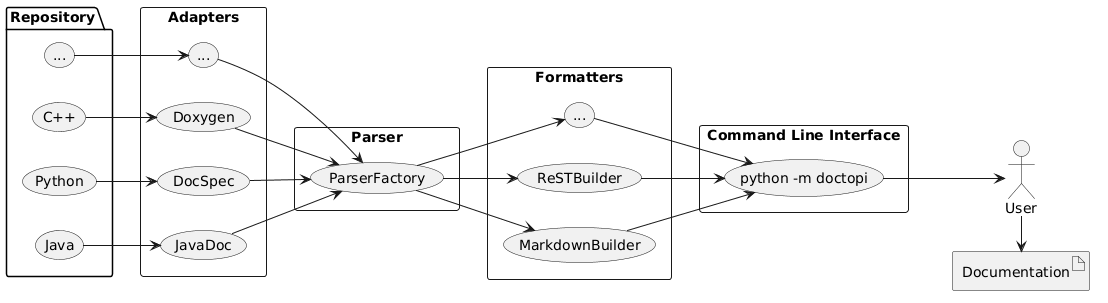
Various adapters are configured to parse source code and convert docstrings to DoctoPi classes. Using the CLI, users can customize which adapters and formatters to use to generate the desired output.
Usage
DoctoPi CLI Commands
usage: python -m doctopi [-h] {generate-ini,markdown} ...

Generate documentation in various formats.

positional arguments:
  {generate-ini,markdown}
                        Output language commands
    generate-ini        Generate DoctoPi default INI configuration file.
    markdown            Generate Markdown documentation

options:
  -h, --help            show this help message and exit
Generate Markdown Documentation with DoctoPi
usage: python -m doctopi markdown [-h] -i INPUT [-o OUTPUT] [-c CONFIG] [-l {python,java,cpp}]
                                  [-d DOCSTRING_STYLE] [-r] [--recursive-all-in-one] [-t TITLE]
                                  [-a AUTHOR] [--toc-depth TOC_DEPTH] [--toc-title TOC_TITLE]
                                  [--table-align {left,center,right}] [--no-table-of-contents]
                                  [--no-constructors] [--no-class-vars] [--no-instance-vars]
                                  [--no-inner-classes] [--no-methods] [--no-file-overview]
                                  [--public-only]

options:
  -h, --help            show this help message and exit
  -i INPUT, --input INPUT
                        Source file or directory to parse
  -o OUTPUT, --output OUTPUT
                        Output Markdown file
  -c CONFIG, --config CONFIG
                        Path to doctopi ini configuration file.
  -l {python,java,cpp}, --src-language {python,java,cpp}
                        Programming language of source code
  -d DOCSTRING_STYLE, --docstring-style DOCSTRING_STYLE
                        Docstring flavor (E.g. Sphinx, Google, JavaDoc)
  -r, --recursive       Recursively create a markdown file in each parsed directory
  --recursive-all-in-one
                        Create a single markdown file with contents of files and directories parsed recursively.
  -t TITLE, --title TITLE
                        Title of the Markdown document
  -a AUTHOR, --author AUTHOR
                        Author of the Markdown document
  --toc-depth TOC_DEPTH
                        Heading depth of the table of contents
  --toc-title TOC_TITLE
                        Title for the table of contents
  --table-align {left,center,right}
                        Text alignment for all markdown tables

Content Toggles:
  --no-table-of-contents
                        Don't render a table of contents
  --no-constructors     Do not document constructors
  --no-class-vars       Do not document class variables
  --no-instance-vars    Do not document instance variables
  --no-inner-classes    Do not document inner classes
  --no-methods          Do not document class methods
  --no-file-overview    Do not document file overview
  --public-only         Document only public class methods
Generate Default DoctoPi INI Configuration File
usage: python -m doctopi generate-ini [-h] [-o OUTPUT]

options:
  -h, --help            show this help message and exit
  -o OUTPUT, --output OUTPUT
Configuring DoctoPi
See Usage for details on configuration via the command-line interface. In addition to the CLI arguments, DoctoPi can be configured by an ini file. DoctoPi will look for the doctopi.ini file in the current working directory by default. Use the CLI --config argument to use an ini file with a different name or path.
The doctopi.ini file has more details on how you can configure aspects of DoctoPi: toggling types of content, reorganizing how classes/functions are documented, etc.
Source Code Programming Languages
Python
Python is currently supported in DoctoPi via a Docspec adapter. Documentation is parsed via Python docstrings in the source code. DoctoPi supports Google, Sphinx, NumPy, ReST, and EpyDoc style docstrings, plus an "auto" mode to detect docstring flavors.
Java
Coming soon!
C++
Coming soon!
Architecture
Software Design Patterns
Adapter Pattern
The purpose of DoctoPi is to create an all-in-one documentation-as-code library to help organizations with multiple programming languages across multiple repositories have a common documentation solution.
Adapter method is a Structural Design Pattern which helps us in making the incompatible objects adaptable to each other. The main purpose of this method is to create a bridge between two incompatible interfaces. [1]
DoctoPi leverages the Adapter pattern to make the library extensible between multiple parsers and APIs. For example, a C++ repository might leverage Doxygen for docs-as-code and parsing source code. A Java repository might use JavaDoc. By using the Adapter Pattern, DoctoPi can translate various off-the-shelf solutions into DoctoPi types.
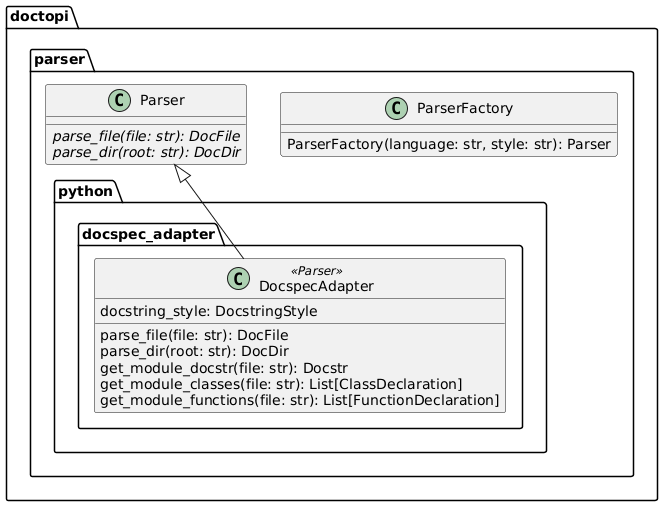
E.g. See doctopi.parser.python for more information on the Docspec adapter for parsing Python source code.
Factory Method Pattern
Developers using DoctoPi's CLI and/or API will likely be able to answer the following:
- What programming language is my source code written in?
- What style am I using to document my source code?
Factory Method is a Creational Design Pattern that allows an interface or a class to create an object, but lets subclasses decide which class or object to instantiate... Objects are created without exposing the logic to the client, and for creating the new type of object, the client uses the same common interface. [2]
In an effort to keep the rest of the implementation details away from users, DoctoPi uses the factory method to instantiate the various documentation parsing adapters, mentioned above. See the parser_factory documentation or see in the code to see how it is implemented.
Builder Pattern
The classes that ultimately configure and generate documentation from source code require a lot of configuration and parameters.
The Builder Design Pattern is a creational pattern used in software design to construct a complex object step by step. The pattern separates the construction of a complex object from its representation, allowing the same construction process to create different representations. [3]
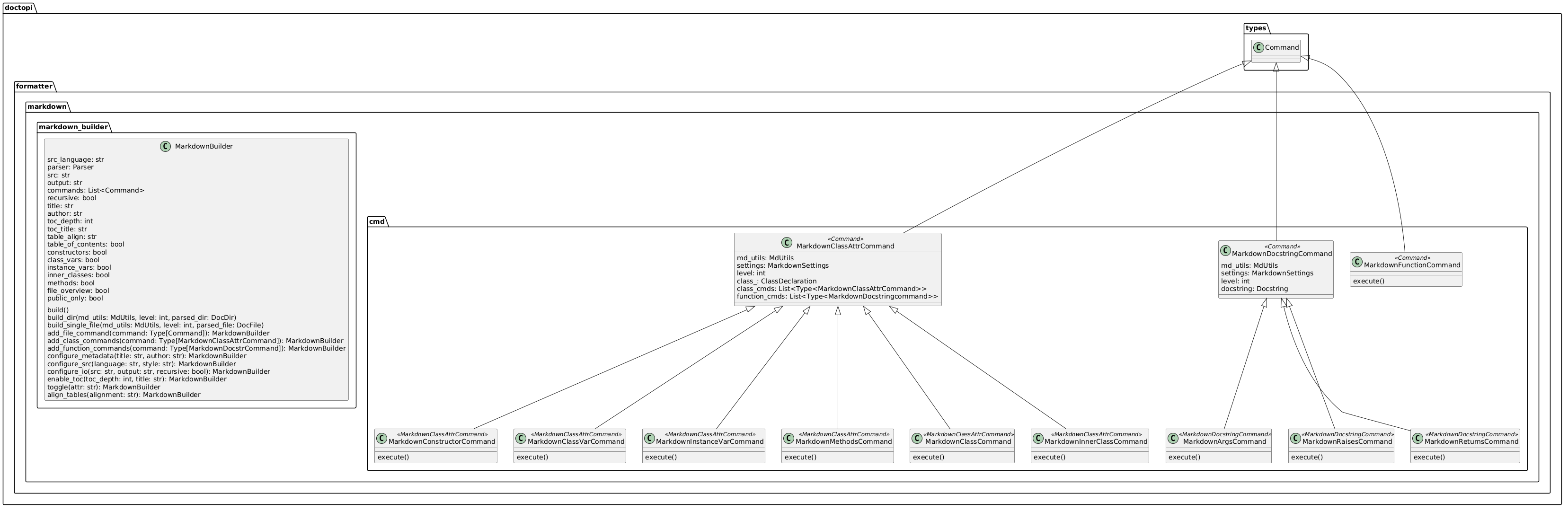
DoctoPi uses the builder design pattern to separate the documentation configuration from the construction of the classes that generate the docs, so that the confguration can be applied step-by-step, avoiding an enormous constructor. E.g. the MarkdownBuilder class implements the builder pattern, and the CLI directs the construction of the MarkdownBuilder. See the MarkdownBuilder documentation for more information.
Command Pattern
A lot of off-the-shelf documentation libraries can parse code and generate some form of documentation. Where DoctoPi stands out is its use of the Command Pattern to allow custom documentation oranization.
Command Method is Behavioral Design Pattern that encapsulates a request as an object, thereby allowing for the parameterization of clients with different requests and the queuing or logging of requests. Basically, it encapsulates all the information needed to perform an action or trigger an event. [4]
DoctoPi creates various command classes to encapsulate the generation of various elements of the source code. For example, a typical function docstring may include a summary, parameters, exceptions raised, and any data returned. For example, by encapsulating each of those pieces as a Command, the MarkdownBuilder can execute commands in a provided order, allowing the director to reorder and/or remove various elements. The MarkdownBuilder class has arrays of commands for functions, classes, and entire files to customize which pieces are documented and how they're organized. The commands specific to the markdown builder are documented here.
Class Diagrams
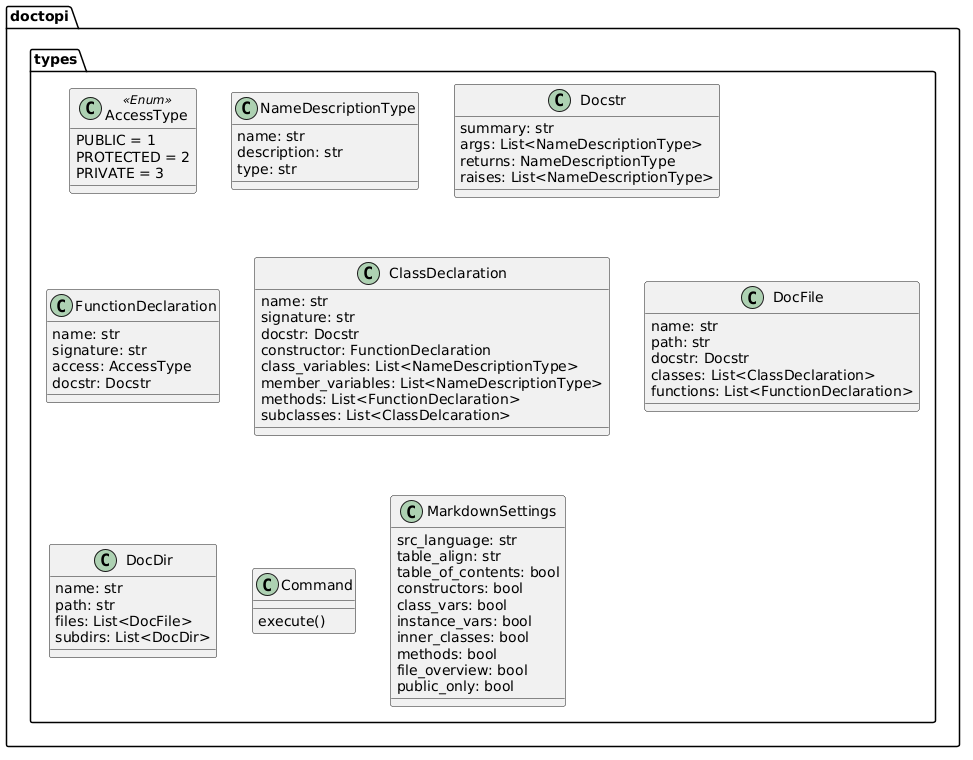
DoctoPi Types
DoctoPi Parser
DoctoPi Formatter
References
[1] “Adapter Method - Python Design Patterns,” GeeksforGeeks, Jan. 27, 2020. https://www.geeksforgeeks.org/adapter-method-python-design-patterns/
[2] “Factory Method - Python Design Patterns,” GeeksforGeeks, Jan. 21, 2020. https://www.geeksforgeeks.org/factory-method-python-design-patterns/
[3] “Builder Design Pattern,” GeeksforGeeks, Jul. 25, 2017. https://www.geeksforgeeks.org/builder-design-pattern/
[4] “Command Method - Python Design Patterns,” GeeksforGeeks, Feb. 22, 2020. https://www.geeksforgeeks.org/command-method-python-design-patterns/
1 maintainer

Metadata
1 maintainer
Release files for DoctoPi 0.1.0
For a detailed explanation of source distributions (sdists) and built distributions (wheels), please see the package formats documentation.
Source distribution (sdist)
| File | Size | Uploaded | |
|---|---|---|---|
| doctopi-0.1.0.tar.gz | 40.4 kB | Details |
Built distribution (wheel)
| File | Interpreter | ABI | Platform | Reset |
|---|---|---|---|---|
| DoctoPi-0.1.0-py3-none-any.whl | Python 3 | none | any | Details |
Total release size: 82.9 kB
Release files / doctopi-0.1.0.tar.gz
| Download URL | doctopi-0.1.0.tar.gz |
|---|---|
| Size | 40.4 kB |
| Tags | Source |
|
SHA-256 checksum How to use checksums |
0d23699be5df57f916d7318ba84f58d838ae1102e2526def90433d929a483f06
|
|
BLAKE2b-256 checksum How to use checksums |
c87adb0360bad7b8866dc4a49469d0dc56e92210e22480be3e6e404d9245b2c4
|
| Upload date | |
|
Uploaded using Trusted Publishing? What is trusted publishing? |
Yes |
| Uploaded via |
twine/5.1.0 CPython/3.12.5
|
Release files / DoctoPi-0.1.0-py3-none-any.whl
| Download URL | DoctoPi-0.1.0-py3-none-any.whl |
|---|---|
| Size | 42.6 kB |
| Tags | Python 3 |
|
SHA-256 checksum How to use checksums |
40b49869484ac8e5643c4f934e4a3c3e18da23c6f840ed0ab977b7e8edf76a22
|
|
BLAKE2b-256 checksum How to use checksums |
239f06d3699358dd829bbcb21bfc32db5f3d5effb1eb484d826114ff529f6e95
|
| Upload date | |
|
Uploaded using Trusted Publishing? What is trusted publishing? |
Yes |
| Uploaded via |
twine/5.1.0 CPython/3.12.5
|













