
HTTP log monitoring console for Humans
watch and log all HTTP traffic of system
generate log in w3c log format
show status about total requests, maximum hits, requests in a timespan
alert when traffic is above a customizable threshold
can log to a custom log file also
Watch Doga in action
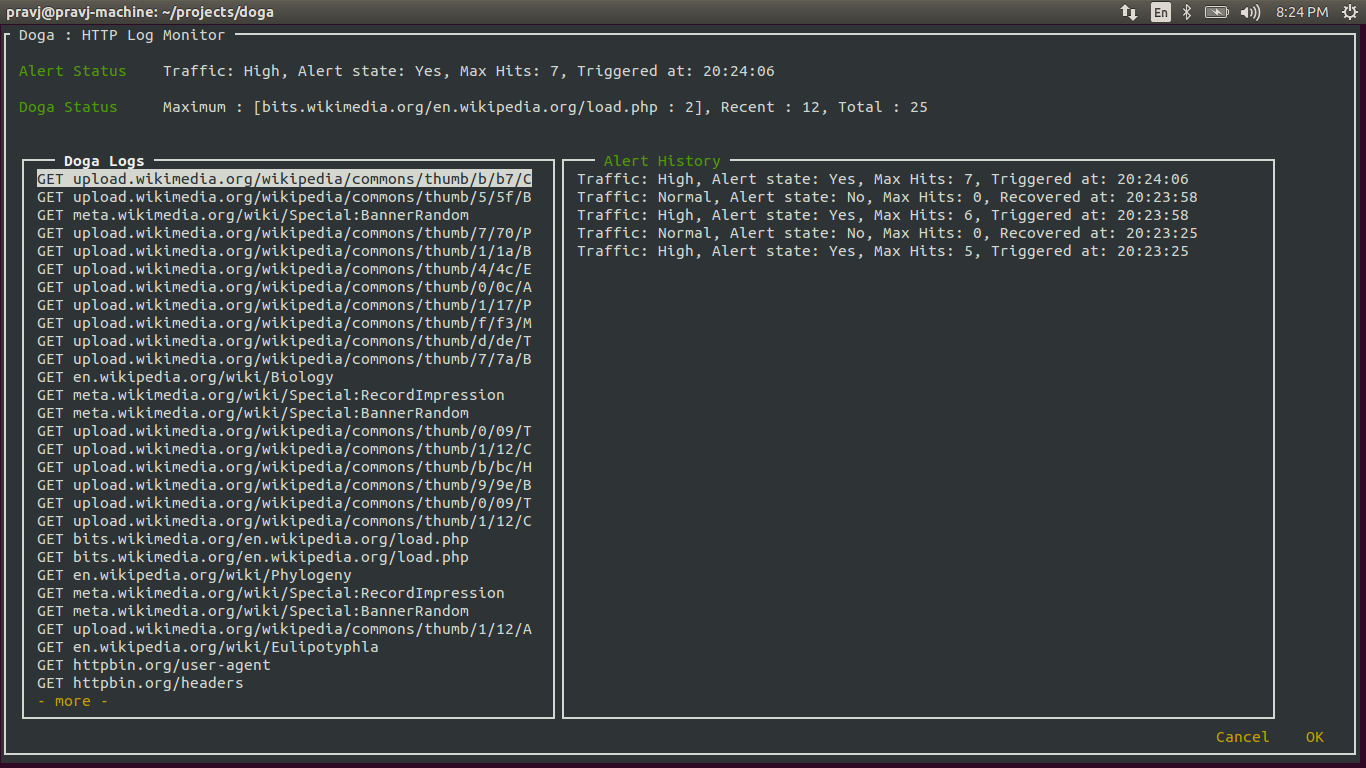
How to let Doga watch for your traffic
sudo pip install doga
install doga to your machine, you can also use easy_install
using Doga requires sudo privilege to run as it explicitly uses socket interface
sudo doga
start watching for your traffic
sudo doga -f filename.txt
write logs to a custom log file filename.txt also
sudo doga -t VALUE
update threshold value to VALUE on which Doga start alerting
Jump between 'Doga Logs' and 'Alert History' sections using 'Ctrl+N'
Doga's GUI is not responsive yet so it will raise exceptions on smaller screen size.
How it’s made
Doga’s GUI is built on top of npyscreen
Doga uses Python’s socket interface library to deal with all TCP/IP/Packets and Bla Bla Bla things
What?
don’t you know Doga? watch out then, He is after you.

“Doga Rules” by Promotional file released by Raj Comics for promotional purposes. Licensed under Fair use of copyrighted material in the context of Doga (comics) via Wikipedia
built with Muzi and Appy by Pravendra Singh
1 maintainer

Metadata
1 maintainer
Release files for Doga 0.2.0
For a detailed explanation of source distributions (sdists) and built distributions (wheels), please see the package formats documentation.
Source distribution (sdist)
| File | Size | Uploaded | |
|---|---|---|---|
| Doga-0.2.0.tar.gz | 9.0 kB | Details |
Release files / Doga-0.2.0.tar.gz
| Download URL | Doga-0.2.0.tar.gz |
|---|---|
| Size | 9.0 kB |
| Tags | Source |
|
SHA-256 checksum How to use checksums |
c83dd3fb922b235d5224b771ec3523328d44c01c1238e7a3891be0545fb1d72f
|
|
BLAKE2b-256 checksum How to use checksums |
1a3f4510c27d3daf7f54998dc504bcbe0f2f15b9d09fa83e1d9a4e03a501fcdc
|
| Upload date | |
|
Uploaded using Trusted Publishing? What is trusted publishing? |
No |















