
DrawExcel
Tool that draws VBA structure of your MS Excel file. It will scan VBA code in a MS Excel file and draws a visual diagram of its structure (Sheets, modules, forms ...) in an interractive SVG file.
Requirement
It works only if you are on Windows OS with Microsoft Excel
Overview
This tool is primary to help people escape the Excel nightmare. It shows an overview of an Excel file structure. This aim to help developpers who need to maintain, update and document an Excel file that contain VBA.
How to generate the output
DrawExcel.DrawExcel( '--Your Excel file folder--' , '--Your excel file name (including extension)--')
Output Example:
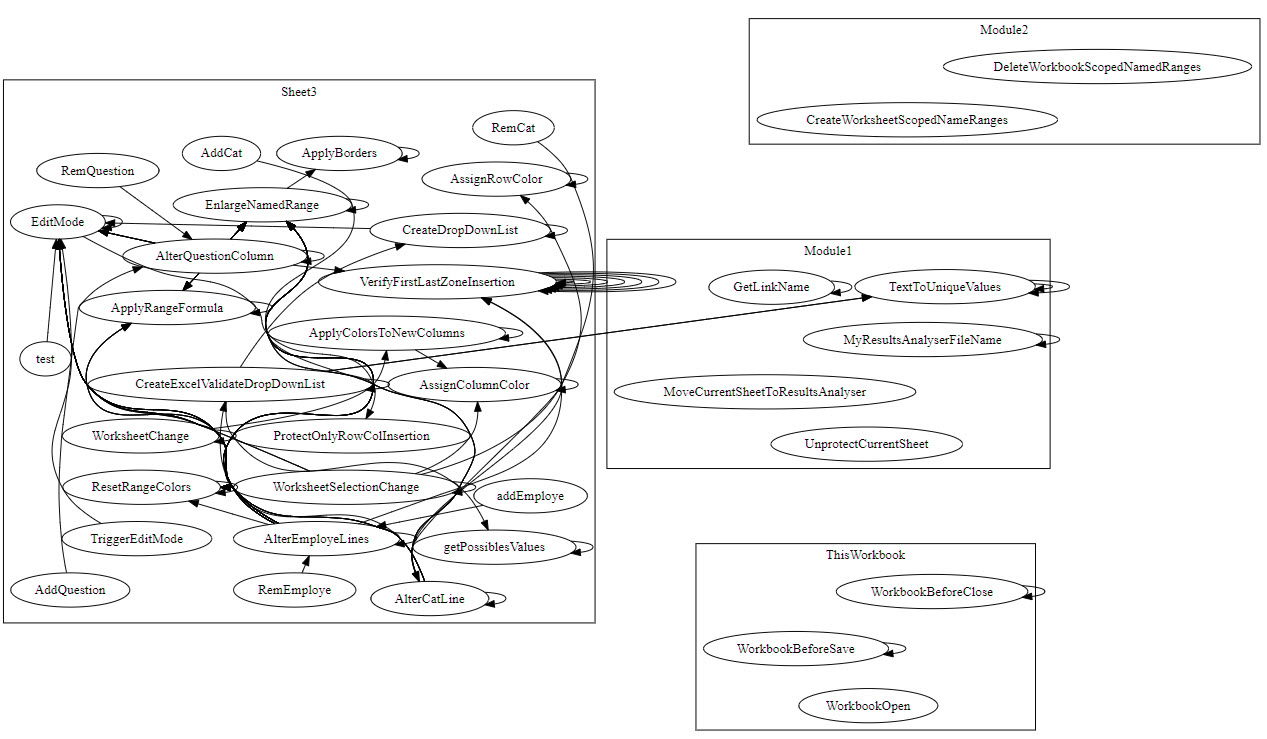
When you are working with a complex Excel file, you may find that some VB components are chaotic. In order to have a better view of some section of your graph, click on the section name at the header of the sub zone to see a deeper view.
For example if we click on Sheet3 we will see the following:
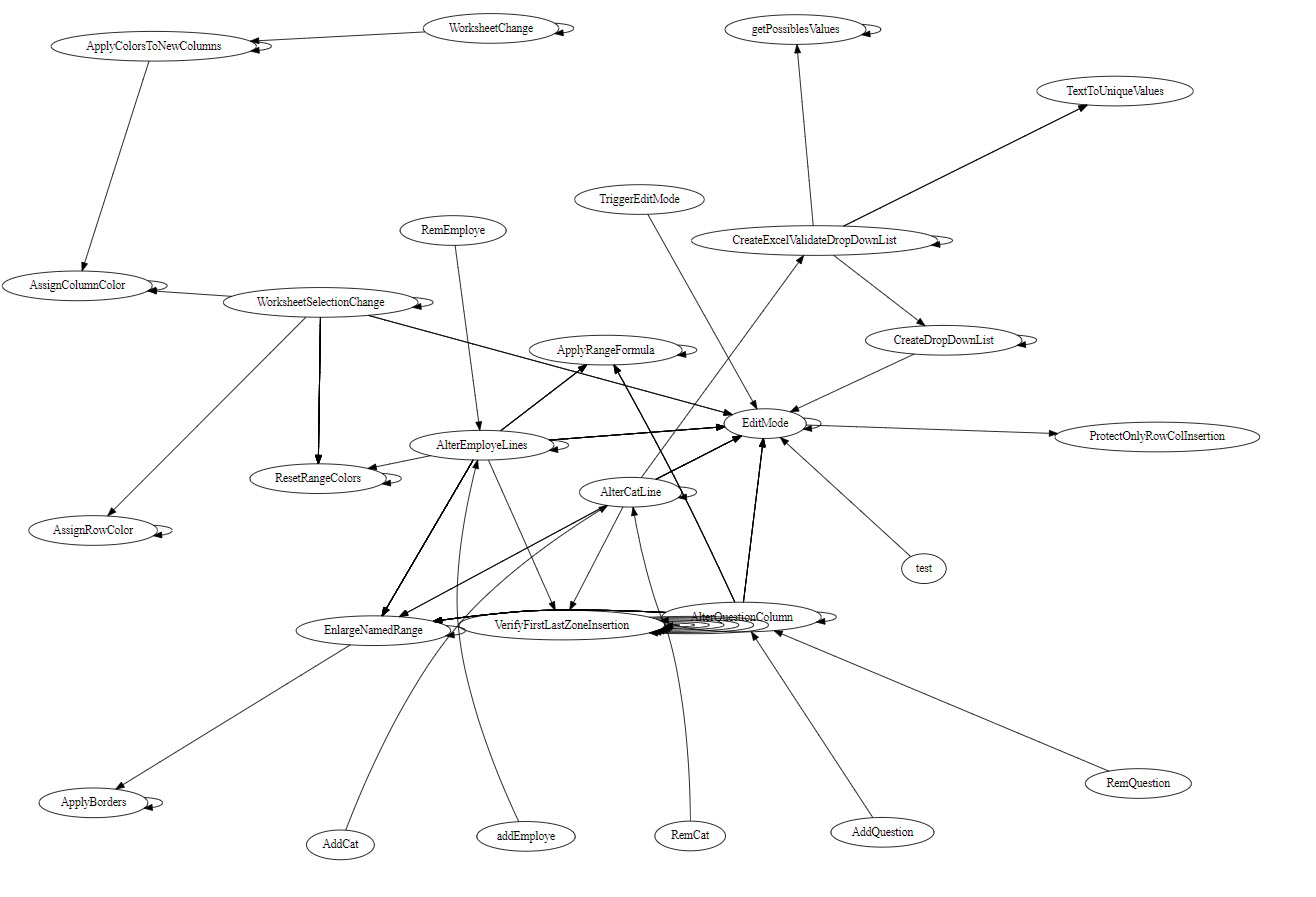
By doing this you can can have a deeper view of you graph.
Dependencies
- All code is written in Python 3.
- Some code depends on:
- pandas
- win32com.client
- graphviz
1 maintainer

Metadata
1 maintainer
Release files for DrawExcel 1.5
For a detailed explanation of source distributions (sdists) and built distributions (wheels), please see the package formats documentation.
Source distribution (sdist)
| File | Size | Uploaded | |
|---|---|---|---|
| DrawExcel-1.5.tar.gz | 4.3 kB | Details |
Built distribution (wheel)
| File | Interpreter | ABI | Platform | Reset |
|---|---|---|---|---|
| DrawExcel-1.5-py3-none-any.whl | Python 3 | none | any | Details |
Total release size: 9.3 kB
Release files / DrawExcel-1.5.tar.gz
| Download URL | DrawExcel-1.5.tar.gz |
|---|---|
| Size | 4.3 kB |
| Tags | Source |
|
SHA-256 checksum How to use checksums |
be2a7c3109ab6f1a87e093a8f83e1a32d5bfa3f71ad6c7ac8250598cb7ad9029
|
|
BLAKE2b-256 checksum How to use checksums |
19e5fc1223adb7ae7a3c6aff547be91d6e3310abbed70f01f3929d1a5fc95f14
|
| Upload date | |
|
Uploaded using Trusted Publishing? What is trusted publishing? |
No |
| Uploaded via |
twine/3.3.0 pkginfo/1.7.0 requests/2.25.1 setuptools/41.2.0 requests-toolbelt/0.9.1 tqdm/4.59.0 CPython/3.8.3
|
Release files / DrawExcel-1.5-py3-none-any.whl
| Download URL | DrawExcel-1.5-py3-none-any.whl |
|---|---|
| Size | 5.0 kB |
| Tags | Python 3 |
|
SHA-256 checksum How to use checksums |
741cc9cedce917fab441e18da5f6a316455fa5efe3b136b722e342b8a7e2775a
|
|
BLAKE2b-256 checksum How to use checksums |
1a527b4ea75490f3a78b8f552a5fce590735f59fb6f7596e64f242502c2528cc
|
| Upload date | |
|
Uploaded using Trusted Publishing? What is trusted publishing? |
No |
| Uploaded via |
twine/3.3.0 pkginfo/1.7.0 requests/2.25.1 setuptools/41.2.0 requests-toolbelt/0.9.1 tqdm/4.59.0 CPython/3.8.3
|













