
EasyRunner


EasyRunner is a lightweight tool for managing and executing multiple parallel experiments. It simplifies the process of running multiple experiments with different configurations or hyperparameters, while monitoring system resources.
Features
- Run multiple experiments in parallel
- Monitor system resources (CPU and memory usage) during experiments
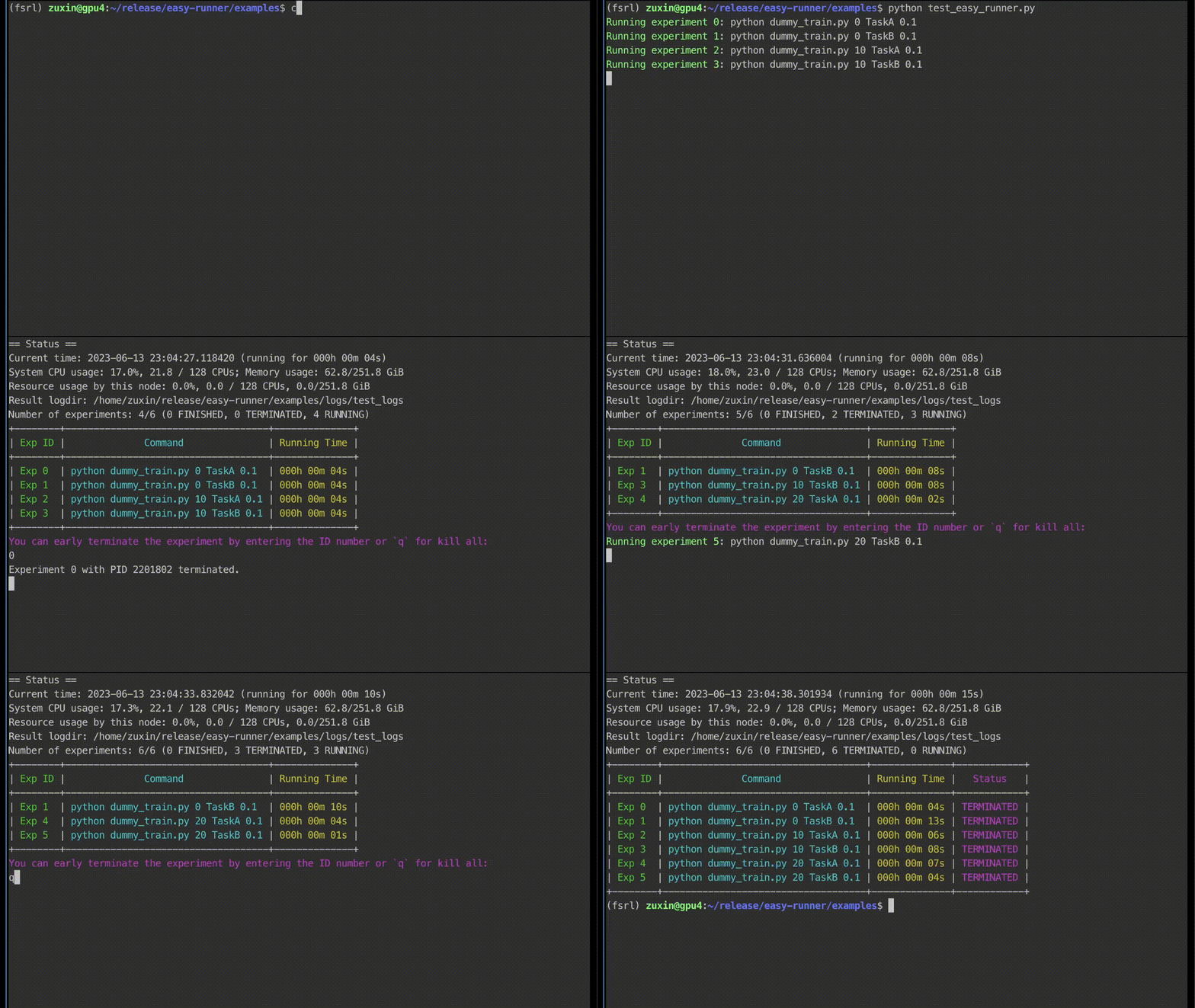
- Early termination of experiments by inputting the experiment number
- Colorized display of experiment status and resource usage
- Generate a list of instructions from a template and arguments
Installation
To use EasyRunner, simply download or clone this repository and then:
pip install -e .
Usage
- Initialize an
EasyRunnerobject with the required parameters. - Specificy a list of commandline instructions to run.
- Use the
startmethod to run experiments. You can specify a list of GPU IDs for running experiments (orNoneby default). - Optionally, use the
composemethod to generate a list of instructions from a template and arguments.
A simple example for running a list of instructions (2 parallel) on cuda 0, 1:
from easy_runner import EasyRunner

# Initialize the EasyRunner
runner = EasyRunner(log_name="experiment_logs")

# Create a list of instructions
instructions = [
    "python script1.py --param1 0.1 --param2 100",
    "python script1.py --param1 0.2 --param2 200",
    "python script2.py --param1 0.3 --param2 300",
    "python script2.py --param1 0.4 --param2 400",
    "python script3.py --param1 0.5 --param2 500"
]

# Run experiments
runner.start(instructions, gpus=[0, 1], max_parallel=2)
Anoter example of how to use the compose feature to perform grid search:
from easy_runner import EasyRunner

# Initialize the EasyRunner
runner = EasyRunner(log_name="experiment_logs")

# List of seeds, and tasks
seeds = [0, 10, 20]
tasks = ["TaskA-v0 --epoch 30", "TaskB-v0 --epoch 150", "TaskC-v0 --epoch 80"]

# Define the command template
template = "nohup python train_script.py --project my_project --seed {} --task {} "

# Generate a list of instructions using the compose method
instructions = runner.compose(template, [agents, seeds, tasks])

# Run the experiments
runner.start(instructions, max_parallel=4)
You can try the example scripts in the examples folder:
cd examples
python test_easy_runner.py
Demo video:
License
This project is licensed under the MIT License. See the LICENSE file for details.
Contributing
We welcome contributions to the Experiment Grid Tool. Please open an issue or submit a pull request on the GitHub repository.
Feel free to customize this template according to your specific requirements or add any additional information you think would be helpful for users.
1 maintainer

Metadata
1 maintainer
Release files for easy-runner 0.1.0
For a detailed explanation of source distributions (sdists) and built distributions (wheels), please see the package formats documentation.
Source distribution (sdist)
| File | Size | Uploaded | Provenance | Actions |
|---|---|---|---|---|
| easy_runner-0.1.0.tar.gz | 8.3 kB | Without provenance | Details for easy_runner-0.1.0.tar.gz |
Built distribution (wheel)
| File | Interpreter | ABI | Platform | Actions Reset |
|---|---|---|---|---|
| easy_runner-0.1.0-py3-none-any.whl | Python 3 | none | any | Details for easy_runner-0.1.0-py3-none-any.whl |
Total release size: 16.2 kB
Release files / easy_runner-0.1.0.tar.gz
| Download URL | easy_runner-0.1.0.tar.gz |
|---|---|
| Size | 8.3 kB |
| Tags | Source |
|
SHA-256 checksum How to use checksums |
9938624a165807f75df44602dc434a4ee311b204c0aa1a6f85b72acd9a9a3ed3
|
|
BLAKE2b-256 checksum How to use checksums |
3e1d25295f0638b98ace270476ee4ec6867ee24e205fc1aa4e1c75ef7a7d72ea
|
| Upload date | |
|
Uploaded using Trusted Publishing? What is trusted publishing? |
No |
| Uploaded via |
twine/4.0.2 CPython/3.8.16
|
Release files / easy_runner-0.1.0-py3-none-any.whl
| Download URL | easy_runner-0.1.0-py3-none-any.whl |
|---|---|
| Size | 7.9 kB |
| Tags | Python 3 |
|
SHA-256 checksum How to use checksums |
894728989625b70eda227cefea144a76d8d06b30581fa7f95bdc9e08ddb1238c
|
|
BLAKE2b-256 checksum How to use checksums |
9cb40e81d4018a61191699430c2b96e9fa817e8d18ef42c3b0513f95a58924b8
|
| Upload date | |
|
Uploaded using Trusted Publishing? What is trusted publishing? |
No |
| Uploaded via |
twine/4.0.2 CPython/3.8.16
|
Security for easy-runner 0.1.0
Provenance
Provenance describes where a file came from. On PyPI, provenance is shared via attestations, which provide a verifiable record of the build or publishing details. View details, limitations and caveats.
No provenance found
None of the files in this release were uploaded with provenance metadata.
A note on package security
PyPI is a repository for distributing packages, not a service for auditing them. While third-party security researchers and our staff do their best to detect and remove malicious packages, PyPI cannot guarantee the quality, security or suitability of any given package.
To learn more about protecting yourself from malicious actors, visit our package security documentation.













