
Easy Web App (for Python)
Create web applications easily.
This is a PyPI package for the rest-web-gui framework.
Focus is on web applications (not simple web pages). A lot of plug-ins are available to get a portal it quickly configured:
Forms
Tables / lists
Content: via MediaWiki API, plain HTML views, or help dialogs
I/O: control switches/drawer, gauges, graphs, LEDs, displays, …
i18n: switch language
Maps: POIs, routes, traffic, …
Page to page navigation with navigation tabs, menus, links and session data
Source code display
Security: HTTP Basic authentication or OAuth
…
This is how it may look like:
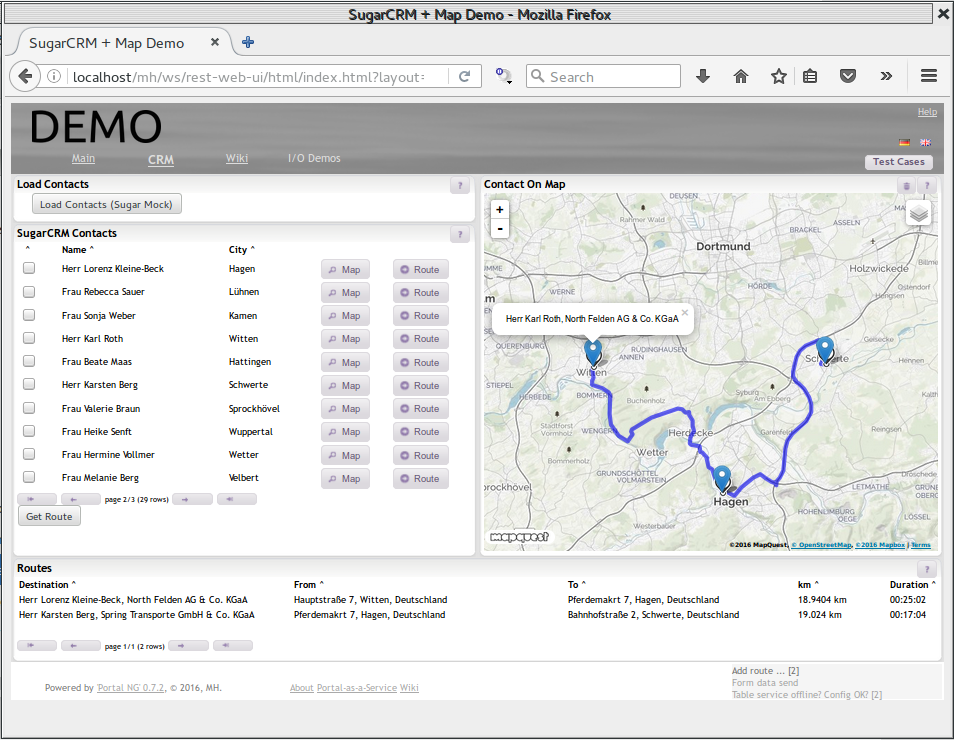
Check out the online demos.
Remark: It is also available as Node.js API package.
Getting started
Prepare:
Create a web application project folder, e.g. mkdir ~/myapp
Create a virtual Python environment for this folder: virtualenv ~/myapp
Change into the project folder and activate the virtual environment: cd ~/myapp; source bin\activate
Install this package: pip install easy-web-app
Create first web app with Python:
Create a file, e.g. firstapp.py
from easywebapp.webapp import Portal
import easywebapp.page_layout as page

mainpage = page.PageLayout( 'First Page' )

# initialize portal
portal = Portal( 'My Portal', 8000, mainpage )

# define a custom web service
portal.addURL( '/myservice', 'myservice' )

class myservice:
    def GET( self ):
        return 'Hello World'

# start the web server
portal.run()
TODOs
[x] First working rest-web-ui integration
[x] PyPI package
[ ] configure port from init
[x] portal.getPage( name )
[x] portal.addPage( pageId [, title] [, viewDef] [, viewConfig] )
[ ] Portal pages navigation tabs
[x] page.addView( def [, config] )
[x] page.addColumnsRow( id, width )
[x] row.addView( def [, config] )
[x] row.addColumnsRow ( id, height )
[x] column.addView ( def [, config] )
[x] column.addRowsColumn ( id, width )
[x] View API
[ ] I/O server and API
1 maintainer

Metadata
1 maintainer
Release files for easy-web-app 0.3.1
For a detailed explanation of source distributions (sdists) and built distributions (wheels), please see the package formats documentation.
Source distribution (sdist)
| File | Size | Uploaded | Provenance | Actions |
|---|---|---|---|---|
| easy-web-app-0.3.1.tar.gz | 6.0 kB | Without provenance | Details for easy-web-app-0.3.1.tar.gz |
Release files / easy-web-app-0.3.1.tar.gz
| Download URL | easy-web-app-0.3.1.tar.gz |
|---|---|
| Size | 6.0 kB |
| Tags | Source |
|
SHA-256 checksum How to use checksums |
09aa9f0b431dbe007fc1abbba52c5bcfaf5f19f66568f484316783d3e2a73249
|
|
BLAKE2b-256 checksum How to use checksums |
c9a2a4889f65322ee543daf6d41a377d71f1a12df96be8d30a18f9b998cf51d5
|
| Upload date | |
|
Uploaded using Trusted Publishing? What is trusted publishing? |
No |
Security for easy-web-app 0.3.1
Provenance
Provenance describes where a file came from. On PyPI, provenance is shared via attestations, which provide a verifiable record of the build or publishing details. View details, limitations and caveats.
No provenance found
None of the files in this release were uploaded with provenance metadata.
A note on package security
PyPI is a repository for distributing packages, not a service for auditing them. While third-party security researchers and our staff do their best to detect and remove malicious packages, PyPI cannot guarantee the quality, security or suitability of any given package.
To learn more about protecting yourself from malicious actors, visit our package security documentation.














