
Simple video and audio player based on mpv

Project description
EasyPlayer
Version 1.4.0
A simple video and audio player based on mpv and QT6 . It is a spin off of my VideoCut app. It handles pictures, plays videos and audio files.
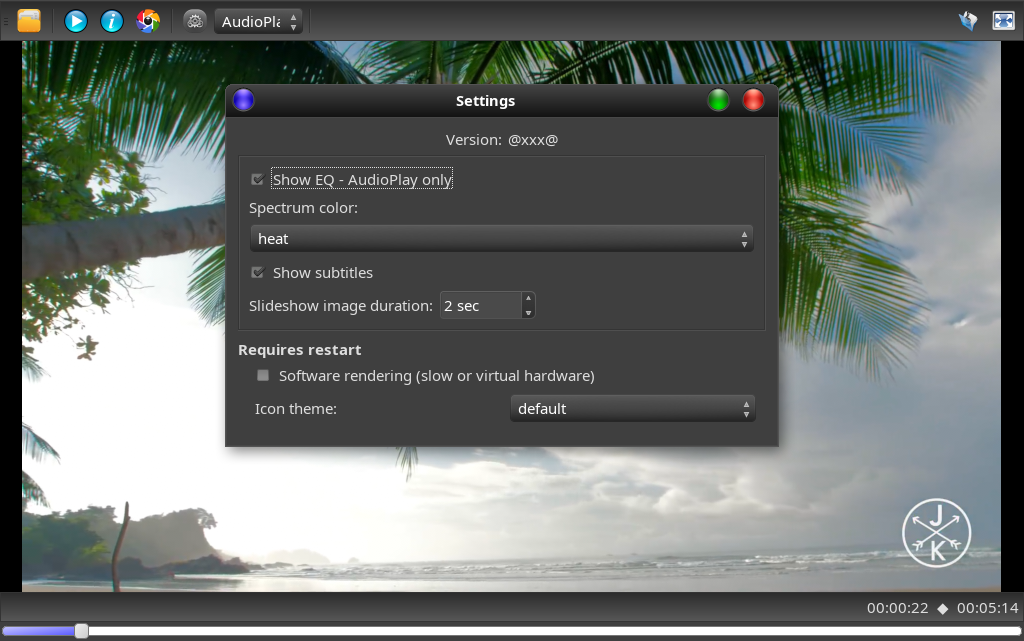
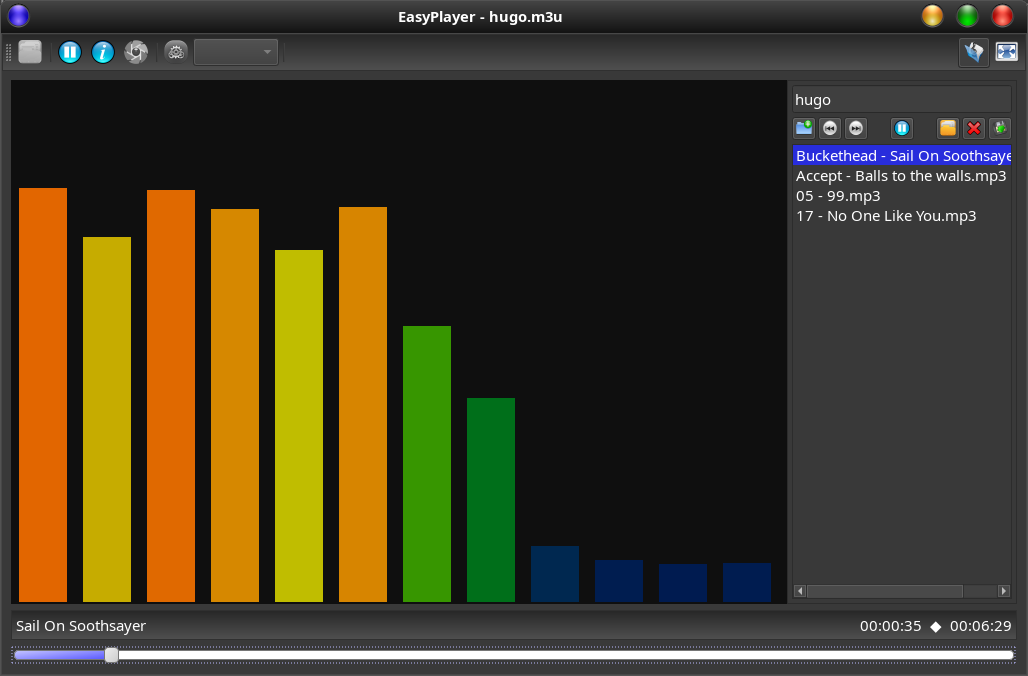
Configurable Spectrum Analyzer:
Prerequisites
- Arch: python3, python-pillow and mpv
- Debian/Mint/Ubuntu: python3 python3-pil libmpv2 (or libmpv1) (no-recommends)
- Ubuntu 26.04 needs additionally qt6-svg-plugins #not working for Ubuntu 18.4: libmpv - use python3-opencv instead
- Fedora: python3-pillow-qt and mpv-libs.x86_64
- ffmpeg > 3.X to 8.X
- python3-pyqt6
Set GTK Theme for this QT application
If you are running a DE with GTK/Gnome (as opposed to LXQT or KDE) you might set QT_QPA_PLATFORMTHEME:
- Depending on the distro and version this variable may be defined with one of:
- gtk2, qt6ct, fusion, gtk3
- Easyplayer will enforce "QT_QPA_PLATFORM=xcb" on Wayland for SSD decorations.
- On Ubuntu 26.04 you need to install qt6-gtk-platformtheme. This will get your GTK theme into any QT6 app.
- On Ubuntu(with libadwaita) use /etc/environment to add GTK_THEME=yourTheme to enforce a third party theme. (Hack)
Features
- Easyplayer supports wayland and orientation recognition (which mplayer does not).
- Has been tested with interlaced video and 4K
- Subtitles can be shown (settings)
- Playlist support
- Picture/image viewer (png, jpg, bmp, gif, webp, tiff)
- Slideshow with configurable timeout
- Flat and non flat icon set
- Language can be selected
- Supports an EQ-display for audio files - Some distros need to install python3-sounddevice via pip. (Not mandatory)
- Colors of the EQ display can be changed live via the settings dialog.
- Settings allows you to switch to software mode (old hardware & virtual environments)
Support for Qemu and old hardware:
- -v will use a virtual GL driver or software for rendering. (easyplayer -v)
- Can be set via the "Settings dialog - Software mode" as well.
Install via ppa on Linux Mint or Ubuntu (Mint 22.2, Ubuntu 22.04 and newer versions)
sudo add-apt-repository ppa:jentiger-moratai/mediatools
sudo apt update
sudo apt install --no-install-recommends easyplayer
(--no-install-recommends will install only what is required) Select video and open it with "Open with ->EasyPlayer", oder via terminal "easyplayer"
Remove with:
sudo apt remove easyplayer
Install EasyPlayer via AUR (Arch Linux /Manjaro only)
- Use pamac or other GUI tools, search for "easyplayer" in AUR, click install
- Manually :
- Download PKGBUILD
- unpack it and go into the "easyplayer" folder
- execute
makepkg -s - excute
sudo pacman -U easyplayer-1.x.x.x-1-x86_64.pkg.tar.zst - uninstall via
sudo pacman -Rs easyplayer
Select video and open it with "Open with ->EasyPlayer", oder via terminal "easyplayer"
Install dependencies manually on Linux Mint or Ubuntu (tested from noble to resolute)
sudo apt –no-install-recommends install python3-pyqt6 ffmpeg python3-pil libmpv2
Install dependencies on Fedora
sudo dnf python3-qt6 ffmpeg python3-pillow-qt mpv-libs.x86_64
How to install with a terminal
- Install dependencies (see prerequisites)
- Download the easyplayer*.tar from the download link (see above)
- Extract it to a location that suits you.
- Open a terminal to execute the install.sh file inside the folder with sudo like
sudo ./install.sh - (if you are in the download directory - just an example)
- The app will be installed in /opt/easyplayer with a link to /usr/bin.
- The app should be appear in a menu or "Actvities"
- Can be openend by selecting a video file & Open with...
- In the terminal can be started via
easyplayer - python qt6, mpv and ffmpeg are required
- you may now remove that download directory.
- logs can be found in the user home ".config/EasyPlayer" folder
How to remove
- Open a terminal
- execute
sudo /opt/easyplayer/uninstall.sh
Changes
23.04.2026:
- Added slideshow features for pictures
- Improved scrolling while playing
18.04.2026
- Remove outer border for fullscreen
- Picture/image support added to file dialog and MIME types
- Fix playlist errors
30.03.2026
- Playlist support
- Fix scaled Xwayland desktops
21.03.2026
- Support for virtual environments or slow hardware via SettingsDialog
20.03.2026
- introducing "parec" for Spectrum EQ (Ubuntu)
16.03.2026
- Configuration of Spectrum EQ
- Reviewed Pulseaudio dependencies
- Distro agnostic installation (Debian & Arch)
12.03.2026
- Graphic EQ display for audio files
09.03.2026
- Support for playlists and streams
05.03.2026
- Hardened interlacing recognition, fixed interprocess communication
26..12.2025
- Initial start
Release history Release notifications | RSS feed

Download files
Download the file for your platform. If you're not sure which to choose, learn more about installing packages.
Source Distribution
Built Distribution
Filter files by name, interpreter, ABI, and platform.
If you're not sure about the file name format, learn more about wheel file names.
Copy a direct link to the current filters
File details
Details for the file easympv-1.4.0.tar.gz.
File metadata
- Download URL: easympv-1.4.0.tar.gz
- Upload date:
- Size: 551.1 kB
- Tags: Source
- Uploaded using Trusted Publishing? No
- Uploaded via: twine/6.2.0 CPython/3.14.3
File hashes
| Algorithm | Hash digest | |
|---|---|---|
| SHA256 |
6e29ac0e2302d404f0d05f30b8cf8bf3cb87da603aa4a09ae1b121452c1c2bb1
|
|
| MD5 |
8024006afbfa5aed968220451e5713ab
|
|
| BLAKE2b-256 |
4e16bb6b4e67a6fec7930bd781ca7cde6e654c6979fee0dd8191b3028c8a71af
|
File details
Details for the file easympv-1.4.0-py3-none-any.whl.
File metadata
- Download URL: easympv-1.4.0-py3-none-any.whl
- Upload date:
- Size: 570.0 kB
- Tags: Python 3
- Uploaded using Trusted Publishing? No
- Uploaded via: twine/6.2.0 CPython/3.14.3
File hashes
| Algorithm | Hash digest | |
|---|---|---|
| SHA256 |
c0c3295e6e9443450a242a68b221a101eac0f920f8b5ec42330d23cc6d502bba
|
|
| MD5 |
7813cbb78d3a1333bf1594803caae9c4
|
|
| BLAKE2b-256 |
61865f8bcba5acfe45336f58a2982ad49a610236899d8f324bdcb80cb01dcf39
|






