
EBIOXP0919
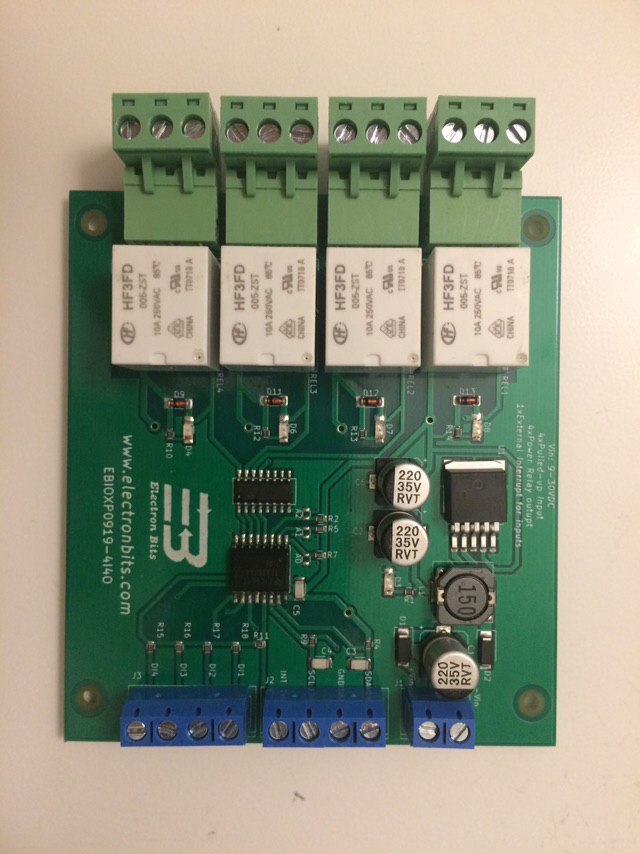
This is a Python package to interface with the EBIOXP0910-4I4O board, it is designed to be easily integrated with EBRPIH1118 and RaspberryPi.
Features
- Read input status
- Control relays
- Easy to use and integrate with other projects
Setting Up I2C on Raspberry Pi
Step 1: Enable I2C Interface
Before interacting with I2C devices, the I2C interface needs to be enabled on your Linux Machine. e.g. Raspberry Pi.
You can install EBIOXP0919 using pip. Ensure you have the necessary Python libraries for GPIO and I2C communication.
-
Open the Raspberry Pi configuration tool:
sudo raspi-config -
Navigate to Interface Options using the arrow keys and select I2C.
-
Choose Yes to enable the I2C interface.
-
Exit the tool and reboot your Raspberry Pi:
sudo reboot
Step 2: Install I2C Tools
After enabling I2C, you'll need to install i2c-tools to scan and interact with I2C devices.
- Update your package list:
sudo apt update
- Install the I2C tools package:
sudo apt install -y i2c-tools
Step 3: Verify I2C is Enabled
After rebooting, verify that the I2C kernel module is loaded.
- Check if I2C modules are loaded by running:
lsmod | grep i2c
You should see something like i2c_bcm2835 or i2c_dev listed. If they are not present, you may need to manually load the modules:
sudo modprobe i2c-bcm2835
sudo modprobe i2c-dev
Step 4: Identify I2C Bus Number
To find which I2C bus your Raspberry Pi is using, check the /dev directory.
- List available I2C buses:
ls /dev/i2c-*You should see something like /dev/i2c-1 (or /dev/i2c-0 depending on your Raspberry Pi model). Most modern Raspberry Pi boards use /dev/i2c-1.
Step 5: Scan for I2C Devices
Now that everything is set up, you can scan the I2C bus to detect any connected devices.
-
Run the following command to scan the I2C bus (assuming your bus is i2c-1):
sudo i2cdetect -y 1
-
The output will display a grid, showing the I2C addresses of any detected devices:
0  1  2  3  4  5  6  7  8  9  a  b  c  d  e  f
00: -- -- -- -- -- -- -- --
10: -- -- -- -- -- -- -- -- -- -- -- -- -- -- -- --
20: -- -- -- -- -- -- -- -- -- -- -- -- -- -- -- --
30: -- -- -- -- -- -- -- -- -- -- -- -- -- -- -- --
40: -- -- -- -- -- -- -- -- -- -- -- -- -- -- -- --
50: -- -- -- -- -- -- -- -- 3f -- -- -- -- -- -- --
60: -- -- -- -- -- -- -- -- -- -- -- -- -- -- -- --
70: -- -- -- -- -- -- -- --
Any value shown (like 3f in the above example) is the hexadecimal address of a detected I2C device.
If you see no addresses, check your wiring and make sure the device is powered on.
Installation
pip install EBIOXP0919
Usage
Importing the Package
from EBIOXP0919_intf import ebioxp0919
Example usage
from EBIOXP0919_intf import ebioxp0919

board = ebioxp0919.EBIOXP0919(chip_address=0x3f)

# Example to toggle relay 1 ON
board.toggle_relay(1, ebioxp0919.RelayState.ON)

# Example to read digital input 2
input_state = board.get_input_state(2)
print(f"Digital Input 2 State: {input_state}")

# Cleanup when done
board.cleanup()
Steps to Contribute
Fork the repository. Create a new branch for your feature or bug fix. Make your changes. Submit a pull request to the main repository.
License
This project is licensed under the MIT License - see the LICENSE file for details.
Acknowledgments
- This package uses the
smbuslibrary for I2C communication.
More Information
For more details, visit our website: www.electronbits.com
1 maintainer

Metadata
1 maintainer
Release files for EBIOXP0919 0.1.5
For a detailed explanation of source distributions (sdists) and built distributions (wheels), please see the package formats documentation.
Source distribution (sdist)
| File | Size | Uploaded | |
|---|---|---|---|
| EBIOXP0919-0.1.5.tar.gz | 5.5 kB | Details |
Built distribution (wheel)
| File | Interpreter | ABI | Platform | Reset |
|---|---|---|---|---|
| EBIOXP0919-0.1.5-py3-none-any.whl | Python 3 | none | any | Details |
Total release size: 10.7 kB
Release files / EBIOXP0919-0.1.5.tar.gz
| Download URL | EBIOXP0919-0.1.5.tar.gz |
|---|---|
| Size | 5.5 kB |
| Tags | Source |
|
SHA-256 checksum How to use checksums |
c0f8ca4c9a04398f82c149b62ab4ed3be3cd307582725b944f3f7ce74bf64907
|
|
BLAKE2b-256 checksum How to use checksums |
72c90dd04c239cbbfe37cb9ab6a52a19f8ee8c7419d854c364b9f6ee00adec90
|
| Upload date | |
|
Uploaded using Trusted Publishing? What is trusted publishing? |
No |
| Uploaded via |
twine/5.1.1 CPython/3.11.2
|
Release files / EBIOXP0919-0.1.5-py3-none-any.whl
| Download URL | EBIOXP0919-0.1.5-py3-none-any.whl |
|---|---|
| Size | 5.3 kB |
| Tags | Python 3 |
|
SHA-256 checksum How to use checksums |
10f878ca873ae93c738ddcb2249977ae08dec57a89970cece4c4f84ba3d9d30c
|
|
BLAKE2b-256 checksum How to use checksums |
f58dfb0608bcb36243ab959c1085293d9254234fbf57032c88d43156d6882cfc
|
| Upload date | |
|
Uploaded using Trusted Publishing? What is trusted publishing? |
No |
| Uploaded via |
twine/5.1.1 CPython/3.11.2
|














