
ec2instance
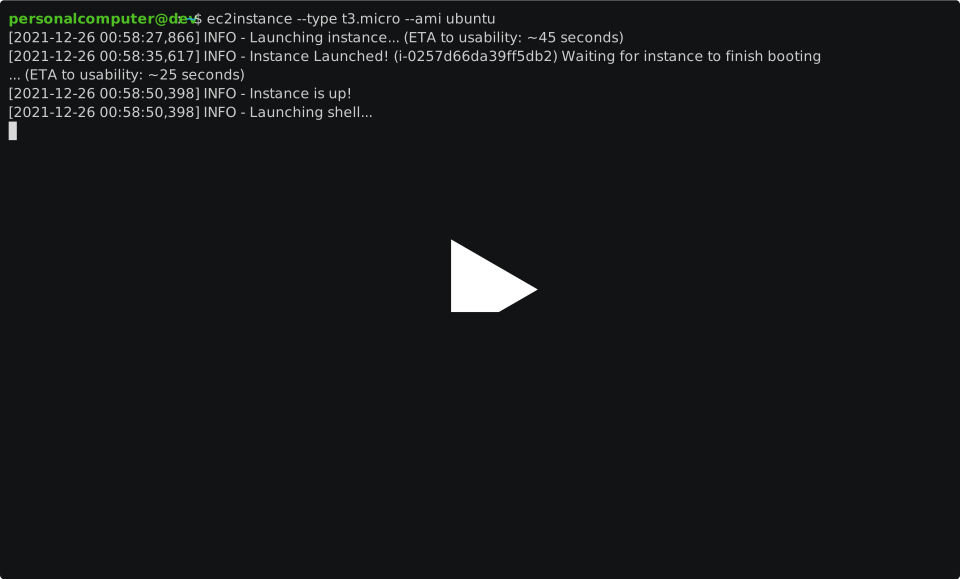
ec2instance is the "docker run -it" of cloud compute. It launches a temporary AWS EC2 instance, connects to it over SSH, and ties its lifecycle to the command by default.
Demo
Install
pip install ec2instance
Usage
usage: ec2instance [-h] [-t INSTANCE_TYPE] [-i AMI_IDENTIFIER] [-f USER_DATA_FILENAME]
                   [--volume-size VOLUME_SIZE] [--profile PROFILE_NAME] [--region AWS_REGION] [-d]
                   [--show-data-path]

Quickly launch an EC2 instance for small tasks. The instance's lifecycle is tied to the process,
enabling easy Ctrl+C instance termination when done.

options:
  -h, --help            show this help message and exit
  -t, --type INSTANCE_TYPE
                        EC2 instance type. (default: t3a.micro)
  -i, --ami AMI_IDENTIFIER
                        EC2 AMI id. You may also pass "ubuntu" as a shortcut to get the latest
                        Ubuntu LTS, or "amazonlinux" as a shortcut to get the latest Amazon Linux.
                        (default: ubuntu)
  -f, --user-data USER_DATA_FILENAME
                        EC2 "user data" script. Path to a shell script. AWS will upload and run
                        this script on the instance immediately after launch. (default:
                        ~/.config/ec2instance_cmd/user_data_scripts/default.sh)
  --volume-size VOLUME_SIZE
                        Root EBS volume size (GiB). (default is normally approximately 8GiB)
  --profile PROFILE_NAME
                        AWS credentials profile name to use.
  --region AWS_REGION   Specific AWS region to use.
  -d, --detach, --non-interactive, --json
                        By default an interactive shell will be opened in the spawned instance,
                        and the instance will be terminated when the shell is closed. To instead
                        output ec2 metadata as json and then detach, specify --detach.
  --show-data-path      Print out the path where ec2instance is storing local data and
                        configuration.

help & support:
  https://github.com/personalcomputer/ec2instance/issues
Notes
- Before using ec2instance, you must configure AdministratorAccess-level AWS authentication credentials locally:
- 1.) install awscli
- 2.) Run
aws configureand enter in your AWS access key. How to get an AWS access key is not in scope of this guide.
- Upon running ec2instance for the first time, it will tell you it is automatically creating a tiny sandbox in your AWS account to ensure that there are no possible conflicts or security concerns from using ec2instance. This sandbox consists of generating a dedicated fresh VPC and SSH keypair, and these are persisted between invocations of ec2instance. There is no AWS fee associated with these resources, and their auto-generated names are obvious and logged to console. Feel free to delete them if you stop using ec2instance.
Other Providers (other than AWS EC2)
ec2instance actually supports Hetzner and Vast.AI too!
Examples:
ec2instance hetzner --type cx23 --location fsn1
ec2instance vast --type 123456789 --ami nvidia-cuda
Run ec2instance hetzner --help or ec2instance vast --help for the Hertzner or Vast.ai specific help, respectively.
1 maintainer

Metadata
1 maintainer
Release files for ec2instance 2.0.1
For a detailed explanation of source distributions (sdists) and built distributions (wheels), please see the package formats documentation.
Source distribution (sdist)
| File | Size | Uploaded | Provenance | Actions |
|---|---|---|---|---|
| ec2instance-2.0.1.tar.gz | 45.9 kB | Without provenance | Details for ec2instance-2.0.1.tar.gz |
Built distribution (wheel)
| File | Interpreter | ABI | Platform | Actions Reset |
|---|---|---|---|---|
| ec2instance-2.0.1-py3-none-any.whl | Python 3 | none | any | Details for ec2instance-2.0.1-py3-none-any.whl |
Total release size: 85.9 kB
Release files / ec2instance-2.0.1.tar.gz
| Download URL | ec2instance-2.0.1.tar.gz |
|---|---|
| Size | 45.9 kB |
| Tags | Source |
|
SHA-256 checksum How to use checksums |
efe2c3688c99eb79cc9241513225cb848fc6b3949230b8fb20fb5f45b5aac88a
|
|
BLAKE2b-256 checksum How to use checksums |
3868e6603dbd6948bb58fe8b3ce51640a529d7b84359d3cd31d13fcc0b50adb2
|
| Upload date | |
|
Uploaded using Trusted Publishing? What is trusted publishing? |
No |
| Uploaded via |
uv/0.10.2 {"installer":{"name":"uv","version":"0.10.2","subcommand":["publish"]},"python":null,"implementation":{"name":null,"version":null},"distro":{"name":"Ubuntu","version":"22.04","id":"jammy","libc":null},"system":{"name":null,"release":null},"cpu":null,"openssl_version":null,"setuptools_version":null,"rustc_version":null,"ci":null}
|
Release files / ec2instance-2.0.1-py3-none-any.whl
| Download URL | ec2instance-2.0.1-py3-none-any.whl |
|---|---|
| Size | 40.0 kB |
| Tags | Python 3 |
|
SHA-256 checksum How to use checksums |
ecbcc23c63c0f5d0e73bccf7ce60da2dfafa3fb385f1328c2533a071cb7c5cc2
|
|
BLAKE2b-256 checksum How to use checksums |
9e7aa5da4e8e30319f7e06d7fc829a655f1102dadc504d970b3d087570650e9e
|
| Upload date | |
|
Uploaded using Trusted Publishing? What is trusted publishing? |
No |
| Uploaded via |
uv/0.10.2 {"installer":{"name":"uv","version":"0.10.2","subcommand":["publish"]},"python":null,"implementation":{"name":null,"version":null},"distro":{"name":"Ubuntu","version":"22.04","id":"jammy","libc":null},"system":{"name":null,"release":null},"cpu":null,"openssl_version":null,"setuptools_version":null,"rustc_version":null,"ci":null}
|
Security for ec2instance 2.0.1
Provenance
Provenance describes where a file came from. On PyPI, provenance is shared via attestations, which provide a verifiable record of the build or publishing details. View details, limitations and caveats.
No provenance found
None of the files in this release were uploaded with provenance metadata.
A note on package security
PyPI is a repository for distributing packages, not a service for auditing them. While third-party security researchers and our staff do their best to detect and remove malicious packages, PyPI cannot guarantee the quality, security or suitability of any given package.
To learn more about protecting yourself from malicious actors, visit our package security documentation.














