
EDAExcelReport







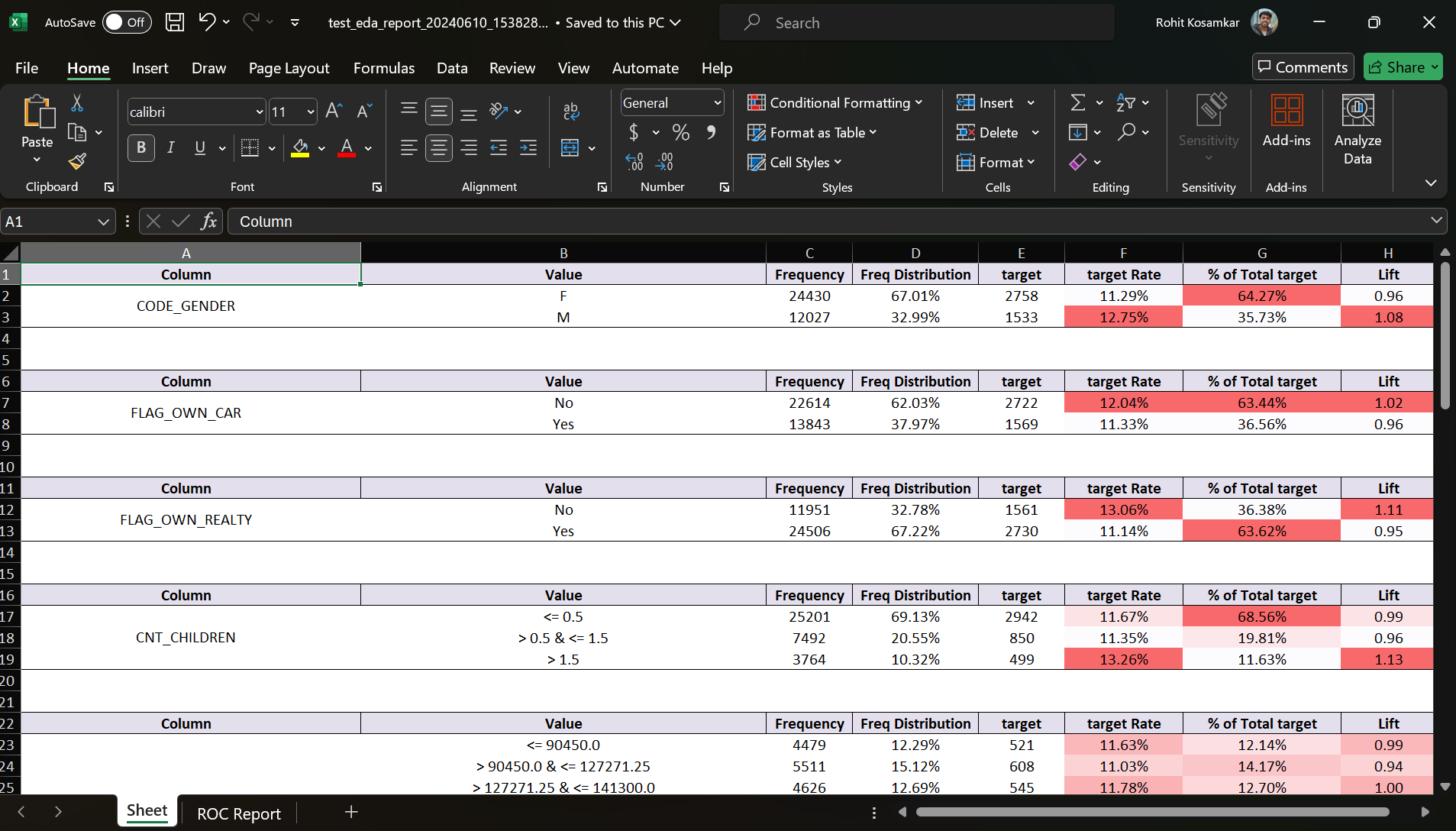
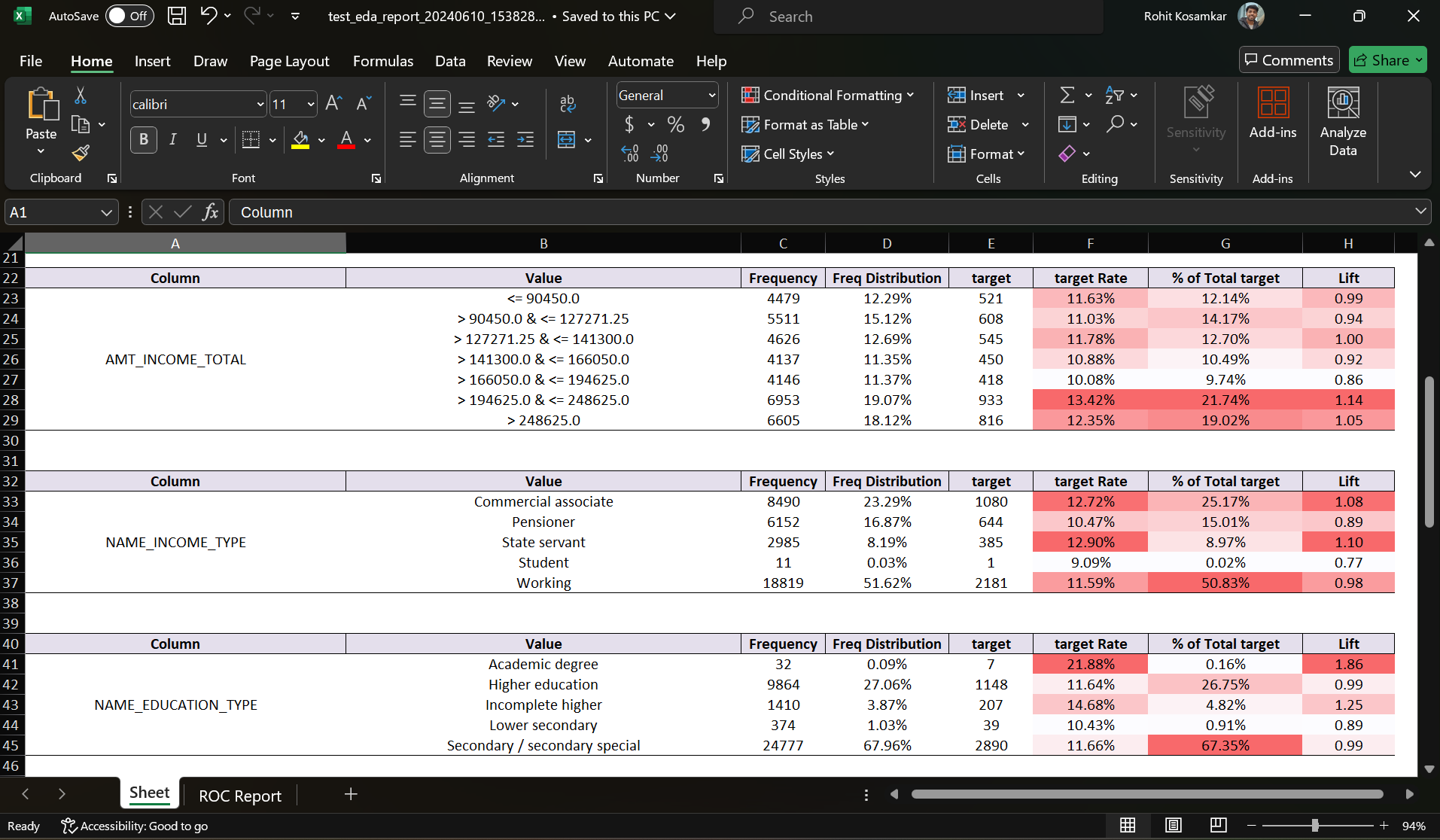
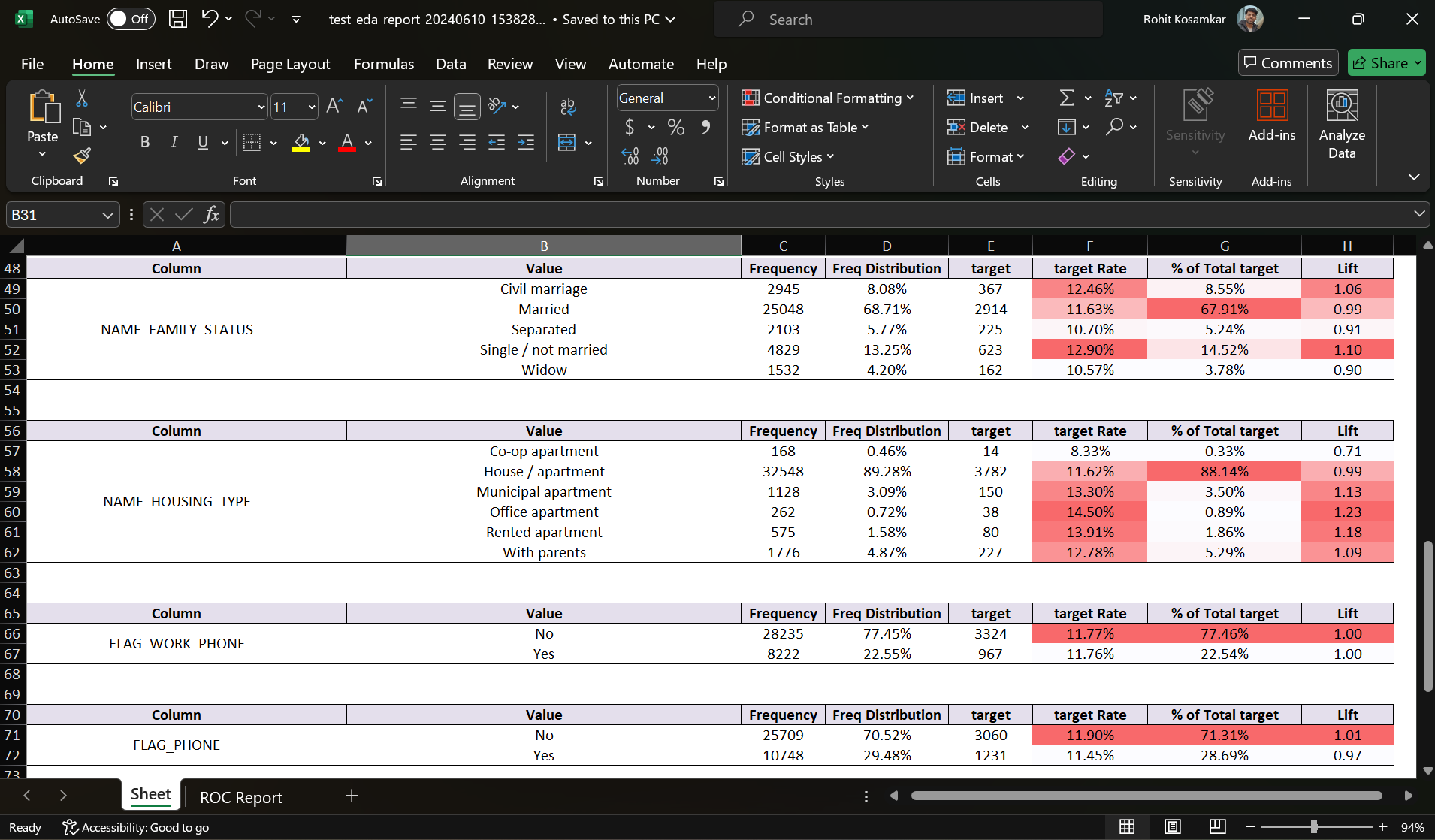
EDAExcelReport is a Python package for generating detailed exploratory data analysis (EDA) reports specifically for datasets with binary target variables. The package creates comprehensive EDA reports in Excel format, which include statistics and visualizations in the form of table that help in understanding the distribution and relationship of various features with the target variable.
Table of Contents
Features
- Calculates frequency and distribution of feature values.
- Computes target rate, percentage of total target, and lift for each feature value.
- Automatically handles numeric and categorical data.
- Generates Excel reports with well-formatted tables and conditional formatting.
- Removes gridlines and adds borders for better readability.
Installation
You can install the package via pip:
pip install EDAExcelReport
# How to import?
from EDAR.excel_report import EDAExcelReport
# Import necessary libraries
import pandas as pd
import numpy as np
import os
from EDAR.excel_report import EDAExcelReport
# Loading the credit dataset
df = pd.read_csv(r"tests\credit_data.csv")
df.columns
Index(['ID', 'CODE_GENDER', 'FLAG_OWN_CAR', 'FLAG_OWN_REALTY', 'CNT_CHILDREN',
       'AMT_INCOME_TOTAL', 'NAME_INCOME_TYPE', 'NAME_EDUCATION_TYPE',
       'NAME_FAMILY_STATUS', 'NAME_HOUSING_TYPE', 'DAYS_BIRTH',
       'DAYS_EMPLOYED', 'FLAG_MOBIL', 'FLAG_WORK_PHONE', 'FLAG_PHONE',
       'FLAG_EMAIL', 'OCCUPATION_TYPE', 'CNT_FAM_MEMBERS', 'target'],
      dtype='object')
df.isna().sum()
ID                         0
CODE_GENDER                0
FLAG_OWN_CAR               0
FLAG_OWN_REALTY            0
CNT_CHILDREN               0
AMT_INCOME_TOTAL           0
NAME_INCOME_TYPE           0
NAME_EDUCATION_TYPE        0
NAME_FAMILY_STATUS         0
NAME_HOUSING_TYPE          0
DAYS_BIRTH                 0
DAYS_EMPLOYED              0
FLAG_MOBIL                 0
FLAG_WORK_PHONE            0
FLAG_PHONE                 0
FLAG_EMAIL                 0
OCCUPATION_TYPE        11323
CNT_FAM_MEMBERS            0
target                     0
dtype: int64
ignore_feats = ["ID", "OCCUPATION_TYPE", "DAYS_BIRTH", "DAYS_EMPLOYED", "FLAG_MOBIL"]
EDAExcelReport(df, 'target',r'tests\test_eda_report.xlsx', ignore_cols= ignore_feats)
Your EDA report is ready at tests\test_eda_report_20240610_153828.xlsx

<ed_report.excel_report.EDAExcelReport at 0x188c09ee9f0>
Important Note
Ensure your dataset is free of null values before using the EDAExcelReport package. This is crucial because numeric data is bucketed during the analysis, and the presence of null values can interfere with the bucket creation process. Additionally, having null values in the dataset can lead to inaccurate or misleading results when showcasing the report to stakeholders.
Example
# Remove or impute null values
df.fillna(method='ffill', inplace=True)
Input Parameters
EDAExcelReport
class EDAExcelReport:
    def __init__(self, data, target, report_path, ignore_cols=None, cat_label_enco_thresh=0.05, num_min_samples_leaf=0.1, conditional_color='red'):


`data:` The input DataFrame containing the dataset.
`target:` The name of the target column in the DataFrame.
`report_path:` The file path where the Excel report will be saved.
`ignore_cols:` (Optional) List of column names to ignore in the analysis.
`cat_label_enco_thresh:` (Optional) Threshold for label encoding of categorical variables (default is 0.05).
`num_min_samples_leaf:` (Optional) Minimum samples per leaf for numeric data bucketing (default is 0.1).
`conditional_color:` (Optional) The color used for conditional formatting in the report (default is 'red').
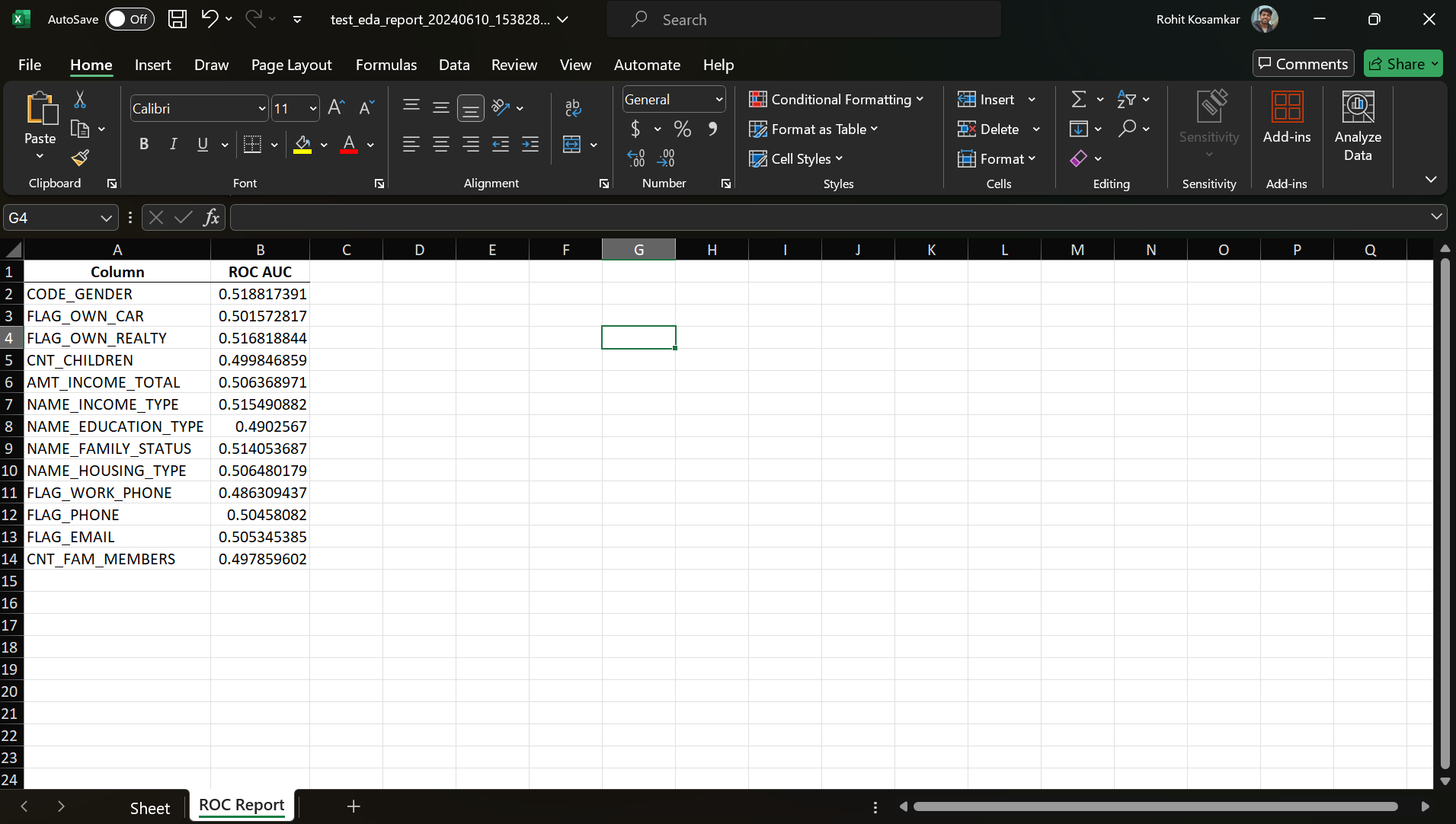
Exploratory Data Analysis Excel File for above Credit Data you can download from here:
Screenshots
Screenshot 1
Screenshot 2
Screenshot 3
Screenshot 4
License
This project is licensed under the MIT License.
1 maintainer

Metadata
1 maintainer
Release files for EDAExcelReport 0.2.1
For a detailed explanation of source distributions (sdists) and built distributions (wheels), please see the package formats documentation.
Source distribution (sdist)
| File | Size | Uploaded | |
|---|---|---|---|
| edaexcelreport-0.2.1.tar.gz | 11.9 kB | Details |
Built distribution (wheel)
| File | Interpreter | ABI | Platform | Reset |
|---|---|---|---|---|
| edaexcelreport-0.2.1-py3-none-any.whl | Python 3 | none | any | Details |
Total release size: 22.2 kB
Release files / edaexcelreport-0.2.1.tar.gz
| Download URL | edaexcelreport-0.2.1.tar.gz |
|---|---|
| Size | 11.9 kB |
| Tags | Source |
|
SHA-256 checksum How to use checksums |
e332f4897ea2fcd77f5557061b0ee8d58b1cbae66cc947b0ff0b7ffdaf6531fa
|
|
BLAKE2b-256 checksum How to use checksums |
cad7250aea8b08f3b497c6e6f3cbbf5c40ebbea69916aa29230415b8e36bf905
|
| Upload date | |
|
Uploaded using Trusted Publishing? What is trusted publishing? |
No |
| Uploaded via |
twine/6.1.0 CPython/3.10.18
|
Release files / edaexcelreport-0.2.1-py3-none-any.whl
| Download URL | edaexcelreport-0.2.1-py3-none-any.whl |
|---|---|
| Size | 10.3 kB |
| Tags | Python 3 |
|
SHA-256 checksum How to use checksums |
22a938a4c41c0fbb555e16dd216ec9363c1478aed6cc1d494b9c6f8e8d7230c9
|
|
BLAKE2b-256 checksum How to use checksums |
1294c315818255a5e1a1154ce5fd2089d4d47308caa79fa9697fe5848a0373dd
|
| Upload date | |
|
Uploaded using Trusted Publishing? What is trusted publishing? |
No |
| Uploaded via |
twine/6.1.0 CPython/3.10.18
|














