
EdgeVox
Offline voice agent framework for robots. Sub-second local voice pipeline. Fully private.









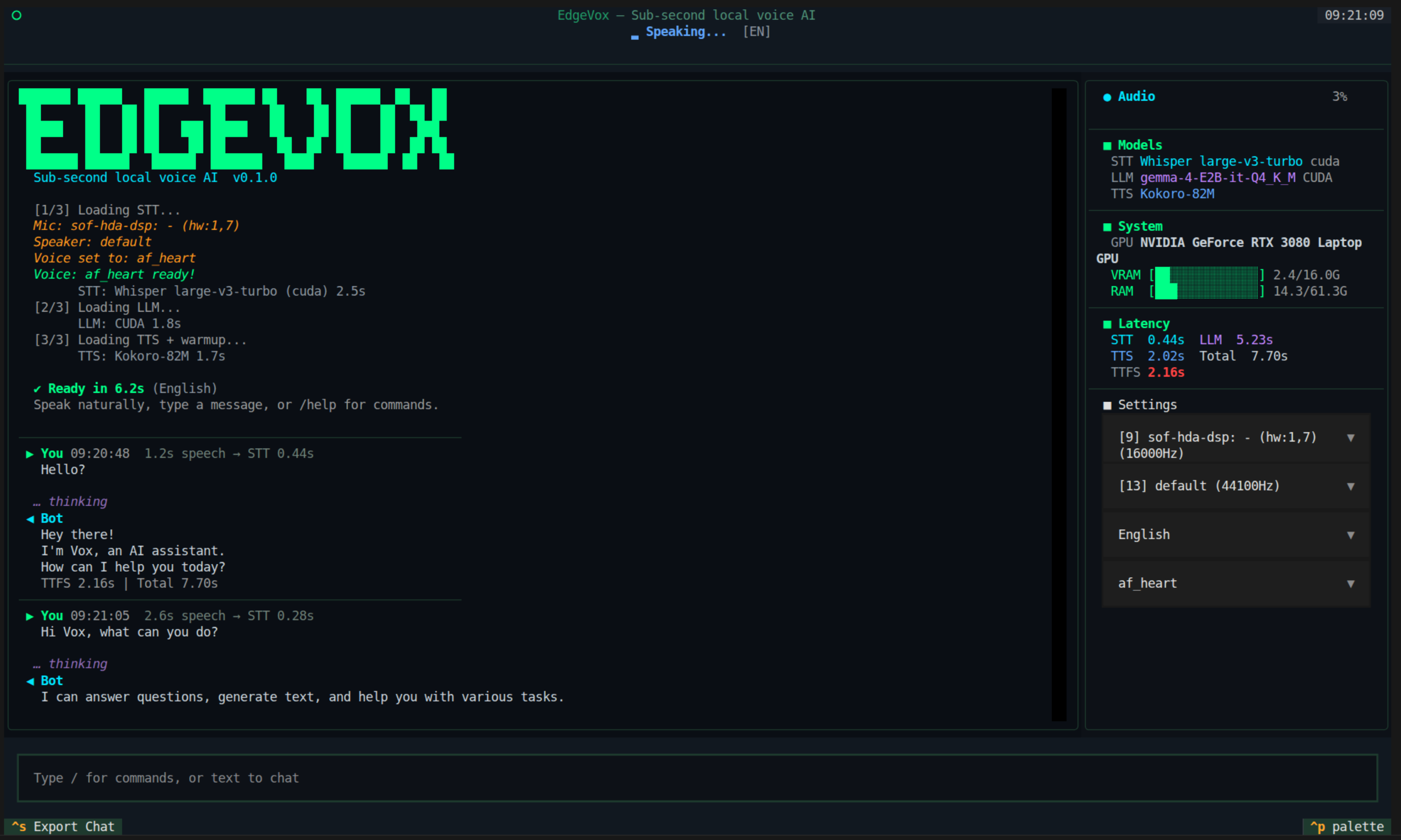
Voice pipeline TUI — streaming STT · LLM · TTS with VAD barge-in |
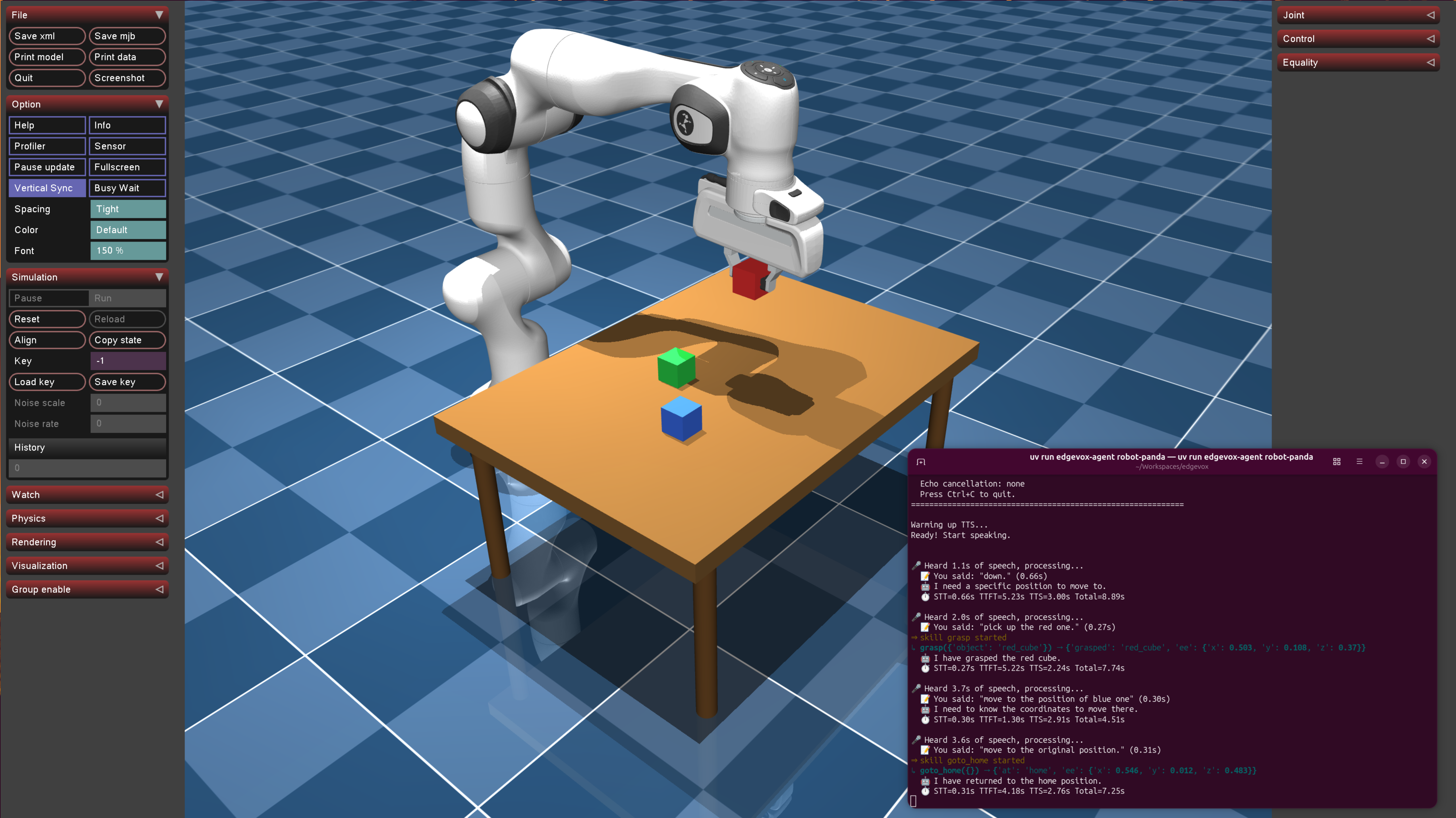
MuJoCo · Franka arm — voice-controlled pick-and-place |
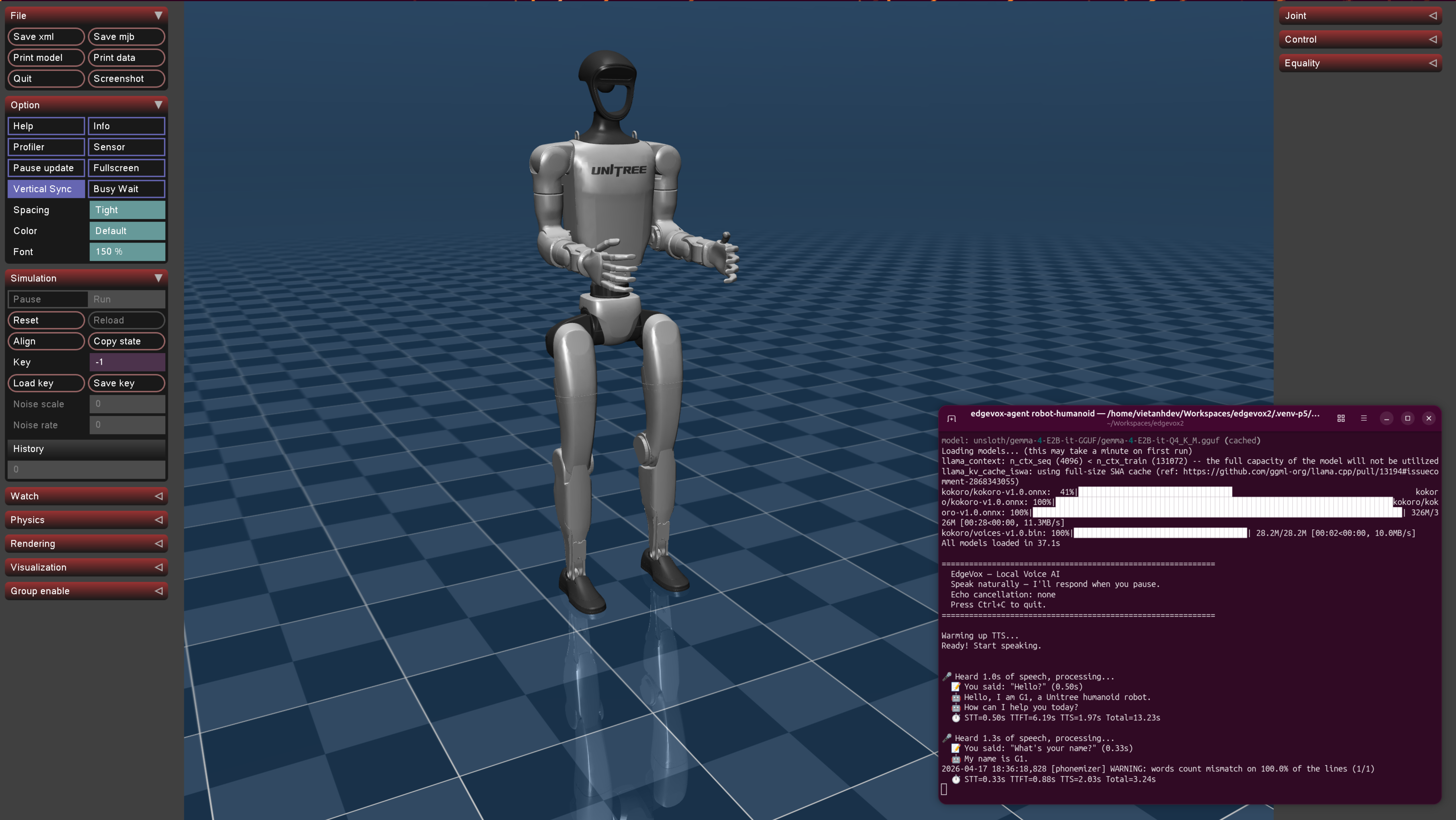
Unitree G1 humanoid — procedural gait + ONNX policy slot |
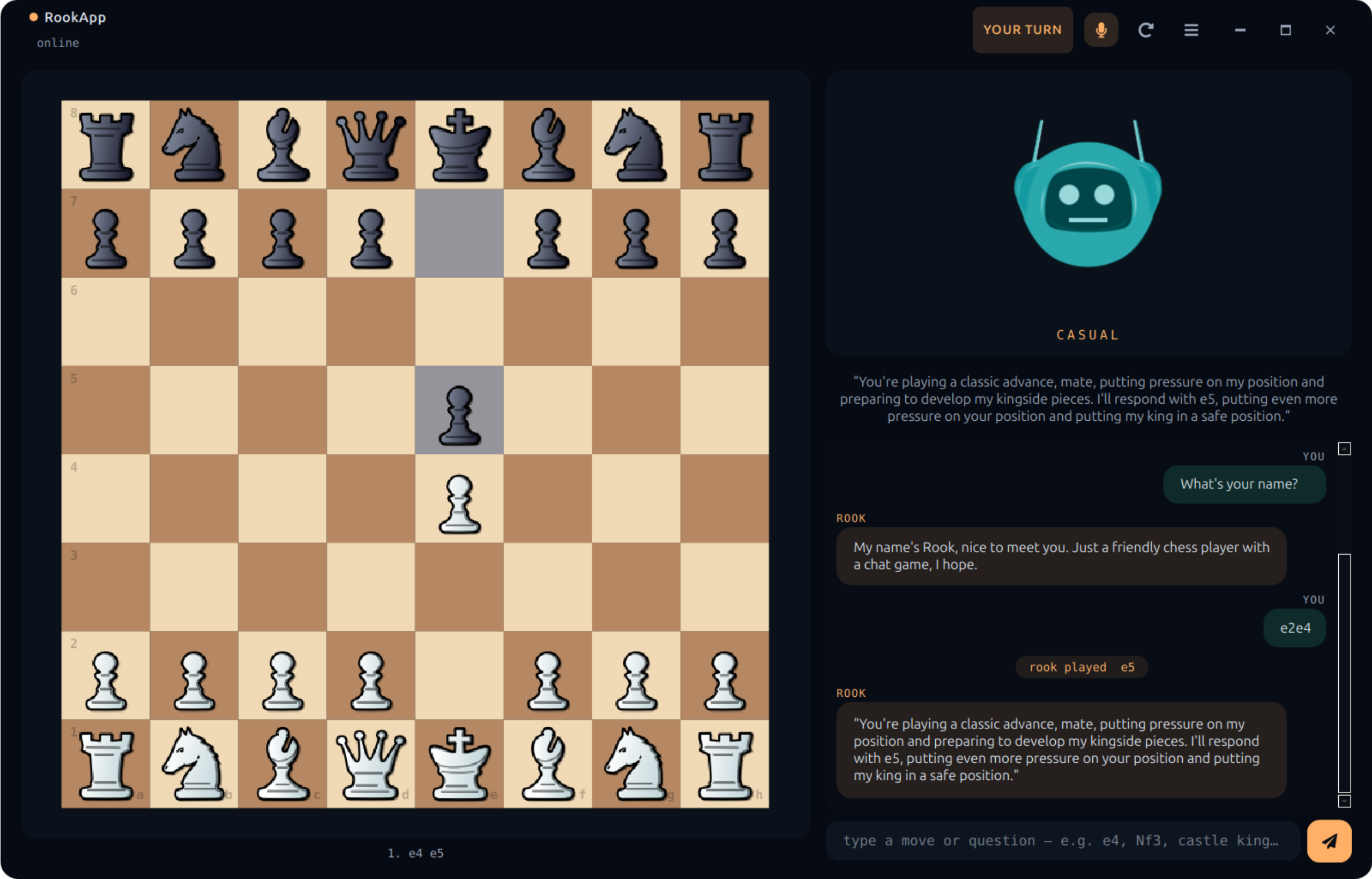
RookApp desktop — offline chess partner (Qt + LLMAgent + Stockfish, one Python process) |
Agents + Skills + Workflows | 2D sim (IR-SIM) | 3D sim (MuJoCo) | 0.8s voice TTFT | 16 languages | 56 voices | ROS2-native | Ships as a desktop app
Why EdgeVox?
- Voice is the interface — streaming STT → LLM → TTS pipeline hits first audio in ~0.8 s on an RTX 3080, runs on a Jetson Orin Nano, CPU fallback on a laptop.
- Agents are the program model — write
@tooland@skillfunctions in Python; compose them withSequence,Fallback,Loop,Parallel, andRouterworkflows; delegate across agents with OpenAI-SDK-style handoffs. - Robots are the target — cancellable skills with
GoalHandle, hard-stop safety monitor that bypasses the LLM, three-tier simulation (stdlib → IR-SIM → MuJoCo), ROS2 bridge. - Everything is offline — no cloud APIs, no telemetry, no vendor lock. Gemma 4 via llama.cpp, faster-whisper, Kokoro/Piper/Supertonic TTS. Your mic audio never leaves the machine.
30-second demo
2D — IR-SIM (mobile robot navigation)
pip install 'edgevox[sim]'
edgevox-setup                      # downloads ~3 GB of models, one time
edgevox-agent robot-irsim --text-mode
A matplotlib window opens showing a 10×10 apartment with four rooms. Type "go to the kitchen" — the blue robot drives visibly. Say "stop" mid-flight and it halts in ~200 ms (the safety monitor preempts before the LLM is consulted). Swap --text-mode for --simple-ui to drive it by voice.
3D — MuJoCo (tabletop arm pick-and-place)
pip install 'edgevox[sim-mujoco]'
edgevox-agent robot-panda --text-mode
A MuJoCo viewer opens with a Franka Panda arm above a table with three colored cubes. Type "pick up the red cube" — the arm moves, grasps, and lifts. Voice commands control move_to, grasp, release, and goto_home skills.
3D — MuJoCo humanoid (Unitree G1 / H1)
pip install 'edgevox[sim-mujoco]'
edgevox-agent robot-humanoid --simple-ui
A Unitree humanoid (auto-fetched from nrl-ai/edgevox-models on first use, ~15 MB) appears in the MuJoCo viewer standing on its home keyframe. Say "walk forward half a meter", "turn left ninety degrees", "stand" — a procedural gait swings the legs + arms while the root advances. Plug in an ONNX walking policy via MujocoHumanoidEnvironment.set_walking_policy(...) for real RL locomotion.
Real robot or external sim via ROS2
source /opt/ros/jazzy/setup.bash
edgevox-agent robot-external --text-mode
Subscribes to odom, optionally scan + camera/image_raw, and publishes cmd_vel + goal_pose. Drives any Gazebo Harmonic world, Isaac Sim (via ROS2 bridge), or a real mobile robot that speaks the standard contract — the same agent code works unchanged.
Features
Agent framework
@tool/@skilldecorators — auto-derive JSON schemas from Python signatures + docstringsLLMAgentwith per-run history isolation, reentrant, thread-safe- Workflows:
Sequence,Fallback,Loop,Parallel,Router,Supervisor,Orchestrator,Retry,Timeout— behavior-tree-shaped + multi-agent patterns, nestable - Handoffs — OpenAI-SDK-style "agent-as-return-value" (2 LLM hops per delegation vs smolagents' 3); LangGraph-style
state_updatewrites blackboard keys before the target runs - Grammar-constrained tool calling — auto-built GBNF from
ToolRegistryschemas;tool_choice_policy="required_first_hop"is the canonical SLM loop-break (no malformed JSON, no fabricated tool names) - Hooks — 6 fire points (
on_run_start,before_llm,after_llm,before_tool,after_tool,on_run_end), priority-ordered (Safety 100 → Observability 0), 12 built-ins ship + 3 SLM hardening hooks - Memory — bi-temporal
Factschema (facts_as_of(t)),JSONMemoryStore+SQLiteSessionStore,Compactorwith tokenizer-exact counts, file-basedNotesFile - Artifacts — versioned, indexed, exposable as LLM tools via
make_artifact_tools(store) - Cancellable skills —
GoalHandlelifecycle withpoll/cancel/feedback, mid-flight preempt in ~200 ms SafetyMonitor— stop-word preempt before the LLM is consultedEventBus— thread-safe pub/sub for observability, metrics, main-thread schedulingSimEnvironmentprotocol — agent code swaps cleanly betweenToyWorld(stdlib),IrSimEnvironment(IR-SIM), andMujocoArmEnvironment(MuJoCo)- Parallel tool/skill dispatch inside a single turn via
ThreadPoolExecutor - 8 built-in example agents —
home,robot,dev,robot-scout,robot-irsim,robot-panda,robot-humanoid,robot-external
Voice pipeline (substrate)
- Sub-second streaming — 0.8 s first-audio on RTX 3080 (VAD 32 ms + faster-whisper + Gemma 4 E2B + Kokoro)
- 16 languages with 56 voices across 4 TTS backends
- Robust voice interrupt — speak over the bot to cut it off;
specsubAEC on by default + energy-ratio gate so the bot doesn't hear itself; LLM generation aborted via llama-cppstopping_criteria(≤40 ms cancellation latency); back-to-back barge-ins re-arm cleanly - 4 wake words — "Hey Jarvis", "Alexa", "Hey Mycroft", "Okay Nabu"
- 4 interfaces — TUI (Textual), Web UI (FastAPI + Vue), simple CLI, text mode
- ROS2-native — voice-pipeline bridge, TF2 / Nav2 / sensor adapter,
edgevox_msgs/action/ExecuteSkillaction server, external-sim driver for Gazebo / Isaac / real hardware - Auto hardware detection — CUDA / Metal / CPU fallback, VRAM-aware GPU-layer selection
Quick Start
# 1. Install uv (fast Python package manager)
curl -LsSf https://astral.sh/uv/install.sh | sh

# 2. Create a virtual environment
uv venv --python 3.12
source .venv/bin/activate

# 3. Install llama-cpp-python (GPU or CPU, your choice)
uv pip install llama-cpp-python \
    --extra-index-url https://abetlen.github.io/llama-cpp-python/whl/cu124
# For Apple Silicon: CMAKE_ARGS="-DGGML_METAL=on" uv pip install llama-cpp-python
# For CPU only:      uv pip install llama-cpp-python

# 4. Install EdgeVox with the sim extra (pulls in ir-sim)
uv pip install -e '.[sim]'

# 5. Download models (~3 GB)
edgevox-setup

# 6a. Run a voice agent with a visible robot
edgevox-agent robot-irsim --text-mode

# 6b. OR run the classic voice pipeline
edgevox
Build your own agent
from edgevox.agents import AgentContext, GoalHandle, ToyWorld, skill
from edgevox.examples.agents.framework import AgentApp
from edgevox.llm import tool


@tool
def set_light(room: str, on: bool, ctx: AgentContext) -> str:
    """Turn a room's light on or off.

    Args:
        room: the room name, e.g. "kitchen".
        on: true to turn on, false to turn off.
    """
    ctx.deps.apply_action("set_light", room=room, on=on)
    return f"{room} light is now {'on' if on else 'off'}"


@skill(latency_class="slow", timeout_s=30.0)
def navigate_to(room: str, ctx: AgentContext) -> GoalHandle:
    """Drive the robot to a named room.

    Args:
        room: target room, e.g. "kitchen", "bedroom".
    """
    return ctx.deps.apply_action("navigate_to", room=room)


AgentApp(
    name="Scout",
    instructions="You are Scout, a terse home robot. Confirm what you did in one sentence.",
    tools=[set_light],
    skills=[navigate_to],
    deps=ToyWorld(),
    stop_words=("stop", "halt", "freeze"),
).run()
Launch with python my_agent.py --text-mode and you have a voice-controllable robot running on a stdlib-only reference sim. Swap ToyWorld() for IrSimEnvironment() and a matplotlib window opens. Full guide: docs/documentation/agents.md.
The five built-in agents are subcommands of edgevox-agent:
| Command | What it does |
|---|---|
edgevox-agent home |
Home automation — lights, thermostat, timers, weather |
edgevox-agent robot |
Simple robot demo with pose + battery |
edgevox-agent dev |
Developer toolbox — arithmetic, unit conversion, notes |
edgevox-agent robot-scout |
Full agent demo on ToyWorld (stdlib, no extra deps) |
edgevox-agent robot-irsim |
Full agent demo on IR-SIM with matplotlib window |
edgevox-agent robot-panda |
MuJoCo Franka Panda — voice pick-and-place |
edgevox-agent robot-humanoid |
MuJoCo Unitree G1 / H1 — voice walk / turn / stand |
edgevox-agent robot-external |
Drive any external ROS2 robot (Gazebo, Isaac, real hardware) |
Each one supports --text-mode, --simple-ui, or (default) full TUI. Any of them composes with --ros2 to attach the full ROS2 bridge + Nav2 / TF2 / sensor adapter + execute_skill action server.
RookApp — desktop chess robot
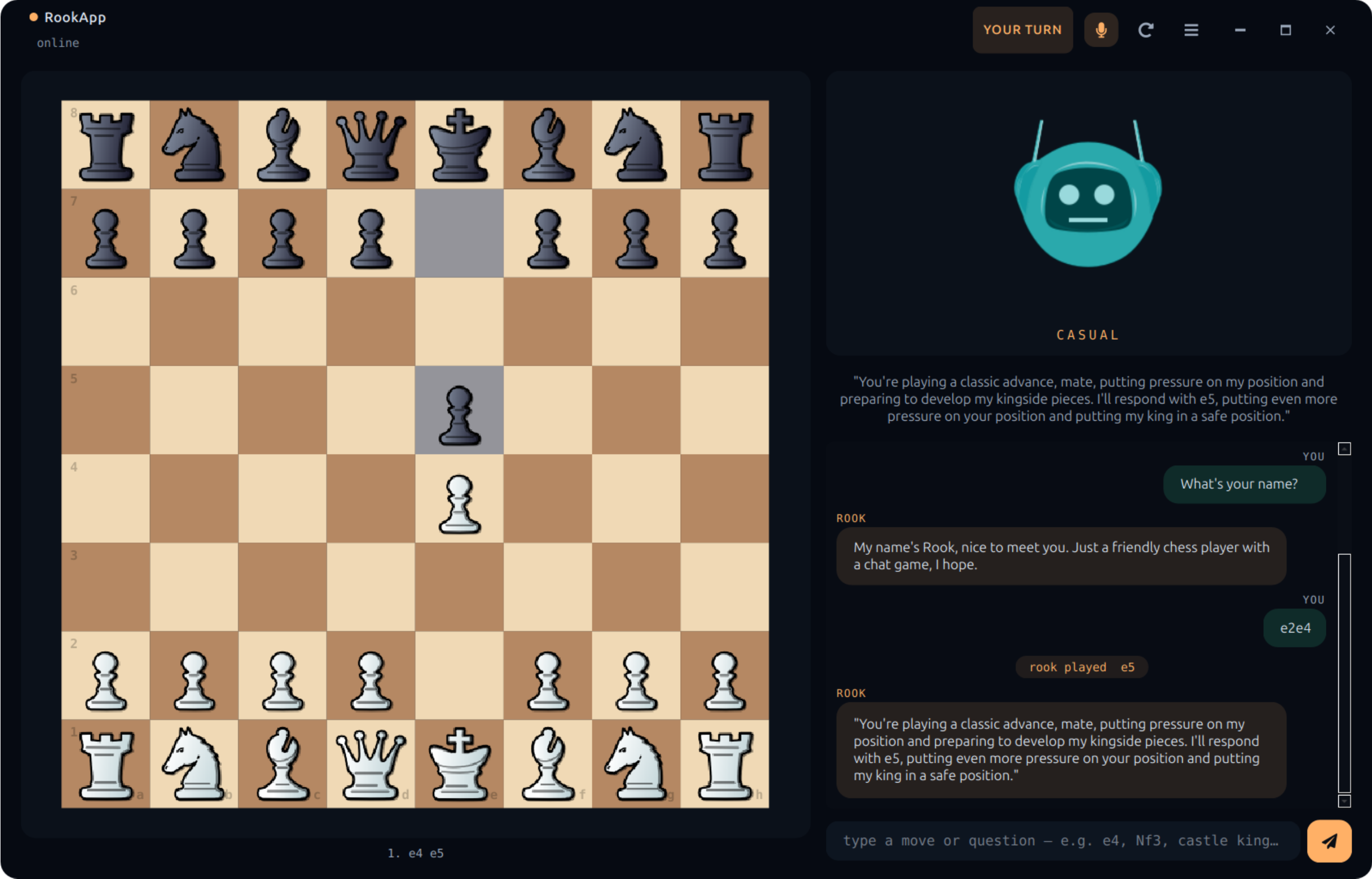
Voice-controlled offline chess partner built on EdgeVox — a PySide6 desktop app that runs the Qt UI, the LLMAgent, llama-cpp (Llama-3.2-1B Q4_K_M), and Stockfish all in one Python process. No browser, no web server, no Node toolchain. Three personas (casual, grandmaster, trash_talker), six board themes, three piece sets, Kokoro TTS, Whisper STT with barge-in.
# 1. Install the desktop extra (PySide6 + qtawesome + rlottie + pillow)
uv pip install -e '.[desktop]'

# 2. Stockfish on $PATH (GPL — stays out-of-process, app stays MIT)
sudo apt-get install -y stockfish          # Linux
brew install stockfish                     # macOS
# Windows: https://stockfishchess.org/download/

# 3. Download STT + LLM + TTS models (~3 GB, one time)
edgevox-setup

# 4. Launch
edgevox-chess-robot
Flags: --persona {grandmaster,casual,trash_talker}, --user-plays {white,black}, --engine {stockfish,maia}, --stockfish-skill 0..20, --maia-weights PATH, -v. Every flag also reads an EDGEVOX_CHESS_* env var. Piece set, board theme, persona, audio devices, and debug-mode settings live in the in-app ☰ → Settings… dialog. Preferences persist via QSettings. Full guide: docs/documentation/desktop.md.
Simulation tiers
| Tier | Sim | Dependencies | Role | Status |
|---|---|---|---|---|
| 0 | ToyWorld |
stdlib only | unit tests, trivial examples | shipped |
| 1 | IrSimEnvironment |
pip install ir-sim |
2D visual demo (matplotlib, diff-drive, LiDAR) | shipped |
| 2a | MujocoArmEnvironment |
pip install mujoco |
3D physics, Franka Panda pick-and-place | shipped |
| 2b | MujocoHumanoidEnvironment |
pip install mujoco |
Unitree G1 / H1, procedural gait, ONNX policy slot | shipped |
| 3 | ExternalROS2Environment |
sourced ROS2 workspace | Gazebo Harmonic, Isaac Sim (ROS2 bridge), real robots | shipped |
All tiers implement the same SimEnvironment protocol — agent code doesn't change when you swap backends. robot-irsim is Tier 1; robot-panda is Tier 2a; robot-humanoid is Tier 2b; robot-external is Tier 3 and can point at any Gazebo world or real robot that publishes nav_msgs/Odometry and accepts geometry_msgs/Twist.
Voice pipeline
EdgeVox's original identity and the agent framework's substrate. Streaming STT → LLM → TTS with voice interrupt, wake words, 16 languages, TUI and web UIs. Run it without any agent code:
edgevox                         # full TUI (default)
edgevox --web-ui                # browser interface
edgevox --wakeword "hey jarvis"
edgevox-cli                     # simple CLI
edgevox-cli --text-mode         # no microphone needed
Languages & backends
| Language | STT | TTS | Voices |
|---|---|---|---|
| 🇺🇸 English, 🇫🇷 French, 🇪🇸 Spanish, 🇮🇳 Hindi, 🇮🇹 Italian, 🇧🇷 Portuguese, 🇯🇵 Japanese, 🇨🇳 Chinese | faster-whisper | Kokoro | 25 |
| 🇻🇳 Vietnamese | sherpa-onnx (Zipformer) | Piper | 20 |
| 🇩🇪 German, 🇷🇺 Russian, 🇸🇦 Arabic, 🇮🇩 Indonesian | faster-whisper | Piper | varies |
| 🇰🇷 Korean | faster-whisper | Supertonic | 10 |
| 🇹🇭 Thai | faster-whisper | PyThaiTTS | 1 |
Models are hosted on nrl-ai/edgevox-models (HuggingFace) with fallback to upstream repos.
Full TUI + slash-command reference: docs/documentation/commands.md.
Hardware requirements
| Device | RAM | GPU | Expected latency |
|---|---|---|---|
| PC (i9 + RTX 3080 16 GB) | 64 GB | CUDA | ~0.8 s |
| Jetson Orin Nano | 8 GB | CUDA | ~1.5-2 s |
| MacBook Air M1 | 8 GB | Metal | ~2-3 s |
| Any modern laptop | 16 GB+ | CPU only | ~2-4 s |
ROS2 integration
EdgeVox ships a full ROS2 surface, opt-in with --ros2 on any agent or the voice pipeline. Topics live under a configurable namespace (default /edgevox).
source /opt/ros/jazzy/setup.bash
edgevox --ros2                                      # voice pipeline
edgevox-agent robot-humanoid --simple-ui --ros2     # G1 + voice + ROS2
edgevox-agent robot-external --text-mode            # drive an external ROS2 robot
Published: transcription, response, state (transient-local), audio_level, metrics, bot_token, bot_sentence, wakeword, info, robot_state (sim snapshot), agent_event (JSON stream of tool calls / skill goals / handoffs / safety preempts). With a sim attached, RobotROS2Adapter adds /tf, pose, scan (IR-SIM lidar), image_raw (MuJoCo camera).
Subscribed: tts_request, command, text_input, interrupt, set_language, set_voice, cmd_vel (Nav2 Twist), goal_pose (Nav2 PoseStamped).
Services: list_voices, list_languages, hardware_info, model_info — each an std_srvs/srv/Trigger returning JSON.
Actions: execute_skill (edgevox_msgs/action/ExecuteSkill) — generic skill_name + arguments_json goal so any agent skill is callable by a stock rclpy.action.ActionClient. Build the companion interface package with colcon build --packages-select edgevox_msgs.
Launch files under launch/: edgevox.launch.py, edgevox_irsim.launch.py, edgevox_panda.launch.py. Full reference: docs/documentation/ros2.md.
Architecture
EdgeVox follows the classical robotics three-layer pattern. The agent framework lives only in the deliberative layer; safety reflexes and real-time control never touch the LLM.
flowchart TB
    D["`**Deliberative** — ≤ 1 Hz
LLMAgent · Workflows · Router · Handoff
@tool · @skill (Python functions)`"]
    E["`**Executive** — 10–50 Hz
Skill library · GoalHandle lifecycle · BT-shaped workflows
goal / feedback / cancel`"]
    R["`**Reactive** — ≥ 100 Hz
Motor control · watchdogs · SafetyMonitor
*(bypasses LLM)*`"]
    VP["`**Voice pipeline** — the substrate
Mic → VAD → STT → AgentProcessor → SentenceSplit → TTS → Spk`"]
    OUT["`ROS2 bridge · IR-SIM (Tier 1) · MuJoCo arm (Tier 2a) · Unitree G1/H1 (Tier 2b) · External ROS2 / Gazebo (Tier 3)`"]
    D --> E --> R
    R --> VP
    VP --> D
    VP --> OUT
    classDef deliberative fill:#e8f0fe,stroke:#1a73e8,color:#0b3d91
    classDef executive    fill:#fef7e0,stroke:#f9ab00,color:#7a4f01
    classDef reactive     fill:#fce8e6,stroke:#d93025,color:#8a1d15
    classDef substrate    fill:#e6f4ea,stroke:#34a853,color:#0d652d
    classDef out          fill:#f1f3f4,stroke:#5f6368,color:#202124
    class D deliberative
    class E executive
    class R reactive
    class VP substrate
    class OUT out
The LLM never enters the reactive layer. Safety reflexes bypass it. Skills expose intents (navigate_to(room)), not control (set_speed(mps)). Every other design choice flows from this rule.
Model sizes
| Component | Model | Size | RAM |
|---|---|---|---|
| VAD | Silero VAD v6 | ~2 MB | ~10 MB |
| STT | whisper-small | 500 MB | ~600 MB |
| STT | whisper-large-v3-turbo | 1.5 GB | ~2 GB |
| LLM | Gemma 4 E2B IT Q4_K_M | 1.8 GB | ~2.5 GB |
| TTS | Kokoro 82M | 200 MB | ~300 MB |
| Wake | pymicro-wakeword | ~5 MB | ~10 MB |
- M1 Air (8 GB): whisper-small + Q4_K_M = 3.4 GB
- PC with GPU: whisper-large-v3-turbo + Q4_K_M = 5.8 GB
Documentation
- Agents & Tools guide — full agent framework reference: tools vs skills, workflows, safety monitor, simulation tiers, threading model, anti-patterns
- Architecture — streaming pipeline deep-dive
- Quick start
- TUI commands
- ROS2 guide — bridge topics, services,
execute_skillaction, TF2 / Nav2 / sensor interop, launch files
Harness architecture
In-depth docs for each subsystem of the agent harness:
- Agent loop — six-fire-point loop, parallel dispatch, handoff short-circuit, cancel-token plumbing
- Hooks — fire points, payloads, priority scale, built-ins, SLM hardening
- Memory —
MemoryStore/SessionStore/Compactor/NotesFile, bi-temporal facts - Multi-agent — Blackboard, Supervisor, Orchestrator, BackgroundAgent (OTP restart policies)
- Interrupt & barge-in —
cancel_tokento llama-cppstopping_criteria, AEC defaults, repeatable interrupts - Tool calling — parser chain, GBNF grammar-constrained decoding,
tool_choice_policy
Full site: EdgeVox Docs (VitePress). Run locally:
cd docs && npm run dev
License
MIT
1 maintainer

Metadata
1 maintainer
Release files for edgevox 1.3.2
For a detailed explanation of source distributions (sdists) and built distributions (wheels), please see the package formats documentation.
Source distribution (sdist)
| File | Size | Uploaded | |
|---|---|---|---|
| edgevox-1.3.2.tar.gz | 392.3 kB | Details |
Built distribution (wheel)
| File | Interpreter | ABI | Platform | Reset |
|---|---|---|---|---|
| edgevox-1.3.2-py3-none-any.whl | Python 3 | none | any | Details |
Total release size: 843.0 kB
Release files / edgevox-1.3.2.tar.gz
| Download URL | edgevox-1.3.2.tar.gz |
|---|---|
| Size | 392.3 kB |
| Tags | Source |
|
SHA-256 checksum How to use checksums |
9df5e59656250eb661e835cdc0ad53c771cc25092ac738124a082c78307b535b
|
|
BLAKE2b-256 checksum How to use checksums |
c967bb5f4a63231035ed690ecd45be38bc9c5d8b121e0bb15294f3447e466f92
|
| Upload date | |
|
Uploaded using Trusted Publishing? What is trusted publishing? |
Yes |
| Uploaded via |
twine/6.1.0 CPython/3.13.12
|
Provenance
Provenance describes where a file came from. On PyPI, provenance is shared via attestations, which provide a verifiable record of the build or publishing details. View details, limitations and caveats.


PyPI Publish Attestation
PyPI verified that this artifact, at this checksum, originated from the publisher listed below.
Signed by GitHub Actions, verified by PyPI on Apr 25, 2026.
Transparency logRelease files / edgevox-1.3.2-py3-none-any.whl
| Download URL | edgevox-1.3.2-py3-none-any.whl |
|---|---|
| Size | 450.7 kB |
| Tags | Python 3 |
|
SHA-256 checksum How to use checksums |
927ec01d507a30742bb085eeeffe9d72f14432c6660eb910a294174c61882688
|
|
BLAKE2b-256 checksum How to use checksums |
a1e383358f59de7988942c11bb11d49b91ff67d9de0c34780512eab5c97d48b7
|
| Upload date | |
|
Uploaded using Trusted Publishing? What is trusted publishing? |
Yes |
| Uploaded via |
twine/6.1.0 CPython/3.13.12
|
Provenance
Provenance describes where a file came from. On PyPI, provenance is shared via attestations, which provide a verifiable record of the build or publishing details. View details, limitations and caveats.
PyPI Publish Attestation
PyPI verified that this artifact, at this checksum, originated from the publisher listed below.
Signed by GitHub Actions, verified by PyPI on Apr 25, 2026.
Transparency log













