
By Investors, For Investors.








Want to read this in Mandarin 🇨🇳? Click here
EigenLedger (prev. "Empyrial") is a Python-based open-source quantitative investment library dedicated to financial institutions and retail investors, officially released in March 2021. Already used by thousands of people working in the finance industry, EigenLedger aims to become an all-in-one platform for portfolio management, analysis, and optimization.
EigenLedger empowers portfolio management by bringing the best of performance and risk analysis in an easy-to-understand, flexible and powerful framework.
With EigenLedger, you can easily analyze security or a portfolio in order to get the best insights from it. This is mainly a wrapper of financial analysis libraries such as Quantstats and PyPortfolioOpt.
| Table of Contents 📖 |
|---|
| 1. Installation |
| 2. Features |
| 3. Documentation |
| 4. Usage example |
| 5. Download the tearsheet |
| 6. Contribution and Issues |
| 7. Contributors |
| 8. Contact |
| 9. License |
Installation
You can install EigenLedger using pip:
pip install empyrial
For a better experience, we advise you to use EigenLedger on a notebook (e.g., Jupyter, Google Colab)
Note: macOS users will need to install Xcode Command Line Tools.
Note: Windows users will need to install C++. (download, install instructions)
Features
| Feature 📰 | Status |
|---|---|
| Engine (backtesting + performance analysis) | :star: Released on May 30, 2021 |
| Optimizer | :star: Released on Jun 7, 2021 |
| Rebalancing | :star: Released on Jun 27, 2021 |
| Risk manager | :star: Released on Jul 5, 2021 |
| Sandbox | :star: Released on Jul 17, 2021 |
| Support for custom data | :star: Released on Aug 12, 2023 |
Documentation
Full documentation (website)
Usage
EigenLedger Engine
from empyrial import empyrial, Engine

portfolio = Engine(
    start_date = "2018-08-01",
    portfolio = ["BABA", "PDD", "KO", "AMD","^IXIC"],
    weights = [0.2, 0.2, 0.2, 0.2, 0.2],  # equal weighting is set by default
    benchmark = ["SPY"]  # SPY is set by default
)

empyrial(portfolio)
Use custom data
See doc here to learn how to do this.
Calendar Rebalancing
A portfolio can be rebalanced for either a specific time period or for specific dates using the rebalance option.
Rebalance for Time Period
Time periods available for rebalancing are
2y, 1y, 6mo, quarterly, monthly
from empyrial import empyrial, Engine

portfolio = Engine(
    start_date = "2018-08-01",
    portfolio = ["BABA", "PDD", "KO", "AMD","^IXIC"],
    weights = [0.2, 0.2, 0.2, 0.2, 0.2],  # equal weighting is set by default
    benchmark = ["SPY"],  # SPY is set by default
    rebalance = "1y"
)

empyrial(portfolio)
Rebalance for Custom Dates
You can rebalance a portfolio by specifying a list of custom dates.
⚠️ When using custom dates, the first date of the list must correspond with the start_date and the last element should correspond to the end_date which is today's date by default.
from empyrial import empyrial, Engine

portfolio = Engine(
    start_date = "2018-08-01",
    portfolio = ["BABA", "PDD", "KO", "AMD","^IXIC"],
    weights = [0.2, 0.2, 0.2, 0.2, 0.2],  # equal weighting is set by default
    benchmark = ["SPY"],  # SPY is set by default
    rebalance = ["2018-06-09", "2019-01-01", "2020-01-01", "2021-01-01"]
)

empyrial(portfolio)
Optimizer
The default optimizer is equal weighting. You can specify custom weights, if desired.
from empyrial import empyrial, Engine

portfolio = Engine(
    start_date = "2018-08-01",
    portfolio = ["BABA", "PDD", "KO", "AMD","^IXIC"],
    weights = [0.1, 0.3, 0.15, 0.25, 0.2],   # custom weights
    rebalance = "1y"  # rebalance every year
)

empyrial(portfolio)
You can also use the built-in optimizers. There are 4 optimizers available:
"EF": Global Efficient Frontier Example"MEANVAR": Mean-Variance Example"HRP": Hierarchical Risk Parity Example"MINVAR": Minimum-Variance Example
from empyrial import empyrial, Engine

portfolio = Engine(
    start_date = "2018-08-01",
    portfolio = ["BABA", "PDD", "KO", "AMD","^IXIC"],
    optimizer = "EF",
    rebalance = "1y"  # rebalance every year
)

portfolio.weights
Output:
[0.0, 0.0, 0.0348, 0.9652, 0.0]
We can see that the allocation has been optimized.
Risk Manager
3 Risk Managers are available:
- Max Drawdown:
{"Max Drawdown" : -0.3}Example - Take Profit:
{"Take Profit" : 0.4}Example - Stop Loss:
{"Stop Loss" : -0.2}Example
from empyrial import empyrial, Engine

portfolio = Engine(
    start_date = "2018-08-01",
    portfolio= ["BABA", "PDD", "KO", "AMD","^IXIC"],
    optimizer = "EF",
    rebalance = "1y",  # rebalance every year
    risk_manager = {"Max Drawdown" : -0.2}  # Stop the investment when the drawdown becomes superior to -20%
)

empyrial(portfolio)
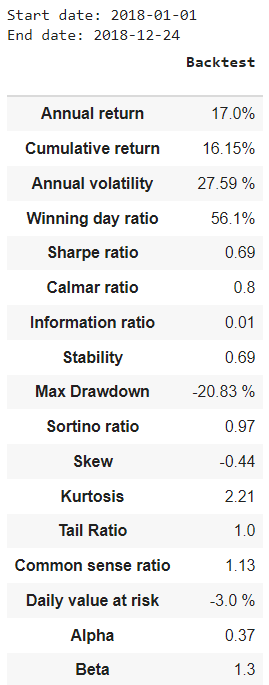
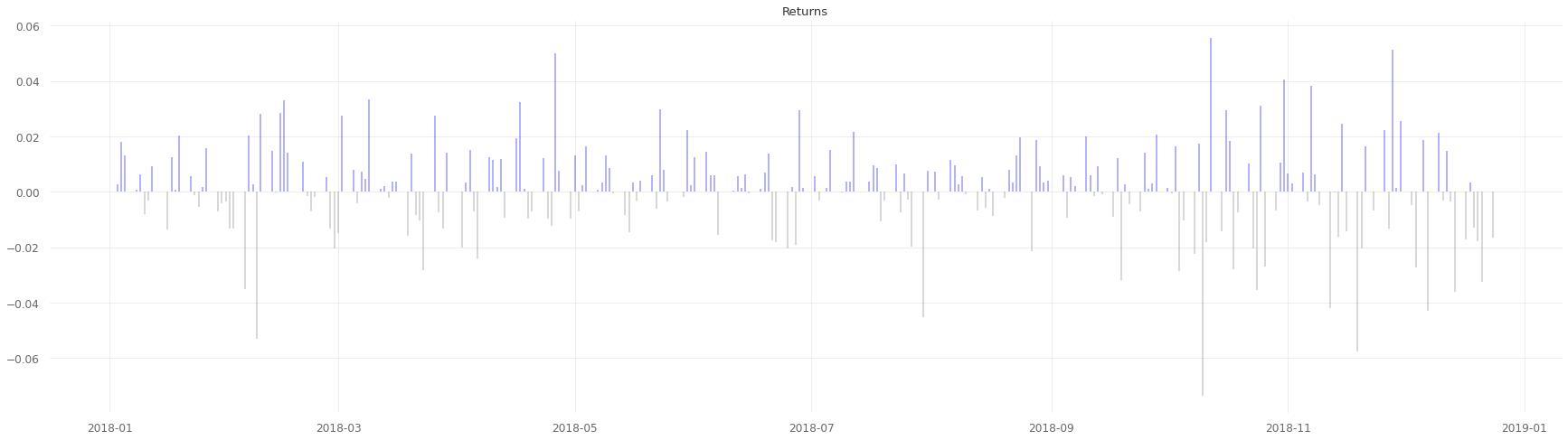
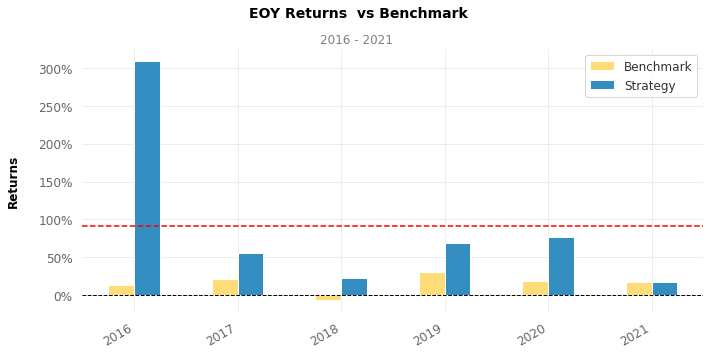
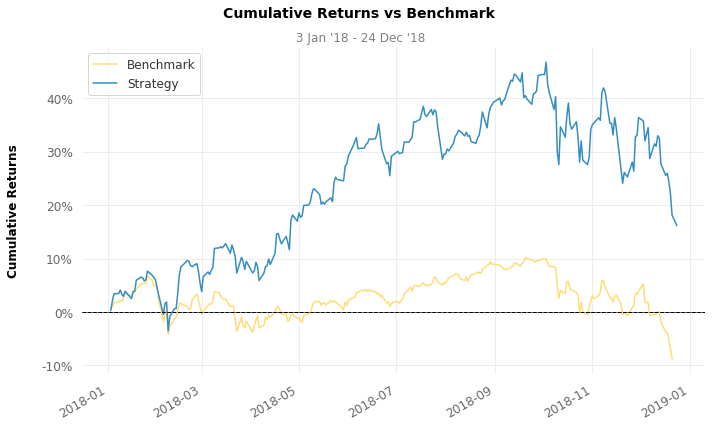
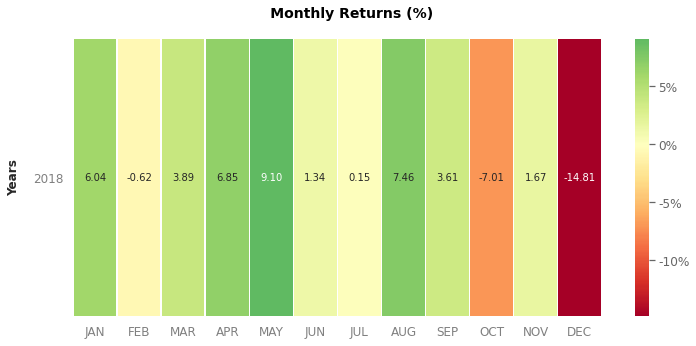
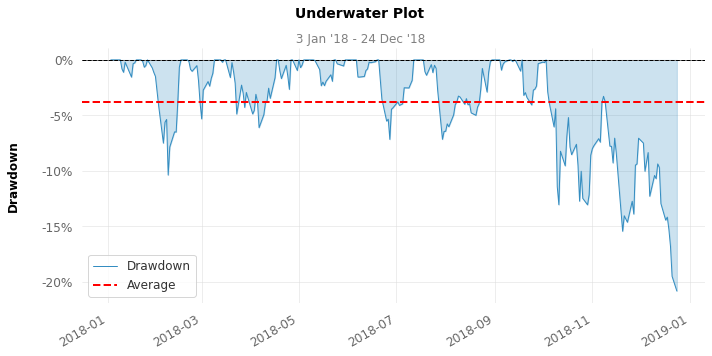
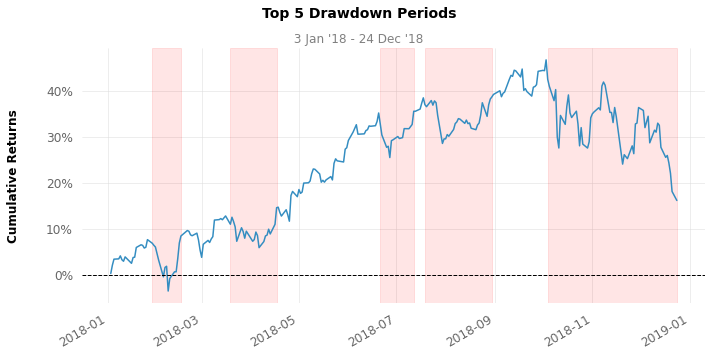
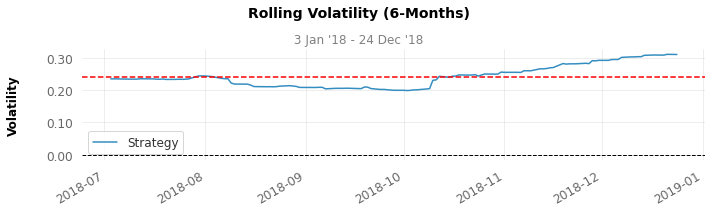
EigenLedger Outputs
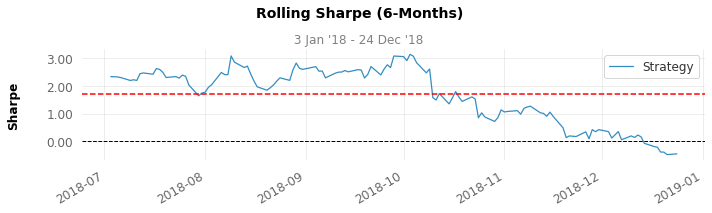
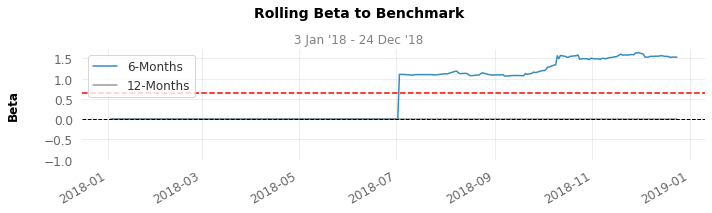
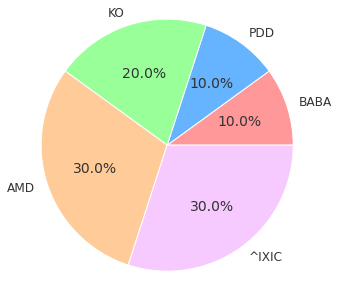
Download the Tearsheet
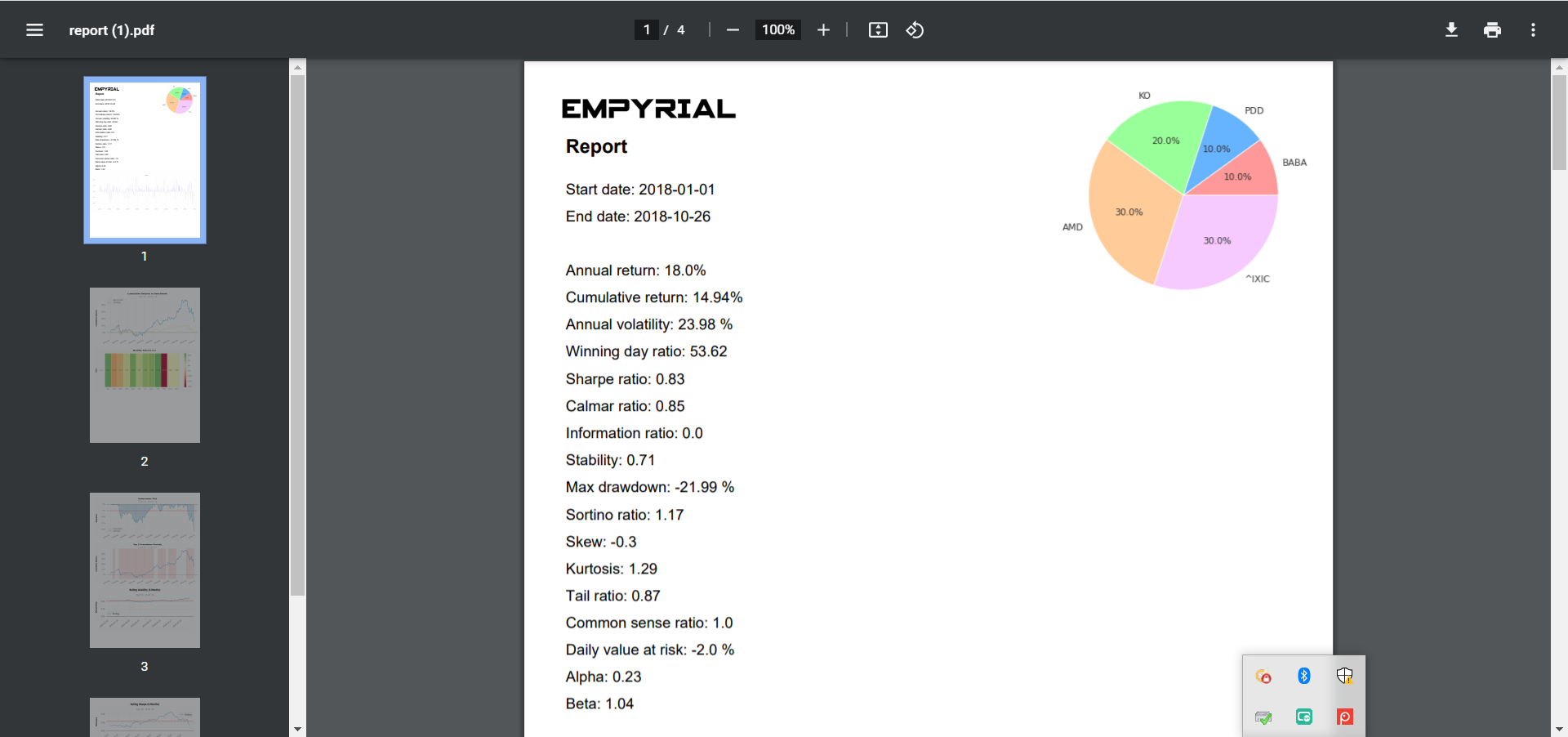
You can use the get_report() function of EigenLedger to generate a tearsheet, and then download this as a PDF document.
from empyrial import get_report, Engine

portfolio = Engine(
      start_date = "2018-08-01",
      portfolio = ["BABA", "PDD", "KO", "AMD","^IXIC"],
      optimizer = "EF",
      rebalance = "1y", #rebalance every year
      risk_manager = {"Stop Loss" : -0.2}
)

get_report(portfolio)
Output:
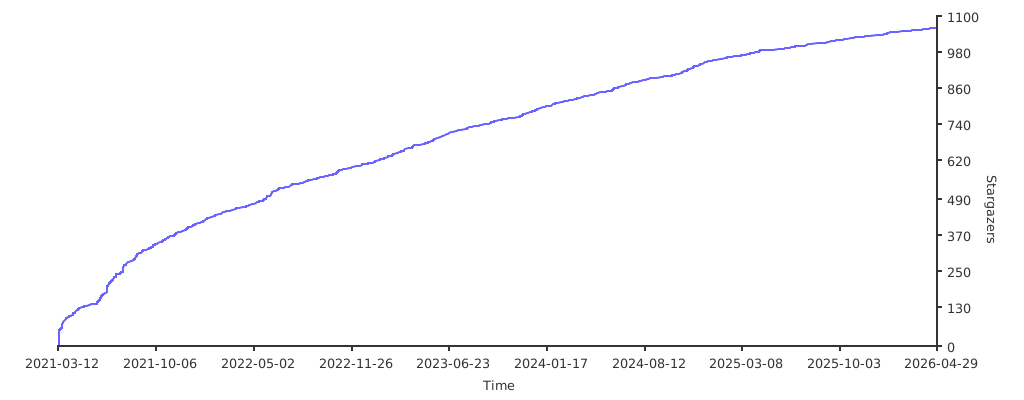
Stargazers over time
Contribution and Issues
EigenLedger uses GitHub to host its source code. Learn more about the Github flow.
For larger changes (e.g., new feature request, large refactoring), please open an issue to discuss first.
- If you wish to create a new Issue, then click here to create a new issue.
Smaller improvements (e.g., document improvements, bugfixes) can be handled by the Pull Request process of GitHub: pull requests.
-
To contribute to the code, you will need to do the following:
-
Fork EigenLedger - Click the Fork button at the upper right corner of this page.
-
Clone your own fork. E.g.,
git clone https://github.com/ssantoshp/EigenLedger.git
If your fork is out of date, then will you need to manually sync your fork: Synchronization method -
Create a Pull Request using your fork as the
compare head repository.
You contributions will be reviewed, potentially modified, and hopefully merged into EigenLedger.
Contributors
Thanks goes to these wonderful people (emoji key):

 Brendan Glancy 💻 🐛 |
 Renan Lopes 💻 🐛 |
 Mark Thebault 💻 |
 Diego Alvarez 💻🐛 |
 Rakesh Bhat 💻 |
 Anh Le 🐛 |
 Tony Zhang 💻 |
 Ikko Ashimine ✒️ |
 QuantNomad 📹 |
 Buckley ✒️💻 |
 Adam Nelsson 💻 |
 Ranjan Grover 🐛💻 |
This project follows the all-contributors specification. Contributions of any kind are welcome!
Credit
This library has also been made possible because of the work of these incredible people:
- Ran Aroussi for the Quantstats library
- Robert Martin for the PyPortfolioOpt
Contact
You are welcome to contact us by email at santoshpassoubady@gmail.com or in EigenLedger's discussion space
License
MIT
1 maintainer

Metadata
1 maintainer
Release files for EigenLedger 2.1.6
For a detailed explanation of source distributions (sdists) and built distributions (wheels), please see the package formats documentation.
Source distribution (sdist)
| File | Size | Uploaded | Provenance | |
|---|---|---|---|---|
| eigenledger-2.1.6.tar.gz | 40.3 kB | Without provenance | Details |
Built distribution (wheel)
| File | Interpreter | ABI | Platform | Reset |
|---|---|---|---|---|
| eigenledger-2.1.6-py3-none-any.whl | Python 3 | none | any | Details |
Total release size: 84.9 kB
Release files / eigenledger-2.1.6.tar.gz
| Download URL | eigenledger-2.1.6.tar.gz |
|---|---|
| Size | 40.3 kB |
| Tags | Source |
|
SHA-256 checksum How to use checksums |
79d19f20e1aaf79fd4f311a0d5cc82115d34221d6c9af53cfebcd2774fd9aafc
|
|
BLAKE2b-256 checksum How to use checksums |
61a42490015369a32ebca0b3613d90ec56757924729347d2099cdfe0914c6a6f
|
| Upload date | |
|
Uploaded using Trusted Publishing? What is trusted publishing? |
No |
| Uploaded via |
twine/5.1.1 CPython/3.12.7
|
Release files / eigenledger-2.1.6-py3-none-any.whl
| Download URL | eigenledger-2.1.6-py3-none-any.whl |
|---|---|
| Size | 44.6 kB |
| Tags | Python 3 |
|
SHA-256 checksum How to use checksums |
628e09ccda67645be4ac1ea1ebef9602afda21de887f19b73e23e0fe7c0486f4
|
|
BLAKE2b-256 checksum How to use checksums |
26414fd56de52c6e65f92ac15f7037944f621cba53244a75a931c3980c489e4d
|
| Upload date | |
|
Uploaded using Trusted Publishing? What is trusted publishing? |
No |
| Uploaded via |
twine/5.1.1 CPython/3.12.7
|
Security for EigenLedger 2.1.6
Provenance
Provenance describes where a file came from. On PyPI, provenance is shared via attestations, which provide a verifiable record of the build or publishing details. View details, limitations and caveats.
No provenance found
None of the files in this release were uploaded with provenance metadata.
A note on package security
PyPI is a repository for distributing packages, not a service for auditing them. While third-party security researchers and our staff do their best to detect and remove malicious packages, PyPI cannot guarantee the quality, security or suitability of any given package.
To learn more about protecting yourself from malicious actors, visit our package security documentation.














