
EKET
EKET is a package for loading the documents(.xls, .xlsx, .pdf, .csv, .md, youtube-links, .pptx, .txt, .json) and converting them into the chunks which has meaning for the further instructions from the user.
We can generate quiz, answers & explanations and answers for topic-based questions.
The Folder Structure
EKET/                         # Root directory of the project
├── EKET/                     # Main Python package (importable as EKET)
│   ├── __init__.py           # Initializes EKET as a package
│   ├── answer.py             # Answering the created quiz questions
│   ├── clean.py              # Functions for cleaning input/output data
│   ├── create.py             # Utilities for creating or generating quiz
│   ├── ingest.py             # Handles document ingestion (loading and chunking files)
│   ├── query.py              # Answering the specific question from the user
│   ├── utils.py              # Helper functions used across multiple modules
│   ├── data_ingest/          # Subpackage for modular ingestion logic
│   ├── evaluate_quiz/        # Subpackage to evaluate quiz answers, scoring, feedback
│   ├── generate_answer/      # Subpackage to generate answers
│   └── generate_quiz/        # Subpackage to create quiz questions from source material
├── example_usage/            # Example scripts or notebooks showing how to use the package
├── tests/                    # Unit and integration tests for all modules
├── README.md                 # Project description, usage instructions, and documentation
├── requirements.txt          # Requirements
└── setup.py                  # Setup script for packaging and installing the project
Installation
Step 0: Set Environment
First you should set your gemini api key into your environment system
setx TUTOR_API_KEY "GEMINI_API_KEY"
setx EMBEDDING_MODEL "gemini-embedding-001"
Step 1: Windows Installation Note (C++ Build Tools Required)
Some dependencies of EKET (such as PyMuPDF) include native C/C++ extensions.
On Windows, if a precompiled wheel is not available for your Python version,
pip may attempt to build the package from source.
If you encounter an error similar to:
please install Visual Studio C++ Build Tools: https://visualstudio.microsoft.com/visual-cpp-build-tools/
During installation, make sure to select:
- C++ build tools
- MSVC v143 (or latest)
- Windows 10/11 SDK
Step 3: HTML Rendering
For HTML rendering
pip install playwright
playwright install
Step 4: Pip Install
After installation, restart your terminal and rerun:
pip install EKET
How to Use
- For debugging and testing phase, in the current working place, you need to do files like below:
python example_usage/ingest.py --file "path/to/file.png" # supported files above.
- for YouTube:
python example_usage/ingest.py --youtube "Youtube-URL" # YouTube URL
-
After starting
example_usage/ingest.py, there will be folders that created in the current folder namedchromawhich is the vectorized database for chunks,saved_datawhich containscontext_language.jsonformatted data in it. -
Then, if you want to generate quiz (multiple-choice and open-ended), you are going to initialize
example_usage/generate_quiz.py. But it has some different kind of logic. Let me explain:- If you directly initialize the
example_usage/generate_quiz.py, it will create the questions from all the documents the user is provided. - If you initialize the
example_usage/generate_quiz.pyafter initializingexample_usage/query_answer.py, then the questions will be much more relevant to the asked question.
- If you directly initialize the
-
To initialize the
example_usage/query_answer.py, you should use it in the terminal that:
python example_usage/query_answer.py --query "Your question here..."
- Lastly,
example_usage/evaluation.pywhich indicates the evaluation of the solved generated quiz by the user. It informs the user how good one did and explains the question to make a better understanding.
Example Usage Scenario
Here is the simple designed FlowChart of the EKET-package:
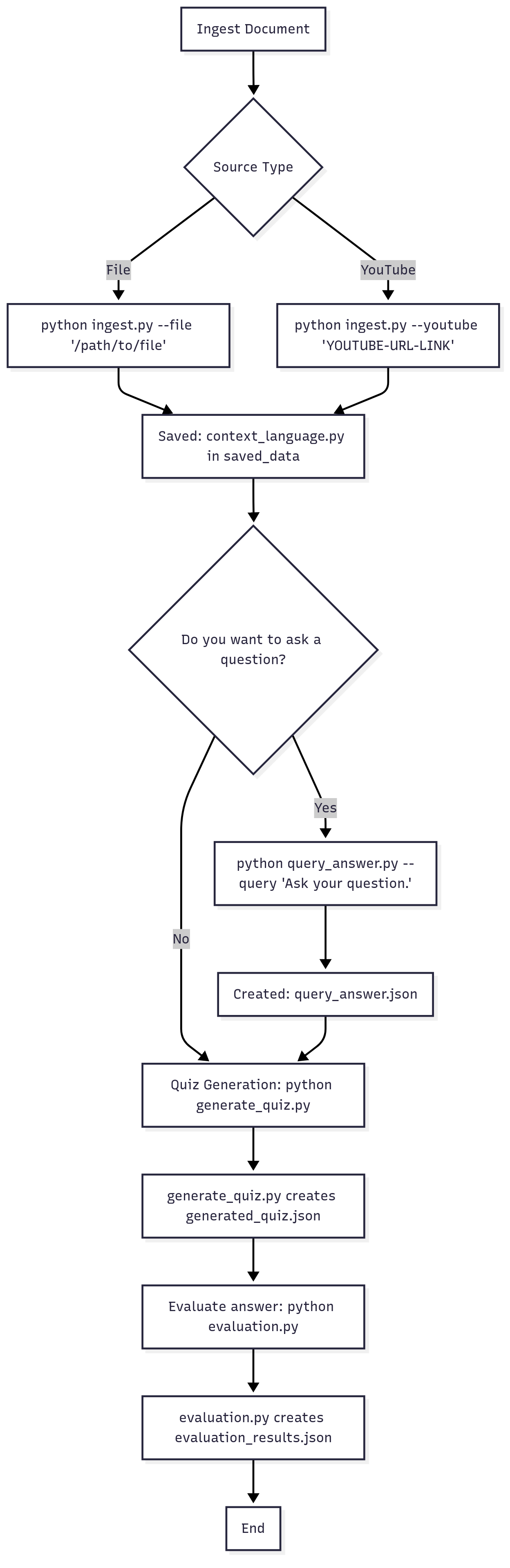
- Ingesting the documents that want to be studied on: For Files:
python example_usage/ingest.py --file "/path/to/file"
For YouTube:
python example_usage/ingest.py --youtube YOUTUBE-URL-LINK
It will yield context_language.json file. Other operations will be depend on this file. (e.g. creating questions, generating quiz).
- Do you want to ask a specific question? If yes:
python example_usage/query_answer.py --query "Your Question" --input "Your context_language.jon" --output "Output Folder"
And it will yield context_question_answer.json. If it is created, the quiz generation(next step) will depend on this question.
- Creating the quiz:
python example_usage/generate_quiz.py --input "Path to JSON file (query_answer.json or context_language.json)" --output "Output folder to save the quiz"
It will yield generated_quiz.json.
- Evaluating the solved quiz:
python example_usage/evaluation.py --input "generated_quiz.json file path" --output "Output folder where evaluation results will be stored"
It will yield evaluation_results.json. It will create this file from generated_quiz.json and answers of the user.
- Optional:
python example_usage/summarize.py --input "Your context_language.json file" --output "Output Folder"
It will yield combined_summary.json. It has a summarization of context_language.json.
The example_usage folder contains the examples of the output files. While it all returns a .json file, you can also manipulate the files to the attributes we've assigned them to.
License
This project is licensed under the GNU General Public License v3.0 or later (GPL-3.0-or-later). See the LICENSE file for details.
2 maintainers


Metadata
2 maintainers
Release files for EKET 0.1.7
For a detailed explanation of source distributions (sdists) and built distributions (wheels), please see the package formats documentation.
Source distribution (sdist)
| File | Size | Uploaded | |
|---|---|---|---|
| eket-0.1.7.tar.gz | 37.6 kB | Details |
Built distribution (wheel)
| File | Interpreter | ABI | Platform | Reset |
|---|---|---|---|---|
| eket-0.1.7-py3-none-any.whl | Python 3 | none | any | Details |
Total release size: 85.9 kB
Release files / eket-0.1.7.tar.gz
| Download URL | eket-0.1.7.tar.gz |
|---|---|
| Size | 37.6 kB |
| Tags | Source |
|
SHA-256 checksum How to use checksums |
c1f0368e2081bade1de2c666ec0a174c74aea48d653182d45d5d5edc4670c0c3
|
|
BLAKE2b-256 checksum How to use checksums |
75924ec1a8d91e73b4c4dcf85ab7138e2206c0478274e676fe8837294bded303
|
| Upload date | |
|
Uploaded using Trusted Publishing? What is trusted publishing? |
Yes |
| Uploaded via |
twine/6.1.0 CPython/3.13.7
|
Provenance
Provenance describes where a file came from. On PyPI, provenance is shared via attestations, which provide a verifiable record of the build or publishing details. View details, limitations and caveats.


PyPI Publish Attestation
PyPI verified that this artifact, at this checksum, originated from the publisher listed below.
Signed by GitHub Actions, verified by PyPI on Jan 20, 2026.
Transparency logRelease files / eket-0.1.7-py3-none-any.whl
| Download URL | eket-0.1.7-py3-none-any.whl |
|---|---|
| Size | 48.2 kB |
| Tags | Python 3 |
|
SHA-256 checksum How to use checksums |
aed955074e493a2b3f942742788669cda6c86168c530dec0d208014d86a78ed8
|
|
BLAKE2b-256 checksum How to use checksums |
44df1a1a04d652f3fa58ccae21d3b8e199e2ba1fa2053d523f5bfdde44b14767
|
| Upload date | |
|
Uploaded using Trusted Publishing? What is trusted publishing? |
Yes |
| Uploaded via |
twine/6.1.0 CPython/3.13.7
|
Provenance
Provenance describes where a file came from. On PyPI, provenance is shared via attestations, which provide a verifiable record of the build or publishing details. View details, limitations and caveats.
PyPI Publish Attestation
PyPI verified that this artifact, at this checksum, originated from the publisher listed below.
Signed by GitHub Actions, verified by PyPI on Jan 20, 2026.
Transparency log













