
| Versions |    |
| Status |     |
| Tools |    |
| License |   |
| Paper |   |
| SPEC |   |
ELaborative Particle Analysis from Satellite Observations (EL-PASO)
EL-PASO is a Python framework designed to streamline the download, processing, and saving of satellite particle observation data.
Its primary purpose is to prepare and standardize particle data for use in radiation belt modeling.
Features
- Format Flexibility: Capable of handling different input formats including
cdf,netcdf,h5,ascii, andjson - Integrated Processing: Provides a comprehensive set of functions for common particle data analysis tasks
- Supports Metadata: Stores all processing and metadata alongside the data, ensuring full traceability and reproducibility.
- Standardized output files: Saving processed data in different standards (e.g. PRBEM) to enable easy loading and sharing of processed data
Full documentation can be viewed here.
Available processing scripts
Color code: ${\color{#4A8A4F}\textsf{publication ready}}$, ${\color{#E6D753}\textsf{needs verification}}$, ${\color{#E67D53}\textsf{draft}}$
- Arase
- ${\color{#E6D753}\textsf{MEPe}}$
- ${\color{#E6D753}\textsf{HEP (L and H)}}$
- ${\color{#4A8A4F}\textsf{XEP (archived and real-time)}}$
- ${\color{#4A8A4F}\textsf{PWE density}}$
- DMSP (F16, F17, F18)
- ${\color{#E6D753}\textsf{SSJ (electrons)}}$
- GOES (13 and 15)
- ${\color{#4A8A4F}\textsf{EPS MAGED and EPEAD combined}}$
- GOES-R
- ${\color{#E6D753}\textsf{MPS-High (archived and real-time)}}$
- GPS
- ${\color{#E6D753}\textsf{GPS processing}}$
- LANL GeoGrid
- ${\color{#E67D53}\textsf{SOPA and ESP (electrons)}}$
- ${\color{#E67D53}\textsf{SOPA (protons)}}$
- ${\color{#E67D53}\textsf{MPA (electrons)}}$
- ${\color{#E67D53}\textsf{MPA (ions)}}$
- ELFIN
- ${\color{#4A8A4F}\textsf{EPD (electrons)}}$
- ESA
- ${\color{#E67D53}\textsf{NGRM satellites}}$
- ${\color{#E67D53}\textsf{GSSC EMU (electrons and protons)}}$
- POES (no proton correction)
- ${\color{#4A8A4F}\textsf{MEPED (electrons)}}$
- ${\color{#4A8A4F}\textsf{TED (electrons)}}$
- PROBA-V
- ${\color{#E6D753}\textsf{EPT (electrons and protons)}}$
- THEMIS
- ${\color{#E6D753}\textsf{FFT waves}}$
- ${\color{#E6D753}\textsf{Spacecraft-potential density}}$
- Van Allen Probes
- ${\color{#4A8A4F}\textsf{HOPE (electrons)}}$
- ${\color{#E67D53}\textsf{HOPE (protons)}}$
- ${\color{#4A8A4F}\textsf{MagEIS (electrons)}}$
- ${\color{#E67D53}\textsf{MagEIS (protons)}}$
- ${\color{#E67D53}\textsf{RBSPICE (protons)}}$
- ${\color{#4A8A4F}\textsf{REPT (electrons)}}$
- ${\color{#4A8A4F}\textsf{ECT-combined}}$
- ${\color{#4A8A4F}\textsf{EMFISIS waves}}$
- ${\color{#4A8A4F}\textsf{EMFISIS and EFW density}}$
- Models
- ${\color{#4A8A4F}\textsf{Last closed drift shell (LCDS)}}$
- ${\color{#4A8A4F}\textsf{Solar wind and geomagnetic indices}}$
Every recipe shares one command line interface; see Running a recipe below.
Installation
Step 0: Install Prerequisites
EL-PASO uses uv for environment and dependency management. Install it if you do not have it yet:
curl -LsSf https://astral.sh/uv/install.sh | sh
Installing EL-PASO also compiles the IRBEM Fortran library, so a Fortran compiler (gfortran) and make must be available on your PATH. For example:
# Debian/Ubuntu
sudo apt install gfortran make

# macOS (Homebrew)
brew install gcc make
Step 1: Clone the Repository
Begin by cloning the EL-PASO repository and navigating into its directory.
git clone https://github.com/GFZ/EL_PASO.git
cd EL_PASO
Step 2: Set up a Python Virtual Environment
It is highly recommended to use a virtual environment to manage dependencies.
uv venv --python 3.12 --seed
source .venv/bin/activate
uv pip install .
The custom setup.py script will automatically download and compile the IRBEM Fortran library during this step.
Verifying the Installation
You can validate your installation by running the minimal example located in examples:
python examples/minimal_example.py
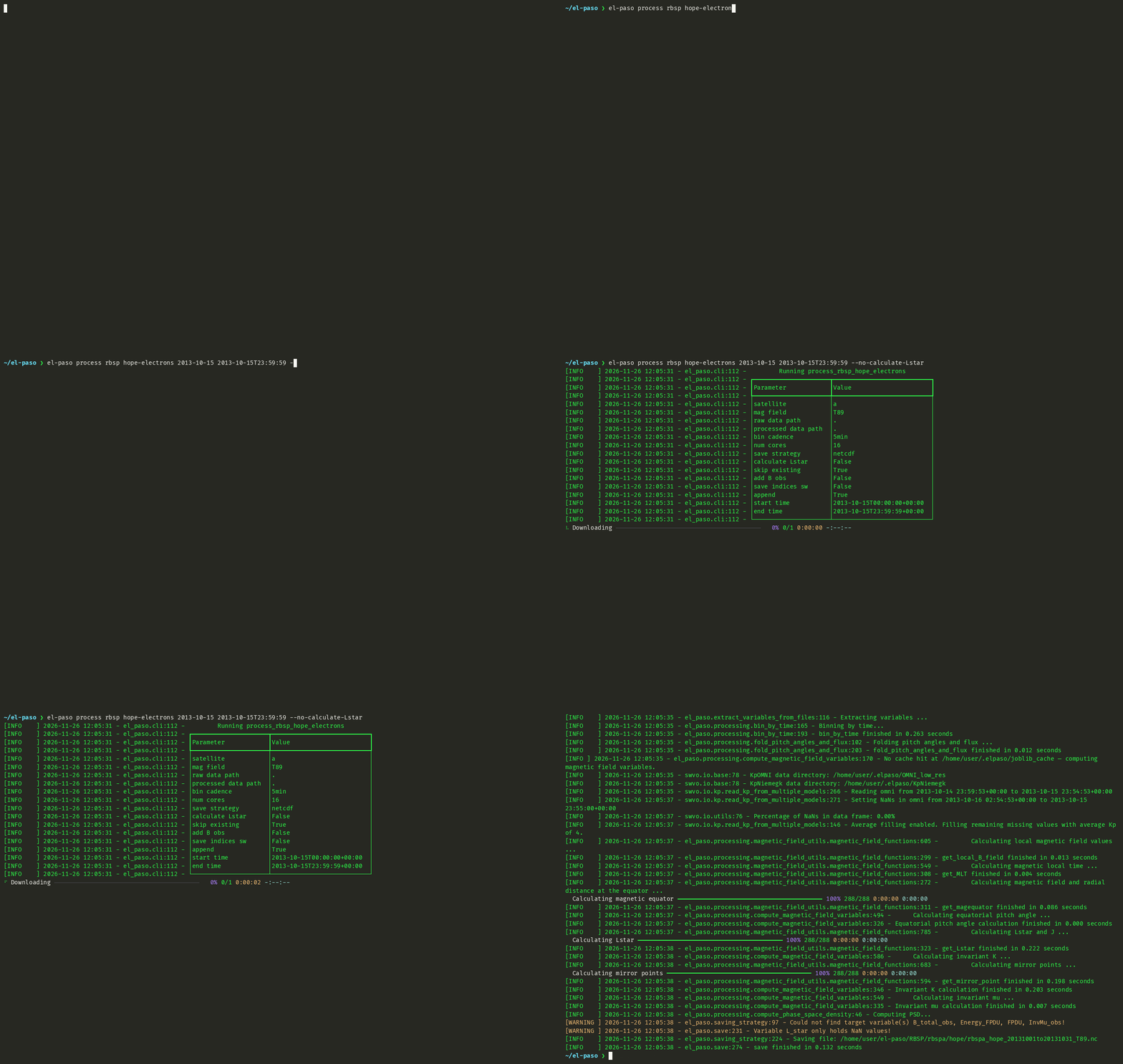
Running a recipe
Installing EL-PASO provides the el-paso command, which exposes every recipe
under a common set of options:
el-paso list-recipes                 # show every available recipe
el-paso process poes meped --help    # options for one recipe
el-paso list-satellites poes meped   # satellites of a recipe and their data coverage

el-paso process poes meped \
    2013-03-16 2013-03-16T23:59:59 \
    --satellite noaa15 --mag-field T89 --bin-cadence 10s \
    --raw-data-path ./raw --processed-data-path ./processed
Recipes can equally be run as modules, which is convenient inside job scripts:
python -m el_paso.recipes.poes.process_poes_meped \
    2013-03-16 2013-03-16T23:59:59
Both forms accept the same options, because both are generated from the recipe
function's own signature. The start and end time (START END) are required; the rest
have per-recipe defaults. Common options are
--satellite (comma-separated to process several, e.g. a,b, or pass all), --mag-field, --bin-cadence
(10s, 5min, 1h), --raw-data-path, --processed-data-path and
--num-cores. Add --dry-run to print the resolved arguments without
processing anything, and --install-completion to set up shell completion.
Which options a given recipe accepts depends on what it actually supports, so
check --help.
See the command line documentation for the full list.
Plotting processed data
el-paso plot <mission> <recipe> draws a quick-look figure of data you have
already processed. Pass the same arguments you used for processing, so the same
files are located again:
el-paso plot rbsp mageis-electrons \
    2017-10-15 2017-10-16T23:59:59 \
    --satellite a --mag-field T89 \
    --processed-data-path ./processed
See the plotting section of the command line documentation for details.
Testing
Step 1: Download the Test Data
Most tests rely on reference/system test data hosted on Hugging Face. Download it by running the following script from the repository root:
bash download_data_for_tests.sh
This fetches the pinned revision of the dataset into tests/system/data/ using the Hugging Face CLI (run through uvx, so uv must be installed). You only need to do this once (rerun it if the pinned revision changes).
pytest is installed as part of the regular dependencies (see Installation), so no separate test install step is needed.
Step 2: Run the Tests
Run the full test suite with pytest:
pytest tests
Tests are grouped using pytest markers, defined in pytest.ini:
-
standard: quick tests suitable for fast, everyday verification of the code. This is what CI runs on every push/PR:pytest tests -m standard
-
visual: tests that produce plots or other visual output which must be checked manually rather than being asserted automatically:pytest tests -m visual
You can combine or exclude markers using standard pytest marker expressions, e.g. to run everything except visual tests:
pytest tests -m "not visual"
Some system tests compare against previously stored reference solutions. Pass --renew_solution to regenerate and overwrite those reference solutions instead of comparing against them:
pytest tests --renew_solution=true
Use this only when you intend to intentionally update the stored reference outputs.
Contributing
Please read our comprehensive contribution guide before submitting a pull request.
Citation
If you use EL-PASO in your research, please cite the associated paper:
Haas, B., Drozdov, A. Y., Szabó-Roberts, M., & Jhawar, S. (2026). EL-PASO: An Open-Source Python Library for Processing and Standardizing Particle Measurements Taken in Space. Earth and Space Science, 13, e2026EA005044. https://doi.org/10.1029/2026EA005044
@article{haas2026elpaso,
  author  = {Haas, Bernhard and Drozdov, Alexander Y. and Szab{\'o}-Roberts, M{\'a}ty{\'a}s and Jhawar, Sahil},
  title   = {{EL-PASO}: An Open-Source Python Library for Processing and Standardizing Particle Measurements Taken in Space},
  journal = {Earth and Space Science},
  volume  = {13},
  number  = {11},
  pages   = {e2026EA005044},
  year    = {2026},
  doi     = {10.1029/2026EA005044},
  url     = {https://doi.org/10.1029/2026EA005044}
}
To cite this repository you can use CITATION.cff.
Acknowledgements
This work has been funded by the German Research Foundation (NFDI4Earth, DFG project no. 460036893, https://www.nfdi4earth.de/). The authors acknowledge the work of Mátyás Szabó-Roberts who led the foundation for the EL-PASO framework.
The thank the authors of the IRBEM library for providing their code.
1 maintainer

Metadata
1 maintainer
Release files for el-paso 2.3.0
For a detailed explanation of source distributions (sdists) and built distributions (wheels), please see the package formats documentation.
Source distribution (sdist)
| File | Size | Uploaded | Provenance | Actions |
|---|---|---|---|---|
| el_paso-2.3.0.tar.gz | 1.0 MB | Without provenance | Details for el_paso-2.3.0.tar.gz |
Release files / el_paso-2.3.0.tar.gz
| Download URL | el_paso-2.3.0.tar.gz |
|---|---|
| Size | 1.0 MB |
| Tags | Source |
|
SHA-256 checksum How to use checksums |
1332c7968eb9444cfee643248934b427a317f9e7397fe856cde07d30e1ac2747
|
|
BLAKE2b-256 checksum How to use checksums |
8b4f9042f4c140637cfa0db4c917e1348a4663567b33b3e1d427a4ce5c1dd4bf
|
| Upload date | |
|
Uploaded using Trusted Publishing? What is trusted publishing? |
No |
| Uploaded via |
twine/7.0.0 CPython/3.13.16
|
Security for el-paso 2.3.0
Provenance
Provenance describes where a file came from. On PyPI, provenance is shared via attestations, which provide a verifiable record of the build or publishing details. View details, limitations and caveats.
No provenance found
None of the files in this release were uploaded with provenance metadata.
A note on package security
PyPI is a repository for distributing packages, not a service for auditing them. While third-party security researchers and our staff do their best to detect and remove malicious packages, PyPI cannot guarantee the quality, security or suitability of any given package.
To learn more about protecting yourself from malicious actors, visit our package security documentation.














