
EmailWidget - Powerful Email Component Library
🚀 A modern, easy-to-use Python email component library that lets you effortlessly create beautiful HTML email reports





✨ Features
- Small & Lightweight: Quick installation, no complex dependencies (less than 1MB)
- Easy to Use: Clear and simple API, create beautiful email templates with just a few lines of code
- Complete Documentation: Full documentation with type annotations, comprehensive IDE support
- Rich Components: Currently includes 17 beautiful display components, all following Fluent design principles
- Fully Tested: Core functionality thoroughly tested to ensure reliability
- Completely Free: MIT open source license, use freely in any commercial project
✨ Why Choose EmailWidget?
Want to send alerts or logs to email but don't know how to beautify them? Use EmailWidget to complete the final step of sending emails!
5 lines of code saves you 30 minutes of dealing with various email CSS compatibility issues. Supports PC and mobile devices, making the once painful task of sending alert emails simple. You can build your unique email template like building blocks, send with one line of code, no heavyweight dependencies, completely open source and free for commercial use. Installation is less than 2MB. EmailWidget welcomes you to join your project anytime.
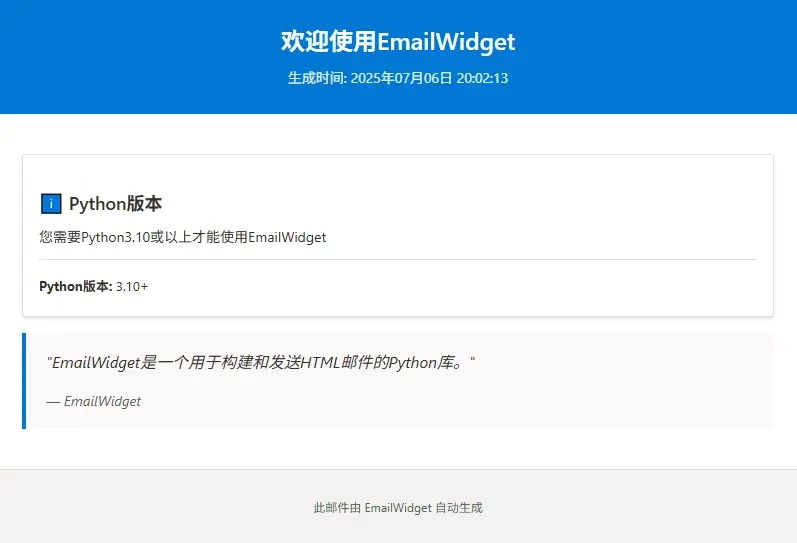
The email style below can be created with just 3 lines of code, and the generated content can be sent directly as an email, with recipients seeing beautiful emails:
from email_widget import Email

email = Email("Welcome to EmailWidget")

email.add_card("Python Version", "You need Python 3.10 or higher to use EmailWidget", metadata={"Python Version": "3.10+"})

email.add_quote("EmailWidget is a Python library for building and sending HTML emails.", "EmailWidget")

email.export_html('welcome_email.html')
🎨 Rich Components - 17 Intuitive Components
# One line of code, multiple components
email.add_widget(TextWidget().set_content("Title").set_type(TextType.TITLE_LARGE))
email.add_widget(TableWidget().set_dataframe(df)) # Supports pandas DataFrame
email.add_widget(ChartWidget().set_chart(plt)) # Supports matplotlib/seaborn charts
email.add_widget(ProgressWidget().set_value(85).set_theme(ProgressTheme.SUCCESS))

# Use shortcut methods to add components directly
email.add_progress(value=95, max_value=100)
| 🎯 Component Type | 📝 Features | 🔧 Use Cases |
|---|---|---|
| 📝 TextWidget | 8 text styles, auto-numbering, section management | Titles, body text, descriptions |
| 📊 TableWidget | DataFrame integration, status cells, color coding | Data tables, statistical reports |
| 📈 ChartWidget | Native matplotlib/seaborn support, auto-encoding | Data visualization, trend charts |
| 📊 ProgressWidget | 5 themes, increment/decrement, percentage display | Task progress, completion rates |
| ⭕ CircularProgressWidget | Circular progress bars, multiple sizes, dynamic updates | KPI metrics, completion rates |
| 🎴 CardWidget | Info cards, icon support, metadata management | Summary info, status display |
| ⚠️ AlertWidget | 5 alert types, custom icons, message notifications | Notifications, warnings, tips |
| 🖼️ ImageWidget | Multi-source support, size control, description text | Image display, logo display |
| 💬 QuoteWidget | Quote styles, author info, source attribution | Quotes, comments, excerpts |
| 📊 StatusWidget | Status item management, layout control, dynamic updates | System status, service monitoring |
| 📑 ColumnWidget | Auto/manual columns, responsive layout, widget management | Multi-column layout, content grouping |
| 📋 LogWidget | Log levels, syntax highlighting, filtering | System logs, runtime records |
| 🔘 ButtonWidget | Link buttons, custom styles, multiple themes | Action buttons, navigation links |
| 📏 SeparatorWidget | Dividers, multiple styles, customizable colors | Content separation, area division |
| ✅ ChecklistWidget | Task lists, status tracking, progress statistics | To-do items, checklists |
| ⏰ TimelineWidget | Timeline display, event management, status markers | Progress tracking, history records |
| 📊 MetricWidget | Data metrics, trend analysis, multiple layouts | KPI display, data monitoring |
🏃♂️ Quick Start
📦 Installation
Basic Installation (Recommended)
pip install EmailWidget
💡 Installation Note: Only requires jinja2 dependency, lightweight and fast. If you need DataFrame functionality for TableWidget or Matplotlib for ChartWidget, please install pandas or matplotlib/seaborn separately.
🎯 Create Your First Report in 30 Seconds
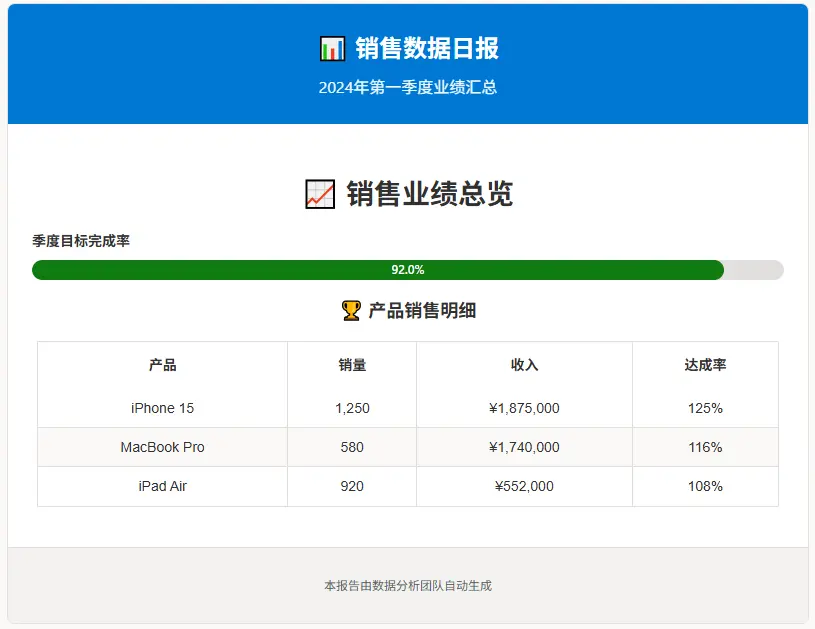
from email_widget import Email, TextWidget, ProgressWidget
from email_widget.core.enums import TextType, ProgressTheme

# 1️⃣ Create email object
email = Email("📊 Daily Sales Report")

# 2️⃣ Add subtitle and footer
email.set_subtitle("Q1 2024 Performance Summary")
email.set_footer("This report is automatically generated by the data analysis team")

# 3️⃣ Add a large title
email.add_widget(
    TextWidget().set_content("📈 Sales Performance Overview").set_type(TextType.TITLE_LARGE)
)

# 4️⃣ Add progress indicators
email.add_widget(
    ProgressWidget()
    .set_value(92)
    .set_label("Quarterly Goal Completion Rate")
    .set_theme(ProgressTheme.SUCCESS)
)

# 5️⃣ Add data table (using convenience method, directly call email instead of creating widget then add_widget)
data = [
    ["iPhone 15", "1,250", "$1,875,000", "125%"],
    ["MacBook Pro", "580", "$1,740,000", "116%"],
    ["iPad Air", "920", "$552,000", "108%"],
]
email.add_table_from_data(
    data=data, headers=["Product", "Sales", "Revenue", "Achievement Rate"], title="🏆 Product Sales Details"
)

# 6️⃣ Export HTML file
file_path = email.export_html("daily_report.html")
# If you need to send email directly, export to string interface is also provided (images are automatically converted to base64 embedded in html)
# html_str: str = email.export_str()
print(f"🎉 Report generated: {file_path}")
🎨 Click to view generated effect
Quick Send
EmailWidget includes a basic email sending function. You can quickly send emails through the EmailSender class, currently supporting QQ Email and NetEase Email.
Before using, you need to obtain the account and key from the respective email providers. Here's a simple example of sending an email by importing QQEmailSender and configuring the account and key:
from email_widget import Email, QQEmailSender

email = Email("Test Email")
email.add_card("Test Card", "This is test card content.")
email.add_quote("This is a quote text.", "PythonImporter")
email.add_status_items(
    [{"label": "Status1", "value": "Complete"}, {"label": "Status2", "value": "In Progress"}],
    title="Test Status",
)
email.add_table_from_data(
    [["Column1", "Column2"], ["Data1", "Data2"]],
    title="Test Table",
)
QQEmailSender(username="your_email@qq.com", password="your_key").send(email)
print("Email sent successfully!")
🔧 Component Showcase
Below are displays of all currently available components (some features may not be updated timely, please refer to documentation if there are errors or inconsistencies):
🎨 Click to view component preview

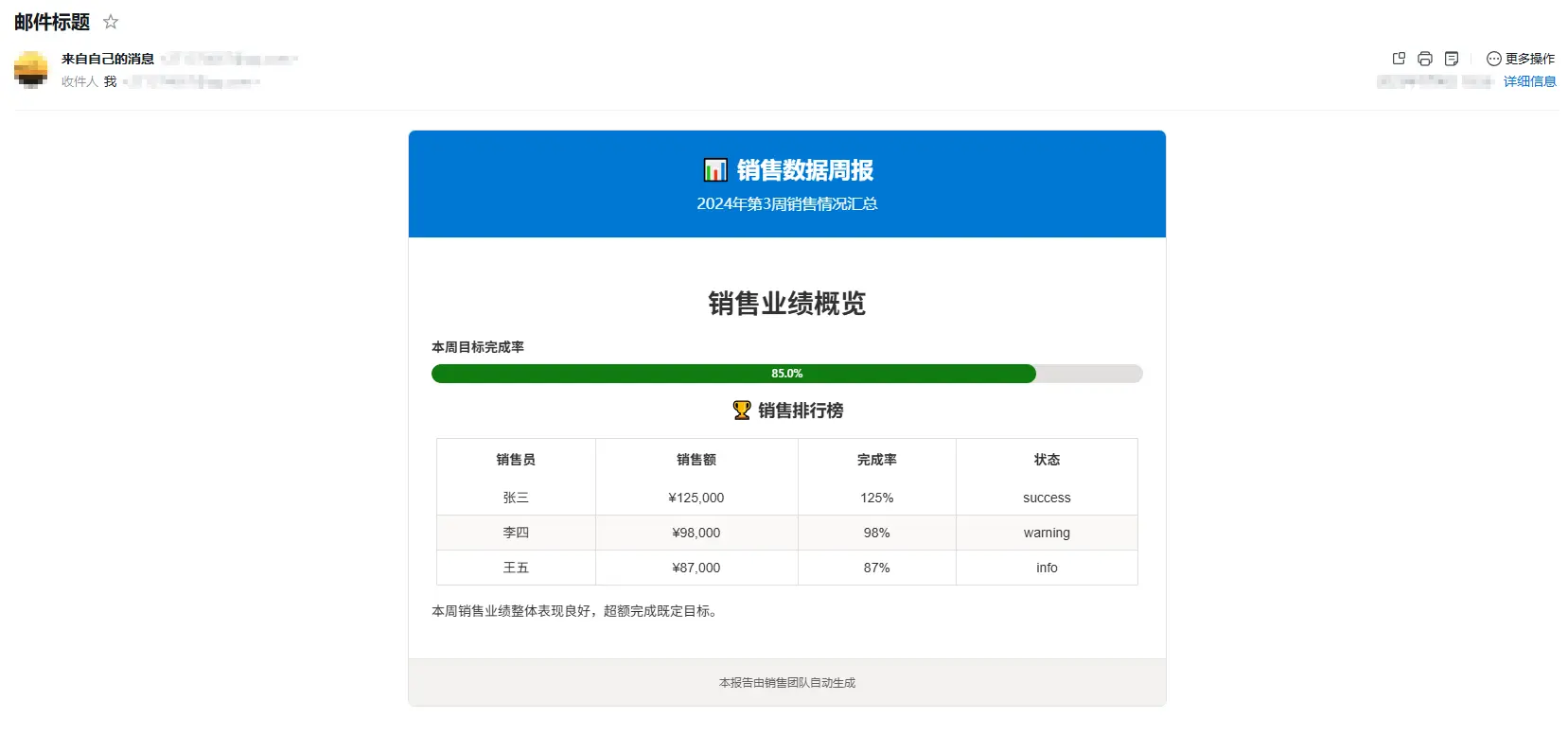
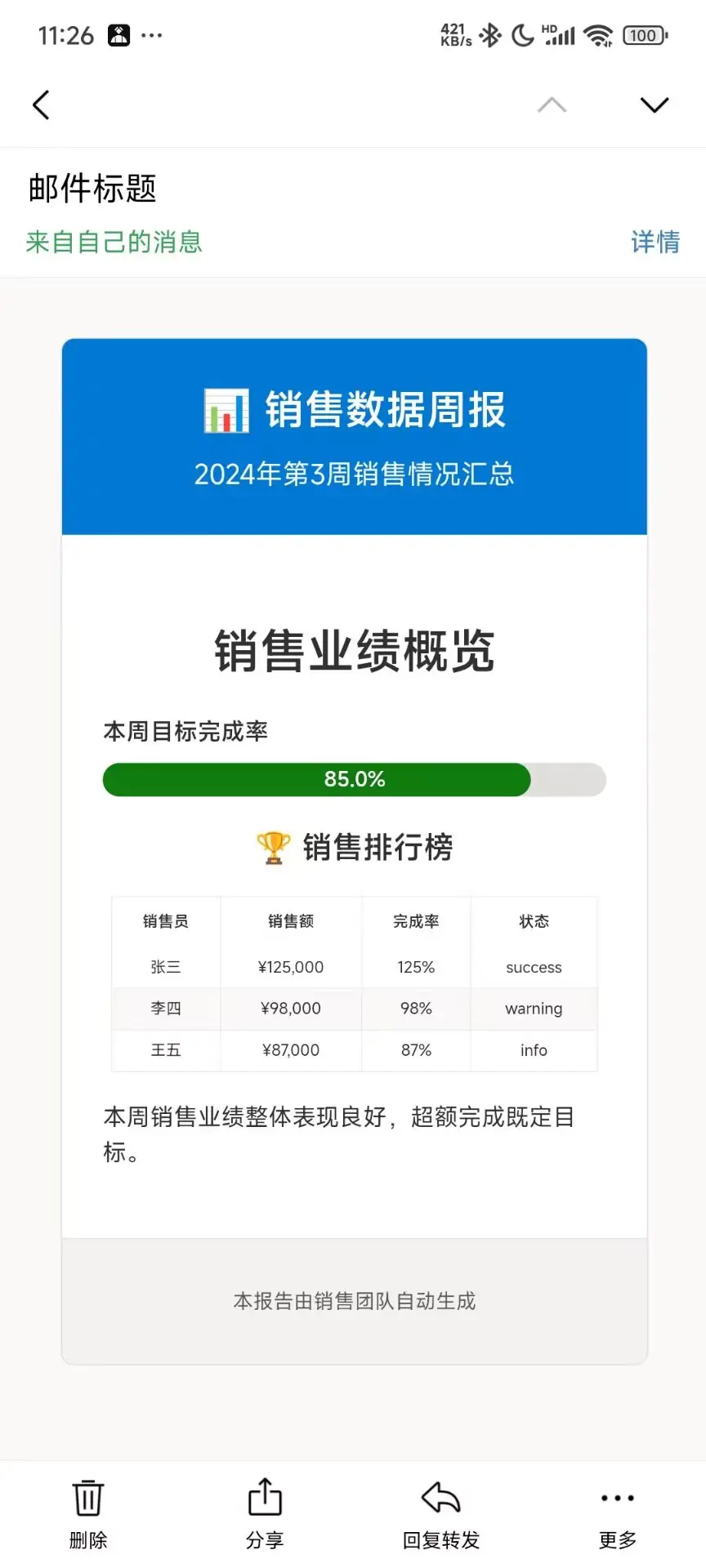
Actual Display in Email
Desktop Web Version
🎨 Click to view desktop report
Mobile Version
🎨 Click to view mobile report
🎨 Advanced Features
🎯 Method Chaining Support
# Fluent API design
email = (Email("Project Progress Report")
         .set_subtitle("Q1 Summary")
         .set_footer("Generated by EmailWidget")
         .add_widget(TextWidget().set_content("Overview").set_type(TextType.TITLE_LARGE))
         .add_widget(ProgressWidget().set_value(78).set_label("Overall Progress")))
📚 Learning Resources
| 📖 Resource Type | 🔗 Link | 📝 Content |
|---|---|---|
| 🚀 Quick Start | Installation Guide | Environment setup, first email |
| 📘 User Manual | Component Guide | Complete tutorial for 17 components |
| 🔧 API Docs | API Reference | Complete class and method documentation |
| 💡 Examples | Use Cases | Real-world scenario code |
| 🛠️ Dev Guide | Contributing | Participate in project development |
🤝 Community & Contributing
🌟 Participate in Open Source
# Clone project
git clone https://github.com/271374667/EmailWidget.git

# Install development dependencies
pip install -e ".[dev]"

# Run tests
pytest tests/

# Submit code
git add .
git commit -m "feat: add new feature"
📞 Contact Us
- 🐛 Bug Reports: GitHub Issues
- 💬 Discussion: GitHub Discussions
- 📧 Email: 271374667@qq.com
- 📺 Video Tutorials: Bilibili Channel
📄 License
This project is licensed under the MIT License.
⭐ If this project helps you, please give us a Star! ⭐
Made with ❤️ by Python 调包侠 | Watch Tutorials | View Documentation
1 maintainer

Download files
Download the file for your platform. If you're not sure which to choose, learn more about installing packages.
Source Distribution
Built Distribution
Filter files by name, interpreter, ABI, and platform.
If you're not sure about the file name format, learn more about wheel file names.
Copy a direct link to the current filters
File details
Details for the file emailwidget-0.23.1.tar.gz.
File metadata
- Download URL: emailwidget-0.23.1.tar.gz
- Upload date:
- Size: 3.4 MB
- Tags: Source
- Uploaded using Trusted Publishing? Yes
- Uploaded via: twine/6.1.0 CPython/3.12.9
File hashes
| Algorithm | Hash digest | |
|---|---|---|
| SHA256 |
a437e8b88007205ebf00c5ae4bdf33371f3eaf2e4e134e5956e9f45862cf2cdb
|
|
| MD5 |
091b815d2f989d003e7b5a9745e80614
|
|
| BLAKE2b-256 |
06073fdfc826f2bf8de74ba5b45f0ebe03acade4e6b619204c0a260dc6f977fa
|
Provenance
The following attestation bundles were made for emailwidget-0.23.1.tar.gz:
Publisher:
docs-and-publish.yml on 271374667/EmailWidget
-
Statement:
-
Statement type:
https://in-toto.io/Statement/v1 -
Predicate type:
https://docs.pypi.org/attestations/publish/v1 -
Subject name:
emailwidget-0.23.1.tar.gz -
Subject digest:
a437e8b88007205ebf00c5ae4bdf33371f3eaf2e4e134e5956e9f45862cf2cdb - Sigstore transparency entry: 304987049
- Sigstore integration time:
-
Permalink:
271374667/EmailWidget@264fdd264a952cff53a78de4acb422223576fd36 -
Branch / Tag:
refs/heads/master - Owner: https://github.com/271374667
-
Access:
public
-
Token Issuer:
https://token.actions.githubusercontent.com -
Runner Environment:
github-hosted -
Publication workflow:
docs-and-publish.yml@264fdd264a952cff53a78de4acb422223576fd36 -
Trigger Event:
workflow_dispatch
-
Statement type:
File details
Details for the file emailwidget-0.23.1-py3-none-any.whl.
File metadata
- Download URL: emailwidget-0.23.1-py3-none-any.whl
- Upload date:
- Size: 104.2 kB
- Tags: Python 3
- Uploaded using Trusted Publishing? Yes
- Uploaded via: twine/6.1.0 CPython/3.12.9
File hashes
| Algorithm | Hash digest | |
|---|---|---|
| SHA256 |
cc0335776309865e9964e2a416f21d195059b4137fdb1dc983f052af69e999a1
|
|
| MD5 |
8d4bbe3e09b12ea1a3c08cfa8fe86049
|
|
| BLAKE2b-256 |
6a3cc594fd69f3366271afea008839f7d1cf11bafa94bab96c75bbe763616039
|
Provenance
The following attestation bundles were made for emailwidget-0.23.1-py3-none-any.whl:
Publisher:
docs-and-publish.yml on 271374667/EmailWidget
-
Statement:
-
Statement type:
https://in-toto.io/Statement/v1 -
Predicate type:
https://docs.pypi.org/attestations/publish/v1 -
Subject name:
emailwidget-0.23.1-py3-none-any.whl -
Subject digest:
cc0335776309865e9964e2a416f21d195059b4137fdb1dc983f052af69e999a1 - Sigstore transparency entry: 304987069
- Sigstore integration time:
-
Permalink:
271374667/EmailWidget@264fdd264a952cff53a78de4acb422223576fd36 -
Branch / Tag:
refs/heads/master - Owner: https://github.com/271374667
-
Access:
public
-
Token Issuer:
https://token.actions.githubusercontent.com -
Runner Environment:
github-hosted -
Publication workflow:
docs-and-publish.yml@264fdd264a952cff53a78de4acb422223576fd36 -
Trigger Event:
workflow_dispatch
-
Statement type:







