
Parallel analysis for ensemble simulations

Project description
Warning: This package is still under constrution.






ENPMDA is a parallel analysis package for ensemble simulations powered by MDAnalysis.
It stores metadata in pandas.DataFrame and distributes computation jobs in dask.DataFrame so that the parallel analysis can be performed not only for one single trajectory but also across simulations and analyses.
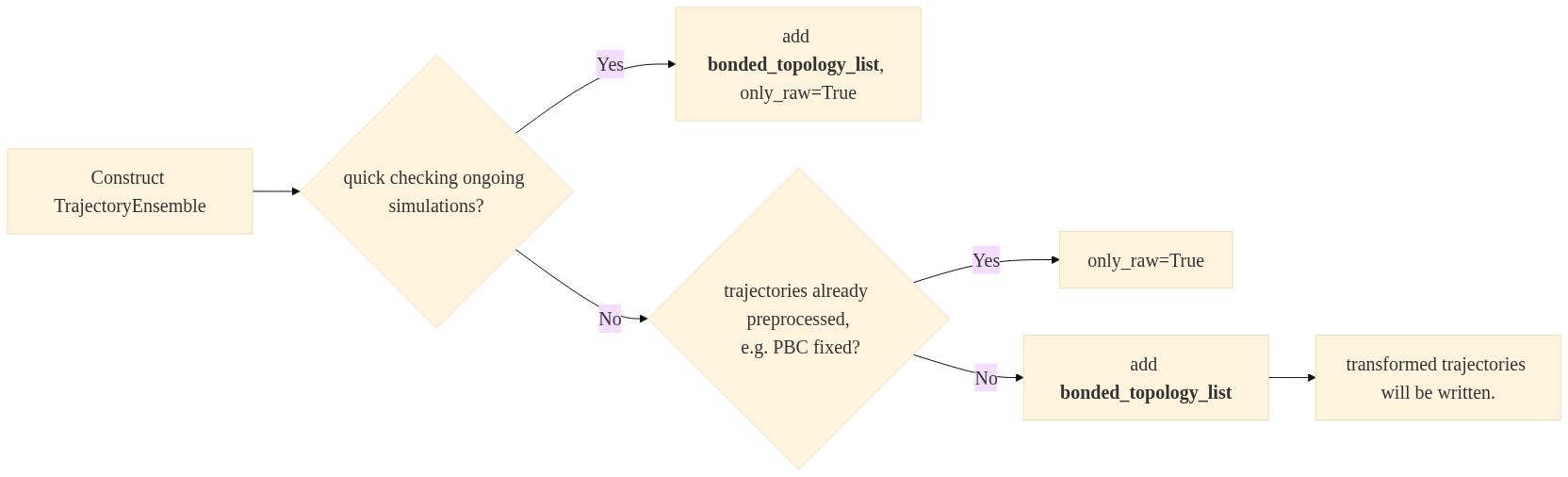
It can be used as an initial inspection of the raw trajectories as well as a framework for extracting features from final production simulations for further e.g. machine learning and markov state modeling. It automatically fixes the PBC issue, and align and center the protein inside the simulation box. It also works for multimeric proteins!
The framework is intended to be adaptable by being able to simply wrapping MDAnalysis analysis functions without worrying about the parallel machinery behind.
Free software: GNU General Public License v3
Documentation: https://ENPMDA.readthedocs.io.
Features
Parallel analysis for ensemble simulations.
Dataframe for storing and accessing results.
dask-based task scheduler, suitable for both workstations and clusters.
Expandable analysis library powered by MDAnalysis.
Example Code Snippet
from ENPMDA import MDDataFrame
from ENPMDA.preprocessing import TrajectoryEnsemble
from ENPMDA.analysis import get_backbonetorsion, rmsd_to_init

# construct trajectory ensemble
traj_ensemble = TrajectoryEnsemble(
                                ensemble_name='ensemble',
                                topology_list=ensemble_top_list,
                                trajectory_list=ensemble_traj_list
                                )
traj_ensemble.load_ensemble()

# initilize dataframe and add trajectory ensemble
md_dataframe = MDDataFrame(dataframe_name='dataframe')
md_dataframe.add_traj_ensemble(traj_ensemble, npartitions=16)

# add analyses
md_dataframe.add_analysis(get_backbonetorsion)
md_dataframe.add_analysis(rmsd_to_init)


# save dataframe
md_dataframe.save('results')

# retrieve feature
feature_dataframe = md_dataframe.get_feature([
                    'torsion',
                    'rmsd_to_init'
                    ])

# plot analysis results
import seaborn as sns
sns.barplot(data=feature_dataframe,
            x='system',
            y='rmsd_to_init')
sns.lineplot(data=feature_dataframe,
             x='traj_time',
             y='0_phi_cos',
             hue='system')
Workflow Illustration
User Cases

Benchmarking
For a system of 250,000 atoms (1500 protein residues), the total time for analyzing 220,000 frames of
RMSD to initial frame
Pore hydration
All protein torsion angle
All C-alpha positions
15,000 pair-wise distances
is 10 minutes using 5 nodes in Dardel (640 cores).

TODO
option to add more than one ensemble
more analysis functions.
unit testing
benchmarking
documentation
add functions to cancel running tasks
See Also
MDAnaysis: https://www.mdanalysis.org/
dask: https://dask.org/
Credits
This package was created with Cookiecutter and the audreyr/cookiecutter-pypackage project template.
Release history Release notifications | RSS feed


Download files
Download the file for your platform. If you're not sure which to choose, learn more about installing packages.
Source Distribution
Built Distribution
Filter files by name, interpreter, ABI, and platform.
If you're not sure about the file name format, learn more about wheel file names.
Copy a direct link to the current filters
File details
Details for the file enpmda-1.2.0.tar.gz.
File metadata
- Download URL: enpmda-1.2.0.tar.gz
- Upload date:
- Size: 2.0 MB
- Tags: Source
- Uploaded using Trusted Publishing? No
- Uploaded via: twine/6.2.0 CPython/3.9.25
File hashes
| Algorithm | Hash digest | |
|---|---|---|
| SHA256 |
bdf2b0c9496cc7b2405e8ea7a0467325f1d548290324afa5b8ab8d92457a3888
|
|
| MD5 |
0d9a376c79bc3d6755e16d8a0626a9bd
|
|
| BLAKE2b-256 |
96d804ada301746d8575b65412ca3c74e3517948962c7d23bdb6751e8883cf2d
|
File details
Details for the file enpmda-1.2.0-py2.py3-none-any.whl.
File metadata
- Download URL: enpmda-1.2.0-py2.py3-none-any.whl
- Upload date:
- Size: 25.7 kB
- Tags: Python 2, Python 3
- Uploaded using Trusted Publishing? No
- Uploaded via: twine/6.2.0 CPython/3.9.25
File hashes
| Algorithm | Hash digest | |
|---|---|---|
| SHA256 |
d8181467e2d74ab5c434724cace9eddf1f39c6b4b34bef234b8f3b39962c26c6
|
|
| MD5 |
c2fafb19542727aa4d6e8c27c52e2a06
|
|
| BLAKE2b-256 |
32f990058a9f450470a893a4745ec0fb9d1242cc461201e0382de56697a2e26b
|






