










EnvPool is a C++-based batched environment pool with pybind11 and thread pool. It has high performance (~1M raw FPS with Atari games, ~3M raw FPS with MuJoCo simulator on DGX-A100) and compatible APIs (supports Gymnasium and dm_env, both sync and async, both single and multi player environment). Currently it supports:
- Atari games
- MuJoCo (Gymnasium)
- Classic control RL envs: CartPole, MountainCar, Pendulum, Acrobot
- Toy text RL envs: Catch, FrozenLake, Taxi, NChain, CliffWalking, Blackjack
- ViZDoom single player
- DeepMind Control Suite
- DeepMind Control Locomotion and Soccer
- Box2D
- Google Research Football
- Procgen
- Minigrid
- MarlGrid
- Highway
- MetaWorld
- MyoSuite
- PGX
- Jumanji
- Craftax and Craftax Classic
- MuJoCo Playground
- MJLab
Here are EnvPool's several highlights:
- All-platform support: Linux, macOS, and Windows wheels for Python 3.12-3.14;
- Built-in rendering with batched
rgb_arrayoutput andhumandisplay mode; - Compatible with
gymnasiumAPIs and DeepMinddm_envAPIs; - Manage a pool of envs, interact with the envs in batched APIs by default;
- Support both synchronous execution and asynchronous execution;
- Support both single player and multi-player environment;
- Easy C++ developer API to add new envs: Customized C++ environment integration;
- Free ~2x speedup with only single environment;
- 1 Million Atari frames / 3 Million MuJoCo steps per second simulation with 256 CPU cores, ~20x throughput of Python subprocess-based vector env;
- ~3x throughput of Python subprocess-based vector env on low resource setup like 12 CPU cores;
- Comparing with existing GPU-based solution (Brax / Isaac-gym), EnvPool is a general solution for various kinds of speeding-up RL environment parallelization;
- XLA support with JAX jit function: XLA Interface;
- Compatible with some existing RL libraries, e.g., Stable-Baselines3, Tianshou, ACME, CleanRL, or rl_games.
- Stable-Baselines3
Pendulum-v1example; - Tianshou
CartPoleexample,Pendulum-v1example, Atari example, MuJoCo example, and integration guideline; - ACME
HalfCheetahexample; - CleanRL
Pong-v5example (Solving Pong in 5 mins (tracked experiment)); - rl_games Atari example (2 mins Pong and 15 mins Breakout) and MuJoCo example (5 mins Ant and HalfCheetah).
- Stable-Baselines3
Check out our arXiv paper for more details!
Installation
PyPI
EnvPool is currently hosted on PyPI. It supports Python 3.12-3.14 on Linux, macOS, and Windows.
You can simply install EnvPool with the following command:
$ pip install envpool
After installation, open a Python console and type
import envpool
print(envpool.__version__)
If no error occurs, you have successfully installed EnvPool.
Platform notes:
- Linux MuJoCo wheels use the system EGL/OpenGL runtime. For Mesa on Ubuntu,
install
libegl1 libopengl0 libgl1-mesa-dri. - Linux Procgen wheels intentionally do not vendor Qt. If making a Procgen
environment reports missing
libQt5Core.so.5orlibQt5Gui.so.5, install the system Qt 5 runtime, for example withapt install qtbase5-devordnf install qt5-qtbase. - Windows Procgen wheels bundle the required Qt runtime DLLs (
Qt5Core.dllandQt5Gui.dll) next to the extension module. - Windows source/release CI validates MuJoCo rendering with Mesa software
OpenGL. To reproduce that setup locally, point
ENVPOOL_DLL_DIRat a Mesa DLL directory and setGALLIUM_DRIVER=llvmpipeplusMESA_GL_VERSION_OVERRIDE=4.5COMPAT. - Building from source still requires platform-local build dependencies, including Qt 5. The full per-platform setup is documented in Build From Source.
From Source
Please refer to the guideline.
Documentation
The tutorials and API documentation are hosted on envpool.readthedocs.io.
The example scripts are under examples/ folder; benchmark scripts are under benchmark/ folder.
Benchmark Results
The historical benchmark tables below were produced with ALE Atari environment
PongNoFrameskip-v4 (with environment wrappers from OpenAI
Baselines)
and MuJoCo environment Ant-v3 on different hardware setups, including a
TPUv3-8 virtual machine (VM) of 96 CPU cores and 2 NUMA nodes, and an NVIDIA
DGX-A100 of 256 CPU cores with 8 NUMA nodes. The current scripts under
benchmark/ use
Gymnasium's ALE/Pong-v5 and Ant-v5. Baselines include 1) naive Python
for-loop; 2) the most popular RL environment parallelization execution by
Python subprocess, e.g.,
gym.vector_env;
3) to our knowledge, the fastest RL environment executor Sample
Factory before EnvPool.
We report EnvPool performance with sync mode, async mode, and NUMA + async mode, compared with the baselines on different number of workers (i.e., number of CPU cores). As we can see from the results, EnvPool achieves significant improvements over the baselines on all settings. On the high-end setup, EnvPool achieves 1 Million frames per second with Atari and 3 Million frames per second with MuJoCo on 256 CPU cores, which is 14.9x / 19.6x of the gym.vector_env baseline. On a typical PC setup with 12 CPU cores, EnvPool's throughput is 3.1x / 2.9x of gym.vector_env.
| Atari Highest FPS | Laptop (12) | Workstation (32) | TPU-VM (96) | DGX-A100 (256) |
|---|---|---|---|---|
| For-loop | 4,893 | 7,914 | 3,993 | 4,640 |
| Subprocess | 15,863 | 47,699 | 46,910 | 71,943 |
| Sample-Factory | 28,216 | 138,847 | 222,327 | 707,494 |
| EnvPool (sync) | 37,396 | 133,824 | 170,380 | 427,851 |
| EnvPool (async) | 49,439 | 200,428 | 359,559 | 891,286 |
| EnvPool (numa+async) | / | / | 373,169 | 1,069,922 |
| MuJoCo Highest FPS | Laptop (12) | Workstation (32) | TPU-VM (96) | DGX-A100 (256) |
|---|---|---|---|---|
| For-loop | 12,861 | 20,298 | 10,474 | 11,569 |
| Subprocess | 36,586 | 105,432 | 87,403 | 163,656 |
| Sample-Factory | 62,510 | 309,264 | 461,515 | 1,573,262 |
| EnvPool (sync) | 66,622 | 380,950 | 296,681 | 949,787 |
| EnvPool (async) | 105,126 | 582,446 | 887,540 | 2,363,864 |
| EnvPool (numa+async) | / | / | 896,830 | 3,134,287 |
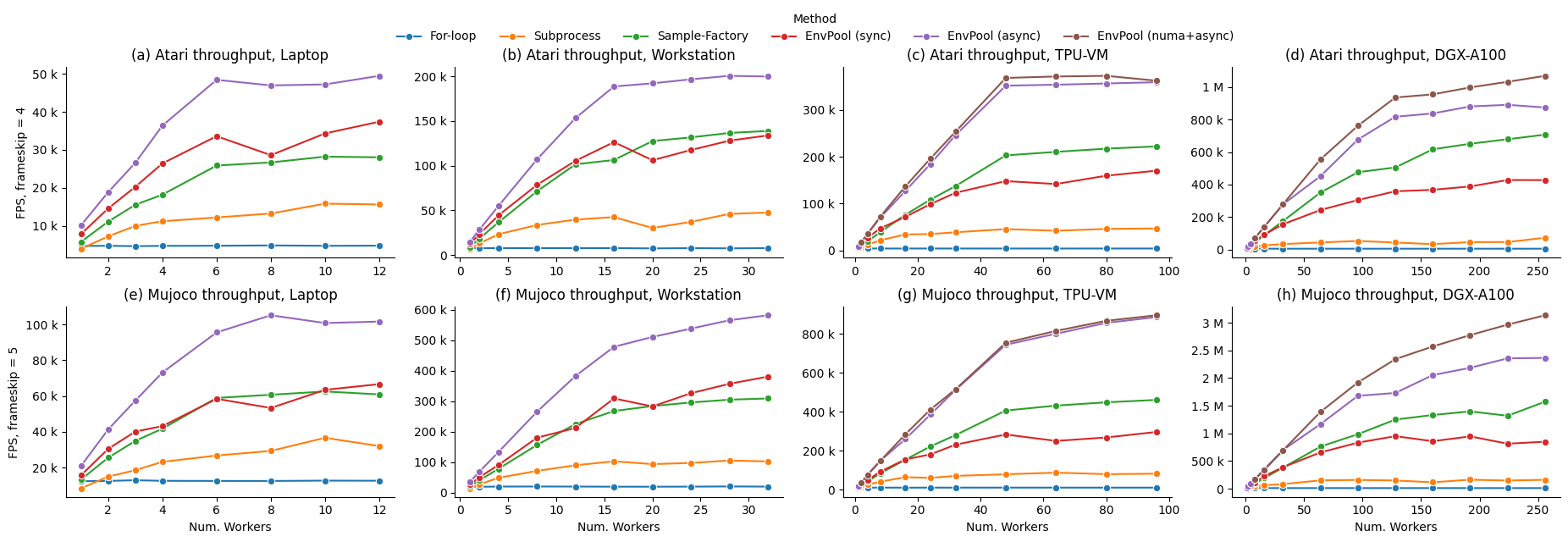
Please refer to the benchmark page for more details.
API Usage
The following content shows both synchronous and asynchronous API usage of EnvPool. You can also run the full script at examples/env_step.py
Synchronous API
import envpool
import numpy as np

# make Gymnasium env
env = envpool.make("Pong-v5", env_type="gymnasium", num_envs=100)
# or use envpool.make_gymnasium(...)
obs = env.reset()  # should be (100, 4, 84, 84)
act = np.zeros(100, dtype=int)
obs, rew, term, trunc, info = env.step(act)
Under the synchronous mode, envpool closely resembles Gymnasium and dm_env. It has the reset and step functions with the same meaning. However, there is one exception in envpool: batch interaction is the default. Therefore, during the creation of the envpool, there is a num_envs argument that denotes how many envs you like to run in parallel.
env = envpool.make("Pong-v5", env_type="gymnasium", num_envs=100)
The first dimension of action passed to the step function should equal num_envs.
act = np.zeros(100, dtype=int)
You don't need to manually reset one environment when any of done is true; instead, all envs in envpool have enabled auto-reset by default.
Asynchronous API
import envpool
import numpy as np

# make asynchronous
num_envs = 64
batch_size = 16
env = envpool.make(
    "Pong-v5", env_type="gymnasium", num_envs=num_envs, batch_size=batch_size
)
action_num = env.action_space.n
env.async_reset()  # send the initial reset signal to all envs
while True:
    obs, rew, term, trunc, info = env.recv()
    env_id = info["env_id"]
    action = np.random.randint(action_num, size=batch_size)
    env.send(action, env_id)
In the asynchronous mode, the step function is split into two parts: the send/recv functions. send takes two arguments, a batch of action, and the corresponding env_id that each action should be sent to. Unlike step, send does not wait for the envs to execute and return the next state, it returns immediately after the actions are fed to the envs. (The reason why it is called async mode).
env.send(action, env_id)
To get the "next states", we need to call the recv function. However, recv does not guarantee that you will get back the "next states" of the envs you just called send on. Instead, whatever envs finishes execution gets recved first.
state = env.recv()
Besides num_envs, there is one more argument batch_size. While num_envs defines how many envs in total are managed by the envpool, batch_size specifies the number of envs involved each time we interact with envpool. e.g. There are 64 envs executing in the envpool, send and recv each time interacts with a batch of 16 envs.
envpool.make("Pong-v5", env_type="gymnasium", num_envs=64, batch_size=16)
There are other configurable arguments with envpool.make; please check out EnvPool Python interface introduction.
Rendering
EnvPool exposes rendering through the Python wrapper. Create the env with
render_mode="rgb_array" to get batched RGB output, or
render_mode="human" to display a single env through OpenCV.
import envpool

env = envpool.make(
    "Ant-v5",
    env_type="gymnasium",
    num_envs=4,
    render_mode="rgb_array",
    render_width=480,
    render_height=480,
)
env.reset()
frames = env.render(env_ids=[0, 2])
assert frames.shape == (2, 480, 480, 3)
render() is batch-first, so even a single render keeps the batch dimension:
env.render().shape == (1, H, W, 3). If env_ids is omitted, EnvPool renders
render_env_id (default 0). camera_id can be overridden per call, while
the output size is fixed at env creation time via render_width and
render_height.
The repo test suite also exercises rendering. make bazel-test runs repeated
render checks for every render-capable env family, and make release-test
includes a wheel smoke that calls render() after reset(). On Windows, the
MuJoCo render tests use the same ENVPOOL_DLL_DIR Mesa preload hook described
above when you want software OpenGL instead of the system driver.
viewer = envpool.make(
    "WalkerWalk-v1",
    env_type="gymnasium",
    num_envs=1,
    render_mode="human",
    render_env_id=0,
)
viewer.reset()
viewer.render()
render_mode="human" returns None and currently supports a single env id per
call. It also requires opencv-python to be installed.
Pixel Observations
For MuJoCo tasks, pixel observations can also be exposed directly through the
regular observation API by passing from_pixels=True. This path is produced
natively in C++, without routing through Python-side render().
pixels = envpool.make(
    "WalkerWalk-v1",
    env_type="gymnasium",
    num_envs=2,
    from_pixels=True,
    frame_stack=3,
    render_width=84,
    render_height=84,
)
obs, info = pixels.reset()
assert obs.shape == (2, 9, 84, 84)
Pixel observations use channel-first layout. With frame_stack=1, each
environment returns (3, H, W); with frame_stack=3, EnvPool stacks frames on
the channel dimension and returns (9, H, W). This matches the usual PyTorch
BCHW convention directly. If render_width / render_height are omitted,
EnvPool defaults them to 84.
Contributing
EnvPool is still under development. More environments will be added, and we always welcome contributions to help EnvPool better. If you would like to contribute, please check out our contribution guideline.
License
EnvPool is under Apache2 license.
Other third-party source-code and data are under their corresponding licenses.
We do not include their source code and data in this repo.
Citing EnvPool
If you find EnvPool useful, please cite it in your publications.
@inproceedings{weng2022envpool,
 author = {Weng, Jiayi and Lin, Min and Huang, Shengyi and Liu, Bo and Makoviichuk, Denys and Makoviychuk, Viktor and Liu, Zichen and Song, Yufan and Luo, Ting and Jiang, Yukun and Xu, Zhongwen and Yan, Shuicheng},
 booktitle = {Advances in Neural Information Processing Systems},
 editor = {S. Koyejo and S. Mohamed and A. Agarwal and D. Belgrave and K. Cho and A. Oh},
 pages = {22409--22421},
 publisher = {Curran Associates, Inc.},
 title = {Env{P}ool: A Highly Parallel Reinforcement Learning Environment Execution Engine},
 url = {https://proceedings.neurips.cc/paper_files/paper/2022/file/8caaf08e49ddbad6694fae067442ee21-Paper-Datasets_and_Benchmarks.pdf},
 volume = {35},
 year = {2022}
}
Disclaimer
This is not an official Sea Limited or Garena Online Private Limited product.
2 maintainers


Metadata
2 maintainers
Release files for envpool 1.2.7
For a detailed explanation of source distributions (sdists) and built distributions (wheels), please see the package formats documentation.
Built distributions (wheels)
Total release size: 650.3 MB
Release files / envpool-1.2.7-cp314-cp314-win_amd64.whl
| Download URL | envpool-1.2.7-cp314-cp314-win_amd64.whl |
|---|---|
| Size | 45.2 MB |
| Tags | CPython 3.14 Windows x86-64 |
|
SHA-256 checksum How to use checksums |
ca90c06427cf1a580a461326ff436b639d65b08b72263a9c606c9f8e18d67d8b
|
|
BLAKE2b-256 checksum How to use checksums |
cb3b334ef4570928f239163bfa76489b6d9d65330b0ed9993c9c88f761a2056d
|
| Upload date | |
|
Uploaded using Trusted Publishing? What is trusted publishing? |
No |
| Uploaded via |
twine/7.0.0 CPython/3.13.14
|
Release files / envpool-1.2.7-cp314-cp314-manylinux_2_28_x86_64.whl
| Download URL | envpool-1.2.7-cp314-cp314-manylinux_2_28_x86_64.whl |
|---|---|
| Size | 63.9 MB |
| Tags | CPython 3.14 Linux glibc 2.28+ x86-64 |
|
SHA-256 checksum How to use checksums |
49568f465b63eff6e7ac2240085bff222ad2bf3006fdd66c08cf367c90fad8d5
|
|
BLAKE2b-256 checksum How to use checksums |
69e89d2a2ebcc18dad6791aef45ccbc09f01f6638dff5c9bf9a4baf89035f2c3
|
| Upload date | |
|
Uploaded using Trusted Publishing? What is trusted publishing? |
No |
| Uploaded via |
twine/7.0.0 CPython/3.13.14
|
Release files / envpool-1.2.7-cp314-cp314-manylinux_2_28_aarch64.whl
| Download URL | envpool-1.2.7-cp314-cp314-manylinux_2_28_aarch64.whl |
|---|---|
| Size | 61.7 MB |
| Tags | CPython 3.14 Linux glibc 2.28+ ARM64 |
|
SHA-256 checksum How to use checksums |
206e843a485cad2cc27645ca9b426ced2204c7a61fc4b2ba8f1da045001110cb
|
|
BLAKE2b-256 checksum How to use checksums |
bc36a4eec9fc183ac9ac1b438ea508604fd775625e1cf2e9f579865e4936697e
|
| Upload date | |
|
Uploaded using Trusted Publishing? What is trusted publishing? |
No |
| Uploaded via |
twine/7.0.0 CPython/3.13.14
|
Release files / envpool-1.2.7-cp314-cp314-macosx_13_0_arm64.whl
| Download URL | envpool-1.2.7-cp314-cp314-macosx_13_0_arm64.whl |
|---|---|
| Size | 46.6 MB |
| Tags | CPython 3.14 macOS 13.0+ ARM64 |
|
SHA-256 checksum How to use checksums |
1901579fea37db629a608a161d1ebc466c173326d42312d644bece01b09c307b
|
|
BLAKE2b-256 checksum How to use checksums |
2bf41757dd0ae4291f95d8d6e8013c035b8e47c1d7bc580b0300ec327d16514d
|
| Upload date | |
|
Uploaded using Trusted Publishing? What is trusted publishing? |
No |
| Uploaded via |
twine/7.0.0 CPython/3.13.14
|
Release files / envpool-1.2.7-cp313-cp313-win_amd64.whl
| Download URL | envpool-1.2.7-cp313-cp313-win_amd64.whl |
|---|---|
| Size | 44.3 MB |
| Tags | CPython 3.13 Windows x86-64 |
|
SHA-256 checksum How to use checksums |
91cfce6a537e974775f7e95a7f010f1da6e29b49713bb7eb5627a35e8ac11b49
|
|
BLAKE2b-256 checksum How to use checksums |
ee621e82423f294e8fa390c46025c9f9462ff54303549d4f2c8e74bcbdd4321a
|
| Upload date | |
|
Uploaded using Trusted Publishing? What is trusted publishing? |
No |
| Uploaded via |
twine/7.0.0 CPython/3.13.14
|
Release files / envpool-1.2.7-cp313-cp313-manylinux_2_28_x86_64.whl
| Download URL | envpool-1.2.7-cp313-cp313-manylinux_2_28_x86_64.whl |
|---|---|
| Size | 63.9 MB |
| Tags | CPython 3.13 Linux glibc 2.28+ x86-64 |
|
SHA-256 checksum How to use checksums |
d5a61ac054df7f81734fa1f4f9b16a604cde11d60cdd983827f94bddf8099490
|
|
BLAKE2b-256 checksum How to use checksums |
6e4cb53151304a8470c49bb6a03d4bd199c5c91731d99eb85ddc270386ee4d30
|
| Upload date | |
|
Uploaded using Trusted Publishing? What is trusted publishing? |
No |
| Uploaded via |
twine/7.0.0 CPython/3.13.14
|
Release files / envpool-1.2.7-cp313-cp313-manylinux_2_28_aarch64.whl
| Download URL | envpool-1.2.7-cp313-cp313-manylinux_2_28_aarch64.whl |
|---|---|
| Size | 61.7 MB |
| Tags | CPython 3.13 Linux glibc 2.28+ ARM64 |
|
SHA-256 checksum How to use checksums |
e37eeff7b8bd331778bb24e750e54eea7b32b4916d4d4dd9196dd22a824d73a1
|
|
BLAKE2b-256 checksum How to use checksums |
3c62531becf02730033fc052e77fea569a8905a66215e8f7b34ee751f1af7f10
|
| Upload date | |
|
Uploaded using Trusted Publishing? What is trusted publishing? |
No |
| Uploaded via |
twine/7.0.0 CPython/3.13.14
|
Release files / envpool-1.2.7-cp313-cp313-macosx_13_0_arm64.whl
| Download URL | envpool-1.2.7-cp313-cp313-macosx_13_0_arm64.whl |
|---|---|
| Size | 46.6 MB |
| Tags | CPython 3.13 macOS 13.0+ ARM64 |
|
SHA-256 checksum How to use checksums |
cb60cc7d936172782ad2647ae95cc858f04e56e5e6c6b103315dc3646e95788d
|
|
BLAKE2b-256 checksum How to use checksums |
8de5996e6e4c5af647ace8000b47d9674942ea290d2ab71f33cef74707b02979
|
| Upload date | |
|
Uploaded using Trusted Publishing? What is trusted publishing? |
No |
| Uploaded via |
twine/7.0.0 CPython/3.13.14
|
Release files / envpool-1.2.7-cp312-cp312-win_amd64.whl
| Download URL | envpool-1.2.7-cp312-cp312-win_amd64.whl |
|---|---|
| Size | 44.3 MB |
| Tags | CPython 3.12 Windows x86-64 |
|
SHA-256 checksum How to use checksums |
937bae2b5f50892e268bf204299c8911cb513960b5c7394659b886e952077da4
|
|
BLAKE2b-256 checksum How to use checksums |
821a2044963b155b384d55d4c3554aab1886ae09ef79a937399fc12146cf03da
|
| Upload date | |
|
Uploaded using Trusted Publishing? What is trusted publishing? |
No |
| Uploaded via |
twine/7.0.0 CPython/3.13.14
|
Release files / envpool-1.2.7-cp312-cp312-manylinux_2_28_x86_64.whl
| Download URL | envpool-1.2.7-cp312-cp312-manylinux_2_28_x86_64.whl |
|---|---|
| Size | 63.9 MB |
| Tags | CPython 3.12 Linux glibc 2.28+ x86-64 |
|
SHA-256 checksum How to use checksums |
9d9e1b1eb9b6b9f7c38afa92ffccac4c69c32a8c8267b4429bcd66e3bce778bd
|
|
BLAKE2b-256 checksum How to use checksums |
670960ddfa05fc7ddab16a20559b30710507c1f49e2b02818fb0a1b4faefe054
|
| Upload date | |
|
Uploaded using Trusted Publishing? What is trusted publishing? |
No |
| Uploaded via |
twine/7.0.0 CPython/3.13.14
|
Release files / envpool-1.2.7-cp312-cp312-manylinux_2_28_aarch64.whl
| Download URL | envpool-1.2.7-cp312-cp312-manylinux_2_28_aarch64.whl |
|---|---|
| Size | 61.7 MB |
| Tags | CPython 3.12 Linux glibc 2.28+ ARM64 |
|
SHA-256 checksum How to use checksums |
9289ad9ddd754b7a8b8d7348bfc3d4aedefaf9dd6bd46f6d7a680d4855344694
|
|
BLAKE2b-256 checksum How to use checksums |
fca047eb2d112f98b13560d39583b1dd93a593d300b34e2fe860a566300d369a
|
| Upload date | |
|
Uploaded using Trusted Publishing? What is trusted publishing? |
No |
| Uploaded via |
twine/7.0.0 CPython/3.13.14
|
Release files / envpool-1.2.7-cp312-cp312-macosx_13_0_arm64.whl
| Download URL | envpool-1.2.7-cp312-cp312-macosx_13_0_arm64.whl |
|---|---|
| Size | 46.6 MB |
| Tags | CPython 3.12 macOS 13.0+ ARM64 |
|
SHA-256 checksum How to use checksums |
e775b468446d639e698d0ba47e0ddee0a819a75cbee3febcda95557c31dd5dbd
|
|
BLAKE2b-256 checksum How to use checksums |
046573896a85fd89458ad61ecebb666989102508b56e2626c68236b0aed267db
|
| Upload date | |
|
Uploaded using Trusted Publishing? What is trusted publishing? |
No |
| Uploaded via |
twine/7.0.0 CPython/3.13.14
|
Security for envpool 1.2.7
Provenance
Provenance describes where a file came from. On PyPI, provenance is shared via attestations, which provide a verifiable record of the build or publishing details. View details, limitations and caveats.
No provenance found
None of the files in this release were uploaded with provenance metadata.
A note on package security
PyPI is a repository for distributing packages, not a service for auditing them. While third-party security researchers and our staff do their best to detect and remove malicious packages, PyPI cannot guarantee the quality, security or suitability of any given package.
To learn more about protecting yourself from malicious actors, visit our package security documentation.














