
Epomakercontroller

A CLI tool to interact with an Epomaker RT100 keyboard that comes with a small screen attached. Some features will probably also work with the TH80.
This project is still very rough around the edges!
NOTE!!!: This currently only works over the USB connection!
Warning
Some users have reported that running this software can cause video playback issues, which can be caused
by repeated temperature sensor readings to a GPU. Given how this project (and, underneath, psutil) gathers
all sensor temperatures in one shot, your GPU will still be getting sensor requests even if you are not
specifically monitoring it (eg, you only care about NVME).
Features
- Upload images to the RT100 screen
- Send arbitrary numbers to the CPU and Temeprature displays on the screen
- Set RGB patterns on the keyboard
- Set individual key colours
- Start a daemon to continuously update the CPU and temperature on the screen
Requirements
Requires python3-tkinter installed eg
sudo apt-get install python3-tkinter
Installation
I suggest using conda or a python virtual env, tested on python 3.10 and 3.12:
Epomakercontroller package is available on PyPi
$ python3.10 -m venv epomaker
$ source epomaker/bin/activate
$ pip install EpomakerController
You can also install Epomakercontroller via poetry
$ sudo apt install poetry
$ git clone https://github.com/strodgers/epomaker-controller
$ cd epomaker-controller
$ python3.10 -m venv epomaker
$ source epomaker/bin/activate
$ poetry install --only main
Usage
$ epomakercontroller
Usage: epomakercontroller [OPTIONS] COMMAND [ARGS]...

  A simple CLI for the EpomakerController.

Options:
  --help  Show this message and exit.

Commands:
  cycle-light-modes  Cycle through the light modes.
  dev                Various dev tools.
  list-temp-devices  List available temperature devices.
  send-cpu           Send CPU usage percentage to the Epomaker screen.
  send-temperature   Send temperature to the Epomaker screen.
  send-time          Send the current time to the Epomaker device.
  set-keys           Open a simple GUI to set individual key colours.
  set-rgb-all-keys   Set RGB colour for all keys.
  start-daemon       Start a daemon to update the CPU usage and...
  upload-image       Upload an image to the Epomaker device.
There is a basic GUI to set key colours, it currently only uses a UK ISO layout. You can open it with:
epomakercontroller set-keys
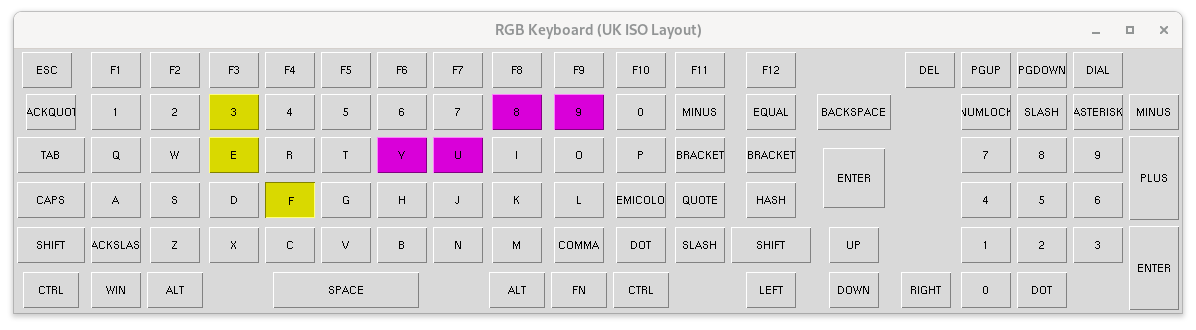
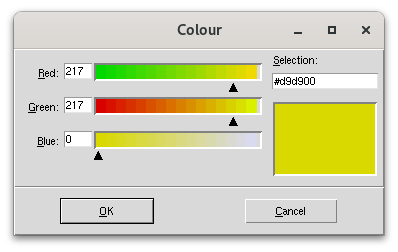
You can click on various keys, then press 'Enter' on your keyboard to select a colour:
Permissions
In order to communicate with your keyboard without having to use sudo, you can use the tool to generate a udev rule for the connected RT100:
epomakercontroller dev --udev
You will need to enter your password when prompted.
CPU/Temperature display
The temperature on the Epomaker screen is supposed to be for the weather, but I thought it was more useful to display the temperature of some device on the host machine. You will need to find out the label used by a sensor on your machine, which you can do by:
$ epomakercontroller list-temp-devices
DEVICE KEY                       CURRENT TEMPERATURE
acpitz-0                         40.0°C
nvme-0                           30.85°C
nvme-1                           35.85°C
nvme-2                           59.85°C
nvme-3                           30.85°C
pch_skylake-0                    35.0°C
coretemp-0                       52.0°C
coretemp-1                       52.0°C
coretemp-2                       44.0°C
coretemp-3                       47.0°C
coretemp-4                       45.0°C
iwlwifi_1-0                      30.0°C
NVIDIA-GeForce-MX150-0           36°C
Note that an NVIDIA device is also listed here, which requires having NVIDIA drivers installed (eg
your system is capable of running nvidia-smi)
Then you can start the daemon with the corresponding label, eg:
epomakercontroller start-daemon coretemp-0
Alternatively leave the label blank to disable and only do CPU usage:
epomakercontroller start-daemon
The daemon will also update the date and time once when it starts
Show connected devices
You can print all the available information about the connected keyboard using the 'dev' command. Here is an example of the output from my own keyboard:
epomakercontroller dev --print
Printing all available information about the connected keyboard.
WARNING: If this program errors out or you cancel early, the keyboard
              may become unresponsive. It should work fine again if you unplug and plug
               it back in!
[
  {
    "path": "1-7.3:1.0",
    "vendor_id": "0x3151",
    "product_id": "0x4010",
    "serial_number": "",
    "release_number": 1281,
    "manufacturer_string": "ROYUAN",
    "product_string": "RT100 Wired",
    "usage_page": 0,
    "usage": 0,
    "interface_number": 0
  },
  {
    "path": "1-7.3:1.1",
    "vendor_id": "0x3151",
    "product_id": "0x4010",
    "serial_number": "",
    "release_number": 1281,
    "manufacturer_string": "ROYUAN",
    "product_string": "RT100 Wired",
    "usage_page": 0,
    "usage": 0,
    "interface_number": 1
  },
  {
    "path": "1-7.3:1.2",
    "vendor_id": "0x3151",
    "product_id": "0x4010",
    "serial_number": "",
    "release_number": 1281,
    "manufacturer_string": "ROYUAN",
    "product_string": "RT100 Wired",
    "usage_page": 0,
    "usage": 0,
    "interface_number": 2
  }
]
TODO
- Support bluetooth/2.4Ghz
- Upload GIFs
- Macros
Contributing
Contributions are very welcome.
License
Distributed under the terms of the MIT license, Epomakercontroller is free and open source software.
Issues
If you encounter any problems, please [file an issue] along with a detailed description.
1 maintainer

Metadata
1 maintainer
Release files for EpomakerController 0.0.8
For a detailed explanation of source distributions (sdists) and built distributions (wheels), please see the package formats documentation.
Source distribution (sdist)
| File | Size | Uploaded | |
|---|---|---|---|
| epomakercontroller-0.0.8.tar.gz | 27.3 kB | Details |
Built distribution (wheel)
| File | Interpreter | ABI | Platform | Reset |
|---|---|---|---|---|
| epomakercontroller-0.0.8-py3-none-any.whl | Python 3 | none | any | Details |
Total release size: 64.2 kB
Release files / epomakercontroller-0.0.8.tar.gz
| Download URL | epomakercontroller-0.0.8.tar.gz |
|---|---|
| Size | 27.3 kB |
| Tags | Source |
|
SHA-256 checksum How to use checksums |
5b89d7bd2c73b83b492fbe2f47d6e43473cdff6e9dbf59ab255c9cce50745afc
|
|
BLAKE2b-256 checksum How to use checksums |
cd7c14101495c11e899cde329b72830116fceb75c2cab71253e7555d42ceb042
|
| Upload date | |
|
Uploaded using Trusted Publishing? What is trusted publishing? |
No |
| Uploaded via |
twine/6.1.0 CPython/3.9.22
|
Release files / epomakercontroller-0.0.8-py3-none-any.whl
| Download URL | epomakercontroller-0.0.8-py3-none-any.whl |
|---|---|
| Size | 36.9 kB |
| Tags | Python 3 |
|
SHA-256 checksum How to use checksums |
2d81e65c7ae9a68c37beac9c9227b876aa23c64e96913dafa40357f71cb27972
|
|
BLAKE2b-256 checksum How to use checksums |
823b9ad6f855a83f6264bce9de2be7b4c0b89a0f45b6f75051eb73df81f479c0
|
| Upload date | |
|
Uploaded using Trusted Publishing? What is trusted publishing? |
No |
| Uploaded via |
twine/6.1.0 CPython/3.9.22
|














