
1 file was added to this release more than 14 days after its initial publication. Inspect the release files before installing.
======
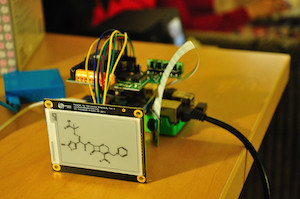
Python driver for Embedded Artists 2.7 inch E-paper Display Module:
http://www.embeddedartists.com/products/displays/lcd_27_epaper.php.
It's based on original C code available here:
http://www.embeddedartists.com/sites/default/files/support/displays/epaper/epaper_pi_130307.tar.gz
[](https://pypi.python.org/pypi/epyper)
Rationale
--------
So you got your new shiny E-paper display from Embeded Artists. You plug it to your rPi to display some images. But how? Example C code is not very easy to adapt. All images included in C demo are written as byte tables in C header files. Function for displaying an image takes pointers to `int8_t`... In order to display new image you need to remember and old one. WTF!?!? You just wanted to display a png or jpg from your disk or web. And preferably do so in python. If that's your story then `epyper` is just for you.
`Epyper` provides high level python interface for displaying images on e-paper. The most important class is `DisplayController`, which provides `displayImg` method accepting PIL `Image` to be displayed. The image needs to have proper size. It doesn't necessary needs to be black and white only - color images will be converted but the effect may be dissapointing so it's better to provide b&w or convert it before handing it to the `DisplayController`.
Installation
--------
The best way to install epyper is to use `PIP`:
pip install epyper
This command will install latest stable version with all dependencies.
You can of course clone development version from github but it's not guaranteed to be working.
How to use it?
--------
#necessary imports first
from PIL import Image
from epyper.displayCOGProcess import Display
from epyper.displayController import DisplayController
#create DisplayController instance specifying display type as an argument
display = DisplayController(Display.EPD_TYPE_270)
#open some image
im = Image.open("some_image.png")
#display it!
display.displayImg(im)
Dependencies
--------
* [WiringPi2-Python] (https://github.com/WiringPi/WiringPi2-Python)
* [Pillow] (https://github.com/python-imaging/Pillow)
1 maintainer

Metadata
1 maintainer
Release files for epyper 0.1.0
For a detailed explanation of source distributions (sdists) and built distributions (wheels), please see the package formats documentation.
File added late
1 file was uploaded more than 14 days after the first file in this release.
While project maintainers occasionally add legitimate files to an existing release, late additions can also indicate a security compromise.
We recommend inspecting the release files before installing.
Source distribution (sdist)
| File | Size | Uploaded | Provenance | |
|---|---|---|---|---|
| epyper-0.1.0.tar.gz | 11.7 kB | Without provenance | Details |
Release files / epyper-0.1.0.tar.gz
File added late
This file was uploaded more than 14 days after the first file in this release.
While project maintainers occasionally add legitimate files to an existing release, late additions can also indicate a security compromise.
We recommend inspecting the release file before installing.
| Download URL | epyper-0.1.0.tar.gz |
|---|---|
| Size | 11.7 kB |
| Tags | Source |
|
SHA-256 checksum How to use checksums |
f1d0745ba9d6a9cd6b81ec3fe478d334ee2ec7954684ef3fd7cdbf230f75400b
|
|
BLAKE2b-256 checksum How to use checksums |
7c38114b6a30e5e8d00cbfd7a42f78732d71cde545c024c86e3d04f7fbf3537a
|
| Upload date | |
|
Uploaded using Trusted Publishing? What is trusted publishing? |
No |
Security for epyper 0.1.0
Upload timing
File added late
1 file was uploaded more than 14 days after the first file in this release.
While project maintainers occasionally add legitimate files to an existing release, late additions can also indicate a security compromise.
Provenance
Provenance describes where a file came from. On PyPI, provenance is shared via attestations, which provide a verifiable record of the build or publishing details. View details, limitations and caveats.
No provenance found
None of the files in this release were uploaded with provenance metadata.
A note on package security
PyPI is a repository for distributing packages, not a service for auditing them. While third-party security researchers and our staff do their best to detect and remove malicious packages, PyPI cannot guarantee the quality, security or suitability of any given package.













