
EvoOpt - Evolutionary Optimization in Python
EvoOpt: Evolutionary Optimization in Python








Python implementation of state-of-art meta-heuristic and evolutionary optimisation algorithms.
This library is implemented in Numpy (which was written in C) for fast processing speed
Table of Contents
About The Project
Current support for algorithms
[x] Genetic Algorithm
[x] Duelist Algorithm
[X] Particle Swarm Optimization
[X] Gravitational Search Algorithm
[X] Firefly Algorithm
[X] Simulated Annealing
[ ] Multi-Verse Optimization
[ ] Grey-Wolf Optimization
More algorithms to come...
Getting Started
There are four simple steps to run an optimization problem using EvoOpt
(Example 2 from example folder)
Prerequisites
from solver.DuelistAlgorithm import DuelistAlgorithm
**1. Define your function. Say you want to minimize the equation f=(x1,x2) = (x1)^2+(x2)^2 **
def f(x1,x2):
	return x1*x1+x2*x2
**2. Define the variables that can be manipulated for optimization. Define their names as string and put them in an array. **
x=["x1","x2"]
3. Define the boundaries for the manipulated variables:
Say:
x1 is bounded from -2 to 10 (-2 is min value of x1 and 10 is max value of x1)
x2 is bounded from 10 to 15 (10 is min value of x2 and 15 is max value of x2)
We can arrange these boundaries according to the definition array in step 2.
| Variables | x1 | x2 |
|---|---|---|
| Min | -2 | 5 |
| Max | 10 | 15 |
The corresponding code is:
 xmin=[-2,5]
 xmax=[10,15]
4. Setup the solver and start the solve procedure.
DA=DuelistAlgorithm(f,x,xmin,xmax,max_gen=1000)
DA.solve(plot=True)
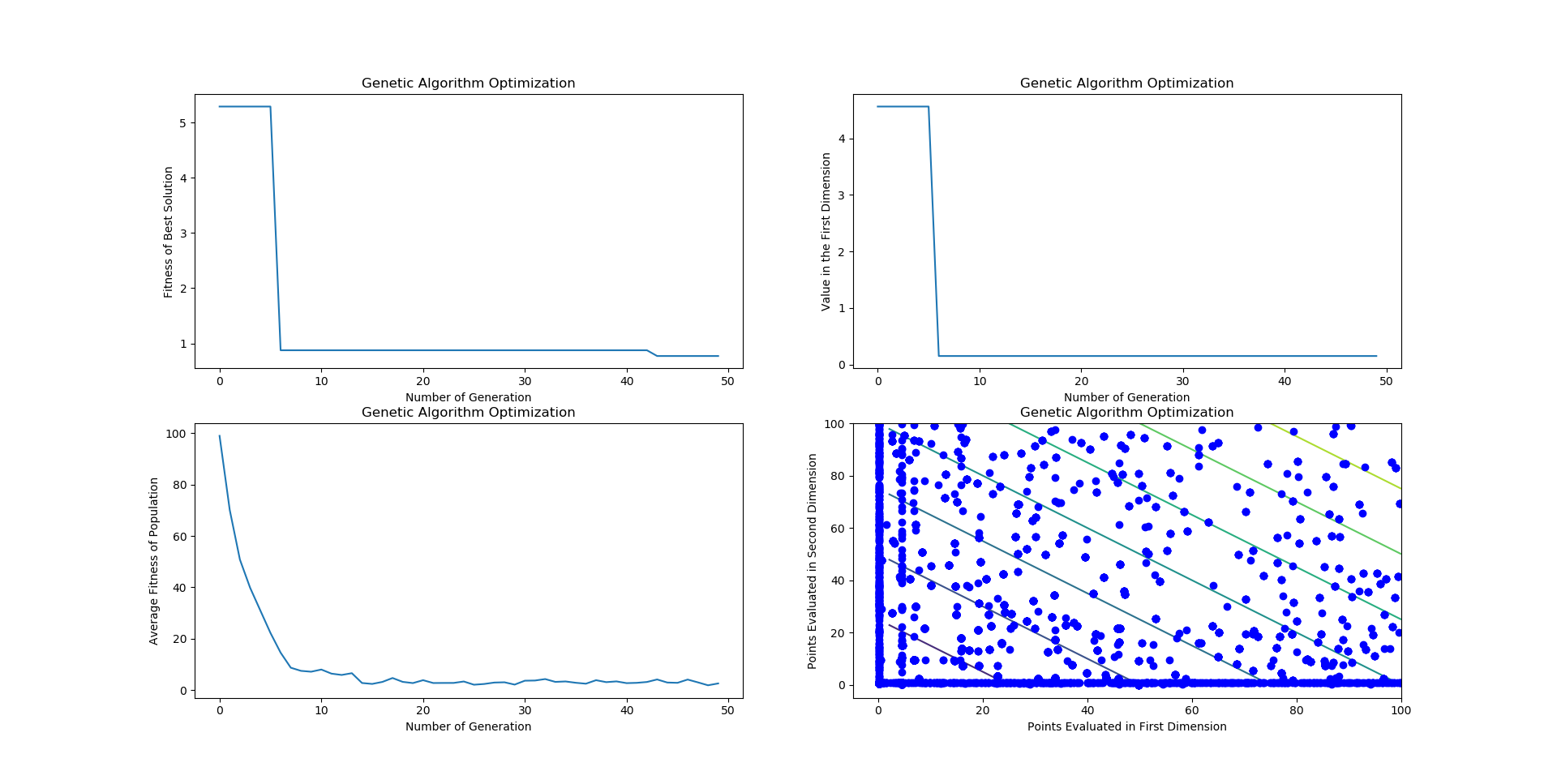
Example Result
Dependencies
Numpy and Matplotlib
Windows:
$python -m pip install numpy matplotlib
Linux:
$pip install numpy matplotlib
Installation
You can use two methods for installation:
1. Install from github (recommended as this will download the newest version)
First download the git repository. You can do this by clicking the download button or using the git command:
$ git pull https://github.com/tsyet12/EvoOpt
Move to the directory:
$ cd (directory of EvoOpt)
Run setup. The following command installs all files in directory:
$ pip install -e .
**1. Install from pip **
You can install this package from pip.
Linux:
$ pip install EvoOpt
Windows:
$python -m pip install EvoOpt
Usage
To be updated.
Contributing
Contributions are what make the open source community such an amazing place to be learn, inspire, and create. Any contributions you make are greatly appreciated.
- Fork the Project
- Create your Feature Branch (
git checkout -b testbranch/solvers) - Commit your Changes (
git commit -m 'Improve testbranch/solvers') - Push to the Branch (
git push origin testbranch/solvers) - Open a Pull Request
License
Distributed under the BSD-2-Clause License. See LICENSE for more information.
Contact
Sin Yong Teng: tsyet12@gmail.com
Project Link: https://github.com/tsyet12/EvoOpt
Acknowledgements
1 maintainer

Metadata
1 maintainer
Release files for EvoOpt 0.14
For a detailed explanation of source distributions (sdists) and built distributions (wheels), please see the package formats documentation.
Source distribution (sdist)
| File | Size | Uploaded | Provenance | |
|---|---|---|---|---|
| EvoOpt-0.14.tar.gz | 13.1 kB | Without provenance | Details |
Release files / EvoOpt-0.14.tar.gz
| Download URL | EvoOpt-0.14.tar.gz |
|---|---|
| Size | 13.1 kB |
| Tags | Source |
|
SHA-256 checksum How to use checksums |
9e05cde1093e6a6a077bd0968079b38d2d02158f12501b0e96831e2c9723de39
|
|
BLAKE2b-256 checksum How to use checksums |
a9503eafd518a5d69506c3cb0bd05f22fad78e3a149d44ab2268754c451e63d9
|
| Upload date | |
|
Uploaded using Trusted Publishing? What is trusted publishing? |
No |
| Uploaded via |
twine/1.13.0 pkginfo/1.5.0.1 requests/2.22.0 setuptools/39.0.1 requests-toolbelt/0.9.1 tqdm/4.32.1 CPython/3.7.0
|
Security for EvoOpt 0.14
Provenance
Provenance describes where a file came from. On PyPI, provenance is shared via attestations, which provide a verifiable record of the build or publishing details. View details, limitations and caveats.
No provenance found
None of the files in this release were uploaded with provenance metadata.
A note on package security
PyPI is a repository for distributing packages, not a service for auditing them. While third-party security researchers and our staff do their best to detect and remove malicious packages, PyPI cannot guarantee the quality, security or suitability of any given package.














