This release is a pre-release and may not be stable for production use.
exactdoc
Turn a PDF into a Word document that looks like the original and that you can actually edit.
exactdoc writes a DOCX made of real headings, paragraphs, lists, tables, footnotes and page headers, and lays them out so each page matches the PDF. Its output is measured by opening it in Microsoft Word, LibreOffice and Google Docs and comparing every page with the original. It runs entirely on your machine: no telemetry, no account, and no network unless you ask for the optional Google Docs measurement (details).
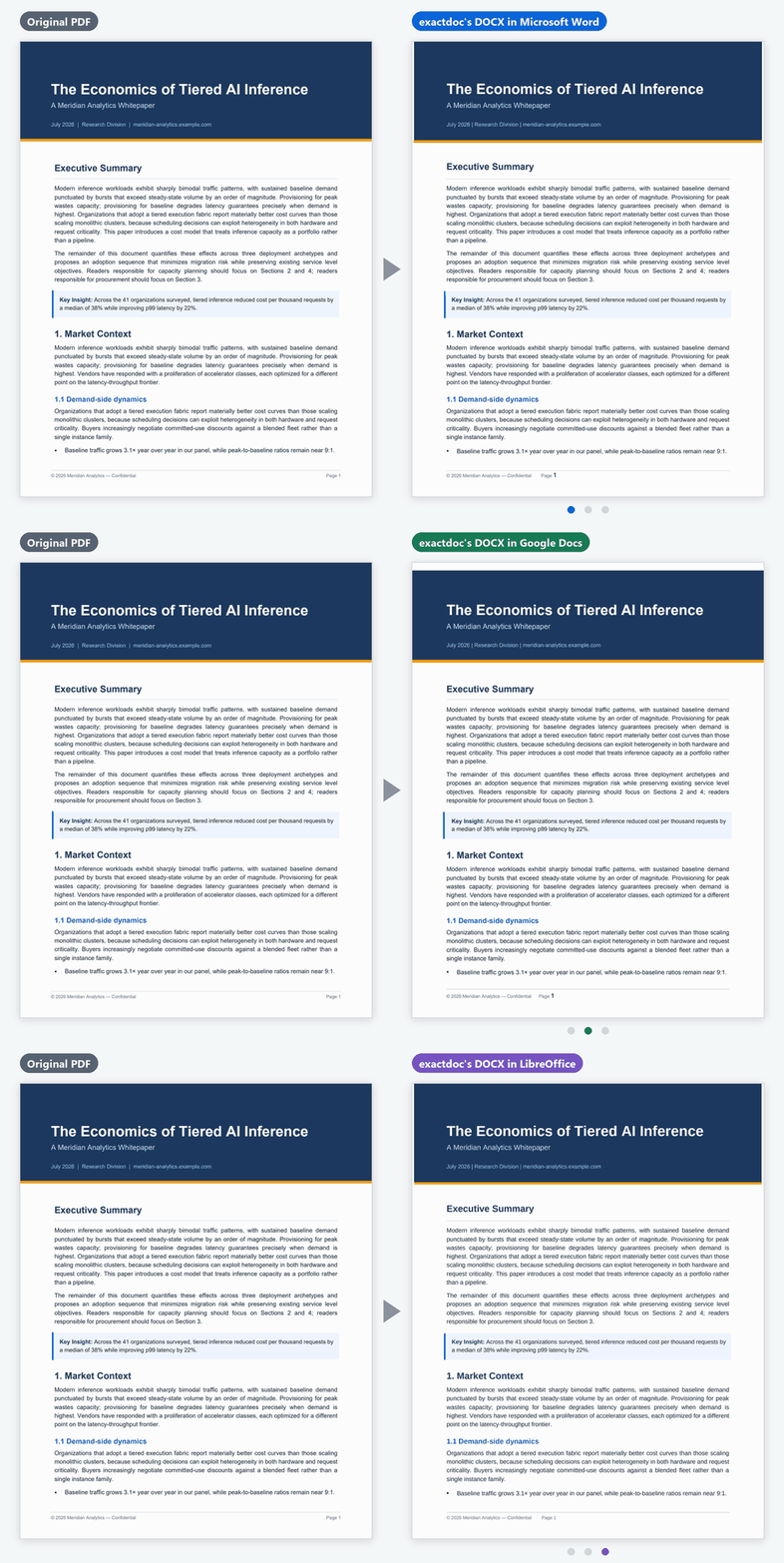
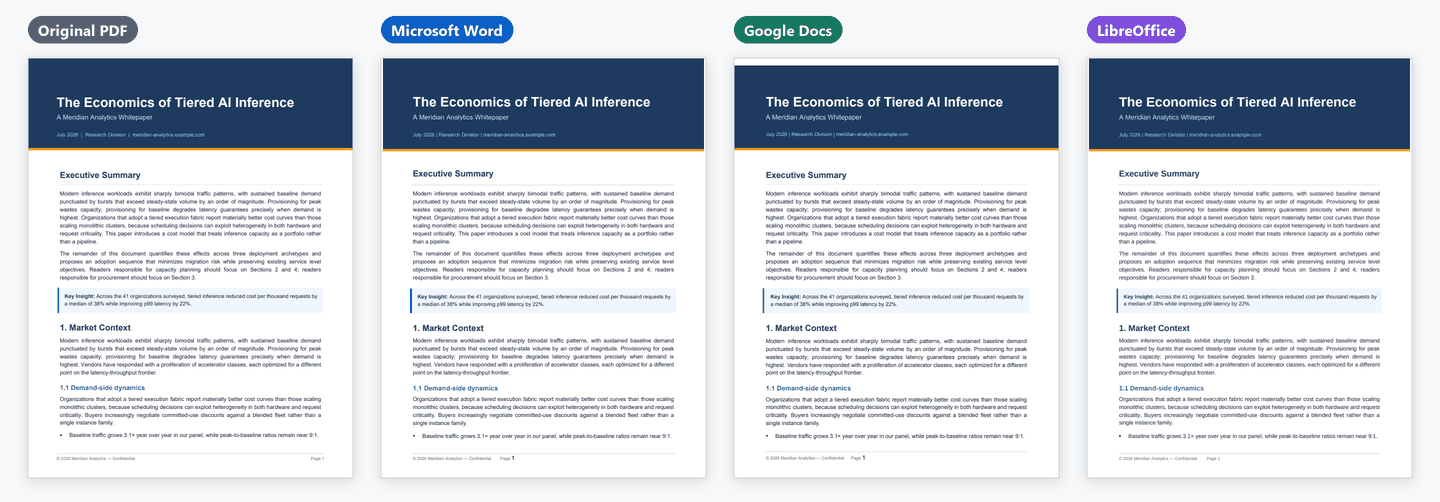
Page 1 of one of the project's test whitepapers, converted with the default settings; Google Docs shows the DOCX made for it (still image, how it was made). Small differences remain: Google Docs adds a thin white strip above the dark band, and the footer's page number sits further left than in the PDF, set larger in Word and Google Docs.
Beta (0.3.0b1), on PyPI. Not announced yet: see the results on documents it has never seen below.
Install
You need Python 3.9 or newer.
pip install --pre exactdoc
exactdoc --version
Optional, and recommended: LibreOffice (free). When it is installed, exactdoc opens its own DOCX in it, compares each page with the PDF and corrects page breaks and spacing. Without it, exactdoc converts in one pass and says so. docs/install.md covers the fonts LibreOffice needs on Linux, how long the check takes, and the optional extras.
Quick start
exactdoc report.pdf                                    # writes report.docx next to it
exactdoc report.pdf --output-profile gdocs --refine 0  # a DOCX made for Google Docs
exactdoc --input-dir pdfs --out-dir docx --recursive   # a whole folder
from exactdoc import convert
convert("report.pdf", "report.docx")                                  # with LibreOffice's check
convert("report.pdf", "report.docx", refine_rounds=0, oracle="none")  # without LibreOffice
exactdoc never replaces a file you did not name. The Google Docs option writes the same document in a form Google Docs' importer reads correctly; it is still made offline, and you upload it to Drive yourself. Every option, the Python API and the exit codes are in docs/usage.md.
What you get
The DOCX is built from the same pieces you would use to write the document in Word yourself, not from text boxes pinned to the page:
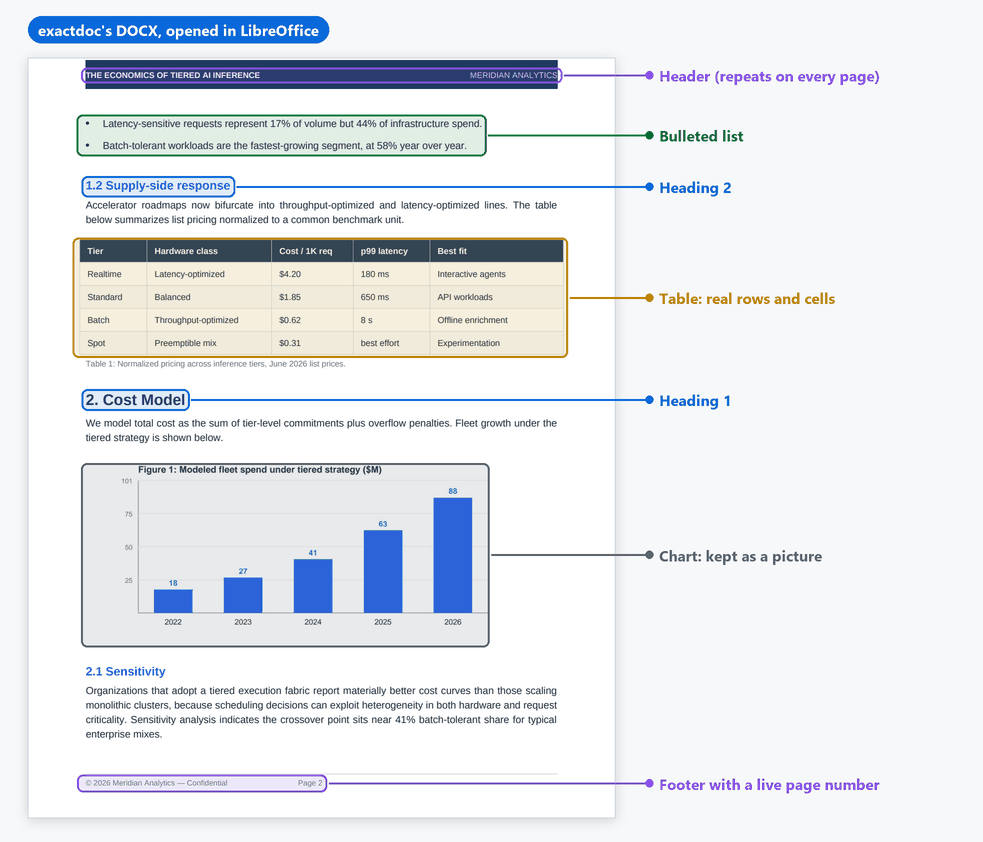
- Headings use Word's heading styles, so the navigation pane and Google Docs' outline work.
- Paragraphs flow and re-wrap when you edit them.
- Lists are real bulleted and numbered lists.
- Tables are real tables, with merged cells and rows that run over pages.
- Headers and footers repeat on every page, with live page numbers. Footnotes are real Word footnotes (plain text in the Google Docs output, because Docs moves real ones), and links still work.
- Charts, logos and artwork stay pictures, placed where the PDF has them.
What works, and what does not yet
What exactdoc promises depends on the program that made the PDF. Documents written as flowing text in Word, Google Docs, LibreOffice or LaTeX are promised. Designed layouts are not, yet. Numbers below are from the release measurement (record) and, where they say "never seen", from the test below (results).
| Kind of PDF | Today |
|---|---|
| Letters, memos, policies, syllabi and other documents of up to 20 pages written in Word, Google Docs, LibreOffice or LaTeX | Works well |
| Résumés | Mostly: of 8 never seen, 5 kept their page count and words; a federal-style résumé went from 3 pages to 6 |
| Reports over 20 pages written in Word | Mixed: of 4 never seen, one came back exact; three US government audit reports gained 2–4 pages, with about a third of their words on the right page |
| Long documents written in LaTeX | Mostly: two manuals never seen came back page for page; a 77-page technical report came back with 78 pages and 42% of its words on the right page |
| Tables, simple two-column pages, headers, footers, footnotes, links | Works well |
| Latin, Cyrillic and Greek text | Works well |
| Chinese, Japanese and Korean text | Partly: the text survives, but some runs become pictures |
| Arabic, Hebrew and Persian (right-to-left) | Partly: right-to-left paragraphs in reading order; pages can grow, and the Google Docs output is not yet right-to-left |
| Long documents opened in Google Docs | Mostly: some gain pages (IRS Publication 15: 62 pages for 59) |
| Designed reports and annual reports (InDesign, Affinity, QuarkXPress, Publisher) | Not yet: the text stays editable, but the layout does not hold |
| Multi-column booklets (IRS, GPO, Federal Register style) | Not yet: IRS Publication 501 grows from 31 pages to 45 in LibreOffice |
| Dense journal papers, equations | Not yet: equations come apart, and pages can be added |
| Slide decks, brochures, posters | Not yet |
| Web pages printed from a browser | Not yet: a 7-page Wikipedia article printed from Chrome came back with 8 pages and a third of its words on the right page |
| Scans without a text layer, fillable forms, over 250 pages | Refused with a clear message and exit code (no OCR is built in; --max-pages raises the cap) |
 |
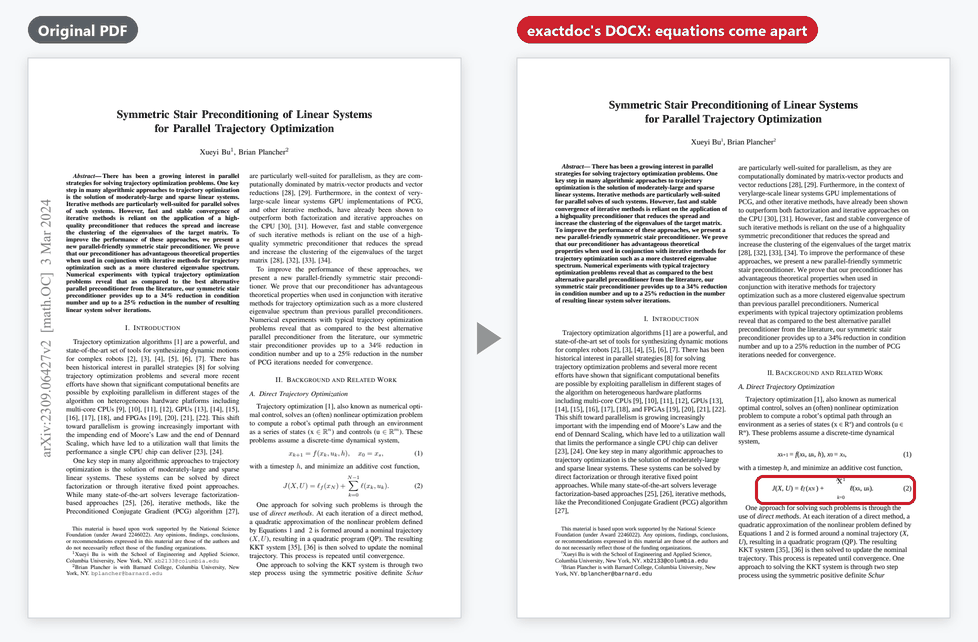 |
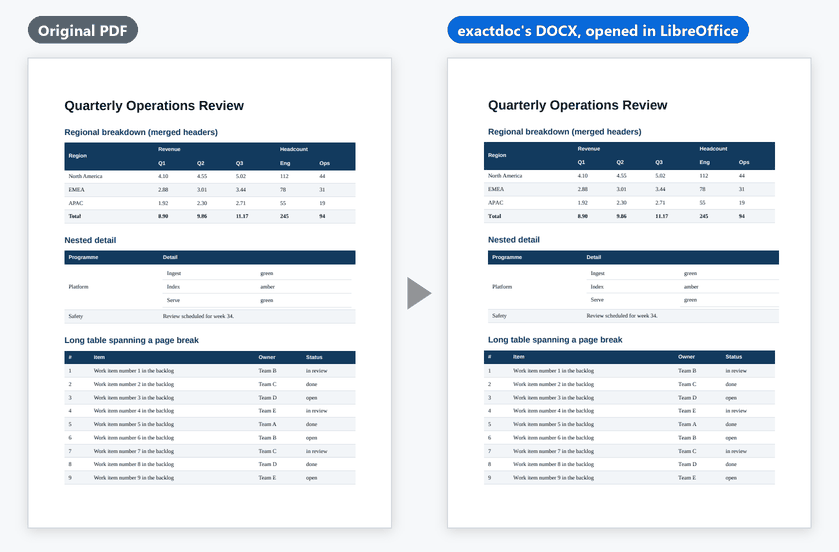
| Works: tables become real Word tables, merged cells included. | Not yet: in a dense arXiv paper (CC BY 4.0) the text converts, but equations come apart. |
To see which program made a PDF, open File → Properties in a PDF viewer and
read the Producer and Application fields, or run exactdoc --diagnose your.pdf,
which prints them without any of the document's text. The full list, with
numbers, is in docs/deep-dive/limitations.md;
more side-by-side pictures are in docs/examples.md.
How we know
Measured, not eyeballed. Every change must pass 16 frozen test documents, gated on every push in CI inside the pinned measurement image, and each milestone converts 95 frozen PDFs (those 16 and 79 more, most of them public real-world documents), opens every DOCX in LibreOffice, Microsoft Word and Google Docs, and compares it with the PDF page by page. In the final measurement for the beta (record, scorecard):
- all 41 promised documents of up to 20 pages kept exactly their page count in all three;
- of the 21 promised documents over 20 pages, all 21 in LibreOffice and Word, and 18 in Google Docs, kept their page count within 2% (or one page) with at least 85% of their words on the right page;
- across everything, including the kinds marked "Not yet", Word opened all 90 DOCX files without asking to repair one, and in Google Docs 66 of the 90 compared came back with exactly the right number of pages. The other five are PDFs exactdoc refuses on purpose.
These are the documents exactdoc was developed against, so they show how well it does on PDFs it has seen. How the measurement works: docs/deep-dive/measured-state.md.
Tested on documents it has never seen
Before the release, 32 public PDFs never used in development were sealed and then converted once, on the release candidate. 23 were classed as promised before the run, including the web page now marked "Not yet". The verdicts were the same in LibreOffice and Word; Google Docs was not part of this test (results, data):
- No crashes, and Word opened all 32 cleanly: pass.
- Short promised documents: fail. 13 of 16 kept exactly their page count, but only 12 of 16 had at least 90% of their words on the right page, below the 80% bar. The four misses: a CMU sample résumé set (9 pages for 8), a federal-style résumé, a LaTeX résumé (88% of words) and a Wikipedia article printed from Chrome (8 pages for 7).
- No unusable result: fail. The federal-style résumé came back with 6 pages for 3 and about a third of its text on the right page.
- Long promised documents (reported): a median page-count error of 1.3%; 4 of 7 within 2% (or one page), and 3 of 7 with at least 85% of their words on the right page.
This did not meet the bar we set in advance for announcing it; 0.3.0b2 is the fix release.
Fonts
The DOCX names only fonts that a standard Windows 10 or 11 computer with
Microsoft Office has, with one exception: Chinese, Japanese, Korean, Arabic,
Hebrew, Persian and Thai text keeps the PDF's own font name, so a reader who
has that font sees it and one who does not gets Word's default for the script.
The fonts the test documents name this way are Noto Sans CJK JP,
IPAPGothic, WenQuanYi Zen Hei, DFKai-SB, DejaVu Sans,
Noto Naskh Arabic, David, Narkisim, BNazanin and Thonburi.
Contributing
PRs welcome. See CONTRIBUTING.md for the one-command quality
check every PR runs. If a conversion goes wrong,
report it
with the output of exactdoc --diagnose your.pdf instead of the PDF itself.
Learn more
| docs/install.md | LibreOffice and its fonts, timing, the optional extras, what talks to the network |
| docs/usage.md | Every option, the Python API, batch mode, exit codes |
| docs/deep-dive/limitations.md | What does not work yet, with numbers |
| docs/examples.md | More pages side by side, the good and the bad |
| docs/deep-dive/measured-state.md | How the numbers are measured |
| CHANGELOG.md | What changed, release by release |
| SECURITY.md | Reporting a security problem privately |
| docs/README.md | Index of every deeper document |
Licence
exactdoc is Apache-2.0. A default install pulls in no copyleft code.
The optional mupdf extra (pip install "exactdoc[mupdf]") adds PyMuPDF, which is
AGPL-3.0; it is only a reference for measurements and does not change the output.
Details: docs/deep-dive/licensing.md and
docs/license-audit.md.
1 maintainer

Metadata
1 maintainer
Release files for exactdoc 0.3.0b1
For a detailed explanation of source distributions (sdists) and built distributions (wheels), please see the package formats documentation.
Source distribution (sdist)
| File | Size | Uploaded | |
|---|---|---|---|
| exactdoc-0.3.0b1.tar.gz | 604.8 kB | Details |
Built distribution (wheel)
| File | Interpreter | ABI | Platform | Reset |
|---|---|---|---|---|
| exactdoc-0.3.0b1-py3-none-any.whl | Python 3 | none | any | Details |
Total release size: 1.2 MB
Release files / exactdoc-0.3.0b1.tar.gz
| Download URL | exactdoc-0.3.0b1.tar.gz |
|---|---|
| Size | 604.8 kB |
| Tags | Source |
|
SHA-256 checksum How to use checksums |
ec4534374475b6684a6f9574d1b31104e9c7d50679d965a6df984b136206ba25
|
|
BLAKE2b-256 checksum How to use checksums |
191258b2aa5722e1110ee593d812cb161509d6df6c3e754c2196b1c8b8ac473d
|
| Upload date | |
|
Uploaded using Trusted Publishing? What is trusted publishing? |
Yes |
| Uploaded via |
twine/7.0.0 CPython/3.13.14
|
Provenance
Provenance describes where a file came from. On PyPI, provenance is shared via attestations, which provide a verifiable record of the build or publishing details. View details, limitations and caveats.


PyPI Publish Attestation
PyPI verified that this artifact, at this checksum, originated from the publisher listed below.
Signed by GitHub Actions, verified by PyPI on Oct 11, 2026.
Transparency logRelease files / exactdoc-0.3.0b1-py3-none-any.whl
| Download URL | exactdoc-0.3.0b1-py3-none-any.whl |
|---|---|
| Size | 620.9 kB |
| Tags | Python 3 |
|
SHA-256 checksum How to use checksums |
21b4f90bf057c173bcda542555c3086e32ffb8946abf52c0f69ce52b6dd18344
|
|
BLAKE2b-256 checksum How to use checksums |
38856a400c45b8107237c85e199ac0be839e5c3c190f79d6006d2eb899e31521
|
| Upload date | |
|
Uploaded using Trusted Publishing? What is trusted publishing? |
Yes |
| Uploaded via |
twine/7.0.0 CPython/3.13.14
|
Provenance
Provenance describes where a file came from. On PyPI, provenance is shared via attestations, which provide a verifiable record of the build or publishing details. View details, limitations and caveats.
PyPI Publish Attestation
PyPI verified that this artifact, at this checksum, originated from the publisher listed below.
Signed by GitHub Actions, verified by PyPI on Oct 11, 2026.
Transparency log