
Runs a SQL script against a PostgreSQL, SQLite, MariaDB/MySQL, DuckDB, Firebird, MS-Access, MS-SQL-Server, or Oracle database, or an ODBC DSN. Provides metacommands to import and export data, copy data between databases, conditionally execute SQL and metacommands, and dynamically alter SQL and metacommands with substitution variables.
Verified details
These details have been verified by PyPIProject links
GitHub Statistics
Maintainers

Project description
[!WARNING] This project is in active development and is not yet stable. The codebase is being modernized from the upstream monolith into a modular package. APIs, CLI behavior, and configuration options may change without notice. Not recommended for production use. For the stable upstream release, see execsql.
Multi-DBMS SQL script processor.



Fork
execsql2 is a maintained fork of execsql originally authored by R.Dreas Nielsen. The upstream project is no longer actively maintained. This fork is maintained by Caleb Grant and is distributed on PyPI as execsql2. Complete documentation is at execsql2.readthedocs.io.
Overview
execsql runs SQL scripts against PostgreSQL, MySQL/MariaDB, SQLite, DuckDB, MS-SQL-Server, MS-Access, Firebird, Oracle, or an ODBC DSN. In addition to standard SQL, it supports a set of metacommands (embedded in SQL comments) for importing and exporting data, copying data between databases, conditional execution, looping, substitution variables, and interactive prompts. Because metacommands live in SQL comments, scripts remain valid SQL and are ignored by other tools such as psql or sqlcmd.
Installation
pip install execsql2
Optional extras install database drivers and feature bundles:
# Database drivers
pip install execsql2[postgres]    # PostgreSQL (psycopg2-binary)
pip install execsql2[mysql]       # MySQL / MariaDB (pymysql)
pip install execsql2[mssql]       # SQL Server (pyodbc)
pip install execsql2[duckdb]      # DuckDB
pip install execsql2[firebird]    # Firebird (firebird-driver)
pip install execsql2[oracle]      # Oracle (oracledb)
pip install execsql2[odbc]        # ODBC DSN (pyodbc)

# Feature bundles
pip install execsql2[formats]    # ODS, Excel, Jinja2, Feather, Parquet, HDF5
pip install execsql2[auth]       # OS keyring integration

# Convenience
pip install execsql2[all-db]     # All database drivers
pip install execsql2[all]        # Everything
SQLite connections use Python's standard library and require no additional packages.
Usage
execsql [OPTIONS] SQL_SCRIPT [SERVER DATABASE | DATABASE_FILE]
Examples:
execsql -tp script.sql myserver mydb        # PostgreSQL
execsql -tm script.sql myserver mydb        # MySQL / MariaDB
execsql -ts script.sql myserver mydb        # SQL Server
execsql -tl script.sql mydb.sqlite          # SQLite
execsql -tk script.sql mydb.duckdb          # DuckDB
execsql -to script.sql myserver myservice   # Oracle
execsql script.sql                          # read connection from config file
Supported Databases
| Flag | Database |
|---|---|
p |
PostgreSQL |
m |
MySQL / MariaDB |
s |
MS SQL Server |
l |
SQLite |
k |
DuckDB |
a |
MS Access |
f |
Firebird |
o |
Oracle |
d |
ODBC DSN |
Options
| Flag | Description |
|---|---|
-t {p,m,s,l,k,a,f,o,d} |
Database type |
-u USER |
Database username |
-p PORT |
Server port |
-a VALUE |
Set substitution variable $ARG_x |
-c SCRIPT |
Execute inline SQL or metacommand string |
-d |
Auto-create export directories |
-f ENCODING |
Script file encoding (default: UTF-8) |
-l |
Write run log to ~/execsql.log |
-m |
List metacommands and exit |
-n |
Create a new SQLite or PostgreSQL database if it does not exist |
-v {0,1,2,3} |
GUI level (0=none, 1=password, 2=selection, 3=full) |
--gui-framework {tkinter,textual} |
GUI framework for interactive prompts |
-w |
Skip password prompt when a username is supplied |
Run execsql --help for the full option list, or execsql -m to list all metacommands.
Features
- Import data from CSV, TSV, Excel, OpenDocument, Feather, or Parquet files into a database table.
- Export query results in 15+ formats including CSV, TSV, JSON, XML, HTML, LaTeX, OpenDocument, Feather, HDF5, DuckDB, SQLite, plain text, and Jinja2 templates.
- Copy data between databases, including across different DBMS types.
- Conditionally execute SQL and metacommands using
IF/ELSE/ENDIFbased on data values, DBMS type, or user input. - Loop over blocks of SQL and metacommands using
LOOP/ENDLOOP. - Use substitution variables (
SUB,$ARG_x, built-in variables like$date_tag) to parameterize scripts. - Include or chain scripts with
INCLUDEandSCRIPT. - Display query results in a GUI dialog; optionally prompt the user to select a row, enter a value, or submit a form.
- Write status messages or tabular output to the console or a file during execution.
- Automatically log each run, recording databases used, scripts executed, and user responses.
An Illustration
The following script demonstrates metacommands and substitution variables. Lines prefixed with -- !x! are metacommands; identifiers wrapped in !! are substitution variables.
-- ==== Configuration ====
-- Put the (date-tagged) logfile name in the 'inputfile' substitution variable.
-- !x! SUB inputfile logs/errors_!!$date_tag!!
-- Ensure that the export directory will be created if necessary.
-- !x! CONFIG MAKE_EXPORT_DIRS Yes

-- ==== Display Fatal Errors ====
-- !x! IF(file_exists(!!inputfile!!))
    -- Import the data to a staging table.
    -- !x! IMPORT TO REPLACEMENT staging.errorlog FROM !!inputfile!!
    -- Create a view to display only fatal errors.
    create temporary view fatals as
        select user, run_time, process
        from   staging.errorlog
        where  severity = 'FATAL';
    -- !x! IF(HASROWS(fatals))
        -- Export the fatal errors to a dated report.
        -- !x! EXPORT fatals TO reports/error_report_!!$date_tag!! AS CSV
        -- Also display it to the user in a GUI.
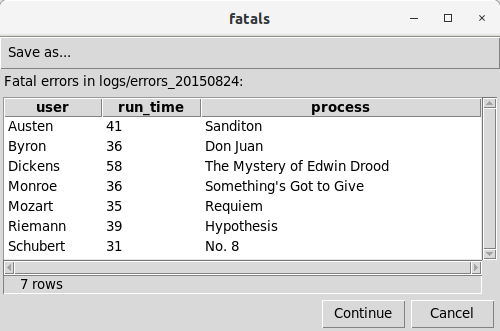
        -- !x! PROMPT MESSAGE "Fatal errors in !!inputfile!!:" DISPLAY fatals
    -- !x! ELSE
        -- !x! WRITE "There are no fatal errors."
    -- !x! ENDIF
-- !x! ELSE
    -- !x! WRITE "There is no error log."
-- !x! ENDIF
drop table if exists staging.errorlog cascade;
The PROMPT metacommand produces a GUI display of the data:
Formatting Scripts
The execsql-format command normalizes execsql script files: it uppercases metacommand keywords, corrects block indentation, and optionally reformats SQL via sqlglot. It is installed automatically with the execsql2 package.
# Format files in place
execsql-format --in-place scripts/

# Check formatting without writing (useful in CI)
execsql-format --check scripts/
See the formatter documentation for all options.
Templates
The templates/ directory in this repository includes ready-to-use execsql scripts:
- Upsert scripts (
pg_upsert.sql,md_upsert.sql,ss_upsert.sql): Perform merge/upsert operations on multiple tables simultaneously, respecting foreign key order, for PostgreSQL, MySQL/MariaDB, and SQL Server. - Comparison scripts (
pg_compare.sql,md_compare.sql,ss_compare.sql): Compare staging and base tables across multiple dimensions. - Glossary scripts (
pg_glossary.sql,md_glossary.sql,ss_glossary.sql): Produce a glossary of column names and definitions to accompany a database export. script_template.sql: A framework for new scripts with sections for configuration, logging, and error reporting.execsql.conf: An annotated configuration file covering all available settings.
Documentation
Full documentation, including a complete metacommand reference and 30+ examples, is at execsql2.readthedocs.io.
Copyright and License
Copyright (c) 2007-2025 R.Dreas Nielsen Copyright (c) 2026-present Caleb Grant
This program is free software: you can redistribute it and/or modify it under the terms of the GNU General Public License as published by the Free Software Foundation, either version 3 of the License, or (at your option) any later version. This program is distributed in the hope that it will be useful, but WITHOUT ANY WARRANTY; without even the implied warranty of MERCHANTABILITY or FITNESS FOR A PARTICULAR PURPOSE. See the GNU General Public License for more details.
Project details
Verified details
These details have been verified by PyPIProject links
GitHub Statistics
Maintainers
Release history Release notifications | RSS feed


Download files
Download the file for your platform. If you're not sure which to choose, learn more about installing packages.
Source Distribution
Built Distribution
Filter files by name, interpreter, ABI, and platform.
If you're not sure about the file name format, learn more about wheel file names.
Copy a direct link to the current filters
File details
Details for the file execsql2-2.1.1.tar.gz.
File metadata
- Download URL: execsql2-2.1.1.tar.gz
- Upload date:
- Size: 1.7 MB
- Tags: Source
- Uploaded using Trusted Publishing? Yes
- Uploaded via: twine/6.1.0 CPython/3.13.7
File hashes
| Algorithm | Hash digest | |
|---|---|---|
| SHA256 |
fa1ef7affc82f444b8bee4caba86ae3f533e92e1cf84c76d65c9077cd3f61171
|
|
| MD5 |
7db77b50135f1e9ba8be07a2c8ad3982
|
|
| BLAKE2b-256 |
30dcc9a8e381c6b66a3170de4bf9f173d5e3390cf1569b8e3377552c4887eb01
|
Provenance
The following attestation bundles were made for execsql2-2.1.1.tar.gz:
Publisher:
ci-cd.yml on geocoug/execsql
-
Statement:
-
Statement type:
https://in-toto.io/Statement/v1 -
Predicate type:
https://docs.pypi.org/attestations/publish/v1 -
Subject name:
execsql2-2.1.1.tar.gz -
Subject digest:
fa1ef7affc82f444b8bee4caba86ae3f533e92e1cf84c76d65c9077cd3f61171 - Sigstore transparency entry: 1181314694
- Sigstore integration time:
-
Permalink:
geocoug/execsql@44bcad95012192abe10e6e32232b5fd79e7b91d2 -
Branch / Tag:
refs/tags/v2.1.1 - Owner: https://github.com/geocoug
-
Access:
public
-
Token Issuer:
https://token.actions.githubusercontent.com -
Runner Environment:
github-hosted -
Publication workflow:
ci-cd.yml@44bcad95012192abe10e6e32232b5fd79e7b91d2 -
Trigger Event:
push
-
Statement type:
File details
Details for the file execsql2-2.1.1-py3-none-any.whl.
File metadata
- Download URL: execsql2-2.1.1-py3-none-any.whl
- Upload date:
- Size: 313.1 kB
- Tags: Python 3
- Uploaded using Trusted Publishing? Yes
- Uploaded via: twine/6.1.0 CPython/3.13.7
File hashes
| Algorithm | Hash digest | |
|---|---|---|
| SHA256 |
ebbb6e56d1f7030d40433b7119a0f7ba1f412a1e12133796ff6106658ad7884d
|
|
| MD5 |
5ab14cca59e14dfc77005571af9c7716
|
|
| BLAKE2b-256 |
b06623559240e4a7a2dd3e2f90ae632bed87686cfab96e494c55ab99b9b30ecc
|
Provenance
The following attestation bundles were made for execsql2-2.1.1-py3-none-any.whl:
Publisher:
ci-cd.yml on geocoug/execsql
-
Statement:
-
Statement type:
https://in-toto.io/Statement/v1 -
Predicate type:
https://docs.pypi.org/attestations/publish/v1 -
Subject name:
execsql2-2.1.1-py3-none-any.whl -
Subject digest:
ebbb6e56d1f7030d40433b7119a0f7ba1f412a1e12133796ff6106658ad7884d - Sigstore transparency entry: 1181314696
- Sigstore integration time:
-
Permalink:
geocoug/execsql@44bcad95012192abe10e6e32232b5fd79e7b91d2 -
Branch / Tag:
refs/tags/v2.1.1 - Owner: https://github.com/geocoug
-
Access:
public
-
Token Issuer:
https://token.actions.githubusercontent.com -
Runner Environment:
github-hosted -
Publication workflow:
ci-cd.yml@44bcad95012192abe10e6e32232b5fd79e7b91d2 -
Trigger Event:
push
-
Statement type:






