

The Explorer HAT and Explorer pHAT have a heap of useful input and output options that will take your Raspberry Pi projects to the next level. Great for driving motors, using analog sensors, interfacing with 5V systems, and touch interfaces.
Installing
Full install (recommended):
We've created an easy installation script that will install all pre-requisites and get your Explorer HAT/pHAT up and running with minimal efforts. To run it, fire up Terminal which you'll find in Menu -> Accessories -> Terminal on your Raspberry Pi desktop, as illustrated below:
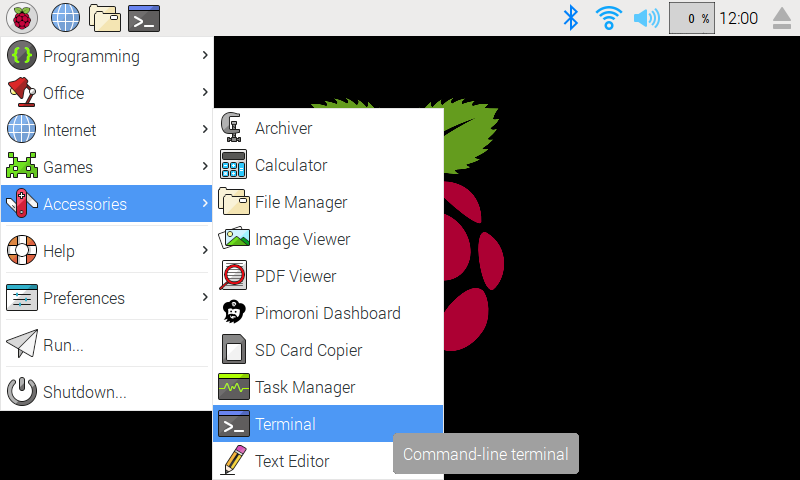
In the new terminal window type the command exactly as it appears below (check for typos) and follow the on-screen instructions:
curl https://get.pimoroni.com/explorerhat | bash
Alternatively, on Raspbian, you can download the pimoroni-dashboard and install your product by browsing to the relevant entry:
sudo apt-get install pimoroni
(you will find the Dashboard under 'Accessories' too, in the Pi menu - or just run pimoroni-dashboard at the command line)
If you choose to download examples you'll find them in /home/pi/Pimoroni/explorerhat/.
Manual install:
Library install for Python 3:
on Raspbian:
sudo apt-get install python3-explorerhat
other environments:
sudo pip3 install explorerhat
Library install for Python 2:
on Raspbian:
sudo apt-get install python-explorerhat
other environments:
sudo pip2 install explorerhat
Development:
If you want to contribute, or like living on the edge of your seat by having the latest code, you should clone this repository, cd to the library directory, and run:
sudo python3 setup.py install
(or sudo python setup.py install whichever your primary Python environment may be)
In all cases you will have to enable the i2c bus.
Documentation & Support
- Guides and tutorials
https://learn.pimoroni.com/explorer-hat
https://learn.pimoroni.com/explorer-phat - Function reference
https://github.com/pimoroni/explorer-hat/blob/master/documentation/ - GPIO Pinout
https://pinout.xyz/pinout/explorer_hat_pro
https://pinout.xyz/pinout/explorer_phat - Get help
http://forums.pimoroni.com/c/support
Important Notes
Explorer HAT/pHAT uses an output driver chip called the ULN2003A, which contains a set of transistor pairs called a Darlington Array. It transforms the small logic signal of the Pi into something capable of driving much bigger loads, such as motors, steppers, lights and more.
The 4 outputs on Explorer can sink 5V, but not source. This means you need to connect your load to one of the 5V pins, and then to the output. When you turn the output on it will connect your circuit to ground, allowing current to flow and your load to turn on. This is the opposite of using a bare Pi GPIO pin, where you might connect to the pin and then to ground; keep this in mind!
Changelog
0.5.1
- Fix Python 3.9 support for Thread.is_alive()
0.5.0
- Refactor library setup()
- Raise ImportError instead of hard exit
- Add support for ADS1115 variant
- Fix Syntax Warning
0.4.2
- Initial release to Raspbian Apt repository
0.4.1
- Dropped junk files from package
- Refactor into package
0.4.0
- Restructure to include pins/ads1015 in package
- Dropped captouch from manifest
0.3.0
- Added support for Explorer pHAT
- Better device detection
0.2.0
- Updated to depend upon common cap1xxx library
- Hopefully supports Python 3
0.1.1
- Added analog changed function
1 maintainer

Release files for ExplorerHAT 0.5.1
For a detailed explanation of source distributions (sdists) and built distributions (wheels), please see the package formats documentation.
Source distribution (sdist)
| File | Size | Uploaded | |
|---|---|---|---|
| ExplorerHAT-0.5.1.tar.gz | 13.4 kB | Details |
Built distribution (wheel)
| File | Interpreter | ABI | Platform | Reset |
|---|---|---|---|---|
| ExplorerHAT-0.5.1-py3-none-any.whl | Python 3 | none | any | Details |
Total release size: 26.3 kB
Release files / ExplorerHAT-0.5.1.tar.gz
| Download URL | ExplorerHAT-0.5.1.tar.gz |
|---|---|
| Size | 13.4 kB |
| Tags | Source |
|
SHA-256 checksum How to use checksums |
82fd7fed4ff83b1f0df30a77d99ebd10909c0d7448ab4cc0ad17fc05a9c02293
|
|
BLAKE2b-256 checksum How to use checksums |
5177765e47c61c78fcdcc0e848ddfe20302d6798acded9d81956a5748ccafa91
|
| Upload date | |
|
Uploaded using Trusted Publishing? What is trusted publishing? |
No |
| Uploaded via |
twine/3.5.0 importlib_metadata/4.8.2 pkginfo/1.7.1 requests/2.25.1 requests-toolbelt/0.9.1 tqdm/4.62.3 CPython/3.9.2
|
Release files / ExplorerHAT-0.5.1-py3-none-any.whl
| Download URL | ExplorerHAT-0.5.1-py3-none-any.whl |
|---|---|
| Size | 12.9 kB |
| Tags | Python 3 |
|
SHA-256 checksum How to use checksums |
db2b5bf183ccfa65ba8ed2c79c33076cf8eca21b768af7aef5d8eb62d1118dc3
|
|
BLAKE2b-256 checksum How to use checksums |
720443ba7061c168d8db83bc0e2d47d366d0428ec90c121c883679aa40098026
|
| Upload date | |
|
Uploaded using Trusted Publishing? What is trusted publishing? |
No |
| Uploaded via |
twine/3.5.0 importlib_metadata/4.8.2 pkginfo/1.7.1 requests/2.25.1 requests-toolbelt/0.9.1 tqdm/4.62.3 CPython/3.9.2
|














