
expressGPT
expressGPT is a handy utility that allows you to run ChatGPT prompts in any window or application just by typing a simple keyword sequence. It provides a quick and convenient way to get assistance from ChatGPT, whether you're drafting an email, writing code, or even coming up with a flirty message for your partner.
Features
- Universal ChatGPT access: Use ChatGPT in any window or application by typing
gpt:followed by your query and ending the query with:gpt. - Versatile use cases: Get help with various tasks, such as drafting emails in your mail app, writing code in a code editor, generating jokes, and more.
Setup
You need to add your openAI API key and the modelname to the evironment variable:
Setting Environment Variables
To use expressGPT, you need to set up the following environment variables:
API_KEY_OPENAI: Your OpenAI API keyCHATGPT_MODEL: The ChatGPT model name for the model you want to use (e.g.,gpt-3.5-turbo)
It is recommended to set the variables permanently for ease of use instead of setting them temporary.
You can follow this tutorial to setup the environment variable in Windows. Follow this tutorial for setting the environment variable in Linux. For Mac OS use this .
Installation
You can install expressGPT using pip:
pip install expressgpt
Usage
Open a terminal and type:
expressgpt
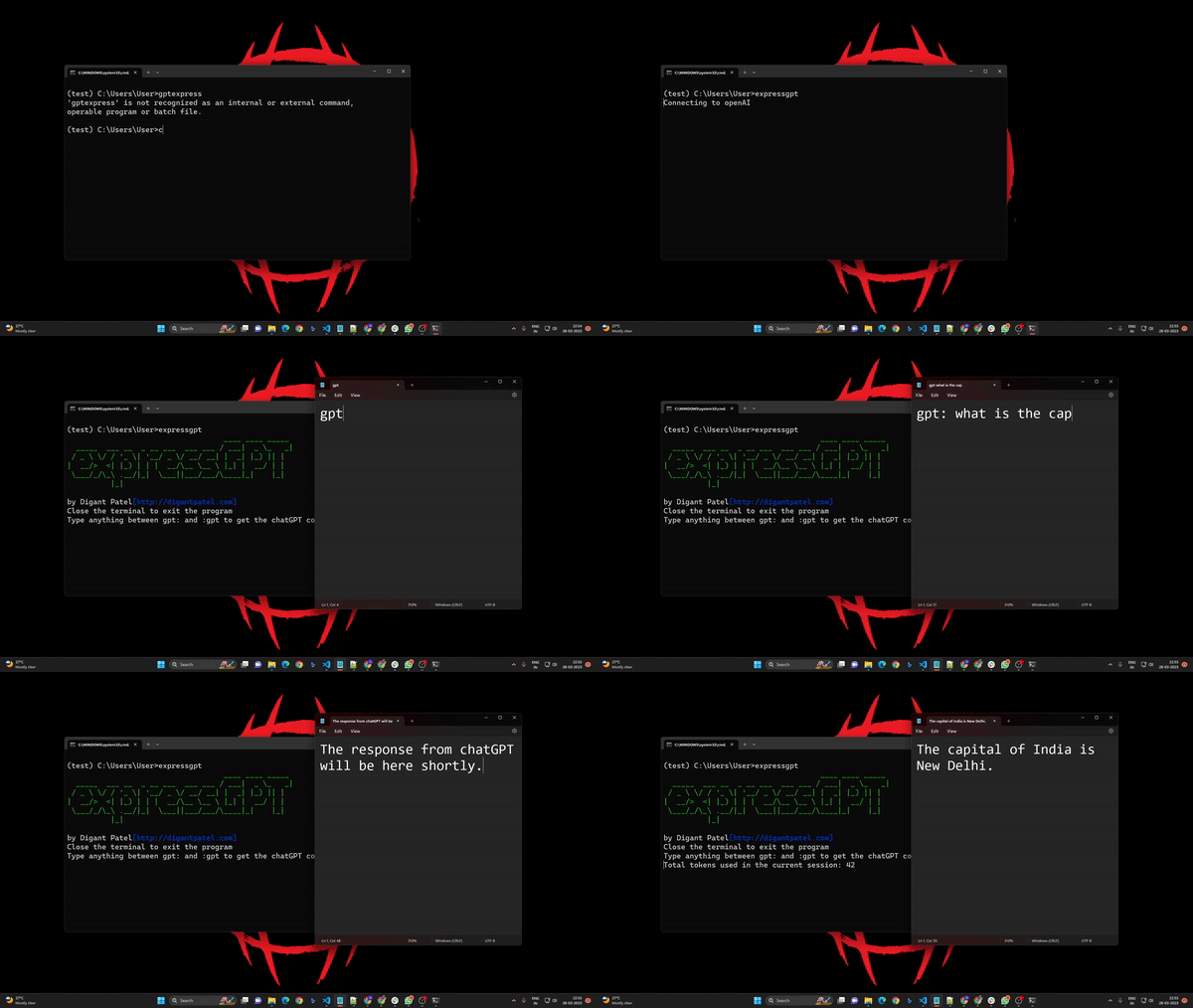
The program will run and to use ChatGPT in any window or application, simply type gpt: followed by your query and end the query with :gpt. expressGPT will replace your query with ChatGPT's response.
For example, if you're in a text editor and you type:
gpt: Who was the winner of the first IPL season :gpt
expressGPT will replace the query with ChatGPT's response, like:
Rajasthan Royal won the first IPL season.
Support
If you find expressGPT helpful and want to show your appreciation, consider buying me a cup of coffee:

Thanks,
Digant Patel www.digantpatel.com
1 maintainer

Release files for expressgpt 0.1.2
For a detailed explanation of source distributions (sdists) and built distributions (wheels), please see the package formats documentation.
Source distribution (sdist)
| File | Size | Uploaded | |
|---|---|---|---|
| expressgpt-0.1.2.tar.gz | 4.1 kB | Details |
Built distribution (wheel)
| File | Interpreter | ABI | Platform | Reset |
|---|---|---|---|---|
| expressgpt-0.1.2-py3-none-any.whl | Python 3 | none | any | Details |
Total release size: 8.5 kB
Release files / expressgpt-0.1.2.tar.gz
| Download URL | expressgpt-0.1.2.tar.gz |
|---|---|
| Size | 4.1 kB |
| Tags | Source |
|
SHA-256 checksum How to use checksums |
e4b76a30b13535b34091e5d8606dd5910d4402b04ac5b1d05f1cc81263540b9e
|
|
BLAKE2b-256 checksum How to use checksums |
12d15a1491994cb9d1c9ae73c0179fef5ee6e0647f760bf9293bfa3169de34ae
|
| Upload date | |
|
Uploaded using Trusted Publishing? What is trusted publishing? |
No |
| Uploaded via |
twine/4.0.2 CPython/3.9.13
|
Release files / expressgpt-0.1.2-py3-none-any.whl
| Download URL | expressgpt-0.1.2-py3-none-any.whl |
|---|---|
| Size | 4.4 kB |
| Tags | Python 3 |
|
SHA-256 checksum How to use checksums |
8374fb489f9b996265d74b96d4bc175250adb0db154ba555b60a0f53beace9b9
|
|
BLAKE2b-256 checksum How to use checksums |
93f447c1e9dfbc51b24bba10f7d550ff15dfddc54dc86e48417decff73130371
|
| Upload date | |
|
Uploaded using Trusted Publishing? What is trusted publishing? |
No |
| Uploaded via |
twine/4.0.2 CPython/3.9.13
|














