
EZVals
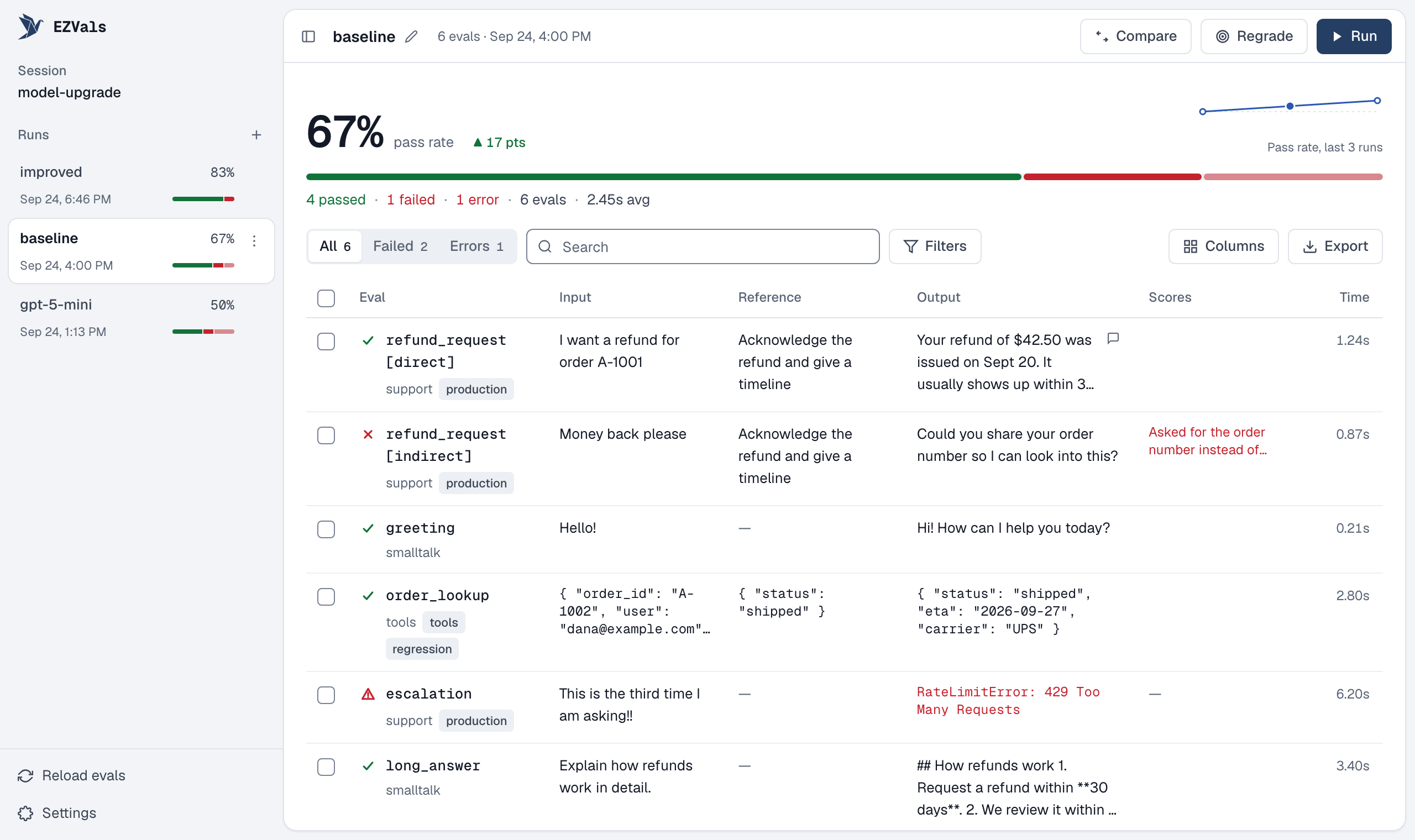
Unit testing for AI agents and LLM apps. Write evals like tests, in Python or TypeScript; EZVals runs them, stores every result, and gives you a web UI to review, annotate and compare runs.
Install
EZVals is a development dependency.
uv add --dev ezvals          # or: pip install ezvals
npm install --save-dev ezvals  # TypeScript (Node >= 22.18)
Write an eval
# evals/support.py
from ezvals import eval, EvalContext

@eval(input="I want a refund", dataset="customer_service")
async def test_refund(ctx: EvalContext):
    ctx.output = await run_agent(ctx.input)
    assert "refund" in ctx.output.lower(), "Should acknowledge refund"
// evals/support.eval.ts
import assert from "node:assert";
import { evaluate } from "ezvals";

evaluate("refund", { input: "I want a refund", dataset: "customer_service" }, async (ctx) => {
  ctx.output = await runAgent(ctx.input);
  assert(String(ctx.output).toLowerCase().includes("refund"), "Should acknowledge refund");
});
A failed assertion is a failing score, not an error, and whatever the eval stored before it is kept. Use cases= to run one eval over many inputs, ctx.store(scores=...) for named or numeric scores, and target= to separate calling your agent from scoring it. See the docs and examples.
Run it
ezvals run evals/                  # headless; saves to .ezvals/sessions/
ezvals run evals/ --json           # ...and print the results as JSON (handy for agents)
ezvals serve evals/                # web UI: run, filter, annotate, compare runs
ezvals run evals/support.py::test_refund -c 8 --timeout 30
ezvals run evals/ --trials 5         # run each eval 5 times; reports pass@5 and pass^5
ezvals regrade a1b2c3d4              # re-score a run's outputs after changing a grader, without re-running the agent
ezvals query "SELECT run_name, total_passed FROM runs"   # SQL over every saved run (see: ezvals query --schema)
TypeScript projects run the same commands through npx ezvals. A directory with both languages runs as one.
Agent skill
EZVals ships a skill that teaches coding agents to write and analyze evals:
ezvals skills add --claude # or --codex, --cursor, --windsurf, --kiro, --roo, --agents
How it works
ezvals is a single Go binary (cmd/ezvals/) that owns the CLI, the web UI (ui/, embedded at build time) and storage. To run evals it spawns a small worker from the language SDK (python/, typescript/) that imports your files and executes evals on request; results stream back and are appended to a per-run event log. Adding a language means writing an SDK against the SDK spec and passing the shared conformance/ fixtures.
Development
Requires Go, Node, and uv.
make build                         # UI + host binary (into python/ezvals/bin) + TypeScript SDK
make test                          # Go (incl. cross-language conformance), Python and TypeScript tests
make test-e2e                      # browser tests for the web UI against a real server
make storybook                     # every UI component and page in its states (also run as tests by `make test`)
uv run --project python ezvals serve examples
Specs in docs/.spec/ are the source of truth for behavior.
1 maintainer

Metadata
1 maintainer
Release files for ezvals 0.2.0
For a detailed explanation of source distributions (sdists) and built distributions (wheels), please see the package formats documentation.
Built distributions (wheels)
| File | Reset | |||
|---|---|---|---|---|
| ezvals-0.2.0-py3-none-win_amd64.whl | Python 3 | none | Windows x86-64 | Details |
| ezvals-0.2.0-py3-none-manylinux_2_17_x86_64.whl | Python 3 | none | Linux glibc 2.17+ x86-64 | Details |
| ezvals-0.2.0-py3-none-manylinux_2_17_aarch64.whl | Python 3 | none | Linux glibc 2.17+ ARM64 | Details |
| ezvals-0.2.0-py3-none-macosx_11_0_arm64.whl | Python 3 | none | macOS 11.0+ ARM64 | Details |
| ezvals-0.2.0-py3-none-macosx_10_12_x86_64.whl | Python 3 | none | macOS 10.12+ x86-64 | Details |
Total release size: 50.9 MB
Release files / ezvals-0.2.0-py3-none-win_amd64.whl
| Download URL | ezvals-0.2.0-py3-none-win_amd64.whl |
|---|---|
| Size | 10.5 MB |
| Tags | Python 3 Windows x86-64 |
|
SHA-256 checksum How to use checksums |
1c3dd2bba98e31544c3f88767bee3d1ec1f0d8e035f24cc3aff9ab7a8e852f31
|
|
BLAKE2b-256 checksum How to use checksums |
5f363b66750bc6dea205af28bf1f433b29e914e2c0fbdf366e00257ef9e5dcaf
|
| Upload date | |
|
Uploaded using Trusted Publishing? What is trusted publishing? |
No |
| Uploaded via |
uv/0.12.19 {"installer":{"name":"uv","version":"0.12.19","subcommand":["publish"]},"python":null,"implementation":{"name":null,"version":null},"distro":{"name":"Ubuntu","version":"24.04","id":"noble","libc":null},"system":{"name":null,"release":null},"cpu":null,"openssl_version":null,"setuptools_version":null,"rustc_version":null,"ci":true}
|
Release files / ezvals-0.2.0-py3-none-manylinux_2_17_x86_64.whl
| Download URL | ezvals-0.2.0-py3-none-manylinux_2_17_x86_64.whl |
|---|---|
| Size | 10.3 MB |
| Tags | Linux glibc 2.17+ x86-64 Python 3 |
|
SHA-256 checksum How to use checksums |
b6ae152bb3544e9fa913ee03f6fd92dd93f9b252be5aa144321d83d59edbc21e
|
|
BLAKE2b-256 checksum How to use checksums |
6a4ab4fe6e0360e3cffc8a79b1de7246b9590508bd8c20a2f051843bdd244985
|
| Upload date | |
|
Uploaded using Trusted Publishing? What is trusted publishing? |
No |
| Uploaded via |
uv/0.12.19 {"installer":{"name":"uv","version":"0.12.19","subcommand":["publish"]},"python":null,"implementation":{"name":null,"version":null},"distro":{"name":"Ubuntu","version":"24.04","id":"noble","libc":null},"system":{"name":null,"release":null},"cpu":null,"openssl_version":null,"setuptools_version":null,"rustc_version":null,"ci":true}
|
Release files / ezvals-0.2.0-py3-none-manylinux_2_17_aarch64.whl
| Download URL | ezvals-0.2.0-py3-none-manylinux_2_17_aarch64.whl |
|---|---|
| Size | 9.7 MB |
| Tags | Linux glibc 2.17+ ARM64 Python 3 |
|
SHA-256 checksum How to use checksums |
db28a5717a29ef4fa2e5755cb906010216f140efddbb6a4bc2211ff79cb2a216
|
|
BLAKE2b-256 checksum How to use checksums |
904fcfef91dd7742efc22fa41515747ac7fbcbf12fe53057aeb8deda8b2434ac
|
| Upload date | |
|
Uploaded using Trusted Publishing? What is trusted publishing? |
No |
| Uploaded via |
uv/0.12.19 {"installer":{"name":"uv","version":"0.12.19","subcommand":["publish"]},"python":null,"implementation":{"name":null,"version":null},"distro":{"name":"Ubuntu","version":"24.04","id":"noble","libc":null},"system":{"name":null,"release":null},"cpu":null,"openssl_version":null,"setuptools_version":null,"rustc_version":null,"ci":true}
|
Release files / ezvals-0.2.0-py3-none-macosx_11_0_arm64.whl
| Download URL | ezvals-0.2.0-py3-none-macosx_11_0_arm64.whl |
|---|---|
| Size | 10.0 MB |
| Tags | Python 3 macOS 11.0+ ARM64 |
|
SHA-256 checksum How to use checksums |
765af3fa8672f1adb6c1f28c1f68bf7476941d7e085042456cdf6ad7f6419882
|
|
BLAKE2b-256 checksum How to use checksums |
7121f53b654ccf728ddfdfea2ce4105c143efbc696e97fb981eec127a6d90b29
|
| Upload date | |
|
Uploaded using Trusted Publishing? What is trusted publishing? |
No |
| Uploaded via |
uv/0.12.19 {"installer":{"name":"uv","version":"0.12.19","subcommand":["publish"]},"python":null,"implementation":{"name":null,"version":null},"distro":{"name":"Ubuntu","version":"24.04","id":"noble","libc":null},"system":{"name":null,"release":null},"cpu":null,"openssl_version":null,"setuptools_version":null,"rustc_version":null,"ci":true}
|
Release files / ezvals-0.2.0-py3-none-macosx_10_12_x86_64.whl
| Download URL | ezvals-0.2.0-py3-none-macosx_10_12_x86_64.whl |
|---|---|
| Size | 10.4 MB |
| Tags | Python 3 macOS 10.12+ x86-64 |
|
SHA-256 checksum How to use checksums |
7ebf4f32636c48f5b8400d49434665b4c678c828c5615c2e885617af2d4ba64c
|
|
BLAKE2b-256 checksum How to use checksums |
f0c76eb9c7ec4b9bf654092329be5139a5122d3d5a174a92c6c0a02480925998
|
| Upload date | |
|
Uploaded using Trusted Publishing? What is trusted publishing? |
No |
| Uploaded via |
uv/0.12.19 {"installer":{"name":"uv","version":"0.12.19","subcommand":["publish"]},"python":null,"implementation":{"name":null,"version":null},"distro":{"name":"Ubuntu","version":"24.04","id":"noble","libc":null},"system":{"name":null,"release":null},"cpu":null,"openssl_version":null,"setuptools_version":null,"rustc_version":null,"ci":true}
|
Security for ezvals 0.2.0
Provenance
Provenance describes where a file came from. On PyPI, provenance is shared via attestations, which provide a verifiable record of the build or publishing details. View details, limitations and caveats.
No provenance found
None of the files in this release were uploaded with provenance metadata.
A note on package security
PyPI is a repository for distributing packages, not a service for auditing them. While third-party security researchers and our staff do their best to detect and remove malicious packages, PyPI cannot guarantee the quality, security or suitability of any given package.
To learn more about protecting yourself from malicious actors, visit our package security documentation.














