
This project implements a method for faster and more memory-efficient RNN-T loss computation, called pruned rnnt.
Note: There is also a fast RNN-T loss implementation in k2 project, which shares the same code here. We make fast_rnnt a stand-alone project in case someone wants only this rnnt loss.
How does the pruned-rnnt work ?
We first obtain pruning bounds for the RNN-T recursion using a simple joiner network that is just an addition of the encoder and decoder, then we use those pruning bounds to evaluate the full, non-linear joiner network.
The picture below display the gradients (obtained by rnnt_loss_simple with return_grad=true) of lattice nodes, at each time frame, only a small set of nodes have a non-zero gradient, which justifies the pruned RNN-T loss, i.e., putting a limit on the number of symbols per frame.
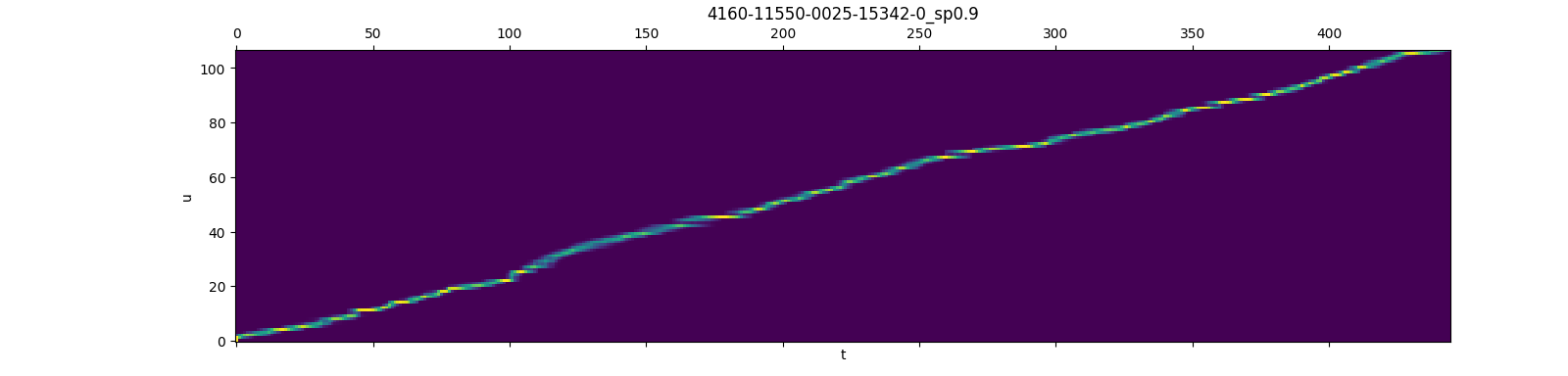
This picture is taken from here
Installation
You can install it via pip:
pip install fast_rnnt
You can also install from source:
git clone https://github.com/danpovey/fast_rnnt.git
cd fast_rnnt
python setup.py install
To check that fast_rnnt was installed successfully, please run
python3 -c "import fast_rnnt; print(fast_rnnt.__version__)"
which should print the version of the installed fast_rnnt, e.g., 1.0.
How to display installation log ?
Use
pip install --verbose fast_rnnt
How to reduce installation time ?
Use
export FT_MAKE_ARGS="-j"
pip install --verbose fast_rnnt
It will pass -j to make.
Which version of PyTorch is supported ?
It has been tested on PyTorch >= 1.5.0.
Note: The cuda version of the Pytorch should be the same as the cuda version in your environment, or it will cause a compilation error.
How to install a CPU version of fast_rnnt ?
Use
export FT_CMAKE_ARGS="-DCMAKE_BUILD_TYPE=Release -DFT_WITH_CUDA=OFF"
export FT_MAKE_ARGS="-j"
pip install --verbose fast_rnnt
It will pass -DCMAKE_BUILD_TYPE=Release -DFT_WITH_CUDA=OFF to cmake.
Where to get help if I have problems with the installation ?
Please file an issue at https://github.com/danpovey/fast_rnnt/issues and describe your problem there.
Usage
For rnnt_loss_simple
This is a simple case of the RNN-T loss, where the joiner network is just addition.
Note: termination_symbol plays the role of blank in other RNN-T loss implementations, we call it termination_symbol as it terminates symbols of current frame.
am = torch.randn((B, T, C), dtype=torch.float32)
lm = torch.randn((B, S + 1, C), dtype=torch.float32)
symbols = torch.randint(0, C, (B, S))
termination_symbol = 0

boundary = torch.zeros((B, 4), dtype=torch.int64)
boundary[:, 2] = target_lengths
boundary[:, 3] = num_frames

loss = fast_rnnt.rnnt_loss_simple(
    lm=lm,
    am=am,
    symbols=symbols,
    termination_symbol=termination_symbol,
    boundary=boundary,
    reduction="sum",
)
For rnnt_loss_smoothed
The same as rnnt_loss_simple, except that it supports am_only & lm_only smoothing
that allows you to make the loss-function one of the form:
      lm_only_scale * lm_probs +
      am_only_scale * am_probs +
      (1-lm_only_scale-am_only_scale) * combined_probs
where lm_probs and am_probs are the probabilities given the lm and acoustic model independently.
am = torch.randn((B, T, C), dtype=torch.float32)
lm = torch.randn((B, S + 1, C), dtype=torch.float32)
symbols = torch.randint(0, C, (B, S))
termination_symbol = 0

boundary = torch.zeros((B, 4), dtype=torch.int64)
boundary[:, 2] = target_lengths
boundary[:, 3] = num_frames

loss = fast_rnnt.rnnt_loss_smoothed(
    lm=lm,
    am=am,
    symbols=symbols,
    termination_symbol=termination_symbol,
    lm_only_scale=0.25,
    am_only_scale=0.0
    boundary=boundary,
    reduction="sum",
)
For rnnt_loss_pruned
rnnt_loss_pruned can not be used alone, it needs the gradients returned by rnnt_loss_simple/rnnt_loss_smoothed to get pruning bounds.
am = torch.randn((B, T, C), dtype=torch.float32)
lm = torch.randn((B, S + 1, C), dtype=torch.float32)
symbols = torch.randint(0, C, (B, S))
termination_symbol = 0

boundary = torch.zeros((B, 4), dtype=torch.int64)
boundary[:, 2] = target_lengths
boundary[:, 3] = num_frames

# rnnt_loss_simple can be also rnnt_loss_smoothed
simple_loss, (px_grad, py_grad) = fast_rnnt.rnnt_loss_simple(
    lm=lm,
    am=am,
    symbols=symbols,
    termination_symbol=termination_symbol,
    boundary=boundary,
    reduction="sum",
    return_grad=True,
)
s_range = 5  # can be other values
ranges = fast_rnnt.get_rnnt_prune_ranges(
    px_grad=px_grad,
    py_grad=py_grad,
    boundary=boundary,
    s_range=s_range,
)

am_pruned, lm_pruned = fast_rnnt.do_rnnt_pruning(am=am, lm=lm, ranges=ranges)

logits = model.joiner(am_pruned, lm_pruned)
pruned_loss = fast_rnnt.rnnt_loss_pruned(
    logits=logits,
    symbols=symbols,
    ranges=ranges,
    termination_symbol=termination_symbol,
    boundary=boundary,
    reduction="sum",
)
You can also find recipes here that uses rnnt_loss_pruned to train a model.
For rnnt_loss
The unprund rnnt_loss is the same as torchaudio rnnt_loss, it produces same output as torchaudio for the same input.
logits = torch.randn((B, S, T, C), dtype=torch.float32)
symbols = torch.randint(0, C, (B, S))
termination_symbol = 0

boundary = torch.zeros((B, 4), dtype=torch.int64)
boundary[:, 2] = target_lengths
boundary[:, 3] = num_frames

loss = fast_rnnt.rnnt_loss(
    logits=logits,
    symbols=symbols,
    termination_symbol=termination_symbol,
    boundary=boundary,
    reduction="sum",
)
Benchmarking
The repo compares the speed and memory usage of several transducer losses, the summary in the following table is taken from there, you can check the repository for more details.
Note: As we declared above, fast_rnnt is also implemented in k2 project, so k2 and fast_rnnt are equivalent in the benchmarking.
| Name | Average step time (us) | Peak memory usage (MB) |
|---|---|---|
| torchaudio | 601447 | 12959.2 |
| fast_rnnt(unpruned) | 274407 | 15106.5 |
| fast_rnnt(pruned) | 38112 | 2647.8 |
| optimized_transducer | 567684 | 10903.1 |
| warprnnt_numba | 229340 | 13061.8 |
| warp-transducer | 210772 | 13061.8 |
1 maintainer

Metadata
1 maintainer
Release files for fast-rnnt 1.3
For a detailed explanation of source distributions (sdists) and built distributions (wheels), please see the package formats documentation.
Source distribution (sdist)
| File | Size | Uploaded | Provenance | |
|---|---|---|---|---|
| fast_rnnt-1.3.tar.gz | 64.2 kB | Without provenance | Details |
Release files / fast_rnnt-1.3.tar.gz
| Download URL | fast_rnnt-1.3.tar.gz |
|---|---|
| Size | 64.2 kB |
| Tags | Source |
|
SHA-256 checksum How to use checksums |
e8758e43e074daec17cbb8fd4c50026045b3b35ed88728854fdbe3590087f0a9
|
|
BLAKE2b-256 checksum How to use checksums |
d2748e9f00ec0357e135f11f272bb3c956ff1ab5b8d8083ac24db9bfdcece034
|
| Upload date | |
|
Uploaded using Trusted Publishing? What is trusted publishing? |
No |
| Uploaded via |
twine/4.0.2 CPython/3.8.8
|
Security for fast-rnnt 1.3
Provenance
Provenance describes where a file came from. On PyPI, provenance is shared via attestations, which provide a verifiable record of the build or publishing details. View details, limitations and caveats.
No provenance found
None of the files in this release were uploaded with provenance metadata.
A note on package security
PyPI is a repository for distributing packages, not a service for auditing them. While third-party security researchers and our staff do their best to detect and remove malicious packages, PyPI cannot guarantee the quality, security or suitability of any given package.
To learn more about protecting yourself from malicious actors, visit our package security documentation.














