
Connecting fast.ai with RawPy
Here we can make fast.ai framework support RawPy library, hence use RAW image files on fastai.
The list of all the RAW image files that can be supported by rawpy (based on LibRaw):
https://www.libraw.org/supported-cameras
Partial list of the supported RAW formats:
- *.IIQ (Phase One)
- *.3FR (Hasselblad)
- *.DCR, *.K25, *.KDC (Kodak)
- *.CRW *.CR2 *.CR3 (Canon)
- *.ERF (Epson)
- *.MEF (Mamiya)
- *.MOS (Leaf)
- *.NEF *.NRW (Nikon)
- *.ORF (Olympus)
- *.PEF (Pentax)
- *.RW2 (Panasonic)
- *.ARW, *.SRF, *.SR2 (Sony)
How to install
Use:
pip install fastai-rawpy
to install this package.
How to import fastai-rawpy
Use:
from fastairawpy import *
in order to import RawImageBlock as well as all of the necessary functions/classes/etc that adjust fast.ai so it supports RawPy.
How to use fastai-rawpy
Upon using fast.ai, wherever you could have used ImageBlock, just type in RawImageBlock.
Examples
example (1)
dblock = DataBlock(blocks=(ImageBlock(cls=PILImage),Categorize))
This line creates two blocks (input and target) of an ImageBlock, that is a transform to be applied to create items of image type. The transform uses PILImage as a data-holder of the image files (such as JPG, PNG, BMP, ...).
dblock = DataBlock(blocks=(RawImageBlock,Categorize))
But this line uses RawImageBlock transform, that is applied automatically on built-in RAWImage items. RAWImage is a data-holder of RAW image files, alike PILImage, but is based on rawpy package.
example (2)
This line code snippet creates two RawImageBlock blocks of input and target, where the parameters being passed in define the postprocessing of each blocks' image:
dblock = DataBlock(blocks=(RawImageBlock(  # Input
                                         gamma=(2.222, 4.5),                 # Gamma values
                                         output_color=rawpy.ColorSpace.sRGB, # sRGB Color Space
                                         output_bps=16),                     # Bits_per_pixel
                           RawImageBlock( # Target
                                         use_camera_wb=True,                 # White blanace
                                         output_color=rawpy.ColorSpace.sRGB, # sRGB Color Space
                                         output_bps=16)                      # Bits_per_pixel
                           )
                    )
The full list of parameters: https://letmaik.github.io/rawpy/api/rawpy.Params.html
Why use fastai-rawpy
RAW format has a bit-depth of 16bits for every channel (R,G,B[,G]), meaning: every pixel gets values in between 0 up to... 65535!
2^16=65536
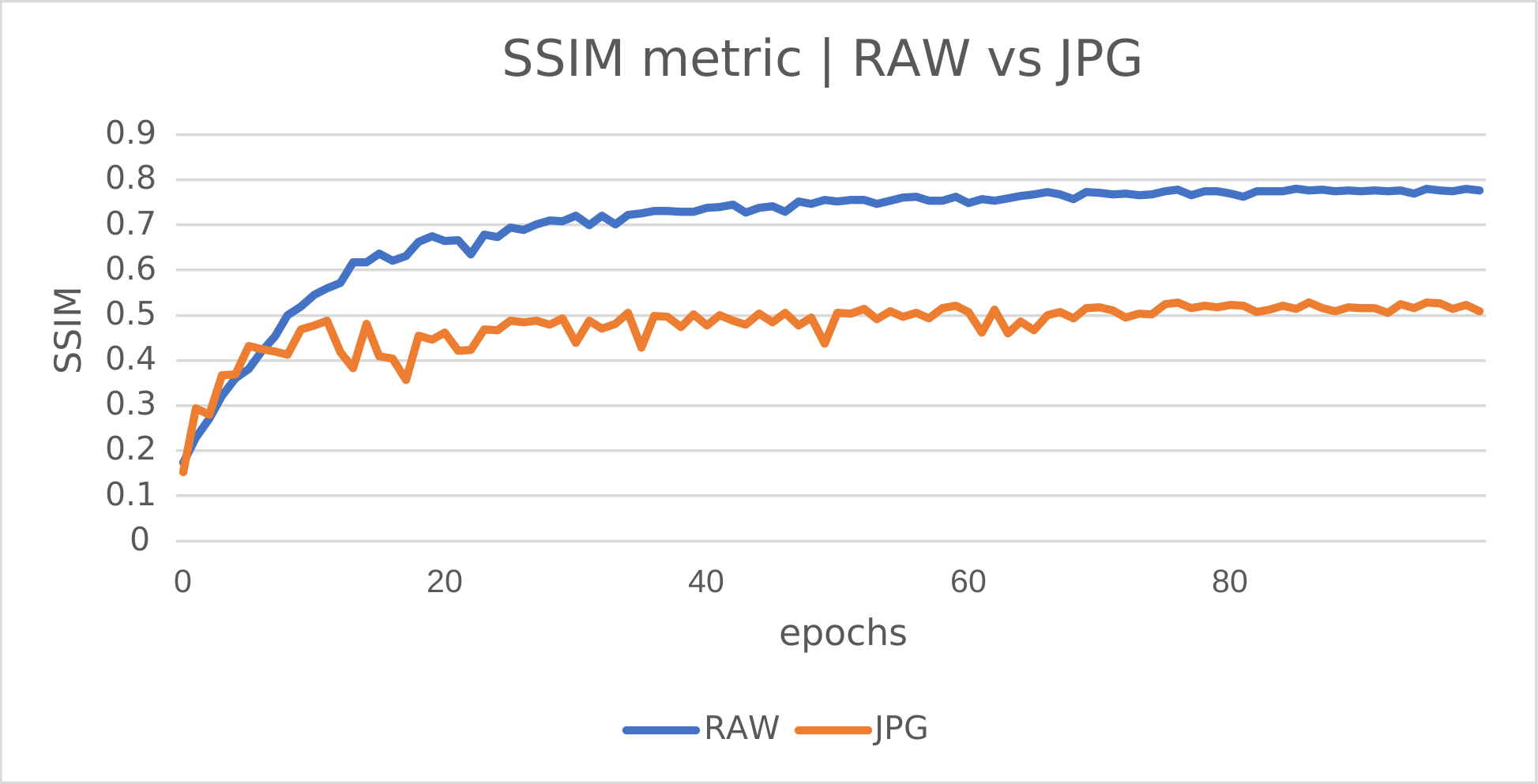
Therefore, a RAW image file would normally have a larger range of values for every pixel. This can help training a model become more precise, when switching from JPG to RAW.
Note: in practice, every DSLR stores RAW files and postprocesses these files into other formats such as JPG. For instance, it crops and compresses the JPG image out of the RAW file.
Performance
Behind the stage
New objects that create the bond between fast.ai and rawpy
class TensorRawImage + class RAWImage

1 maintainer

Metadata
1 maintainer
Release files for fastai-rawpy 0.0.15
For a detailed explanation of source distributions (sdists) and built distributions (wheels), please see the package formats documentation.
Source distribution (sdist)
| File | Size | Uploaded | Provenance | Actions |
|---|---|---|---|---|
| fastai-rawpy-0.0.15.tar.gz | 15.6 kB | Without provenance | Details for fastai-rawpy-0.0.15.tar.gz |
Built distribution (wheel)
| File | Interpreter | ABI | Platform | Actions Reset |
|---|---|---|---|---|
| fastai_rawpy-0.0.15-py3-none-any.whl | Python 3 | none | any | Details for fastai_rawpy-0.0.15-py3-none-any.whl |
Total release size: 31.4 kB
Release files / fastai-rawpy-0.0.15.tar.gz
| Download URL | fastai-rawpy-0.0.15.tar.gz |
|---|---|
| Size | 15.6 kB |
| Tags | Source |
|
SHA-256 checksum How to use checksums |
2a7bd54b9b4441cb78e56c08f4b74111c678d3820a3866343a14734fbe6759b9
|
|
BLAKE2b-256 checksum How to use checksums |
ca0141ecf520de4f0225506e4329dd4b50715124736f1d72aeb37ea32911ab30
|
| Upload date | |
|
Uploaded using Trusted Publishing? What is trusted publishing? |
No |
| Uploaded via |
twine/4.0.1 CPython/3.9.2
|
Release files / fastai_rawpy-0.0.15-py3-none-any.whl
| Download URL | fastai_rawpy-0.0.15-py3-none-any.whl |
|---|---|
| Size | 15.8 kB |
| Tags | Python 3 |
|
SHA-256 checksum How to use checksums |
74715ad41e5bb564b22711b38f360308478210b4a73d06fd08bd2548882b09bc
|
|
BLAKE2b-256 checksum How to use checksums |
a694f0b8823b1f4bd26ee80238ca6b48e7de184df4b290df9cc38845bf2dd569
|
| Upload date | |
|
Uploaded using Trusted Publishing? What is trusted publishing? |
No |
| Uploaded via |
twine/4.0.1 CPython/3.9.2
|
Security for fastai-rawpy 0.0.15
Provenance
Provenance describes where a file came from. On PyPI, provenance is shared via attestations, which provide a verifiable record of the build or publishing details. View details, limitations and caveats.
No provenance found
None of the files in this release were uploaded with provenance metadata.
A note on package security
PyPI is a repository for distributing packages, not a service for auditing them. While third-party security researchers and our staff do their best to detect and remove malicious packages, PyPI cannot guarantee the quality, security or suitability of any given package.
To learn more about protecting yourself from malicious actors, visit our package security documentation.














