
This release is a pre-release and may not be stable for production use.



FHIR Python Analysis and Conversion Kit (FHIRPACK)

FHIRPACK (FHIR Python Analysis Conversion Kit) is a general purpose library that simplifies the access, analysis and representation of FHIR and EHR data using PANDAS, an ETL philosophy and a functional syntax. FHIRPACK was designed and developed at the Institute for Artificial Intelligence in Medicine (IKIM) and the Database Systems Research Group of the University of Heidelberg (HDDBS).
About FHIRPACK
The FHIR standard is a promising framework for interacting with healthcare data. However, expressive tools for efficient FHIR server interaction are few and are either too low level, and powerful, or too abstract, and lack features. FHIRPACK provides an easy-to-use and intuitive API that enables effortless access to FHIR data. We strive for a balance between flexibility, usability and feature richness in order to make interacting with FHIR data less painful.
| :link: | |
|---|---|
| 🚀 tutorial | learn about FHIR, FHIRPACK and PANDAS with our example Jupyter Notebooks |
| jayson.salazar@uk-essen.de or salazar@informatik.uni-heidelberg.de | |
| 🎤 talk | join our Slack channel for the latest updates and discussions around FHIR, FHIRPACK and EHR in general |
| 🐞 issues | bugs and feature requests go preferrably on our main GitLab tracker or here on GitHub |
| 🔧 dev | learn more about contributing to FHIRPACK or extending its functionality |
| 📚 docs | read our documentation on Read the Docs |
| 📖 citation | cite FHIRPACK as https://doi.org/10.5281/zenodo.7941705 or visit Zenodo vor more details |
Usage
Installation
You can easily install the latest FHIRPACK release from PyPI or the most current version by cloning this repository. As usual with Python, we strongly recommend using virtual environments such as pipenv, venv or conda.
Requirements
FHIRPACK requires Python 3.9 or greater as well as libmagic to work without problems. In case you're using an older Python version, you can use asdf, conda or pyenv to have several Python versions coexist on your system. libmagic can be installed with apt-get install libmagic-dev on Ubuntu or brew install libmagic on MacOS.
Using the Latest Release from PyPI
pip install fhirpack
alternatively use pipenv:
pipenv --python 3.9 install fhirpack
Using the Latest Version a from Local Clone
git clone https://gitlab.com/fhirpack/main.git
mv main fhirpack
pip install -e fhirpack
alternatively use pipenv:
git clone https://gitlab.com/fhirpack/main.git
mv main fhirpack
pipenv install -e fhirpack
Upgrading your Version of FHIRPACK
You can use pip install --upgrade fhirpack or if you're using pipenv pipenv update fhirpack to upgrade to the latest release of FHIRPACK once you've already installed it.
Configuration
To set up a server configuration, create an .env file in the directory where you'll work with FHIRPACK and specify the settings as can be seen in .env.example.
Alternatively, copy, rename and modify .env.example according to your needs.
:warning: By Default, FHIRPACK connects to the public R4 FHIR test server from HAPIFHIR http://hapi.fhir.org/baseR4. We recommend using this setup to get familiar with the library.
Simple Examples
FHIRPACK is based on the ETL paradigm, and as all functions available to you can be classified as Extractors, Transformers or Loaders. In the following examples we quickly show how this works, but remember to have a look at our examplary Jupyter Notebooks and the API reference
1. Get All Conditions for a Patient
In this example we extract all the conditions for a patient with the ID: 43fb1577-3455-41cf-9a07-c45aa5c0219e from the public FHIR-server with the Base-URL: http://hapi.fhir.org/baseR4.
# import FHIRPACK
import fhirpack as fp

# instantiate a connected PACK for the specified FHIR API base
pack = fp.PACK("http://hapi.fhir.org/baseR5")

# retrieve a list of Patients of length one by ID
patient = pack.getPatients(["43fb1577-3455-41cf-9a07-c45aa5c0219e"])

# retrieve all respective conditions for said patients
condition = patient.getConditions().explode()

# gather and display the FHIR elements with the specified paths from the conditions
condition.gatherSimplePaths(["id", "code.coding.code", "code.coding.display", "onsetDateTime" ])
| id | code.coding.code | code.coding.display | onsetDateTime | |
|---|---|---|---|---|
| 0 | 2a65f2a4-1a8d-46d9-a5f9-3af95a5d99bd |
[267036007] |
[Dyspnea (finding)] |
2020-02-23T12:07:58-06:00 |
| 1 | c9f11f99-796c-4c34-9a8e-246f1faa0039 |
[840544004] |
[Suspected COVID-19] |
2020-02-23T12:07:58-06:00 |
| 2 | d5c30da3-546c-486c-bdb4-ff8f1b62a553 |
[386661006] |
[Fever (finding)] |
2020-02-23T12:07:58-06:00 |
| 3 | a9c2b72d-b6de-4544-95d8-16246786fb5b |
[49727002] |
[Cough (finding)] |
2020-02-23T12:07:58-06:00 |
| 4 | dd0b2c03-75fe-4d2e-9d49-45c543f5c825 |
[840539006] |
[COVID-19] |
2020-02-23T13:26:58-06:00 |
2. Get All Patients with Sepsis
# import FHIRPACK
import fhirpack as fp

# instantiate a connected PACK for the specified FHIR API base
pack = fp.PACK("http://hapi.fhir.org/baseR5")

# retrieve  all conditions containing the term sepsis
conditions = pack.getConditions(searchParams={"_content": "sepsis"})

# get the respective patients
patients = conditions.getPatients().explode()

# display the specified FHIR elements of the patients
patients.gatherSimplePaths([
	"name.given",
	"name.family",
	"telecom.value",
	"address.country",
	"address.city",
	"birthDate"
])
| name.given | name.family | address.country | address.city | birthDate | |
|---|---|---|---|---|---|
| 0 | [[Herbert]] |
[Hoover] |
None |
[Everytown |
1990-07-04 |
| 1 | [[Aaron697]] |
[Stiedemann542] |
[US] |
[Westford] |
1946-03-29 |
| 2 | [[Aaron697]] |
[Stiedemann542] |
[US] |
[Westford] |
1946-03-29 |
| 3 | [[Aaron697]] |
[Stiedemann542] |
[US] |
[Westford] |
1946-03-29 |
| 4 | [[Aaron697]] |
[Stiedemann542] |
[US] |
[Westford] |
1946-03-29 |
| 5 | [[Aaron697]] |
[Stiedemann542] |
[US] |
[Westford] |
1946-03-29 |
| 6 | [[Charlesetta336], [Charlesetta336]] |
[Kihn564, Pouros728] |
[US] |
[Falmouth] |
1943-12-17 |
| 7 | [[Hiram237]] |
[Kertzmann286] |
[US] |
[Fall River] |
1999-06-07 |
| 11 | [[Tim]] |
[Shabad] |
None |
None |
1980-01-01 |
:information_source: For more examples and a deep-dive into FHIRPACK, please take a look at the example jupyter notebooks.
CLI
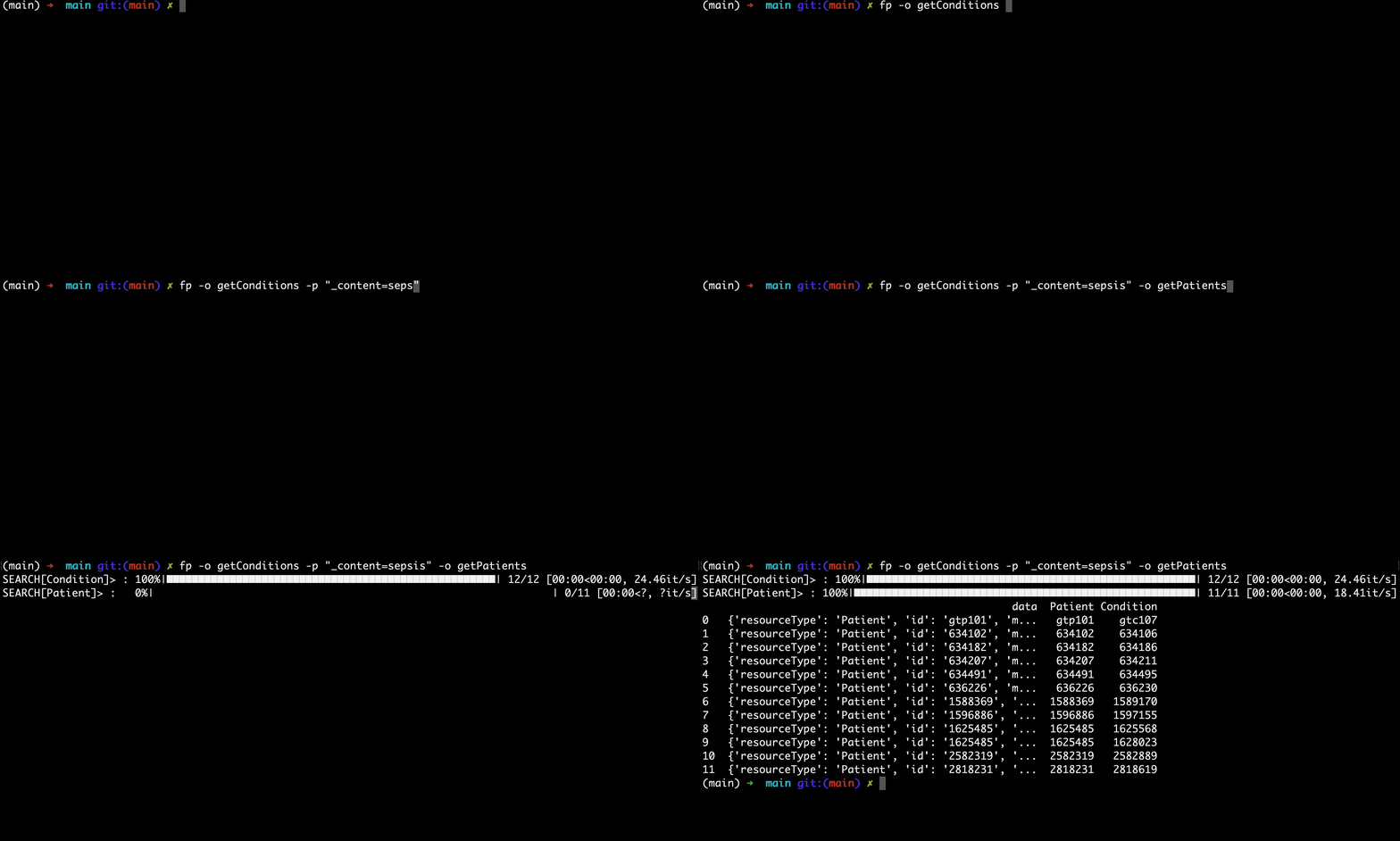
FHIRPACK also provides a CLI for easy and quick data exploration.
The CLI can be invoked by using python -m fhirpack.cli or fp once FHIRPACK has been installed.
> fp --help
Usage: fp [OPTIONS]

  The pack for your FHIR server.

Options:
  --version               Show the version and exit.
  -s, --source TEXT       URL of the FHIR server or path to json files.
  -e, --environment TEXT  Path to Dotenv file containing configurations.
  -d, --destination TEXT  Location of the output.
  -o, --operation TEXT    Operations to retrieve data.
  -p, --params TEXT       Provide additional search parameters.
  -v, --verbose           Print results in verbose format.
  -h, --help              Show this message and exit.
CLI usage is analogous to the general fhirpack dataflow.
| Python | CLI |
|---|---|
pack.getPatients(["1"]) |
fp -o "getPatients 1" |
pack.getPatients(["1", "181", "525"]) |
fp -o "getPatients 1, 181, 525" |
PACK(envFile=".env.example").getPatients(["1"]) |
fp -e .env.example -o "getPatients 1" |
pack.getPatients(searchParams={}).gatherSimplePaths(["name.family"]) |
fp -o "getPatients" -p all -o "gatherSimplePaths name.family" |
pack.getPatients(searchParams={"family":"Koepp"}) |
fp -o "getPatients" -p "family = Koepp" |
:warning: Operations spanning mutliple spaces have to be quoted.
Bugs and Feature Requests
Please report any bugs you find on our main GitLab Tracker or here as well. If you want to contribute a fix or feature, you're welcomed to create a pull request from your fork/branch or create a merge request on our main GitLab repository according to our contribution guidelines.
Attribution and License
If you're using FHIRPACK, feel free to reach out over Twitter, Slack or e-mail
FHIRPACK is released under the MIT, see LICENSE.txt for more information.
1 maintainer

Metadata
1 maintainer
Release files for fhirpack 0.0.9b0
For a detailed explanation of source distributions (sdists) and built distributions (wheels), please see the package formats documentation.
Source distribution (sdist)
| File | Size | Uploaded | Provenance | Actions |
|---|---|---|---|---|
| fhirpack-0.0.9b0.tar.gz | 40.9 MB | Without provenance | Details for fhirpack-0.0.9b0.tar.gz |
Built distribution (wheel)
| File | Interpreter | ABI | Platform | Actions Reset |
|---|---|---|---|---|
| fhirpack-0.0.9b0-py3-none-any.whl | Python 3 | none | any | Details for fhirpack-0.0.9b0-py3-none-any.whl |
Total release size: 40.9 MB
Release files / fhirpack-0.0.9b0.tar.gz
| Download URL | fhirpack-0.0.9b0.tar.gz |
|---|---|
| Size | 40.9 MB |
| Tags | Source |
|
SHA-256 checksum How to use checksums |
685e0acb0094eb926d65096eaf94dc80a57584cf852cc4ee74a4fdd8c589de4d
|
|
BLAKE2b-256 checksum How to use checksums |
3a0c7ec8b2d2d2138e3c05f67d2c0511834951c63394340e1efd208aa583d21f
|
| Upload date | |
|
Uploaded using Trusted Publishing? What is trusted publishing? |
No |
| Uploaded via |
twine/4.0.2 CPython/3.9.6
|
Release files / fhirpack-0.0.9b0-py3-none-any.whl
| Download URL | fhirpack-0.0.9b0-py3-none-any.whl |
|---|---|
| Size | 62.2 kB |
| Tags | Python 3 |
|
SHA-256 checksum How to use checksums |
75e4a1dc84f4809057d51efd28c414e0b486800660cd3133622d806b48cc9420
|
|
BLAKE2b-256 checksum How to use checksums |
f6d840309fdd3073799b1f7d431925f934768e61bc8025bdbf01f7be7eb7c0a9
|
| Upload date | |
|
Uploaded using Trusted Publishing? What is trusted publishing? |
No |
| Uploaded via |
twine/4.0.2 CPython/3.9.6
|
Security for fhirpack 0.0.9b0
Provenance
Provenance describes where a file came from. On PyPI, provenance is shared via attestations, which provide a verifiable record of the build or publishing details. View details, limitations and caveats.
No provenance found
None of the files in this release were uploaded with provenance metadata.
A note on package security
PyPI is a repository for distributing packages, not a service for auditing them. While third-party security researchers and our staff do their best to detect and remove malicious packages, PyPI cannot guarantee the quality, security or suitability of any given package.
To learn more about protecting yourself from malicious actors, visit our package security documentation.














